
unable to resolve underextrusion
Dear Core One community
sorry for the long post, but it has become a rather long story so far...
I have a very strange issue with my Core One + that I have bought as an assembly kit. At first I tried to resolve the issue by searching through the forum posts and other online resources, but could not find any solution. I have then contacted Prusa chat support (multiple times) and spent quite some hours with them analysing the issue.
As a last resort they are now suggesting that I send the assembled printer back to them for further checking. However, I would really like to see, if one of you has come across a similar issue or has any suggestion that was not yet covered by Prusa’s support team.
What is going on is the following:
I have assembled the printer beginning of December last year. Assembly worked fine, all self-tests passed on first startup and printing worked out perfectly. I only printed PLA so far, most of it being Buddy 3D PLA but also some other brands like eSun or extrudr - but for the most part Buddy 3D.
Now, beginning of February this year (about 8days of total printing time according to stats), more or less two months into printing results without any complaints, the Core One started to underextrude. And so far there was no way to resolve the issue.
- The first suggestion by Prusa support was that the thermistors might read a wrong value. Even after the multimeter resistance values read all in the proper range, we agreed to change the hotend thermistor. That change did not bring any result.
- In the second session, Prusa support suggested it might be a clogged nozzle. Cold pulls, however, were apparently looking as they should and also did not show any signs of “old”, stuck filament. Changing the nozzle also did not resolve the issue.
- In the meantime I have bought a filament dryer and dried the PLA filament, which was until then only stored in the plastic bags with some drying bags inside. The underextrusion issue did occur on already opened filament, dried filament, newly opened filament.
- I have also found that playing around with the idler lever tension screws somehow reduces clicking sound a little bit - but the overall issue with clicking and underextrusion still persists. And to notice any effect I have to open the screws far over what was described in the assembly manual.
- In the meantime I had also disassmbled the complete gear box, reassembled it and ran a gearbox alignment - which showed no issues.
- The next Prusa support session suggested that it might be worth trying to exchange the extruder motor. Which was done. Since the extruder motor shipped with the hotend heater as well, I replaced that as well. I.e. the hotend only had the aluminium block that was not changed.
- The motor also did not bring any result to my problem.
- Next support session suggested to exchange the loveboard. Again said and done. Unfortunately no solution.
- The next time I contacted Prusa support they suggested to exchange the complete hotend as one part. Did that and was able to print one 1×2 gridfinity bin without any issue. However, the second print again failed with underextrusion. With the new hotend, support also shipped a roll of PETG to make sure it is not a filament related issue. However, also with PETG the issue persists.
General: The issue appears when feeding filament through PTFE tube and when feeding directly to the extruder. Pushing filament through the extruder when doing a cold pull works fine.
Currently when I send the gridfinity bin 2×3 to the printer, it starts out looking fine, but after about 4 layers, it startes to underextrude again. No print finishes anymore.
I am waiting now for Prusa support to ship a box big and stable enough to ship back the assembled printer. Maybe someone has clue on what else to check before I ship the printer back...
RE: unable to resolve underextrusion
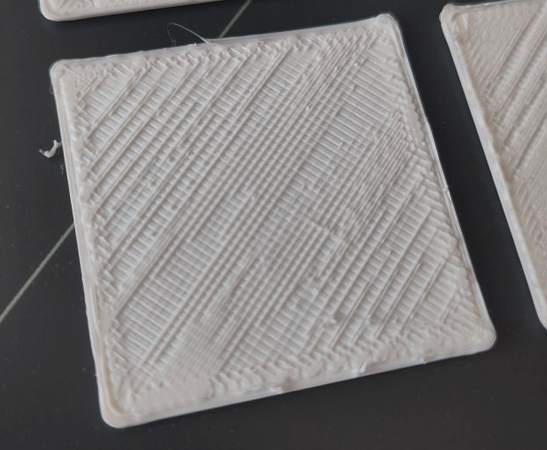
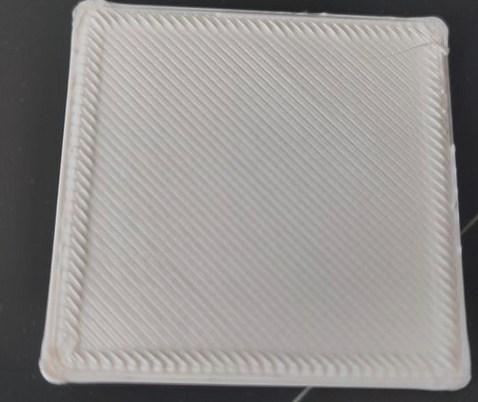
I was too slow editing the last post...here are two pictures of what it looks like at the moment. It starts out with layers that are fine and then gets quite bad...

RE: unable to resolve underextrusion
IMO, the Nextruder shouldn't be clicking at all. Divide and conquer! Either the Nextruder can't pull the filament for some downstream reason, or there's something wrong with it. I can't imagine it's a problem with PLA, but just to be sure, pull the Teflon tube out of the Nextruder and try to pull filament through it from that end. It should be easy. I mention this only because I found some soft filaments can easily be pushed from the spool end but are impossible to pull from the head end. If you can pull easily, then the problem is (most likely) something to do with the Nextruder assembly. Make sure the bearings in the arm (no doubt it has a name!) turn freely and smoothly. The ends of the tension screws should be flush with the end of the threaded hole. Double check how far the nozzle extends from the block. You've already checked and changed most of this, so I'm hoping you'll find some problem that binds up the filament on its way to the Nextruder.
RE: unable to resolve underextrusion
Thanks for your response. What do you mean by the bearings in the arm that should turn freely and smoothly? The cable and ptfe tube are only fixed to a very small arm which is moving freely.

I have removed the tube from the extruder. Pushing filament through it from the nextruder side does not feel any different than what it does from the regular side. I ran another test with feeding the filament directly into the extruder. I have also made sure the idler screws are level with the part.
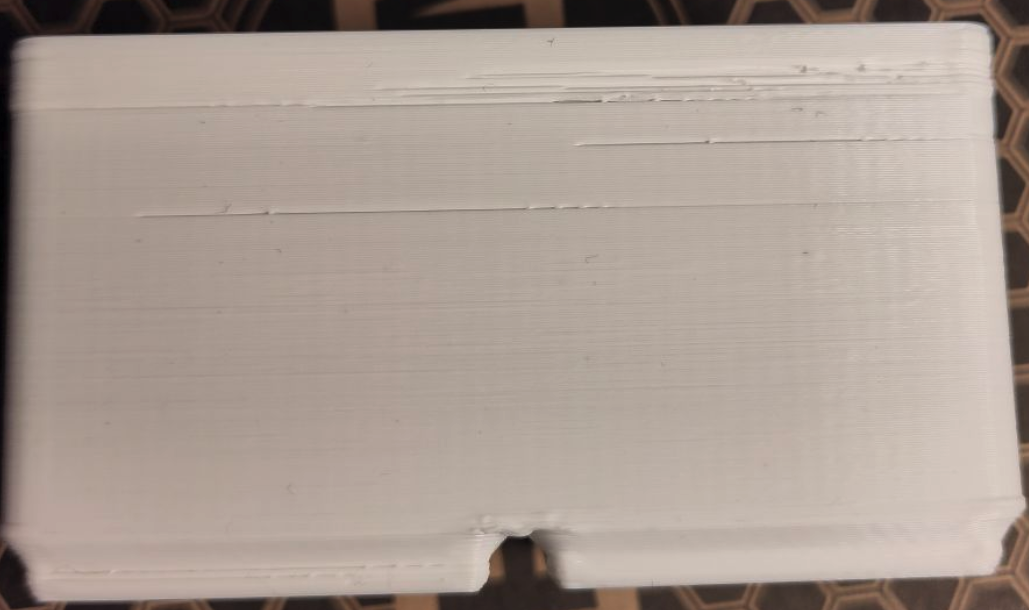
The printing got a little better. However, only when more or less constantly making sure the filament is not going into the nextruder in a sharp corner and keeping the top lid open of course. As you can see in the picture the closer to the top (the bin is sideways) the more missing lines. But also at the very bottom you can see missing lines.

RE:
This looks like a partial clog due to heat creep. PLA can get soft in the heat break tube which creates a temporary plug that blocks flow. Pressure builds up and pushes the plug through which then builds up again and re-blocks. This is what causes the gaps.
Check the chamber temp, make sure it stays below 35°. Open the door if necessary. Also try decreasing the nozzle temperature by 5-10°
Is this a gridfinity box? One trick is print two side by side which forces a travel move between each layer. Part of the problem is that heat from the part itself could be softening the filament in the heatbreak tube.
This is precisely why I don't print with PLA anymore. I would use PETG or PCTG here instead.
RE: unable to resolve underextrusion
Forgot to emphasize in my previous post: decrease nozzle temp 5° and open the door.
RE: unable to resolve underextrusion
If you feed the filament directly, that should eliminate downstream problems with the tube and such. Just for clarity, I meant pull the filament from the Nextruder end because that's what the Nextruder has to do. Pushing and pulling can be very different in terms of friction and binding. If it's not mechanical, I think @hyiger might be on the right track. PLA should be the easiest thing in the world to print- until it isn't. Has your printer environment changed since it was working well? Change of seasons, heat on or off, air conditioning. I keep temperature and humidity monitors logging data continually.
RE: unable to resolve underextrusion
Thank you folks, for your feedback. Very much appreciated.
In fact, during my troubleshooting efforts I have read about heat creep but did not really follow up on it.
My environment is, from what I would say stable. The printer is situated in a heated room and environment temp should not have changed much over time. Also, all the prints so far, which were as mentioned only PLA, were printed with the door closed and the top vent automatically opened by the printer. In addition to that it did not make any difference in those two months whether I opened the window in the room to get fresh air in or let it stay closed. It also did not matter whether I started prints on a cold printer or printed a whole day through. All outcome was perfect.
But to be honest, I haven't paid much attention to the chamber temperature. However, would that not be regulated by the chamber fans? They are set to auto mode.
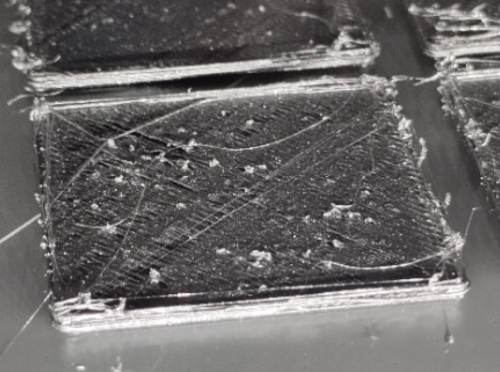
Regarding the suggestion to use PETG instead: This is what Prusa support wanted me to test as well, why they shipped a roll PETG prusament. The results with a gridfinity bin sliced with the default Slicer settings for Prusament turned to bad in the first couple of layers. See the image below....
--> I will certainly give the print another try with the door opened and let you know how it goes.
PS IMO having to open the door while printing would not really make sense to me. Why would I buy a printer with an enclosure, if I have to keep it open manually? Why would the printer have a door sensor that stops the print when opening the door by default?
RE: unable to resolve underextrusion
If every other thing fails, you might consider reflashing the firmware- https://help.prusa3d.com/article/factory-reset-core-one-l-core-one-mk4-s-mk3-9-s-mk3-5-s-mini-xl_421206
I'd do that as a last resort, before sending the thing back!
RE:
PS IMO having to open the door while printing would not really make sense to me. Why would I buy a printer with an enclosure, if I have to keep it open manually? Why would the printer have a door sensor that stops the print when opening the door by default?
I don't print with the door open, however if you open the door and the problem goes away, it proves that there is a heat creep problem. It could be that the chamber fans have issues or that there is a problem with the heatsink fan. Or perhaps too much debris on the heatsink. Anyway, all of this is fixable without sending a 26kg printer back.
I would suggest adding the heatbreak temperature to the UI footer. Or otherwise, while you are printing goto: Tune -> Info -> Sensor Info -> Heatbreak Temperature and monitor it.
RE: unable to resolve underextrusion
All this is fixable? So why haven't we fixed it already? 😉 Seriously, I have read that it takes very little debris on the heat sink or fan to cause trouble. You've had that apart (I think, or was it just the gearbox?); is it possible that the heat sink has a crack or isn't in good contact with the upper end of the nozzle and isn't getting it cooled? I was under the impression that heat creep takes some time to develop, and this seems to happen quickly, within a few layers. That suggests something very wrong with the cooling, assuming creep is the problem.
Just so you don't feel alone, we have two Bambu printers here at work, X1C and X1E. One has been down for weeks with blown circuit boards that take forever to get. It's in pieces on the bench. The other one has developed terrible surface finish problems with PLA that the guys have yet to pin down. It's useless for production now. I don't know how it would work, but this hobby/business needs bulletproof diagnostic methods to find problems and get things up and running quickly.
RE: unable to resolve underextrusion
I have now tried to run some tests and properly document them:
Attempt 1
- decreased nozzle temp 5°C compared to previous run / 5° below filament label
- Print Gridfinity Box 1×2 - PLA Buddy 3d White
- Top Lid Vent open / front door open
- Absorbing Heat: 26/20°C → no chamber fan running
- probing at nozzle 170/170°C / bed 60/60°C and chamber 26/20°C (indicating in blue)
- Print start with nozzle 210/210°C / bed 50/50° and chamber 26/20°C (indicating in blue)
- first extruder click, when the first cleaning extrusion is done, the cleaning strand has a small gap visible
- on the first layer, underextrusion starts right away 😕
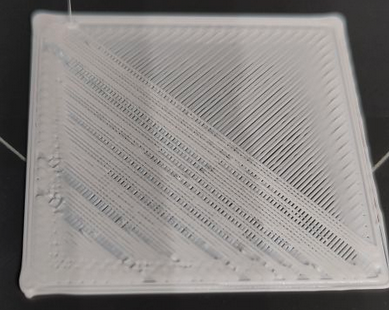
Attempt 2
- set nozzle temp +10° from what it says on the filament label
- Print Gridfinity Box 1×2 - PLA Buddy 3d White
- Top Lid Vent open / front door open
- Absorbing Heat: 26/20°C → no chamber fan running (skipped)
- probing at nozzle 170/170°C | bed 60/60°C | chamber 26/20°C (indicating in blue)
- Print start with nozzle 225/225°C | bed 60/60°C | chamber 27/20°C (indicating in blue)
- one click when the first cleaning extrusion is done, cleaning stand looks okay though
- first layer worked out fine, second layer underextrusion, third layer okay
- following layers look okay, chamber temp 26/20°C
- had to stop the print due to tangled filament - I suspected something like this being the cause at first, but made sure during my other tests that this was not causing the extruder to not transport the filament. 🙄
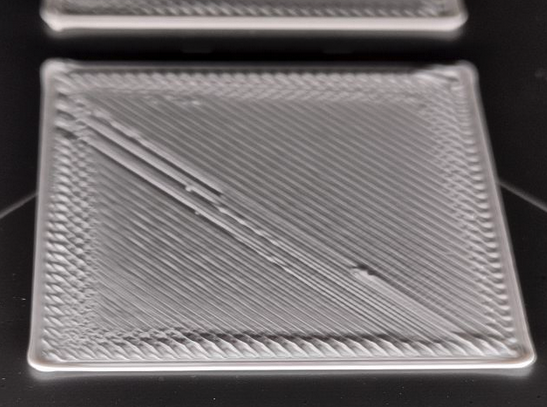
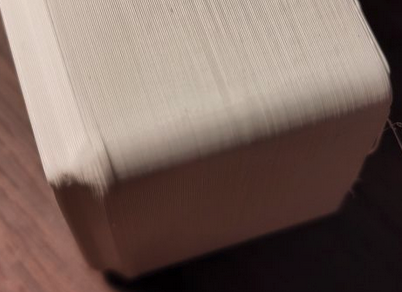
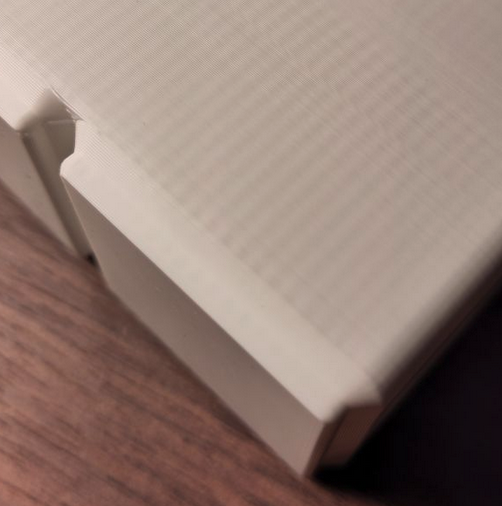
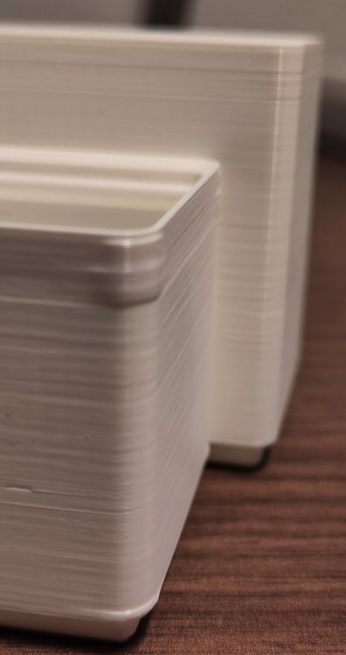
Comparing the half finished printed box, to one printed earlier this year it seems not as clean as the old prints. Especially the bottom where the bin widens looks a bit flabby - although quite hard to capture on camera. However, it is of course not the same gcode that is printed. The old example was another shape of the box.
New print:
Old print:
Attempt 3
- nozzle temp +15° from what it says on filament label
- Print Gridfinity Box 1×2 - PLA Buddy 3d White
- Top Lid Vent open / front door open
- Absorbing Heat: 26/20°C → no chamber fan running (skipped)
- probing at nozzle 170/170°C | bed 60/60°C | chamber 26/20°C (indicating in blue)
- Print start with nozzle 230/230°C | bed 60/60°C | chamber 27/20°C (indicating in blue)
- one click when the first cleaning extrusion is done, cleaning stand looks okay though
- immediately starting to underextrude
- heatbreak temp at 36.2°C
- stopped the print after frist three layers being completely unusable 😕
Attempt 4
- nozzle temp +10° from filament label
- Print Gridfinity Box 1×2 - PLA Buddy 3d White
- Top Lid Vent open / front door open
- Absorbing Heat: 26/20°C → no chamber fan running (skipped)
- probing at nozzle 170/170°C | bed 60/60°C | chamber 26/20°C (indicating in blue)
- Print start with nozzle 225/225°C | bed 60/60°C | chamber 28/20°C (indicating in blue)
- one click when the first cleaning extrusion is done, cleaning stand looks okay though
- heatbreak temp at around 36.2°C
- chamber temp showing 30/20°C during the end of the print
- during the final layer two or three noticeable clicks
- result is looking okay, still not as clean around the edges as the earlier prints, as mentioned above 🤔
The box in the front is the new one, in the back the old one.
Regarding...
...debris in the heatsink: During my efforts to disassemble and assemble parts I always looked for debris but only found very little, which I then cleaned.
...the heatsink fan: looks fine to me. Gets turned on and off automatically, increases and decreases speed automatically.
...chamber fans have issues: What exactly do you have in mind? The chamber fans indeed did not switch on during my tests. When I set them to manual, they run (worth noting, I have the advanced filtration attached (from the beginning), and the filter fan runs at 51%, which seems not enough to regulate the chamber temp, if it is supposed to do that.)
...firware: reflashing the firmware is indeed something I am going to try.
Summary of this testing round: The results seem rather mixed to me. And why would the printer be that picky after I printed two months without going through all that? Sliced, sent to printer, forget about it (door closed)
RE: unable to resolve underextrusion
When replacing the extruder motor I took the complete nextruder head including heatsink apart - and also there I could not find much debris.
RE: unable to resolve underextrusion
one more thing I would like to mention is how it looks when purging filament. At first the filament curls and once that curly ball drops it looks as though the filament is somehow pulled forward. It is not flowing down exactly straight. Unfortunately, I cannot remember if it looked like that while the printer was working properly.
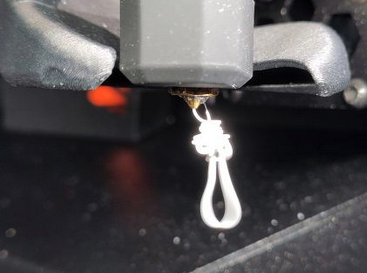

Not sure if that tells anything at all....
RE: unable to resolve underextrusion
In my more innocent days, I would have said that purge is not normal. Then I used a heavily pigmented filament and got a purge that looked like a fat worm, once it decided to drop straight. It might have been larger than the incoming filament! It was also PLA Blend and drying it helped a lot. Being white, yours might be normal. My black PLA (Buddy3D) purges in a shiny straight line and measures less then 0.5 mm from a 0.4 mm nozzle. I leave it out a lot and it doesn't seem to pick up much water. What kind of PETG did Prusa send you? Have you tried a "simple" filament like a non-silk black PLA?
RE:
In my more innocent days, I would have said that purge is not normal. Then I used a heavily pigmented filament and got a purge that looked like a fat worm, once it decided to drop straight. It might have been larger than the incoming filament! It was also PLA Blend and drying it helped a lot. Being white, yours might be normal. My black PLA (Buddy3D) purges in a shiny straight line and measures less then 0.5 mm from a 0.4 mm nozzle. I leave it out a lot and it doesn't seem to pick up much water. What kind of PETG did Prusa send you? Have you tried a "simple" filament like a non-silk black PLA?
I got Prusament Galaxy Black PETG. That is what the above pictures from my PETG test showed. In the meantime, I did run some more tests with Buddy 3d Grey PLA.
Attempt 5
- Object: Gridfinity Bin 2x3
- Filament: Buddy 3D PLA grey
- starts with heat absorption, no reduction of temp -> skipped
- probing at nozzle 170/170 bed 60/60 chamber 27/20 heatbreak 32
- print start at noz 230/230 bed 60/60 chamb 28/20 heatbreak 34
- door closed / top lid closed but vents open / normal mode
- 18min into printing: noz 230/230 bed 60/60 chamb 31/20 heatbreak 36
- 27 min into printing: noz 230/230 bed 60/60 chamber 32/20 heatbreak 38-40 -> underextrusion started
- print paused, top lid removed no change
- stealth mode enabled. Underextrusion stopped
- top lid added again
- 33min into printing: noz 230/230 bed 60/60 chamber 33/20 heatbreak 38
- 53 min into printing: noz 230/230 bed 60/60 chamber 35/20 heatbreak 41, no underextrusion
- print finished okay, corners are a bit widended but overall okay quality
Attempt 6
- Object: Benchy boat
- Filament: Buddy 3d Filament grey
- default benchy from printer usb drive, 15min benchy, immediate underextrusion
- benchy from printables newly sliced 45min print time estimate, default slicer settings
- stealth mode on / door closed / top lid closed but with vents open
- print probing at 170/170 | 60/60 | 33/20 | 38
- print start at 230/230 | 60/60 | 33/20 | 39
- 48 min: 230/230 | 60/60 | 34/20 | 40
- result overall okay from my point of view, not as good as my first benchys, however, front of boat of poor quality
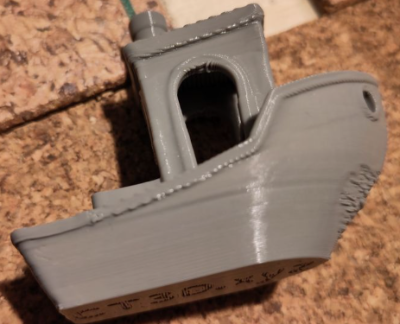
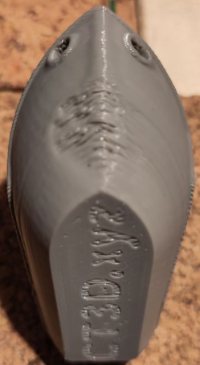
I am still not sure what to make of all these results. 🤔 I used to be able to print the USB drive's benchy fine without having to play around with any settings. Printing would also work in normal and in stealth mode.
While doing more research on the internet I found a case with another printer brand, where the cable from the extruder to the mainboard was faulty. Could that cause the issues I am seeing?
Also I will still try and reflash the firmware to see if that changes anything....

Check your fans. Make sure there is no fine stringing clogging the hubs and the blades are clean. Check the fan shrouds are undamaged.
Cheeru=io,
RE:
Agree with @diem. Seems (in the case of the Benchy) there might be an issue with airflow from the part cooling fan
RE:
@diem / @hyiger, just checked the fans and as far as I can see nothing out of the ordinary there. The print fan lets itself regulate in the control menu. Not sure if I can manually set the heatbreak fan as well. During my extruder motor exchange I took a closer look at them, but could not see anything suspicious.
I have now started a gridfinity bin in PLA. It was sliced with Prusa Slicer's default settings. The print fan is off while printing it. Should it be off? It was off but turned on now. The heatbreak fan is regulated with different rpm.
Can you tell, if the heatbreak temperature values I posted above are in the normal range?
RE: unable to resolve underextrusion
Attempt 7
The print started out quite fine. However, around 30 minutes into printing, it starts to fail again:
- Print started with door closed (as yesterday)
- top lid attached, vent open
- stealth mode on from the beginning this time
- Now at around 30min into printing, clicking noise from the extruder starts again and printer is underextruding.
- Heatbreak and printing fan were both running
- temps at nozzle 230/230 | chamber 33/20 | bed 60/60 | heatbreak 38
- Paused the print and let the door and top lid open for a while.
- Temp chamber is down to 27/20.
- Resumed print with open top lid and door.
- Still underextrusion
- after 2-3 layers underextrusion stopped again
- top lid attached and door closed again
- temps again at nozzle 230/230 | chamber 32/20 | bed 60/60 | heatbreak 38
- no underextrusion for around 5 minutes
- underextrusion started again
The bin is the same size as yesterday's attempt 5 where also at around 30 mins underextrusion started, then went away again.
Started the 15min USB storage's benchy again. Door open, stealth mode on, causing clicking and underextrusion again. If it was some kind of heat problem, should it not have no issues with the print when the door is open? The benchy provided on the usb storage is not printable any more it seems, no matter the settings. And why would heat issues turn up suddenly out of the blue. 🧐