
RE: Core One MMU3 Filament unloading getting stuck
Everyone who has the problem that the filament is sucked into the gears, read this post until the end.
I have the same issues.
I think the problem lies in to long unloading of the extruder.
When filament is unloaded i hear the extruder ticking (and possible fipping) the tip of the filament.
The unload is to long and not triggering the filament sensor in nextruder.
I think the cooling tube length setting is the right thing to change if the unload time is based on this.
But i assume mmu rewinding/unloading is only triggered when nextruder filament sensor is deactivated.Mmu unload should be triggered after the 80mm cooling tube retraction is passed and not look into nextruder filament sensor.
I had the same "fipping" / clicking of the filament tip when the extruder gears hit it during unload. If the ramming before the unloads happens, it does not work correctly, you are left with a string that is then pulled into the gears. I also did not manage to reduce this. However, if you're playing around with the tension, be sure to recalibrate the sensor, which is important.
I guess the more important thing here is that the ramming phase does what it is designed to do: shape the filament tip. If the tip has no string that can be sucked into the gears, the flipping of the tip is an annoying sound, but can be ignored (at least I currently have no problems with it).
But it would be good to get this fixed as well, since it prevents the filament from being sucked in during stringing. I am curious whether other people, where the C1 works flawlessly, have also experienced these clicks. Since the hardware is the same, so is the unloading length; this should happen to all users or to none if there is no hardware problem.
@gbmaryland, do you use the correct filament profile / add a custom one for filaments with special needs? The blob typically occurs when printing too hot. For example, I have some PLA that prints best at 195 °C, which is way outside the typical default PLA range around 215 °C --- so when I used the generic profile for that PLA, I also got a blob due to the high temperatures. Try decreasing the nozzle temperature in the slicer by 10 °C for that filament or better, print a temperature tower to find the optimal nozzle temperature.
I've been sticking with the temp that works best with the print tower for that filament (in this case it was Elegoo Rapid PETG, but I've had issues with PLA and other PETGs too...)
I'm really tempted to use explosives at this point. I've got a request to use the high-speed camera...
I know how extremely annoying this problem 😀
When your temperatures are correct, I can recommend running tests as I did to find the problem: I created a minimal G-code file, loaded it into the printer, and started tinkering.
First of all, I would recommend cleaning the extruder gear by disassembling the PG if you have had many unload errors and removing any filament leftovers from the gear.
I appended the G-code here. The g-code does the following:
- It skips all the stuff like bed leveling or homing (because that takes to much time to do various tests)
- If you want to be on the safe side, uncomment (remove ";")
;G28 ; home all without mesh bed level
- If you want to be on the safe side, uncomment (remove ";")
- Heats up the nozzle. Please set the correct temperature for your filament here:
; prepare for purge
M104 S200
- then it loads the filament, purges a bit and then unloads it
- finally it lowers the nozzle temp to 170C to be ready for the next round of testing
During the tests, I adjusted the idler tension, played with the PTFE tube length settings, and checked whether the filament path was frictionless.
The major problem on my side was my custom filament path (before the MMU) and the wrong-sized PTFE tubes, which caused excessive friction. So I would recommend testing this first. To do so, use a piece of filament ---not directly from a roll---, insert it into the MMU and print my provided gcode. When I've done this, the unload was fine and the filament tip was just perfect. If that's the case, you might have too much friction between the filament roll and the MMU, I would recommend repeating this 3-4 times to make sure it wasn't a lucky one.
If you have an alternative filament path, make sure you use the same PTFE tube size as Prusa does (2.5mm inner diameter) -- I used 2.0mm, which was part of the problem.
If your hardware setup is fine, then you should not need custom end-gcodes --- this might reduce the symptoms, but does not solve the problem.

RE: Core One MMU3 Filament unloading getting stuck
I did it like on photo but now i have from MMU to Nextruder 950mm long tube
I've gone though various iterations. For now I've settled with this.


RE: Core One MMU3 Filament unloading getting stuck
Did any one tried to simulate problem with material loaded from side without MMU if the issue is realy connected with custom tube path friction ?

RE: Core One MMU3 Filament unloading getting stuck
Count me in. Same issues. I do have a conversation going with support and they are waiting on the internal MMU team to get back to me.
Filament gets stuck retracting during color change. Instead of pulling the filament through the top to clear it, I cut the PTFE tube with the filament in it, disassembled the Nextruder, and pulled the filament through the bottom. This is what it looked like. Top was coming from the MMU3, bottom part was what was remaining in the nozzle.
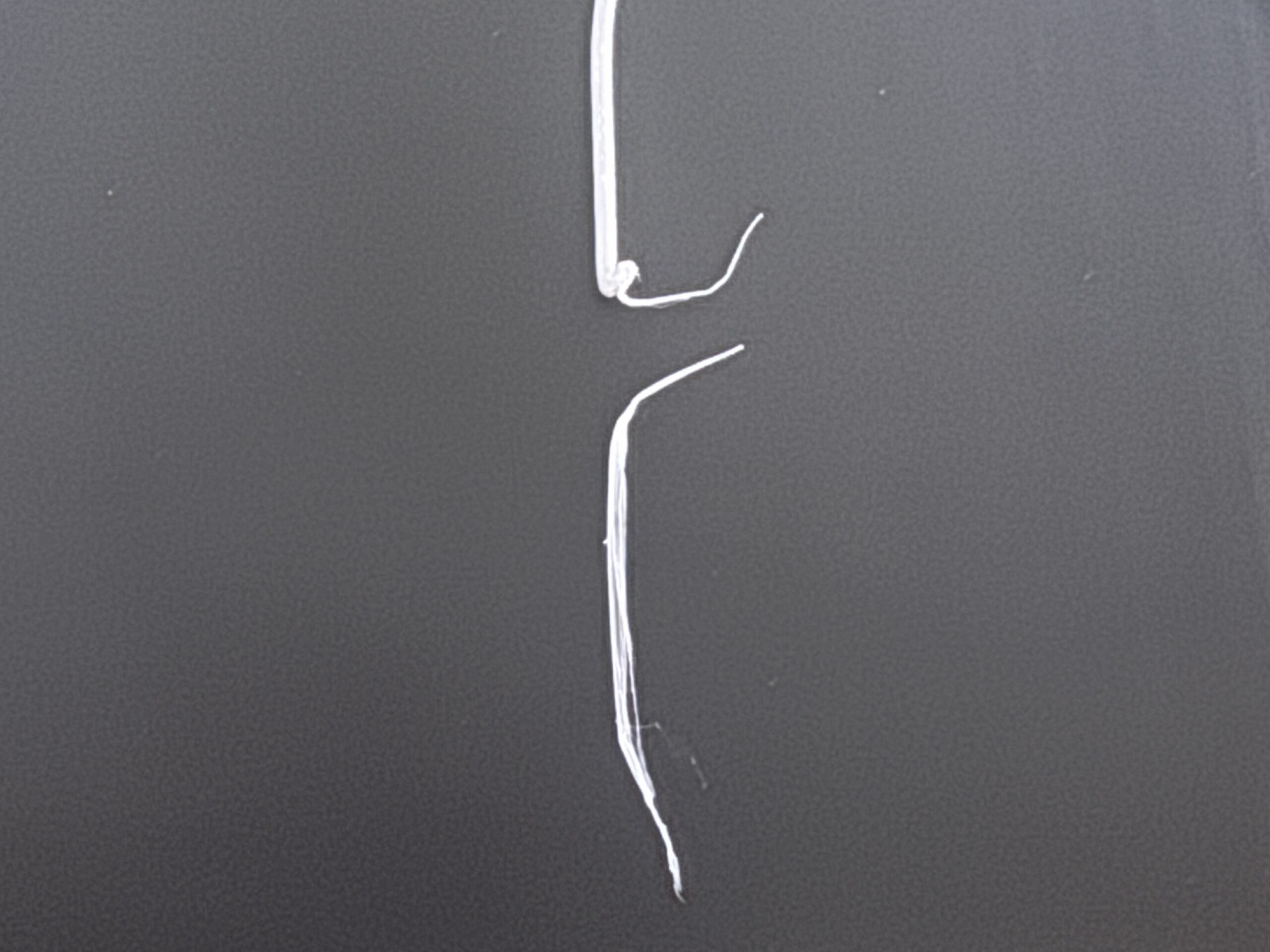

RE: Core One MMU3 Filament unloading getting stuck
Adding my +1 here as well. Biggest thing I have noticed with the Core One and MMU is mismanagement of the filament tip. On the MK3.5S, the LCD would display "ramming" , and the tip would come out with a nice cone on it. But it sounds like that doesn't happen with the core one? My printer only says "finishing buffer gcodes", clicks a few times, then pulls the filament out. The tips are jagged and not clean compared to previously.

RE: Core One MMU3 Filament unloading getting stuck
"Ramming" settings are in Prusa slicer "Filaments": "Advanced", "Toolchange parameters with single extruder MM printers". Maybe it's disabled in the filament?
I believe I have seen it on the display occasionally so my guess is the feature exists.

RE: Core One MMU3 Filament unloading getting stuck
Is clear that the root problem is ramming faults. The worst thing is that in the MK4 and MK4S all is ok, ramming OK, MMU3 with no faults, same nextruder. I cant understand why they have fucked up the ramming function on firmware for the CO printers. It would be the hell same of the MK4 as soon as hardware is the same.
RE: Core One MMU3 Filament unloading getting stuck
I see those settings and even increased my ram time, but the machine still says "finishing buffered gcodes". My tips aren't stringy thankfully, they are blunt. Its working right now, but I think there is a lot of room for improvement with tip management and the wipe tower. New problem with the wipe tower is excessive blobbing and some clicking while unloading at it.

RE: Core One MMU3 Filament unloading getting stuck
I have made the adjustment to the g-code as detailed on page 2 but am still having trouble with PLA getting stuck just above the gear of the extruder and below the push to fitting for the filament tube.
Has anyone else found some solutions? I am using the correct push to connect fitting on the extruder. PETG unloads just fine.