
Trying to change tool at some height, implying different nozzle widths and other settings - getting headaches
Hello,
I am printing some parts in PETG with the top having some fine details. I have made tryouts and I have good results with a 0.1 nozzle, but it's quite slow therefore I'd like to print the bottom with a 0.4 nozzle.
But: switching from one toolhead/nozzle width also implies to change extrusion width, speed, layer height to get good results.
I haven't found a way yet. If I try to use settings made for 0.4 nozzle coupled with a height range adaptation for the 0.1 nozzle including different extrusion width the slicer complains that the first layer height is not compatible with these settings even if they start from some upper layer only...
Does anyone got such configuration example with nozzle width changes coupled with other changes at some specific height which functions?

The trick is to define the print as two or more parts - eg, create one .stl for the body and another for the detail and allocate the different toolheads just as you would with a colour or material change. Combine this with a variable layer height modifier and you should be OK.
Cheerio,
RE: Trying to change tool at some height, implying different nozzle widths and other settings - getting headaches
Mhhh.
But then how do you do to put some part in a upper position (that is, not touching the bed) without fusing the parts into a single object?
Load them as parts - not objects
Attached is a zip file containing two parts of the same object, load them together *as parts* then play with the slicing.
You should be able to get this sort of result without too much trouble:
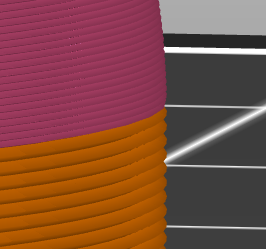
Cheerio,
RE: Trying to change tool at some height, implying different nozzle widths and other settings - getting headaches
Thanks @diem !