
Trying to change tool at some height, implying different nozzle widths and other settings - getting headaches
Hello,
I am printing some parts in PETG with the top having some fine details. I have made tryouts and I have good results with a 0.1 nozzle, but it's quite slow therefore I'd like to print the bottom with a 0.4 nozzle.
But: switching from one toolhead/nozzle width also implies to change extrusion width, speed, layer height to get good results.
I haven't found a way yet. If I try to use settings made for 0.4 nozzle coupled with a height range adaptation for the 0.1 nozzle including different extrusion width the slicer complains that the first layer height is not compatible with these settings even if they start from some upper layer only...
Does anyone got such configuration example with nozzle width changes coupled with other changes at some specific height which functions?

The trick is to define the print as two or more parts - eg, create one .stl for the body and another for the detail and allocate the different toolheads just as you would with a colour or material change. Combine this with a variable layer height modifier and you should be OK.
Cheerio,
RE: Trying to change tool at some height, implying different nozzle widths and other settings - getting headaches
Mhhh.
But then how do you do to put some part in a upper position (that is, not touching the bed) without fusing the parts into a single object?
Load them as parts - not objects
Attached is a zip file containing two parts of the same object, load them together *as parts* then play with the slicing.
You should be able to get this sort of result without too much trouble:
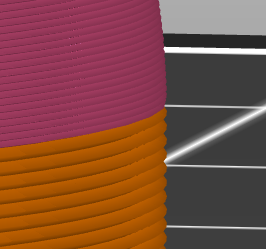
Cheerio,
RE: Trying to change tool at some height, implying different nozzle widths and other settings - getting headaches
Thanks @diem !
RE: Trying to change tool at some height, implying different nozzle widths and other settings - getting headaches
Ok, this allows to change the extruder, but how do you do when you have different nozzle widths associated with each part, each nozzle width requiring different settings (layer height, extrusion width) ?
You have set nozzle sizes and related parameters in: Printers > Extruder n ....?
Cheerio,
RE: Trying to change tool at some height, implying different nozzle widths and other settings - getting headaches
Yes but one can't change the layer height to be used with the smaller nozzle...
Use a modifier - a Height range Modifier would probably be easiest in your case.
Cheerio,
RE: Trying to change tool at some height, implying different nozzle widths and other settings - getting headaches
It kind of works but not totally as the height range modifier can't modify the first layer.
I think that PrusaSlicer is very weak when it comes to combining different nozzle sizes. Despite Prusa selling multi-toolheads printers for years...
It's rare to have successful first layer adhesion at less than 0.2mm, with much larger nozzles you might sometimes double it. Whatever you do with the settings all heads printing on the first layer must use the same thickness, it's your foundation.
You will find that if you think about the underlying geometry most multiple nozzle-size/layer-height constraints become obvious - try drawing simple paths on paper without lifting your pencil if it remains unclear.
As for ease of use; a new generation of Prusa Slicer is due soon intended among other things to assist with new multi-toolhead usage - but 'improvements' often break workarounds that have been OK for years and consequently require reworking. There's always a trade-off.
Cheerio,
RE:
Actually I have got very good bed adhesion with PETG and layers of 0.05mm. The objects are even difficult to remove from the bed. But setting all layers with this thickness do also make the objects a bit fragile. So setting the first layers with a 0.2mm thickness helps both to remove objects and to make them stronger.
So it makes totally sense to have layers of 0.2mm followed by layers of 0.05mm but the current version of Prusa (2.9.5) cannot cope with that so I had to insert a 0.1mm layer printed with the 0.1 nozzle. So it's not so fast as it could but still better than printing all layers with a 0.1mm nozzle and a 0.05mm layer thickness.
I hope PrusaSlicer 3.0 will indeed address this because the software lags behind the hardware at the moment obviously.

RE: Trying to change tool at some height, implying different nozzle widths and other settings - getting headaches
After some Testing i think the best way for multiple nozzle size is the Orca slicer. Prusa slicer Always Messing Things Up for me.
I OS you can define the nozzle size per object which ist pretty nice. Or Support.
I wonder why prusa cant