
Massive MMU3 speed boost!
Massive MMU3 speed boost: New FW slashes filament change times + CORE One L MMU3 news

The MMU3 has been our workhorse for single-nozzle multi-material printing, and before it hands the baton to the upcoming INDX system, we wanted to give it one last significant upgrade. We usually design our hardware with some headroom, so it can be pushed further even with software updates. And the latest firmware update for MMU3 delivers a 20% speed improvement to filament changes, dropping from 52 seconds down to ~42 seconds per swap, saving up to 9 seconds. That might sound modest until you realize what it means across an entire print: total print times are slashed by 2-6 hours (or even more) depending on the model complexity!

And by the way, we can consider these numbers still rather conservative – we want to prioritize reliability across the entire user base. In case you would like to experiment, and your setup is flawless, it is theoretically possible, e.g., to push the loading speed up to 200mm/s and save even more time.
Why 9 seconds is huge
Multi-material prints rack up filament changes fast. In fact, on a complex 5-color model, like the Deadpool bust in the picture below, up to 60% of the total print time is spent entirely on non-printing tasks like load/unload sequences and wipe towers – and this is just the MMU3, which is already among the most efficient solutions on the market.

The example model uses a 0.2mm layer height, and it’s the well-known Deadpool bust remix by MacDonald Print Works.

A moderately complex five-color print might perform 400 (or more) filament swaps. By shaving 9 seconds off every single one of those, you are saving an hour on a single print. Scale up to a detailed model with 2,200 changes, and you’re looking at five and a half hours saved.
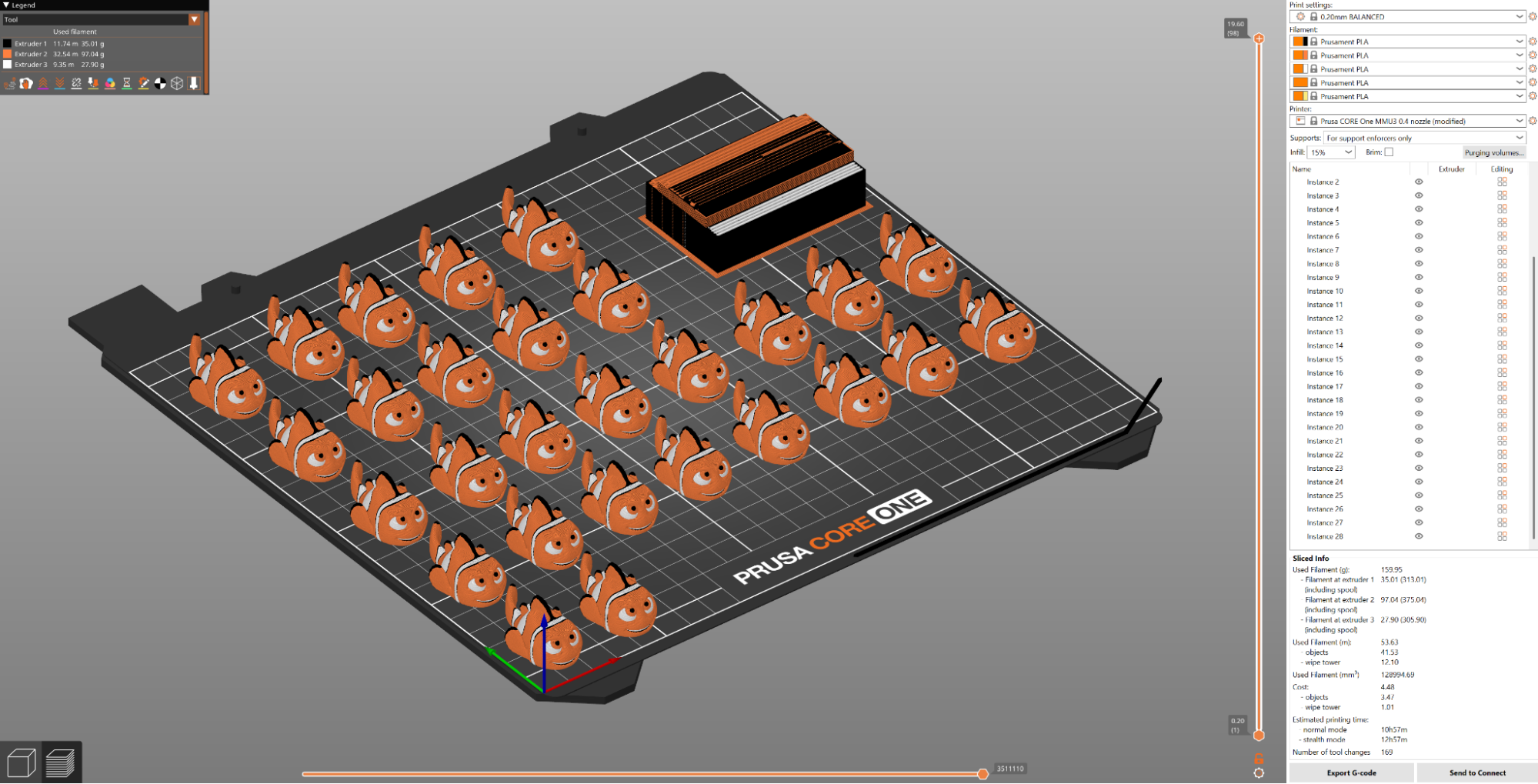 Nemo by Cipis
The math gets even better on production runs. If you’re printing a batch of 25 small items with 150 changes each, you save a significant amount of time. For anyone running a small business or cranking out prototypes, this is a huge timesaver.
With this optimization, the MMU3 combined with the CORE One (using a 0.2mm SPEED profile and a standard 0.4mm nozzle) quickly climbs the speed charts:
- Print Speed: The MMU3 is approximately 40-50% faster on average with PLA compared to similar competitor designs (single nozzle multi-material) using default configurations.
- PETG Performance: It is also roughly 18% faster on average with PETG compared to the competition’s default configurations.
- Filament Waste: Thanks to our current implementation of ramming and stamping, the wipe tower remains contained and compact. As a result, the MMU3 wastes an average of 73% less material (in default config) than its competitors when printing PLA and PETG.

Printing the Benchbin is faster by 2 hours! Dropping from 23:41 to 21:48.
Note: We decided not to publish a table with a speed overview/improvements. This is mainly due to the fact that various setups might affect the overall time, e.g., when the MMU3 repeats a filament load, it adds to the total print time. We’ll be more than happy if you decide to share your experience and observations – even compare it to other printers!
Ready to jump in and test the new speeds? Let’s go through a quick checklist:
- You will need the updated printer firmware (6.5.3 or newer)
- …and the updated MMU3 firmware (see here for flashing instructions)
- In PrusaSlicer, go to Configuration -> Configuration Wizard and let PrusaSlicer check for and download the latest profiles.
Before you start your first high-speed print, please ensure that the correct PTFE length for your setup is set in the printer’s menu via Settings -> Hardware -> MMU -> Front PTFE Length. When in doubt, see the MMU3 Handbook.
Please keep in mind that proper maintenance and correct setup have a large impact on the overall performance.
The filament swap time is “faster by up to 9 seconds” because it also depends on the length of the PTFE tube – some printers have a longer PTFE tube, which adds some hundreds of milliseconds to the loading process.

Derpy Tiger Painted by Tommy_Prusa3D (Remixed from Derpy Tiger by Heidi Makes)
The Lighthouse contains 3777 filament changes, which means saving 33,993 seconds or 9,5 hours!
And finally, a quick note on nozzles before you print: While it might be tempting to use a High Flow (HF/CHT) nozzle to speed things up further, we strongly advise sticking with the Standard (STD) nozzle for MMU prints. A high flow nozzle only offers a theoretical 2% speed improvement for multi-color prints, but standard nozzles are much better at ensuring a clean filament unload, less waste, and generally very fast prints in real scenarios. You can learn more here.

Technical Details: How We Did It
If we look closely at a filament change, the unload/load movements and the cooling moves on the wipe tower represent a massive 60% of the swap time for PLA and 70% for PETG. It was a bit like building a streamlined version of a sports car for track use – you need to shed as much weight as possible. So it’s a couple of grams here, a couple of grams there.

The speed gains come from optimizing these mechanical motion sequences.
Here are a couple of areas we focused on:
Parallel Idler Disengage
During filament loading, once the extruder takes over from the MMU, it no longer waits for the MMU to fully disengage the idler — a step that previously took about 2 seconds of dead time. Now the extruder pushes filament into the nozzle immediately while the MMU disengages in the background.
Predictive Idler Staging
During unloading, while the printer retracts filament from the nozzle, the MMU simultaneously moves the idler from its parked position to a ready stance — just short of engagement. Engaging from the “park” position normally takes over a second, but pre-staging virtually eliminates that wait.
Smoother Unload Ramp-Up
A refined pressure-relief step right before the unload sequence prevents extruder motor stalls, allowing us to safely increase retraction speed.
These are just some of the examples – we had to optimize more areas to reach the aforementioned 9 seconds, basically shaving hundreds of milliseconds wherever we could.
Every supported printer benefits immediately: MK4S, MK3.9, MK3.5, and CORE One/One+ users just need to flash new firmware(s) – one for the MMU3, and one for the printer itself. The correct firmware versions are 6.5.3 (printer) and 3.0.4 (MMU3).
Quality of Life and Reliability Tweaks
Speed isn’t everything; we also wanted to make the MMU3 less of a hassle to manage. By popular demand from our beta testers, we’ve added a “Preload All” feature. You can now preload all filaments of the same type (like all your PLA spools) at once, saving you from clicking through the menu for each individual slot.

Ripper Mask by Borderlands
We’ve also squashed a few bugs to improve overall stability and you can find all the details in full release notes.
CORE One L and MMU3: The Path Forward
We also had to make a decision regarding the CORE One L – it wasn’t an easy decision, but in the end, it makes the most sense. While we initially planned official MMU3 support, the imminent arrival of INDX shifted our priorities.
Instead of developing a dedicated MMU3 kit for the CORE One L, we’re providing adaptation guidelines for users who want to modify the CORE One+ MMU3 to work with the larger machine.
- To make it work, you will need the MMU3 for the CORE One+ available here.
- Then, print a couple of conversion parts – you can get them free at Printables.com
- And finally, follow the instructions in our guide.
One caveat is that you will also need larger buffer plates – they need to be sourced separately from your local hardware store, etc., as they cannot be easily printed, and we provide STEP/DXF files to enable alternative manufacturing methods. Please check Printables and the article linked above for more info.
A goodbye gift (except it isn’t goodbye)
The MMU3 remains an exceptional single-nozzle multi-material system. Its minimal waste output, reliable tip forming, and now significantly faster operation continue to make it a solid choice for anyone looking for five-color printing.

Model 7 Buggy by 3D Sets
This firmware update is our thank-you to the community that’s pushed the MMU3 to its limits. Whether you’re printing beautiful visual models, functional prototypes with dissolvable supports, or production models, you’ll immediately notice the extra speed in every print.
The INDX will bring even better speeds and up to 8 toolheads, but the MMU3 still remains a great choice, and we’ll keep offering it as long as there is interest in it.
Your MMU3 just got faster – go make something colorful with all that extra time! 😉
Shane (AKA FromPrusa)

RE: Massive MMU3 speed boost!
installed update and no longer can preload mmu 1,2,3,4,5 can only change type or unload. had to preload manually with buttons on mmu3
RE: Massive MMU3 speed boost!
The preload changed. Preload to MMU requires you to now Pick a filament type, even if you are not changing the type. If left unchanged it will not load. When 1-x filaments are selected for up to five slots, then pick the "Carry out the changes" at the bottom of the menu and it loads. Another step is added.
Preload all will set all five to the same filament.
I would also make sure the related Prusaslicer configuration update is installed. Print files may need to be redone accordingly.
RE: Massive MMU3 speed boost!
thanks, in the middle of a print right now, but will check it out when its done, Thank You

RE: Massive MMU3 speed boost!
I ran the upgrade and now my Core One can't load filament. There was nothing wrong with it before the upgrade, I just wanted to clear it's constant demands for a firmware update. After updating the MMU3, it maked a horrible noise as it chewed on the filament instead of loading it. I looked here for advice, told the printer it's tube was 360 instead of 390 and now instead of grinding with much noise, it spins quietly. This is terrible.

RE: Massive MMU3 speed boost!
Now getting filament loading issues and blobs causing layer shift, not had this before the new version, will have to revert to the old version

RE: Massive MMU3 speed boost!
Really great news for someone heavily invested in the MMU3 system like me.
A question though, as someone who runs custom printer & filament profiles, do I need to sync some of the changes from a filament & print profile over into mine to see the full benefit? E.g. using the compare then move left to right tool I can update from Prusament PLA @ MK4s to my [CustomfilamentName] @ [CustomPrinterProfile]?
I noticed after doing the configuration wizard, then pushing the toolchange parameters from the Prusament PLA @ MK4s profile over and many changes from the default Printer profile (MK4s MMU3 0.4 nozzle) I don't see the estimated print time change in the slicer.
Am I doing something wrong? Or does the slicer not show the estimated print time changes? My prints are quite similar to the clown fish plate.

RE: Massive MMU3 speed boost!
Haven't started a multi-colored/material print yet with the new f/w, so I'm looking forward to the increased speed. However, I don't like the new addition where when starting a job, the printer now states something along the lines of "filament detected, do you want to eject the filament or start the job with it?" It makes starting jobs remotely practically impossible unless you can run over to the printer and tell it to use that filament.
I print ABS with my MMU setup, and since my enclosure is passively heated, I like to set the heat on the bed and close it and start it remotely if I have to walk away, I can't do that now with this new setting.

RE: Massive MMU3 speed boost!
Just don't start printing with filament in the nozzle! Have all your filaments installed in the correct MMU slots and let the printer start with an empty Nextruder according to the settings in the slicer! The MMU will feed the printer the correct filament itself.

RE: Massive MMU3 speed boost!
I have done the FW update on both the MMU3 and the Core one and now the MMU3 is bricked as it is saying I need to put a newer FW on the MMU. Any assistance on this? Both downloaded this morning 4/18/26

RE: Massive MMU3 speed boost!
Same here, lumps on the purge tower and massive layer shifts. Can it be fixed or should I revert to previous?


RE: Massive MMU3 speed boost!
Less solid. 5 loadind fails on 69 filament loading. the print act as if it's OKn keeping on printing but the filament doesn't go.
Faster is good, reliability is more important.
I noticed some issues with the control of the axis when in high speed too on my MK3.9.
I go back to the previous versions.