
look to learn how to make array of negative 3mm cylinders, then merge them with a 115x165x3mm slab to make a LED matrix face plate
I know how to add negative space, I have 150 3mmx3mmx10mm cylinders as part, How do I change this to negative type so I can place on 125x165x3mm slab and merge them creating a LED matrix faceplate? I thought I saw a type change somewhere but cant remember where its located, its not on normal select pull down when you select the array 10x15 of 3mm bits. thx

RE:
This isn't really a slicer function although PrusaSlicer can do it (I rather wish it couldn't, these CADish extras cause no end of problems) - see below.
It rather depends which CAD you are using but usually you are looking for a simple difference and the job is best done parametricaly; eg. in OpenSCAD:
//  LED array faceplate
// All measurements in millimetres

// Faceplate dimensions
slabx=115;
slaby=165;
slabz=3;

// LED spacing
xspace=9;
yspace=10.5;

// LED arrangement
rows=15;
columns=10;

// Starting point for array
insetx=(slabx-xspace*(columns-1))/2; // Can be any suitable values
insety=(slaby-yspace*(rows-1))/2;  //      Here calculation is to centralise

//  LED dimensions - measure yours, they are often slightly large
LEDdia1=3.1;    // head diameter
LEDdia2=3.75; //  collar diameter
// How deep do you want the LED to seat?
LEDrimdepth=1.5;

//  How much to allow for extrusion 'squidge' around the socket
//  - will vary depending on filament, nozzle size, speed and layer height
// - test print first.
tolerance=0.5;

$fn=20;  // a little extra smoothing for the narrow cylinders, can go higher at need

difference(){
    cube([slabx,slaby,slabz]);
    translate([insetx,insety,0]){
        for (row=[0:rows-1]){
            for (column=[0:columns-1]){
                LEDsocket(column*xspace, row*yspace, LEDrimdepth);
            }
        }
    }
}

module LEDsocket(x,y,rimd){  // assumes the face is against the build sheet
    // NOTE: the slabz value works in this instance
    //              but may not be appropriate in complex cases
    translate([x,y,rimd-slabz]){
        cylinder(d=LEDdia1+ tolerance, h=slabz);
    }
    translate([x,y,rimd]){
        cylinder(d=LEDdia2+ tolerance, h=slabz);
    }
}
Produced this:
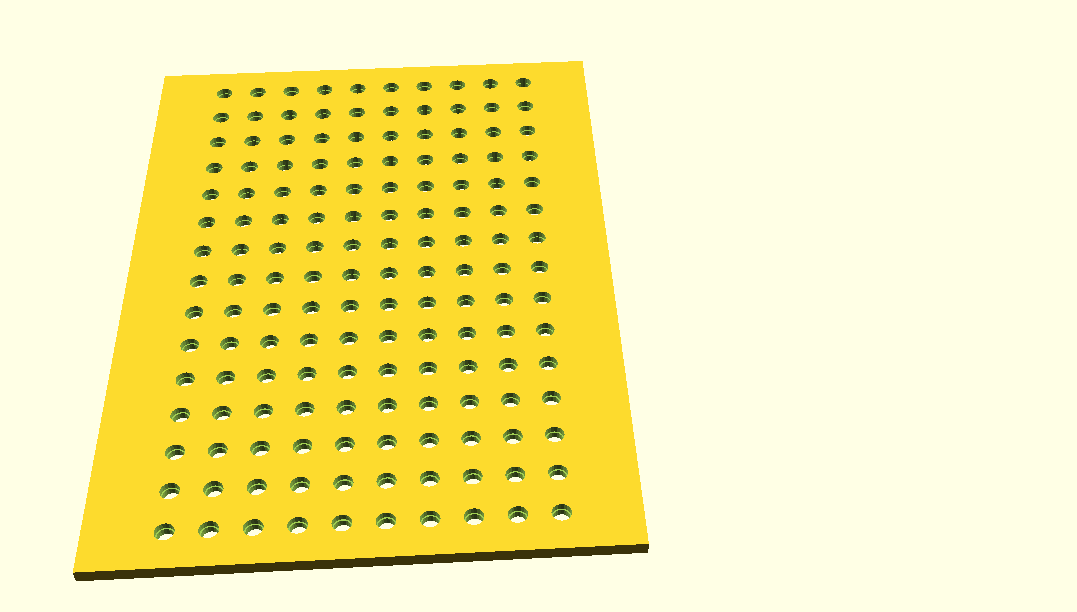
Everything is parametric, adjust the values to choice: OpenSCAD is a free open source download.
To do a similar job in PrusaSlicer first import your slab then right click on it, select add negative volume and load your cylinder array and place it with the movement controls.
Cheerio,

RE: look to learn how to make array of negative 3mm cylinders, then merge them with a 115x165x3mm slab to make a LED matrix face plate
Right click options on the model to change type.