
INDX and "Full Spectrum" prints
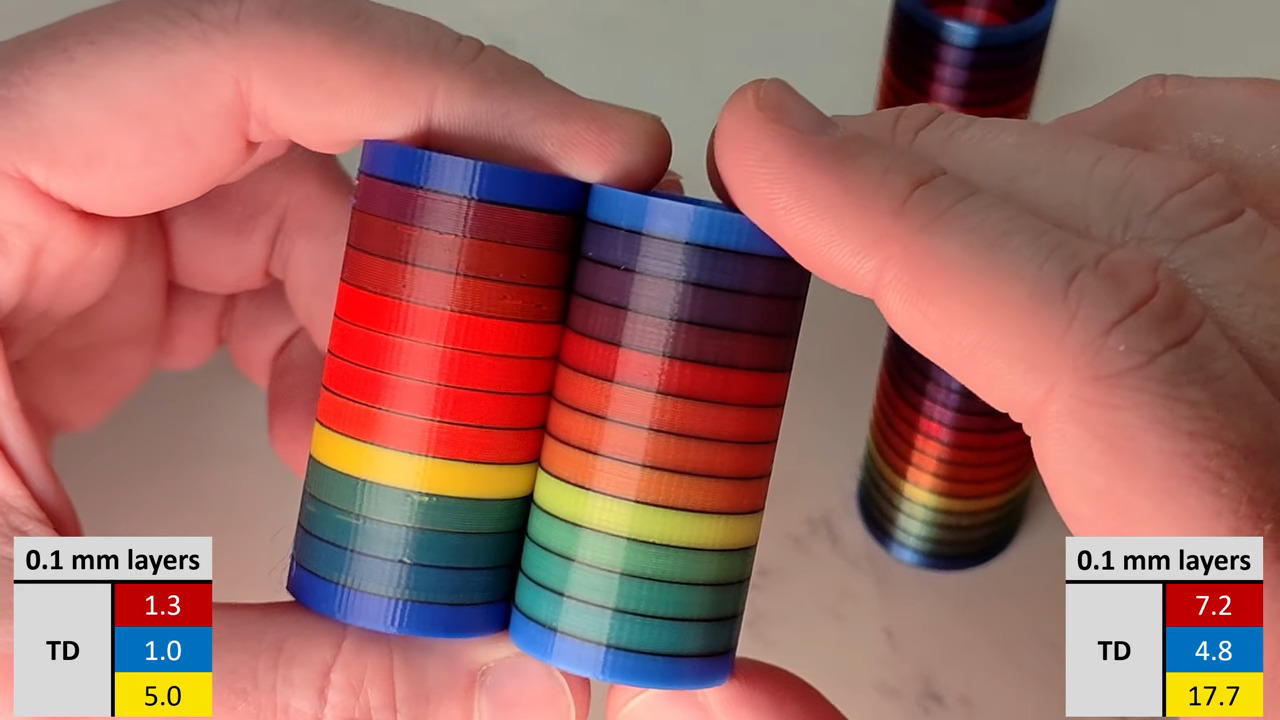
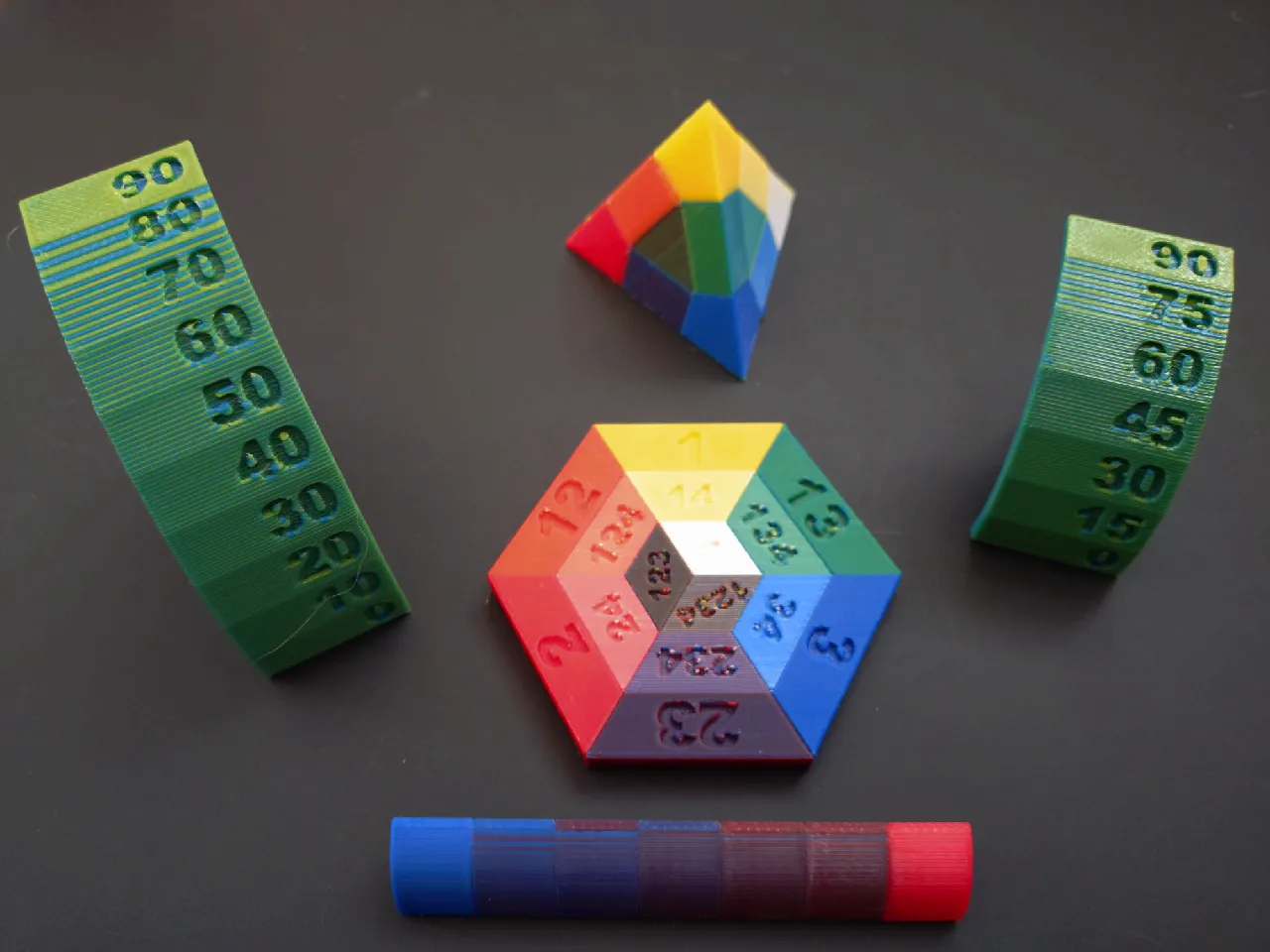
I am really surprised I wasn't able to find any discussion about this project on the forum. Basically this is a technique that blends filament colors through dithering. You can use cyan, magenta, yellow and white to create a reasonable gamut of colors. You can also blend between any arbitrary colors. This is being shown off on the Snapmaker Orca Slicer fork for the U1. It takes TD (transmission distance) into account like HueForge. It seems to be an obvious case where the "brick layers" technique could be applied to allow even better color blending.
I'm pretty sure that this feature ported over to PrusaSlicer XL or INDX would be a huge selling point for users. I'm sure someone will implement it eventually, either entirely with Python (thus slicer-agnostic) or hopefully integrated directly into a fork of PS I am surprised I haven't been able to find discussion about wanting to see this feature supported in PS.
Here are a few random links about it. There is more on Reddit, Discord and Youtube, but you are on your own.
https://www.printables.com/model/1646424-snapmaker-orca-full-spectrum-test-objects
https://github.com/ratdoux/OrcaSlicer-FullSpectrum
https://github.com/halloworld007/snapmaker-u1-fullspectrum-helper
A little more technical background: https://github.com/justinh-rahb/filament-mixer
What do you think? Do you have a U1 and have you tried this? Would you like to see this working with the Core One INDX?

RE:
I own an XL and tried this with the (ugly) default 0.2mm profile from OrcaSlicer.


The blue isn't true blue, it's blue/white alternances, as for the grey that is black/white.
The critical part is to find a way to "easily" get and feed your filament specs, because the color blending can be way out of spot.
This attempt's results is more a less something like the "Chicken 1.0" from the authors.

What do you think? Do you have a U1 and have you tried this? Would you like to see this working with the Core One INDX?
Frankly, I am always astonished at the efforts people make to avoid simply painting their models or (Hueforge) 2D printing photo paper and maybe 3D printing the frame. Curating the range of working basic colours and keeping all the spools dry is going to be a nightmare.
Cheerio,

RE: INDX and "Full Spectrum" prints
If I print out a picture on paper, I would not be happy if I had to then break out the paint brushes to get color on there.
Likewise, full color 3D printing is something to strive towards for those of us who don’t want to do time consuming, skill dependent post processing.
Full Spectrum looks really cool to me, and would be great to have such functionality for C1 + INDX.
What do you think? Do you have a U1 and have you tried this? Would you like to see this working with the Core One INDX?
Frankly, I am always astonished at the efforts people make to avoid simply painting their models or (Hueforge) 2D printing photo paper and maybe 3D printing the frame. Curating the range of working basic colours and keeping all the spools dry is going to be a nightmare.
Cheerio,
RE:
What do you think? Do you have a U1 and have you tried this? Would you like to see this working with the Core One INDX?
Frankly, I am always astonished at the efforts people make to avoid simply painting their models or (Hueforge) 2D printing photo paper and maybe 3D printing the frame. Curating the range of working basic colours and keeping all the spools dry is going to be a nightmare.
Cheerio,
Frankly, I am always astonished at the responses by some of the users here. "You want to do X? Why would you do X? You should do Y instead" too many times. Is it an European thing? There's always a few people like that on forums, but they seem to congregate here.
I don't want to paint my models -- I have hand tremors so I've never been pleased with the results. And for the kinds of things I want to do (transparent / art prints, hollow objects, PVB etc) unless you have a novel way to paint the inside of a print, that won't work. People use Hueforge because the effect looks neat, quasi-3D, not because they can't afford an Epson inkjet. I actually have Hueforge (and a TD1 to measure transmission distance more accurately) and it's fun. It's not what I'm trying to do here.
RE: INDX and "Full Spectrum" prints
I own an XL and tried this with the (ugly) default 0.2mm profile from OrcaSlicer.
The blue isn't true blue, it's blue/white alternances, as for the grey that is black/white.
The critical part is to find a way to "easily" get and feed your filament specs, because the color blending can be way out of spot.
This attempt's results is more a less something like the "Chicken 1.0" from the authors.
I think that turned out pretty good for a trial print! Certainly nice enough to give a friend or kid as a gift. I would recommend trying one of the Biqu TD1 meters recommended by the Hueforge folks. My friend with a U1 borrowed my TD1 and found it so useful he bought his own. 🙂 The RGB values can be rather off (especially for violet) but that is easier to guess and check on screen than the transmission distance.
RE: INDX and "Full Spectrum" prints
https://x.com/BambulabGlobal/status/2044397315486785838
Hopefully coming to Prusaslicer soon.

RE: INDX and "Full Spectrum" prints
Am I correct to assume that this color mixing only works (well) on pretty vertical walls? The more slanted or rounded an object becomes, the wider the stripes of the primary, non-mixed colors will be, right? And horizontal surfaces must always have one of the available primary colors.
So how is this used in real-world objects? Print the main body in a primary color and add some "decorations" (with close-to-vertical surfaces) in mixed hues?

RE: INDX and "Full Spectrum" prints
Am I correct to assume that this color mixing only works (well) on pretty vertical walls? The more slanted or rounded an object becomes, the wider the stripes of the primary, non-mixed colors will be, right? And horizontal surfaces must always have one of the available primary colors.
So how is this used in real-world objects? Print the main body in a primary color and add some "decorations" (with close-to-vertical surfaces) in mixed hues?
Here is a pretty good demo/explanation on a U1:

RE:
The perfect C1 setup for me. Maybe with the other 3 nozzles 0.25

ideally without the front plate so that I can see what is going on

RE: INDX and "Full Spectrum" prints
Instead of CMYKW I woudld rather go:
1. Blue PLA
2. Green PLA
3. Red PLA
4. Black PLA
5. White PLA
6. Any color for PETG for supports
So 6 would be perfect.
Regarding PrusaSlicer support, I guess hyiger did already a port via AI in another thread.
See my GitHub and printables.com for some 3d stuff that you may like.
RE:
Why would you use RGB? RGB works for emissive colors (like TV screen or LEDs), but for absorptive colors (like your paper printer or 3D printer) CMYK works best.
Instead of CMYKW I woudld rather go:
1. Blue PLA
2. Green PLA
3. Red PLA
4. Black PLA
5. White PLA
6. Any color for PETG for supports
So 6 would be perfect.
Regarding PrusaSlicer support, I guess hyiger did already a port via AI in another thread.
RE: INDX and "Full Spectrum" prints
Yes I know that, it was more about additional filaments such as support ir tpu, not the colors precisely.
See my GitHub and printables.com for some 3d stuff that you may like.

RE: INDX and "Full Spectrum" prints
Yep Bambulab is smashing it, very fast follow up release. The Snapmaker Full spectrum release was in begging\mid March and it took only a month of Bambulabs slicer to go in their distro. I wonder if in the future release of the slicer they will integrate the TD value to be set per filament. Using the TD in the colour calculation is crucial to be more accurate, let see how things will develop.
It seems that Prusa slicer is falling behind, wonder why.
RE: INDX and "Full Spectrum" prints
Well in the big announcement the other day, they are doing some kind of full-spectrum thing in Prusa Slicer. Right now, they only have it working in the web/phone app slicer. But they claim they are working on it for real Prusa Slicer currently. So it's on their minds at least...

RE: INDX and "Full Spectrum" prints
Prusa have now dropped their version (beta) of Full Spectrum: PrusaSlicer 2.9.6-beta1
This is the first beta release of PrusaSlicer 2.9.6. This release introduces ColorMix - our variation of FullSpectrum, which is a community feature that "mixes" different filaments colors by alternating materials between layers.
To let you enjoy the beta without worries, the beta builds save their profiles into PrusaSlicer-beta directory, so you may use the beta side by side with the current release without ruining your production configuration.
Note that Linux builds are distributed through Flatpak only (flathub-beta), and that their release is couple of hours delayed compared to the github release.

RE: INDX and "Full Spectrum" prints
I'm not completely sold on this full spectrum thing. I don't like how 'messy' models can look closer up........
Plus, looks like you need to use 0.1, or everything is going to loo striped. Which means, probably okay for fidget toys and articulated dragons but anything else will take forever to print. And doesn't seem like there's a good solution for flat top surfaces yet. At this point I'm not holding my breath for it and will still buy colored filament, so things do still look good from close up.
Formerly known on this forum as @fuchsr -- https://foxrun3d.com/
RE: INDX and "Full Spectrum" prints
At this point I'm not holding my breath for it and will still buy colored filament
... And then sand it and paint it 😋
See my GitHub and printables.com for some 3d stuff that you may like.
RE: INDX and "Full Spectrum" prints
So, I guess the next link ("quantum leap") will be automatic color mixing of scanned objects ?
I don;t follow these things very closely, so maybe it is here already (-: