
Top Surfaces stripes when holes are present
Something that has always bugged me, and I've never been able to completely solve, is the top surface finish when there is a hole present (or any top surface where the geometry means the surface cant be printed in one continuous extrusion):
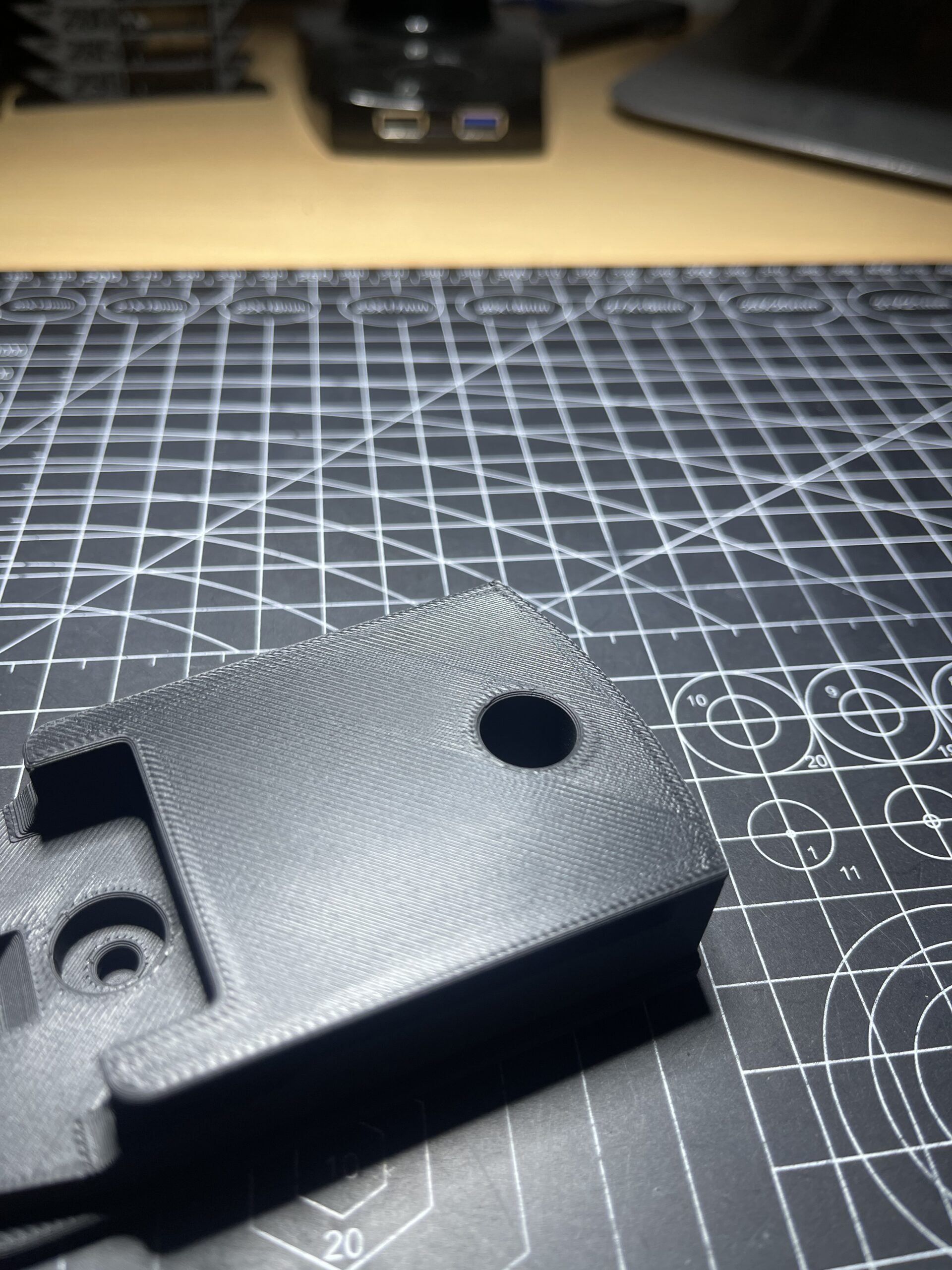
That photo kinda shows the problem, It's hard to photograph but seems worse when you have the part in your hand.
Infill direction doesn't make much difference (just changes the direction/location of the stripe), ironing again shows the same problem.
I've read this blog post which mentions, and claims to have solved the issue by using monotonic infill:
https://blog.prusa3d.com/make-top-surfaces-super-smooth-ironing-prusaslicer-2-3-beta_41506/
Yet I see no real difference whatever infill approach I try.
Anyone know of a solution, or a way to reduce this striped effect?
Cheers.

RE: Top Surfaces stripes when holes are present
From what I can see in the picture, is this CF filament?
Have you tried changing the position of the entire component? Can the component be rotated 45 degrees and positioned differently on the build plate?
The surface shows some over-extrusion points. How fast are you printing the surface? What are the acceleration values?
Do you have a 3MF file for us so we can take a closer look at it in the slicer?
Mods for Core One: Core One HT 450 degrees, Comfortable display , Very fast print start and Reducing noises
Mods for Prusa XL: Very fast print start
RE: Top Surfaces stripes when holes are present
From what I can see in the picture, is this CF filament?
Have you tried changing the position of the entire component? Can the component be rotated 45 degrees and positioned differently on the build plate?
The surface shows some over-extrusion points. How fast are you printing the surface? What are the acceleration values?
Do you have a 3MF file for us so we can take a closer look at it in the slicer?
It's not CF, but it is a matte filament.
I'll try the rotation thing, unfortunately I cant share 3MF as it's not my part...I don't wanna get my ass kicked 😂
Top solid infill speed is 100mm/s
Top solid infill accel is 2000mm/s
Cheers for suggestions.
RE: Top Surfaces stripes when holes are present
It's not CF, but it is a matte filament.
Okay, close but no cigar. What is it? PLA, ASA, ABS?
I'll try the rotation thing
When it is tilted, the surface is no longer smooth, but these stripes are gone. You may need to lower the print height further.
unfortunately I cant share 3MF as it's not my part...I don't wanna get my ass kicked 😂
No problem. Some people share it and some don't want to. That's understandable!
Top solid infill speed is 100mm/s
Top solid infill accel is 2000mm/s
I would definitely set it 10 to 20% lower.
Bye
Mods for Core One: Core One HT 450 degrees, Comfortable display , Very fast print start and Reducing noises
Mods for Prusa XL: Very fast print start
RE: Top Surfaces stripes when holes are present
Yeah sorry, it's Overture Matte PLA.
I'll be honest though, I see this same issue on all filaments.
Im trying the print rotated 45 degrees. I'll report back 👍

RE: Top Surfaces stripes when holes are present
The blog entry you had linked to in the original post suggests the monotonic infill in combination with ironing. Have you tried ironing? (Your picture does not look like it was enabled there, right?) It should certainly improve the surface, but of course it's slow.
RE:
The blog entry you had linked to in the original post suggests the monotonic infill in combination with ironing. Have you tried ironing? (Your picture does not look like it was enabled there, right?) It should certainly improve the surface, but of course it's slow.
Yeah I've tried it with ironing mate, the irritating thing is with dialled in ironing settings, I can get a close to perfect top layer as long as there are no holes on the top surface.
If there are holes, the same problem persists... an ugly stripe on the top layer.
If you look at this blog post , which doesn't relate to ironing at all:
https://help.prusa3d.com/article/infill-patterns_177130
Basically the problem im having is the images in the monotonic infill section. Their images show the problem better than my image. However I cant get anywhere close to the image they have used claiming it's all fixed if you use monotonic infill.

RE:
I have seen this as well. My theory is that this is a difference in how long time it takes between lines, when that time changes a little with every line as in where there is no hole or structure on the part that change is not visible, but when something interrupts the line and the lay down pattern changes creating an abrupt change in that time it becomes visible. I think you will see the same if you have an extrusion on a flat top surface, not just a hole.
Also, if I am not wrong it it will usually skip the visible area and continue other side of the hole, then return and print around the hole both sides, longer cooling time for the neighbor material becomes a visible edge.
/Anders
RE:
My theory is that this is a difference in how long time it takes between lines, when that time changes a little with every line as in where there is no hole or structure on the part that change is not visible, but when something interrupts the line and the lay down pattern changes creating an abrupt change in that time it becomes visible. I think you will see the same if you have an extrusion on a flat top surface, not just a hole.
Therefore, only significantly reduce the speed of the top layer. Just give it a try 🙂
PS: Normally, you should also be able to see in the slicer how it calculated the speeds for the top layer.
Mods for Core One: Core One HT 450 degrees, Comfortable display , Very fast print start and Reducing noises
Mods for Prusa XL: Very fast print start