
Troubleshooting - looking for ideas
Hello everyone,
I'm trying to get to the bottom of a recurring problem with my Core One and hope to get some ideas here. My printer has a stringing problem and under-extrudes when printing at coarse 0.28 Draft quality (see photos).
TLDR; I suspect that the Nextruder or another piece of hardware might be the problem, as both the stringing issues and some under-extrusion (only at coarse quality settings) occur. Please correct me if I am wrong. Maybe I am even overlooking something obvious.
What I have already tried in detail:
The problems started to occur some time ago. The stringing is particularly annoying with very small and fine prints and requires a lot of post-processing to make the parts usable.
I have already performed a basic printer maintenance, cleaning and lubricating all moving parts. I also checked and corrected the tension of the belts. Neither of these measures brought any improvement.
My filament does not seem to be the cause either. I have the problem with both PLA and PETG. Regardless of whether the filament had been open for a while or was brand new out of the package.For all filaments used (Polyterra and Prusament), I printed a temperature tower beforehand to make sure I was printing in the correct range. Interestingly, there is hardly any stringing on the towers (again see the photos). I have also performed a cold pull - again, no improvement.
To rule out the slicer as the problem, I sliced the same model in Prusa Slicer and Orca - same settings same result. In addition, I stumbled upon several pre-sliced benchies that came with the printer. I tried printing one of them as well right away, and the stringing was noticeable there too.
I read somewhere that printing more slowly can reduce stringing. Since my printer is in the living room, I always use stealth mode for printing by default. This reduces both the volume and the printing speed. In other words, I already print slowly and still have stringing.

printing in progress. very visible stringing. resolution is 0.11 layer height.

this is how it looks finished

same model, different filament - same problem
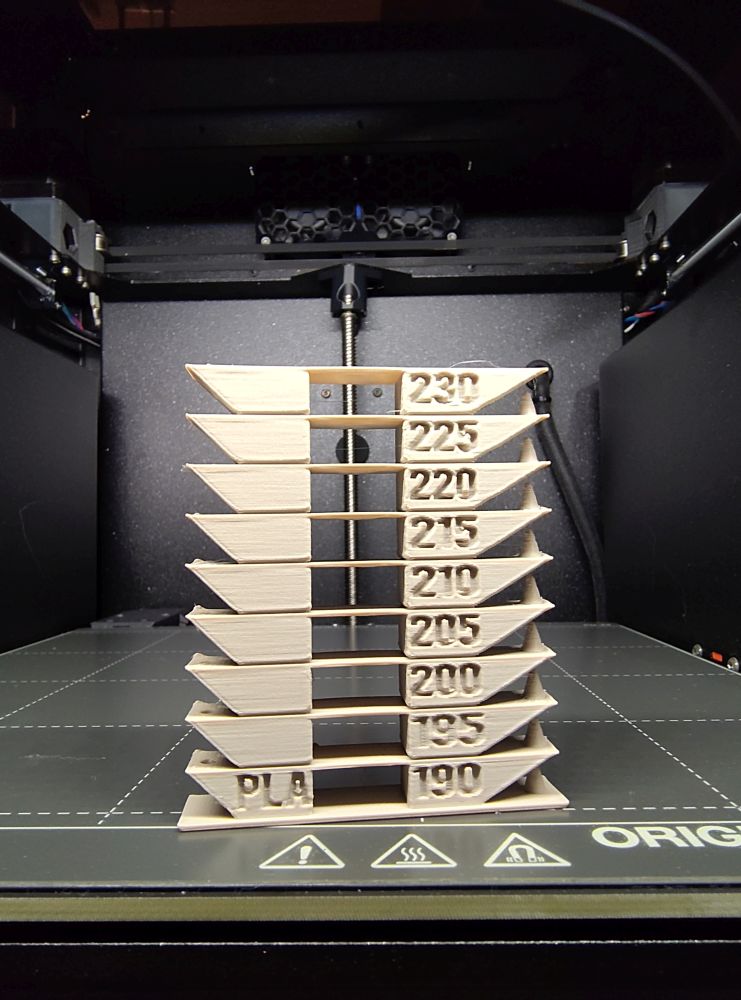
the tower looks fine. only expected stringing at certain temperatures.

slight stringing as well. the outer wall is not perfect but within acceptable parameters.

another print but at 0.28. visible under-extrusion.

RE: Troubleshooting - looking for ideas
Well, it *is* called "draft" mode. I'm not sure what compromises have been made to speed it up. It's probably the wrong choice for multiple parts and certainly not what you'd want for a finished part. On the flash drive that came with the printer there's "benchy bonkers" or something like that. It's an 8-minute benchy print where the printer really flies. It would be interesting to see how that does in comparison. I'd look at the all the profile parameters between draft and one of the "balanced" profiles to see what's different. AFAIK, "balanced" were optimized for the Core One.

RE: Troubleshooting - looking for ideas
I use draft mode, a 0.8mm nozzle, 1-2 perimeters and lightening infill when I want to print something quickly for sizing. I would never print something in draft mode and expect it to be functional.

Draft printing is for rapid rough checking of a prototype - not production, it is by definition sub optimal.
And your filament is damp.
Cheerio,

RE: Troubleshooting - looking for ideas
Do you have a filament dryer?
Mods for Core One: Core One HT 450 degrees, Comfortable display , Very fast print start and Reducing noises
Mods for Prusa XL: Very fast print start
RE: Troubleshooting - looking for ideas
Thank you very much for your ideas and suggestions so far. I will try to address them all.
Well, it *is* called "draft" mode. I'm not sure what compromises have been made to speed it up. It's probably the wrong choice for multiple parts and certainly not what you'd want for a finished part. On the flash drive that came with the printer there's "benchy bonkers" or something like that. It's an 8-minute benchy print where the printer really flies. It would be interesting to see how that does in comparison. I'd look at the all the profile parameters between draft and one of the "balanced" profiles to see what's different. AFAIK, "balanced" were optimized for the Core One.
I use draft mode, a 0.8mm nozzle, 1-2 perimeters and lightening infill when I want to print something quickly for sizing. I would never print something in draft mode and expect it to be functional.
The "Bonkers" Benchy is a good point. Of course, I should have realized that this is not a good comparison because the print quality is reduced. So here is a Benchy printed with the 0.20mm Balanced profile. Looks indeed pretty normal.
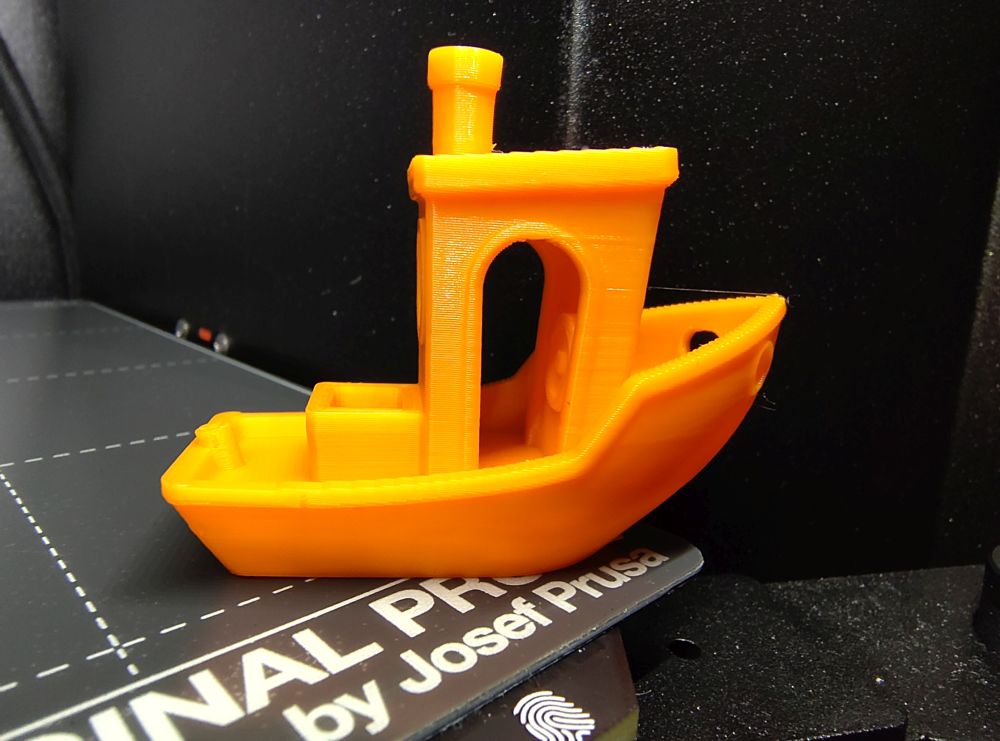
However, I'm not sure if that can really be the cause. I have often printed in 0.28 mm before—whenever a print needed to be done quickly and precision wasn't so important, e.g., organizers for my workshop. I never had any under-extrusion like this before. That's why I'm so surprised that it started relatively spontaneously a few weeks ago (unfortunately, I can't remember exactly when). But I'm relatively sure that it wasn't at the same time as I installed a firmware update or anything like that.
Draft printing is for rapid rough checking of a prototype - not production, it is by definition sub optimal.
And your filament is damp.
Cheerio,
Do you have a filament dryer?
Another great point. Apparently, I underestimated how even slightly damp filament affects the print quality of very fine prints. That's why I put this spool in a food dehydrator for five hours this morning. And this is the result. Much better, but still far from what I would have expected. The "blobs" on the top are still quite pronounced, as are the lines in the walls.
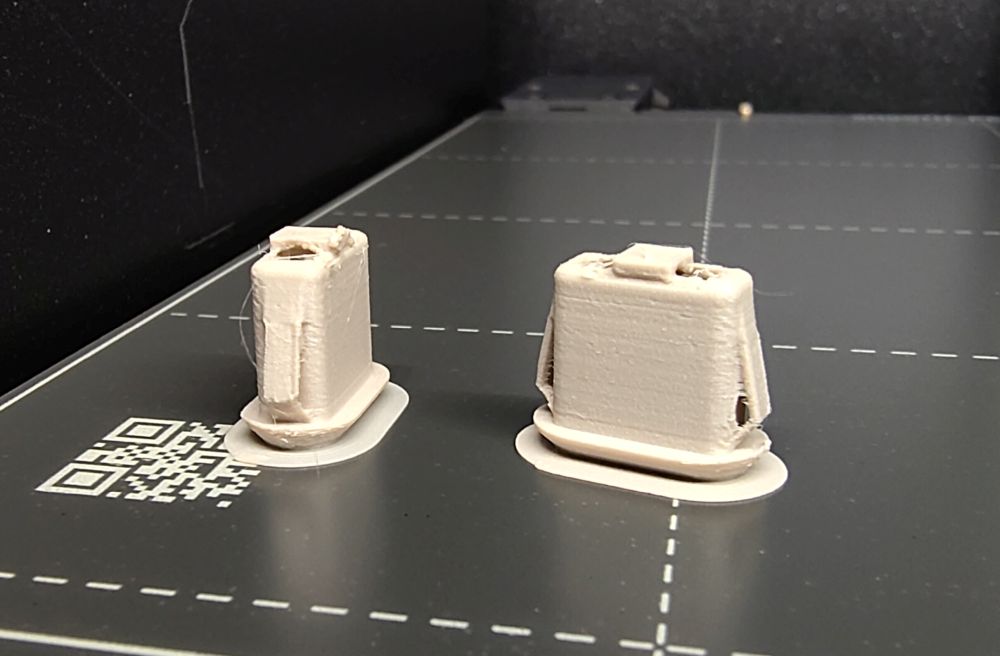
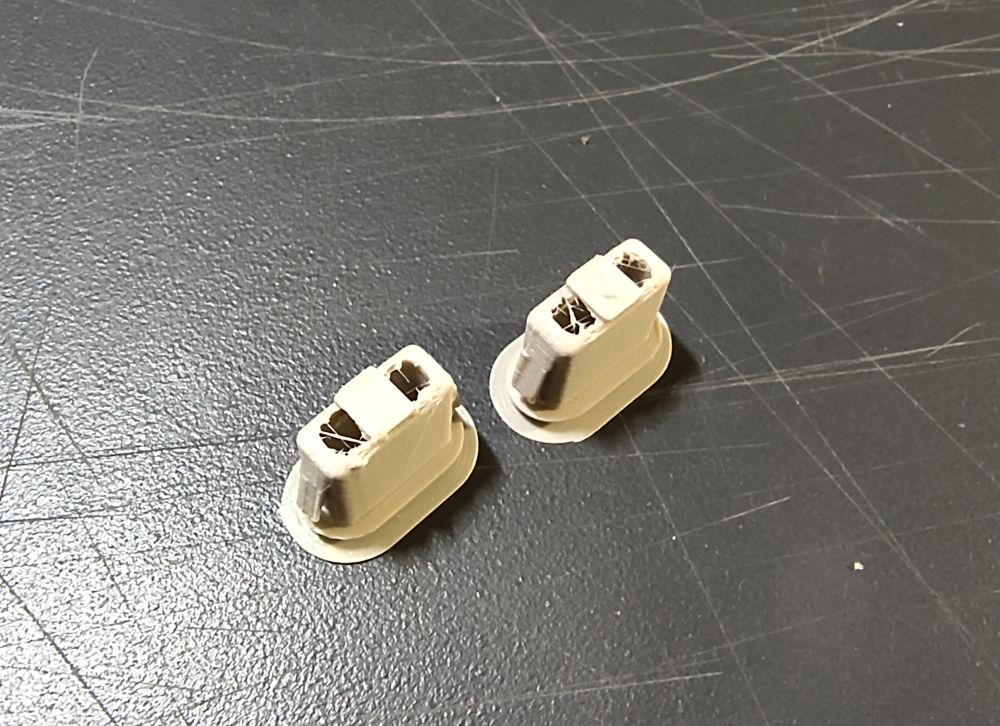
My printer has only been printing for a total of 16 days and 4 hours. After that amount of time, I wouldn't expect any real wear and tear yet. How long have your Core Ones been in use? Have you noticed any decline in quality?
RE: Troubleshooting - looking for ideas
That's why I put this spool in a food dehydrator for five hours this morning
At what temperature? I usually dry PETG at 60C for 8hrs
RE:
This was PLA and I dried it at about 40°C for around 5 hours.
RE: Troubleshooting - looking for ideas
Even the temperature tower sides look bad. What does the string look like when you purge filament? It should be round and perfect and drop straight down. Have you looked in the Nextruder for debris? I wouldn't expect perfection in draft mode, but something seems a bit off. Can you direct me to the stl file for that pair of whatever-they-ares?
We're getting there, it looks like it needs even more drying.
Cheerio,
RE: Troubleshooting - looking for ideas
It might be a moisture issue but truth is that PLA is the only kind of filament with which I never ever had serious trouble because of this. Many PLA spools I’ve used during the past years never were dried and they printed just fine. Nowadays I usually dry all my PLA spools once, specially if I see a bit of stringing during the first prints. I’m talking not only about reliable manufacturers -Prusament, Fillamentum, Polymaker - but also low profile Chinese brands.
RE:
A quick update: My new filament dryer should arrive tomorrow. I'll try again with completely dry filament and report back then.
Even the temperature tower sides look bad. What does the string look like when you purge filament? It should be round and perfect and drop straight down. Have you looked in the Nextruder for debris? I wouldn't expect perfection in draft mode, but something seems a bit off. Can you direct me to the stl file for that pair of whatever-they-ares?
The tower was printed before I dried the filament. I'll print a new tower once I have put the new filament dryer into use. I performed a cold pull twice and opened the Nextruder on the side and sprayed it with compressed air. However, I did not notice anything unusual.
I attached the 3MF if you want to try it yourself (usb_c_panel_mount_with-endstop2). It is a modified version of this model.
It might be a moisture issue but truth is that PLA is the only kind of filament with which I never ever had serious trouble because of this. Many PLA spools I’ve used during the past years never were dried and they printed just fine. Nowadays I usually dry all my PLA spools once, specially if I see a bit of stringing during the first prints. I’m talking not only about reliable manufacturers -Prusament, Fillamentum, Polymaker - but also low profile Chinese brands.
That is what I thought. Specifically, since I actually only use filament from renowned manufacturers. I mainly use Prusament and Polymaker. The gray filament in the photos is Polymaker PolyTerra.
RE:
Important point to consider is that even if the filament is from a reputable vendor such as Prusa, no matter how well it is packaged, I never consider it to be in printable condition. I always dry it first.
Here is an example, I opened a brand new box of Prusament PC-CF (was made 3 months before I opened the package). The vacuum seal was intact and there was a dessicant bag inside the spool. On the left is my object printed immediately upon openning and on the right after drying at 80C for 8 hours:


RE: Troubleshooting - looking for ideas
80C for 8 hours
Hello hyiger, what dryer did you use? My Sunlu S2 is only up to 70°C. Sunlu E2?
RE: Troubleshooting - looking for ideas
80C for 8 hours
Hello hyiger, what dryer did you use? My Sunlu S2 is only up to 70°C. Sunlu E2?
I had a Sunlu E2 dryer for about a week and returned it. Was too noisy, heavy and the UI is terrible. I got the Creality Space Pi 4 which can reach 85C. Has 2 separate chambers with different temperature control so I can dry 4 spools of filament (2 each chamber) at different temps.
RE: Troubleshooting - looking for ideas
I admit I didn't appreciate how small these things are. I printed them with standard "balanced" settings and a 0.4 nozzle. No extra code, no brim, no nothing. I do try to print multiple items complete, then move on to the next one. The slicer is good at locating things so they don't collide when you do that, just be sure to hit "A" after checking the complete box, not before.
RE: Troubleshooting - looking for ideas
Just black Buddy PLA that I've never dried. (Some people can edit and can put more than one image in a post but that's presently above my pay grade.)
Drying should get rid of those bubble pits.
Cheerio,
RE: Troubleshooting - looking for ideas
Yes, I'm afraid I'm in analysis-paralysis mode on a drier. I want a two-spool heated drier that goes hot enough for most filaments, won't break the bank and won't burn the house down. Still, that's not a terrible part for filament that's never been dried. I believe the OP's file had a lot of extra gcode. What was that for?
RE: Troubleshooting - looking for ideas
Yes, I'm afraid I'm in analysis-paralysis mode on a drier. I want a two-spool heated drier that goes hot enough for most filaments, won't break the bank and won't burn the house down. Still, that's not a terrible part for filament that's never been dried. I believe the OP's file had a lot of extra gcode. What was that for?
Personally I like the Creality Space Pi dryers. I definitely think the Space Pi 4 is worth the investment since I can dry different materials at the same time.