
How do we setup PrUSA Link to our Prusa Slicer?
It seems that PRUSA Connect is down this morning. So I cannot use that route to drop my file on my printer from Prusa Slicer.
I realized that I had never setup PRUSA Link on my Computer (only on my phone)... {{and I have to recover all my LinkSys logins first, cause I had not reset those since I got the new computer}}
So in Prusa slicers, we go to Prusa Connect, then we Select a printer, then setup a printer.
(getting a string did not match the expected pattern if I put in SN*******)
Now it wants a Code.
- Where do we get the code and what is the format (presumably from the silver tag on the back of the machine)
Best Answer by NickAtNight:
Thanks to PrusaSUPPORT - it was an Apple Security issue.
Go to SETTINGS
.. then Privacy and Security
.. .. then Local Network
.. .. .. then turn on PrusaSlicer so that it can find and
communicate with devices on my local network.

Now the Test works !

RE: How do we setup PrUSA Link to our Prusa Slicer?
I'm not in front of my printer, but you should be able to get the API code from the firmware in UI. Probably under network settings. Prusa Connect is working for me so getting the API key from there is usually easier.
RE: How do we setup PrUSA Link to our Prusa Slicer?
In the Browser:
We enter the IPv4 Address: Found in the PRUSALINK submenu
(pretty sure I had to log-in. But I don't see a log-in/log-out now that it is setup)
It has two tabs: Dashboard and Storage
So I can drag and drop my G-code here
And I can manage the Storage on the USB drive

In PRUSA Slicer,
Go to Printers
Complete the printer info:
Give the printer a descriptive name
Select Host type: PrusaLink
Enter Hostname, IP or URL: Presumably the IPv4Address
Authorization type: API key (?)
API Key/ Password.
So in Prusa slicers,
RE: How do we setup PrUSA Link to our Prusa Slicer?
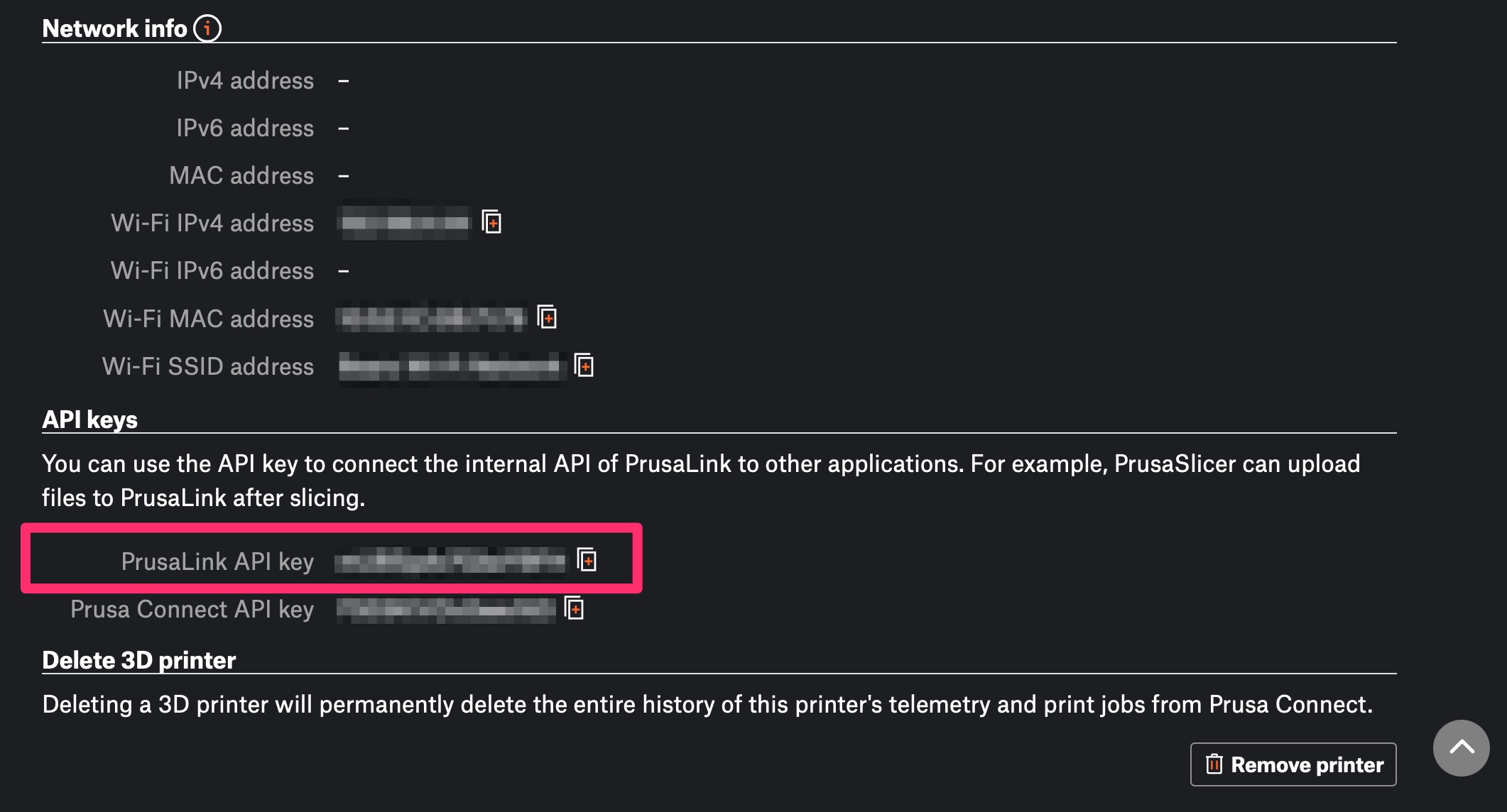
In Prusa Connect, select the printer, goto settings then scroll down to get the API key for PrusaLink:
RE: How do we setup PrUSA Link to our Prusa Slicer?
Thanks to PrusaSUPPORT - it was an Apple Security issue.
Go to SETTINGS
.. then Privacy and Security
.. .. then Local Network
.. .. .. then turn on PrusaSlicer so that it can find and
communicate with devices on my local network.
Now the Test works !