
RE: Core One MMU3 Filament unloading getting stuck
Same problem here with different types of filament, but especially with PLA. I have the Core One kit, with the MMU in the side panel, and therefore a custom set of PTFE tube lengths.
I already tested a lot of different things to solve the issue and it drives me crazy.
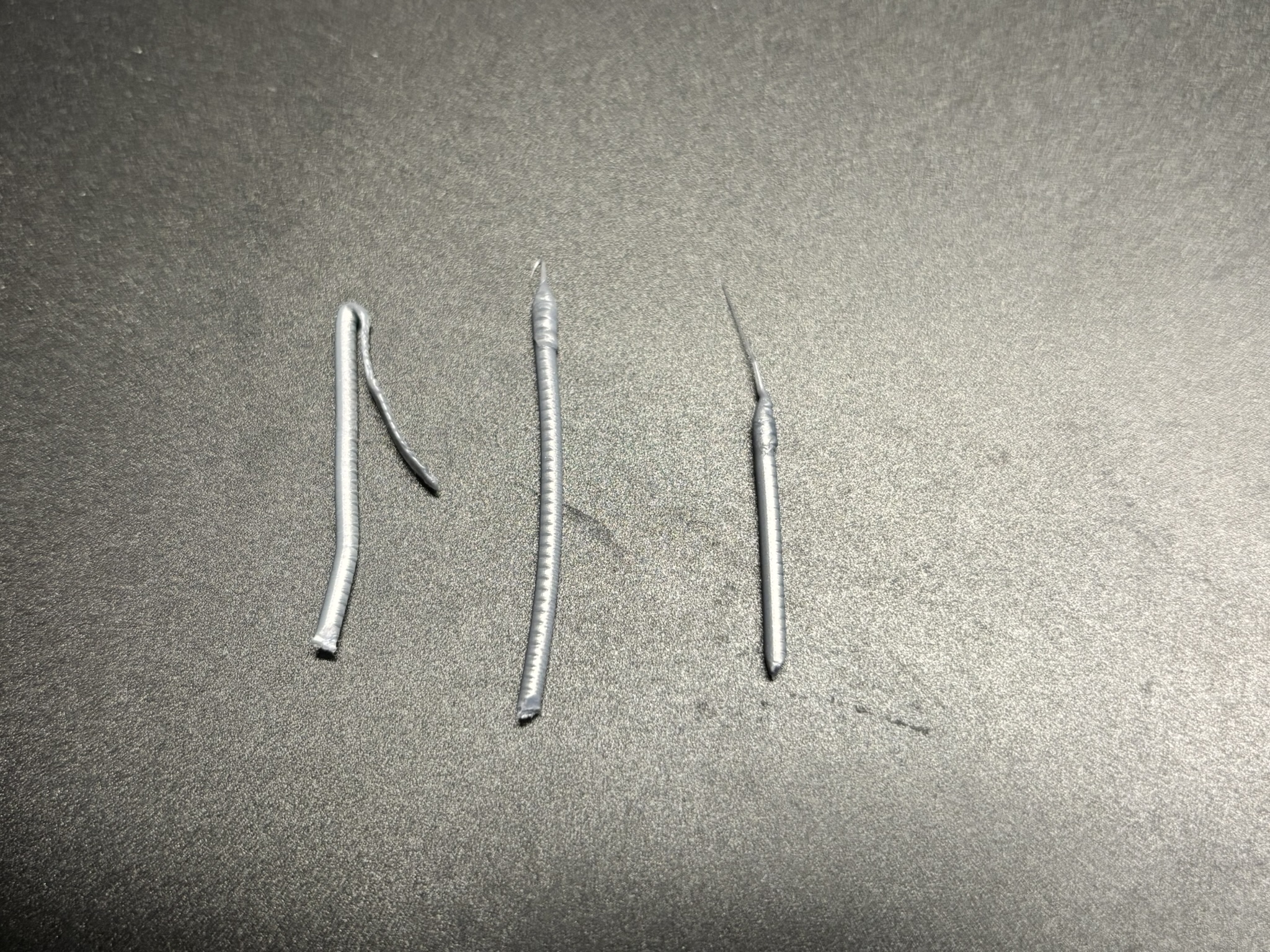
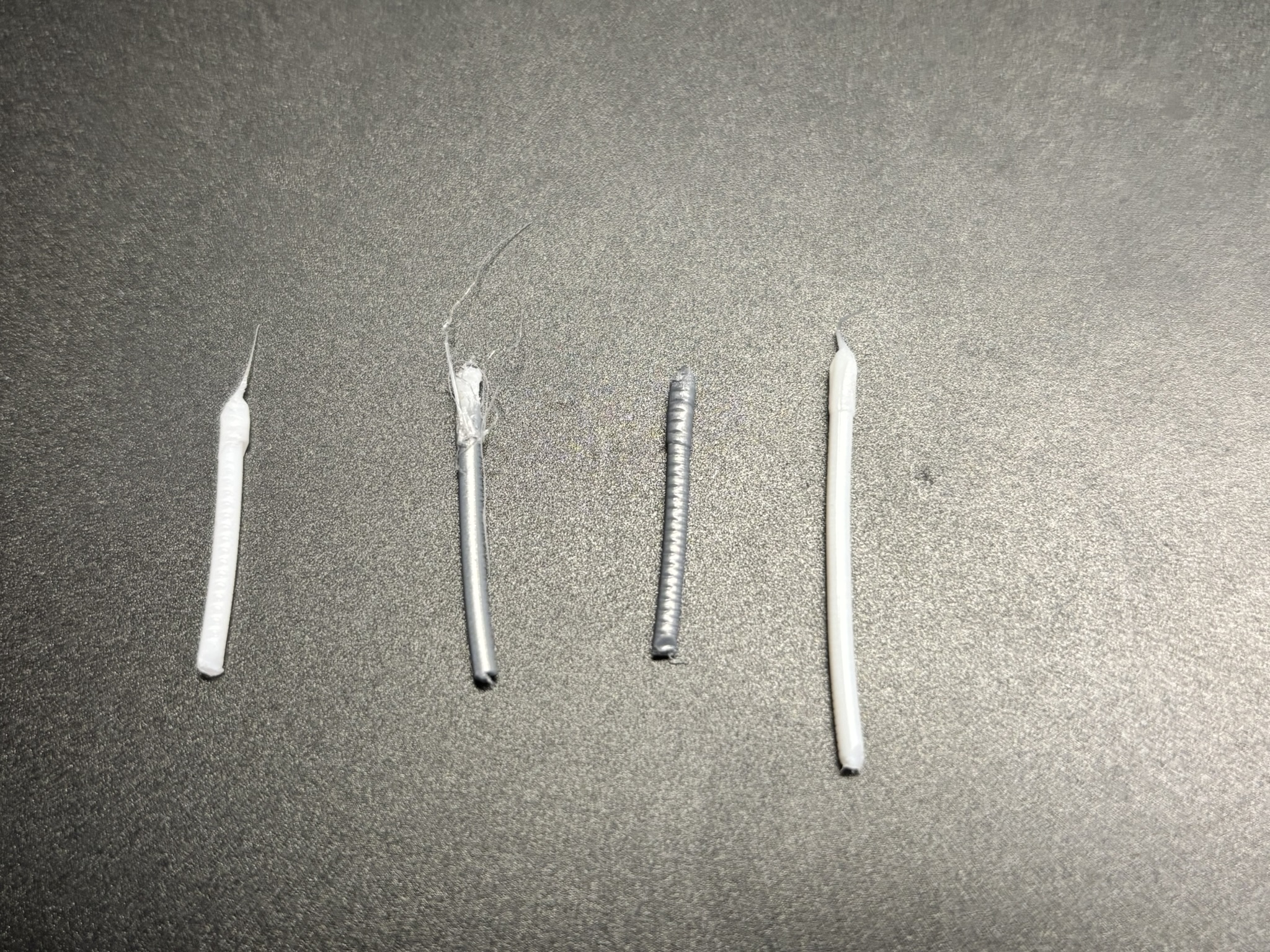
The interesting thing is, that the unloading problem occurs nearly every time when doing prints without color changes and thus when the final unload happens -- but on multi-color prints, the unloading issue didn't happen (for small test prints). I suppose that whenever a color change occurs, my slicer settings for ramming and the cooling moves, etc., take care and form nice tips. However, the final unload did not use those settings; at least, I didn't find the ramming or unloading stage in the generated gcode, so this might be done by the printer itself.
Another thing I noticed is, that when using the HF nozzle, the printer cools down the nozzle before unloading the filament, which is not done when using the default nozzle --- but that cooling is also done during a color change (tbh I don't remember if I used the HF nozzle when observing this during the color change).
Finally, when the filament is unloaded, I can hear the filament tip vibrating as the gear teeth move against it, since the Nextruder gears are still spinning when the MMU takes over and pulls the filament. Not sure if the setting for this is the unloading distance in the slicer...
Things I tried:
- reducing overall nozzle temperature
- tested everything on both HF and default nozzle
- playing around with the ramming and cooling moves (but again, I think those have no effect for the final unload)
- creating a custom filament profile (on the printer) with lower temperatures than e.g. the default 215C for PLA
- tested the HF profile when the default nozzle is installed (to get that nozzle cooling before unload) -- which at least gave me a less stringy tip
- dried my PLA for 12h at 40C
- played around with the settings for the length of the PTFE tube (from far to short to a bit too long)
- tested different retract speeds

RE: Core One MMU3 Filament unloading getting stuck
I too started with MK4S and then added the MMU3 about two years ago. Multi prints worked very well with almost no problems. Except for TPU, which I realize is not supported. But even with TPU I managed some prints with dozens of PLA/TPU changes.
Since the MMU3 changes were made to the Nextruder, I forgot that the filament sensor is triggered when the idler wheels move away from the drive gear. So I recalibrated the filament sensor making sure it was pulled into the drive gear and that the idler moved outward.
Ran 4 hour stress test with 250 changes in 4 colors and no problems.
I'm running a buffer box with the MMU on a rail and custom-length tube running through a Y-splitter so I can still use the side spool if I want.

Y-splitter
Swing arm clips
MMU mounting rail and port
I tried getting a feed tube length by inserting filament from the MMU end of the bowden tube to the Nextruder, marking the filament and then measuring. This resulted in a length that was too long because the MMU tried to drive the filament into the Nextruder while grinding a dent in the filament (made a bad noise!). So I backed off 10mm at a time until the MMU didn't grind the filament on loading. On unloading, as another post stated, I can hear the Nextruder drive gear click against the end of the filament about 5 times. Although I don't like it, the stress test went well.

RE: Core One MMU3 Filament unloading getting stuck
Hello!
I have the exact same problem as @VladimirD. The filament unload fails because the tip is bent. It happens almost always with the same filament (position 4 of the MMU3), but not always. The fault occurs in the Nextruder, so the fact that it always fails with the filament I have in position 4 of the MMU3 seems rather coincidental to me... But I'm mentioning it anyway, just in case. Has anyone found a solution or improvement for this specific problem?

 Photo of @VladimirD

RE: Core One MMU3 Filament unloading getting stuck
I am having a problem where the filament is getting stuck in the nextruder above the gear and below the Fitting M5-4 where the PFTE is held. If I unscrew the fitting and pull up manually the filament comes free without too much force. The resistance seems to be just enough that the MMU3 cannot unload the filament.
I have cleaned out path and blown it out with canned air. I disassembled the nextruder and can't see anything obvious that is causing the filament to stick.
what am I missing?
Same thing happened with me and I tried (I thought everything) until someone asked me if I reassembled the Nextruder's idler arm and filament sensor with the same parts that were provided to me from the original MMU3 kit (I originally purchased the MMU3 for a MK4S, than when I got the Core One I purchased the MMU3 Conversion kit to turn my MK4S back to stock, while adjusting the MMU3 to retrofit the Core One. I inadvertently skipped the step of removing the filament sensor from the original stock Nextruder and replacing it with the MMU3 variety.
Making the Core One ready for the MMU3 also requires changing out the Main Plate with an alternative fitting one.
RE: Core One MMU3 Filament unloading getting stuck
Well, I found the root cause of my issue: excessive friction in the filament path.
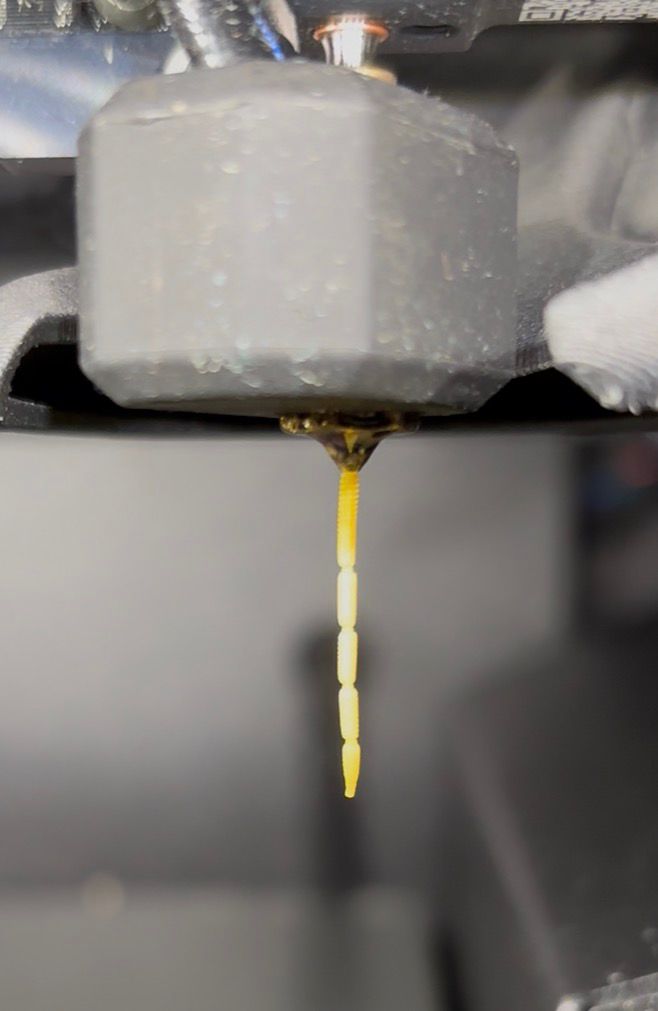
I print from a drybox located in the cupboard beneath the printer. From there, the filament runs through 2.5 mm PTFE tubes into the buffer and then to the MMU. During printing, continuous extrusion causes no problems. However, during unloading the printer performs several fast ramming moves, which led to extruder skips because the friction was too high to compensate for these rapid movements (see the first image). I initially thought this was normal and part of the ramming process, since this behavior occurred from the first day I installed the MMU.
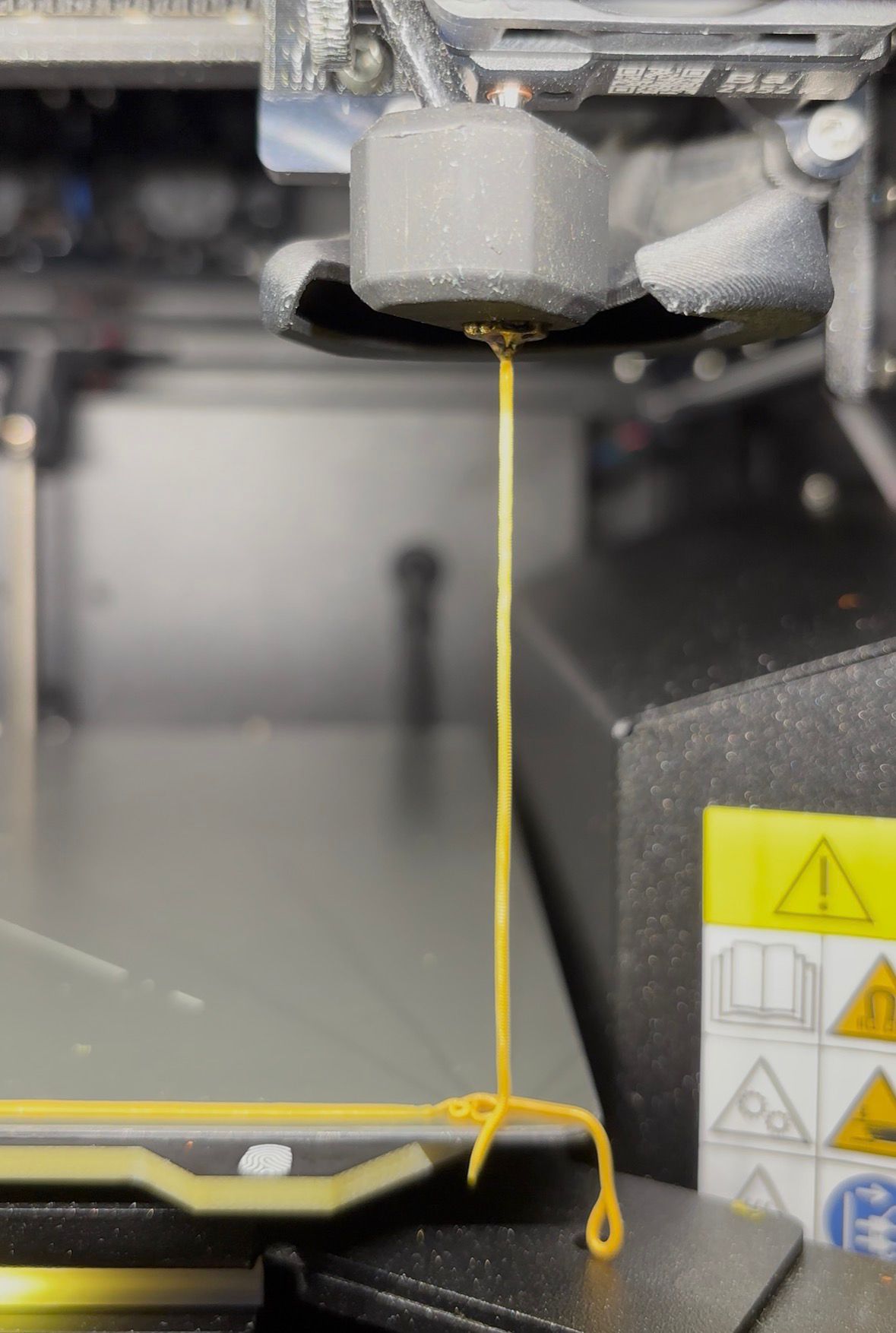
I tested with a loose piece of filament, bypassing the drybox and buffer, and during ramming I observed no skips and a smooth continuous extrusion (see the second image), resulting in perfect filament tips without any stringing that could be pulled into the extruder gears. I had already tried increasing the idler tension, but the friction remained too high, so I need to optimize my filament path.
If you experience similar issues:
- Check whether you have extruder skips at the start of the unload phase.
- If so, increase the idler tension.
- Ensure your filament path does not introduce excessive friction.

RE: Core One MMU3 Filament unloading getting stuck
Folks,
Seems I too have this issue, and it's not always constantly happening. Typically, the filament deforms in the nextruder prior to being retracted back to the MMU3 on the Core One. Thus, I end up with the filament stuck in the nextruder, usually with either a bulb on the end of the filament (at the top of the load cell) or a very fine string of filament attached to the main body of the filament (with then get's stuck at the top of the load cell).
WPLA posted this in the CoreBoxx discord channel, and I'm curious to see if it works well for anyone else?
[quote]My solution was to edit the END_CODE in Prusaslicer: I made the following changes: I added some code befor the M!107 :Turn Off Fan command. I added the following code; M106 S255 ; Full Part Cooling FAN ON then G4 S5 ; wait 5 sec to cool heatbreak/entry area then M83 ;relative extrusion then G1 E0.6 F600 ;tiny nudge to release hob "bite" then G4 P100 ;short pause then G1 E-16 F3600 ; strong pre-retract to clear soft plug/heat creep zone then M400 ;ensure all moves are finished then M82: back to absolute then M702 C ;complete unload of current filament to mmu the M107 ; part cooling fan off. then the remaining commands to end the process. The fact that a blob can occur is caused by a filament which is still too hot when the retract command is given and when it hits the gear it gets deformed and can block the entrance to the PTFE. My solution works for me spcifically after a multi hour print job where the extruder area is more hot then when used for a short print. You can use also CHATGPT for finding a solution, I used it and it heled me to get on the right track.[/quote]
 WPLA's Code for fixing nextruder to MMU3 filament swap
RE: Core One MMU3 Filament unloading getting stuck
This is what I found on discord, Maybe it works
Between the M141 S0 and M107 line:
; START: Extra code for stuck filament solution
; --- HEAT CREEP PROTECTION: blast part fan to cool cold zone ---
M106 S255 ; full part cooling fan on
G4 S5 ; wait 5s to cool heatbreak/entry area
; --- ANTI-BITE + BIG PRE-RETRACT (for all materials) ---
M83 ; relative extrusion
G1 E0.6 F600 ; tiny nudge to release hob "bite"
G4 P100 ; short pause
G1 E-16 F3600 ; strong pre-retract to clear soft plug / heat creep zone
M400 ; ensure all moves are finished
M82 ; back to absolute
; --- CHOOSE UNLOAD TEMPERATURE BASED ON FILAMENT TYPE ---
: PLA: unload at ~175°C
; PETG : unload at ~190°C
: ABS : unload at ~215°C
; PCCF : unload at ~235°C (tweak if needed)
M104 S{if filament_type[0]=="PLA”} 175\
{elsif filament_type [0]=="PETG”} 190\
{elsif filament_type[0]=="ABS”} 215\
{elsif filament_type [0]==“PCCF”} 235\
{else} 190\
{endif}
M109 S{if filament_type[0]=="PLA”} 175\
{elsif filament_type [0]=="PETG”} 190\
{elsif filament_type[0]=="ABS”} 215\
{elsif filament_type [0]==“PCCF”} 235\
{else} 190\
{endif} ; wait for unload temp
--- MMU UNLOAD WHILE TIP IS HARDENED ---
M702 C ; complete unload of current filament to MMU
; END: Extra code for stuck filament solution
RE: Core One MMU3 Filament unloading getting stuck
@gbmaryland, do you use the correct filament profile / add a custom one for filaments with special needs? The blob typically occurs when printing too hot. For example, I have some PLA that prints best at 195 °C, which is way outside the typical default PLA range around 215 °C --- so when I used the generic profile for that PLA, I also got a blob due to the high temperatures. Try decreasing the nozzle temperature in the slicer by 10 °C for that filament or better, print a temperature tower to find the optimal nozzle temperature.
RE: Core One MMU3 Filament unloading getting stuck
Yup... as formatted, it looks like this:

RE: Core One MMU3 Filament unloading getting stuck
I can also recommend to add a custom filament profile in the printer menu itself (Filament-> Manage Filaments) for filaments that have temperatures outside the default range

RE: Core One MMU3 Filament unloading getting stuck
Yup... as formatted, it looks like this:
This seems to work well, with a few changes. Like actually waiting for the nozzle to cool down and higher unload temp for ASA.
I've tested mostly with PETG, which is what I have had most trouble with, feeding from a Coreboxx. The tips look way nicer when unloaded and so far no failed print starts.
; ------------------------------------------
; START: Extra code for stuck filament solution
; --- HEAT CREEP PROTECTION: blast part fan to cool cold zone ---
M106 S255     ; full part cooling fan on
G4 S5         ; wait 5s to cool heatbreak/entry area

; --- ANTI-BITE + BIG PRE-RETRACT (for all materials) ---
M83 ; relative extrusion
G1 E0.6 F600 ; tiny nudge to release hob "bite"
G4 P100 ; short pause
G1 E-16 F3600 ; strong pre-retract to clear soft plug / heat creep zone
M400 ; ensure all moves are finished
M82 ; back to absolute

; --- CHOOSE UNLOAD TEMPERATURE BASED ON FILAMENT TYPE ---
: PLA: unload at ~175°C
; PETG : unload at ~190°C
: ABS : unload at ~215°C
; PCCF : unload at ~235°C (tweak if needed)

G1 X242 Y0 F10200 ; park for unload

M109 R{if filament_type[filament_extruder_id]=="PLA"} 175
 {elsif filament_type[filament_extruder_id]=="PETG"} 190
 {elsif filament_type[filament_extruder_id]=="ABS"} 215
 {elsif filament_type[filament_extruder_id]=="ASA"} 215
 {elsif filament_type[filament_extruder_id]=="PCCF"} 235
 {else} 190
{endif} ; wait for unload temp

--- MMU UNLOAD WHILE TIP IS HARDENED ---
M702 C ; complete unload of current filament to MMU

; END: Extra code for stuck filament solution
; ------------------------------------------
RE: Core One MMU3 Filament unloading getting stuck
@gbmaryland, do you use the correct filament profile / add a custom one for filaments with special needs? The blob typically occurs when printing too hot. For example, I have some PLA that prints best at 195 °C, which is way outside the typical default PLA range around 215 °C --- so when I used the generic profile for that PLA, I also got a blob due to the high temperatures. Try decreasing the nozzle temperature in the slicer by 10 °C for that filament or better, print a temperature tower to find the optimal nozzle temperature.
I've been sticking with the temp that works best with the print tower for that filament (in this case it was Elegoo Rapid PETG, but I've had issues with PLA and other PETGs too...)
I'm really tempted to use explosives at this point. I've got a request to use the high-speed camera...
RE: Core One MMU3 Filament unloading getting stuck
 MMU3 / Nextruder / Filament gets stuck

RE: Core One MMU3 Filament unloading getting stuck
Adding my +1 to this thread. MMU3 + Core One, I'm getting my filament jammed like this 100% of the time when the print ends, but oddly only maybe 20% of the time while multi-color printing. That really tells me it's the final unload procedure that's messed up...
Yup... as formatted, it looks like this:
This seems to work well, with a few changes. Like actually waiting for the nozzle to cool down and higher unload temp for ASA.
I've tested mostly with PETG, which is what I have had most trouble with, feeding from a Coreboxx. The tips look way nicer when unloaded and so far no failed print starts.
; ------------------------------------------
; START: Extra code for stuck filament solution
; --- HEAT CREEP PROTECTION: blast part fan to cool cold zone ---
M106 S255     ; full part cooling fan on
G4 S5         ; wait 5s to cool heatbreak/entry area

; --- ANTI-BITE + BIG PRE-RETRACT (for all materials) ---
M83 ; relative extrusion
G1 E0.6 F600 ; tiny nudge to release hob "bite"
G4 P100 ; short pause
G1 E-16 F3600 ; strong pre-retract to clear soft plug / heat creep zone
M400 ; ensure all moves are finished
M82 ; back to absolute

; --- CHOOSE UNLOAD TEMPERATURE BASED ON FILAMENT TYPE ---
: PLA: unload at ~175°C
; PETG : unload at ~190°C
: ABS : unload at ~215°C
; PCCF : unload at ~235°C (tweak if needed)

G1 X242 Y0 F10200 ; park for unload

M109 R{if filament_type[filament_extruder_id]=="PLA"} 175
 {elsif filament_type[filament_extruder_id]=="PETG"} 190
 {elsif filament_type[filament_extruder_id]=="ABS"} 215
 {elsif filament_type[filament_extruder_id]=="ASA"} 215
 {elsif filament_type[filament_extruder_id]=="PCCF"} 235
 {else} 190
{endif} ; wait for unload temp

--- MMU UNLOAD WHILE TIP IS HARDENED ---
M702 C ; complete unload of current filament to MMU

; END: Extra code for stuck filament solution
; ------------------------------------------
Is this your entire End G-code script now? I'm assuming not since it doesn't ever turn off the fan, nor disable steppers. If there's more to your script, would you be kind enough to share the whole thing so myself and others can be lazy and copy the whole thing until Prusa comes up with a fix? 😅

RE: Core One MMU3 Filament unloading getting stuck
Try to relax retract settings during print e.g. 0.2 mm and 10mm/s. It is possible that the problem starts already here with heat creep.
RE: Core One MMU3 Filament unloading getting stuck
Adding my +1 to this thread. MMU3 + Core One, I'm getting my filament jammed like this 100% of the time when the print ends, but oddly only maybe 20% of the time while multi-color printing. That really tells me it's the final unload procedure that's messed up...
Is this your entire End G-code script now? I'm assuming not since it doesn't ever turn off the fan, nor disable steppers. If there's more to your script, would you be kind enough to share the whole thing so myself and others can be lazy and copy the whole thing until Prusa comes up with a fix? 😅
Sure. This is the whole End G-code section.
{if layer_z < max_print_height}G1 Z{z_offset+min(max_layer_z+1, max_print_height)} F720 ; Move print head up{endif}

M140 S0 ; turn off heatbed
M141 S0 ; disable chamber control

{if layer_z < max_print_height}G1 Z{z_offset+min(max_layer_z+50, max_print_height)} F720 ; Move bed down{endif}

; ------------------------------------------
; START: Extra code for stuck filament solution
; --- HEAT CREEP PROTECTION: blast part fan to cool cold zone ---
M106 S255     ; full part cooling fan on
G4 S5         ; wait 5s to cool heatbreak/entry area

; --- ANTI-BITE + BIG PRE-RETRACT (for all materials) ---
M83 ; relative extrusion
G1 E0.6 F600 ; tiny nudge to release hob "bite"
G4 P100 ; short pause
G1 E-16 F3600 ; strong pre-retract to clear soft plug / heat creep zone
M400 ; ensure all moves are finished
M82 ; back to absolute

; --- CHOOSE UNLOAD TEMPERATURE BASED ON FILAMENT TYPE ---
: PLA: unload at ~175°C
; PETG : unload at ~190°C
: ABS : unload at ~215°C
; PCCF : unload at ~235°C (tweak if needed)

G1 X242 Y0 F10200 ; park for unload

M109 R{if filament_type[filament_extruder_id]=="PLA"} 175
 {elsif filament_type[filament_extruder_id]=="PETG"} 190
 {elsif filament_type[filament_extruder_id]=="ABS"} 215
 {elsif filament_type[filament_extruder_id]=="ASA"} 215
 {elsif filament_type[filament_extruder_id]=="PCCF"} 235
 {else} 190
{endif} ; wait for unload temp

--- MMU UNLOAD WHILE TIP IS HARDENED ---
M702 C ; complete unload of current filament to MMU

; END: Extra code for stuck filament solution
; ------------------------------------------

M104 S0 ; turn off temperature
M107 ; turn off fan
M870 C ; Close grille

G1 X242 Y211 F10200 ; park
G4 ; wait
M572 S0 ; reset PA
M84 X Y E ; disable motors
; max_layer_z = [max_layer_z]
My setup is a Coreboxx with a 825 mm PTFE tube coming down in the rear right corner with hachleitners Y-splitter on the swing arm.
Multicolor prints with filament swaps worked fine before but the end unload resulted in a long string at the tip or filament stuck. The next load then somehow resulted in an immediate automatic unload and stuck filament with a blob around the gear unless I trimmed the filament tip manually.
The above unload routine seems to work fine so far. There are a few weird movements I've not bothered to diagnose but I think it works way better than before.

RE:
I have the same issues.
I think the problem lies in to long unloading of the extruder.
When filament is unloaded i hear the extruder ticking (and possible fipping) the tip of the filament.
The unload is to long and not triggering the filament sensor in nextruder.
I think the cooling tube length setting is the right thing to change if the unload time is based on this.
But i assume mmu rewinding/unloading is only triggered when nextruder filament sensor is deactivated.
Mmu unload should be triggered after the 80mm cooling tube retraction is passed and not look into nextruder filament sensor.
RE: Core One MMU3 Filament unloading getting stuck
Also the tensioner screws are of much importance.Too loose or too tight will flip the tip of the filament.
I designed my tensioner screws so the screws have an smooth bore that passes through the heatbreak. 40 or 45mm screw with only 5mm thread left after cutting it shorter. This way the filament sensor is triggered right on time and it never seizes on the bolts which would result in not triggering.
Also i shaved some plastic of the plastic piece after the screw heads.
This way the plastic is not pushing the screws out of alignement.
I have read somewhere that the soutpole of the magnet has to be orientated to the hall sensor in the heatbreak. This is more accurate.After taht you have to recalibrate the sensor (very hard since it is not sensing in the right way because you maybe just reversed it.
The screw mod helps in reliabality but it is still unloading too long.


RE:
Hi,
i also have CoreBox. can u also post pick how your tube is going rom MMU tu Y-Splitter for inspiration.
I am still interested what has change from MK4 where changing material was flawless.
With upgrade to coreONE ?
RE: Core One MMU3 Filament unloading getting stuck
I did it like on photo but now i have from MMU to Nextruder 950mm long tube.
