
Print Trouble shooting - Always second layer
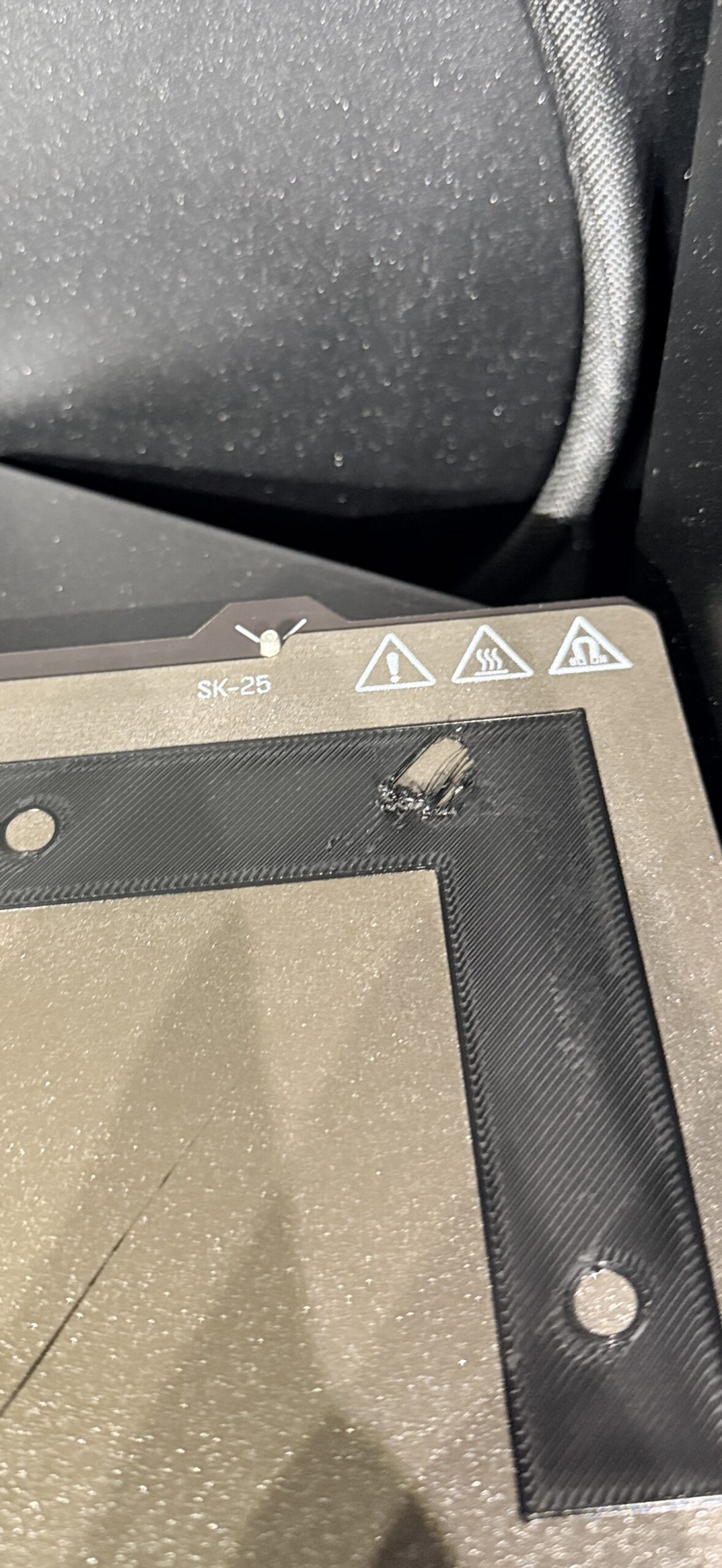
Anyone know why this happens? Always seems to be second layer on some prints

RE: Print Trouble shooting - Always second layer
I hope someone can help, because I'm getting the same. Prints are constantly being dragged up.

RE: Print Trouble shooting - Always second layer
Need a lot more information. Example, what kind of filament is this? Usually this can be caused by poor bed adhesion or over extrusion of material or both.
Or with some textured sheets, even after a bed mesh is created, the nozzle is too close to the print bed due to the surface variation of sheet which causes it to scrape up the first layer. Try slighting increasing the Z-offset, maybe 0.2mm
RE: Print Trouble shooting - Always second layer
I hope someone can help, because I'm getting the same. Prints are constantly being dragged up.
Probably in your case it's a problem with bed adhesion. What built plate are you using and how are you cleaning it?
RE: Print Trouble shooting - Always second layer
In my case it is PETG, textured plate. And using print adhesive on the plate.
RE: Print Trouble shooting - Always second layer
I found my problem. It was the idiot that mixed up PETG and PLA while picking up spools of filament.
I'm a fool. But, at least my problem was solved. I'm impressed that I only had these issues while printing with COMPLETELY the wrong settings.

RE: Print Trouble shooting - Always second layer
ID 10 T error. Maybe you need the new high priced NFC rolls! Not funny, I have done it.
Extra HAM (and eggs some say) Radio - N4MCC

RE: Print Trouble shooting - Always second layer
ID 10 T error. Maybe you need the new high priced NFC rolls! Not funny, I have done it.
layer 8 problem 🤣
Mods for Core One: Core One HT 450 degrees, Comfortable display , Very fast print start and Reducing noises
Mods for Prusa XL: Very fast print start

RE: Print Trouble shooting - Always second layer
So, would this be a PEBCASH or PEBCAP problem?
(PEBCA[SH|P] = "Problem Exists Between Chair And [Spool Holder|Printer]" if anyone was wondering...) 🤣
See my (limited) designs on:
Printables - https://www.printables.com/@Sembazuru
Thingiverse - https://www.thingiverse.com/Sembazuru/designs

RE: Print Trouble shooting - Always second layer
When I got my MK4S (my first printer), my first 2 prints were with the included Prusament PETG Orange. Printed great! I only realized afterwards that I was using PLA settings. Luckily I never had a failure due to that mistake...
Prusa MK4 since Jan 2024, MK4S/MMU3 since Jan 2025, Printables: @MikeB_1505898
RE: Print Trouble shooting - Always second layer
Same as PEBKAC
Extra HAM (and eggs some say) Radio - N4MCC
RE: Print Trouble shooting - Always second layer
Same as PEBKAC
I can never remember if the original is PEBKAC or PEBCAK... This problem is between my ears. ;-D
See my (limited) designs on:
Printables - https://www.printables.com/@Sembazuru
Thingiverse - https://www.thingiverse.com/Sembazuru/designs