
Layer lines problem
Hello everyone,
I've been getting some visible layer lines at a certain height when printing but somehow only in a specific type of prints (large box-like models)


What could it be and how do I troubleshoot this problem?
Thank you all in advance.

RE: Layer lines problem
I've been getting some visible layer lines at a certain height when printing but somehow only in a specific type of prints (large box-like models)
I'm guessing that the floor ends right at that line behind it and only the wall continues upwards?
Mods for Core One: Core One HT 450 degrees, Comfortable display , Very fast print start and Reducing noises
Mods for Prusa XL: Very fast print start

RE:
This is the classic benchy hull line problem. In short it won’t be simple to eliminate. You have a floor with infill, several top layers and a wall. You can research online (there is a recent YouTube video) that describes and provides some solutions to the problem. The short answer is it’s not trivial to get rid of them. An easy way if you don’t mind the appearance is to use a fuzzy skin.
Getting rid of layer lines in general can be done by switching to matte or carbon fiber filaments.

RE: Layer lines problem
Or search this forum for "buldge" (sic). Dozens of pages, no generally applicable solution.
Formerly known on this forum as @fuchsr -- https://foxrun3d.com/

RE: Layer lines problem
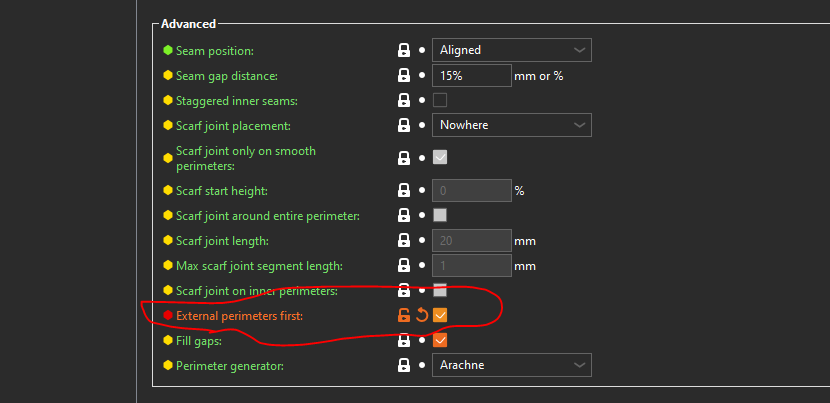
Hi, try "External perimeters first" option in "Advanced section" of "Layers and perimeters" settings. (slicer must be switched into "Expert" mode)

RE: Layer lines problem
Hello everyone,
I've been getting some visible layer lines at a certain height when printing but somehow only in a specific type of prints (large box-like models)
What could it be and how do I troubleshoot this problem?
Thank you all in advance.
This, from Slant 3D, is a comprehensive explanation of this issue.
Flashforge finder -> Flashforge Creator Pro -> Prusa MK3S -> Prusa MK4S ->???
RE: Layer lines problem
I’m not sure if I should feel good about this or not since it’s such a tough flaw to fix.
Yeah the floor inside this geometry is what creates this issue.
Unfortunately, having a texture or fuzzy skin is not viable for this model, will have to find another work around.
I tried making the outer walls first, but it ended up with a bunch of unconnected layer lines. Then I gave that hull lines solution from the video a shot, but that didn’t work either.

But thank you all for your insight on the problem! 😀

RE: Layer lines problem
I gave that hull lines solution from the video a shot, but that didn’t work either.
The video discusses multiple solution approaches. Which one(s) did you try?
Based on that video and other experiences I have seen described, decoupling the walls from the large continuous inner floor surface is the "proper" solution. A groove between floor and wall, or an embossed or debossed grid pattern on the floor, seem equally effective.
RE: Layer lines problem
Yes, i tried that solution. Maybe is not perceptible in the photo. But here is the geometry: