
Microphone selection for belt tuning app
I was becoming frustrated with my Core One + kit after it passed all self-tests and printed the keychain but had issues when printing the calibration cube in vase mode. I tuned the belts fairly close with the phone app, then used the built-in manual belt tuning. It didn't seem very precise as the oscillation spread over 6 Hz or more with the manual belt tuning. After much effort and many support chats investigating pulley tightness, gantry squareness, etc. I discovered that the phone app used my hearing aids as the microphone source. Hearing aids have basically no low frequency response, so the phone app wasn't reliable at all. In fact, what the phone app detected was the 2nd harmonic, which I dutifully adjusted to 96Hz. What I saw with the built-in manual tuner was also a 2nd harmonic. Finally, when I was setting the belt tension for the 20th time, it occurred to me that I needed to turn off the hearing aids so the phone app would listen to the microphone in the phone that I positioned near the belt.
What do you know, you really need to tighten those belt tension adjusting screws. They push back by the time you get to 96 Hz. And the manual belt tuner is super easy to see and very precise once you stop detecting 2nd harmonics.
The ridges on the left are nearly gone when reprinting the calibration cube and I'm moving on to print other more interesting objects.
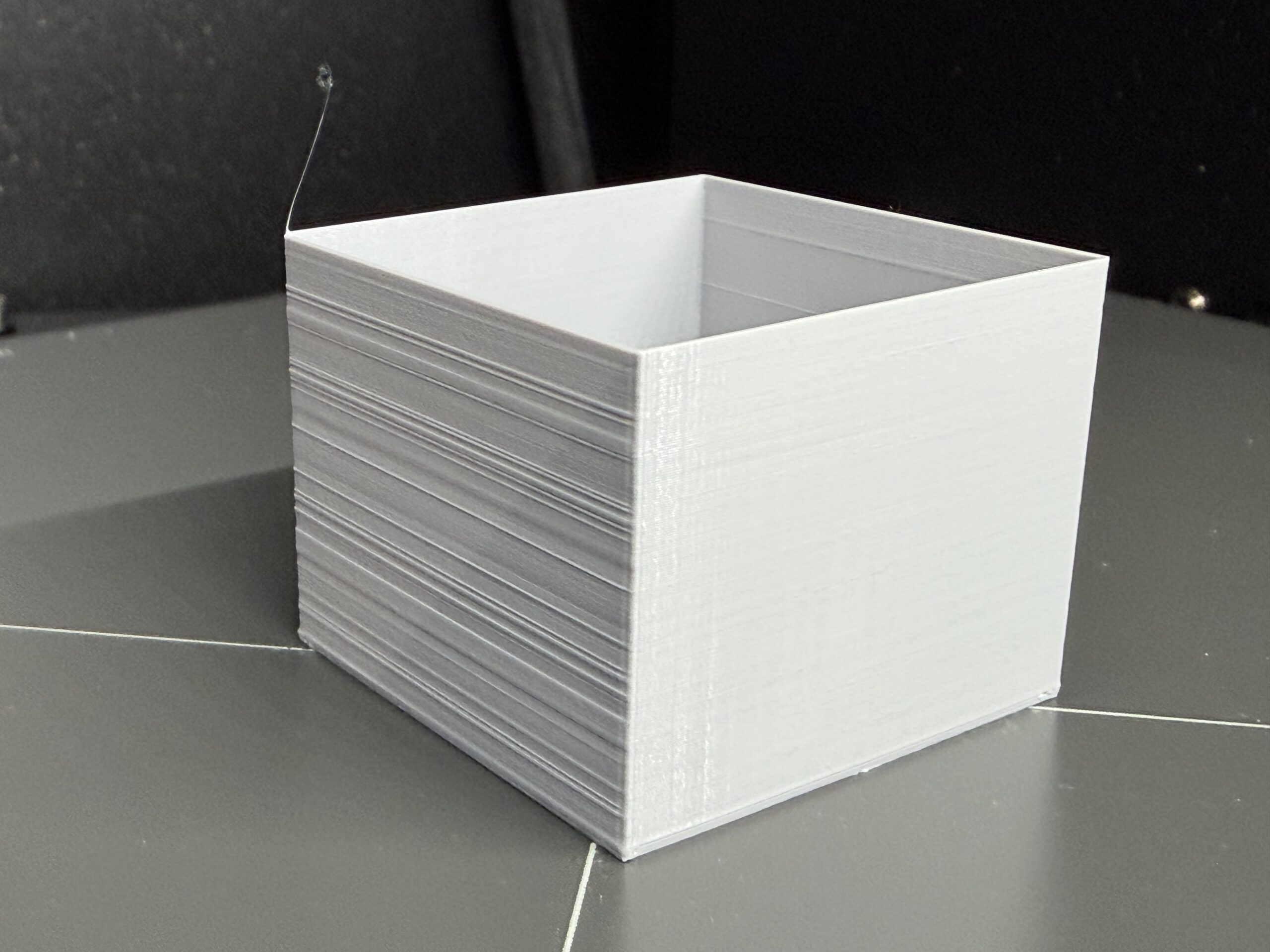 Cube printed in vase mode

RE: Microphone selection for belt tuning app
That's an unusual reason for getting the belts right 🙂
Glad you got it sorted. Ultimately, the app is really kind of useless.
Follow https://help.prusa3d.com/article/adjusting-belt-tension-core-one-l-core-one_845048
RE: Microphone selection for belt tuning app
That's an unusual reason for not getting the belts right 🙂Glad you got it sorted. Ultimately, the app is really kind of useless.
Follow https://help.prusa3d.com/article/adjusting-belt-tension-core-one-l-core-one_845048
RE: Microphone selection for belt tuning app
Broken forum. Unable to edit, can't delete the duplicate. 🙁

RE: Microphone selection for belt tuning app
Your mic selection adventure is a helpful reminder of the 2nd harmonic problem I think a lot of us run into. My phone natively had no low frequency response. So, I was tightening to ~130Hz while the early version of the phone app showed too low. I kept on thinking this seems way too tight. Changed phones and then used Spectroid to get the absolute frequencies sorted out. Much better using that app in the early CoreOne days for proper adjustment before the stroboscopic manual tuner was introduced.
I noticed the link k1mu provided at least lumps the thread lubrication and belt slipped out of the holder instructions with belt tuning. The topic grouping helps. I recall that info being scattered about beforehand.
I still have my 130Hz keychain from my first print 🙂 Actually not too bad.
Good that you got it sorted out quickly (~20 attempts). Beat my record and maybe above average. I've been impressed with results but getting past the tuning hurdles on the kit build is a milestone. Happy printing.

RE: Microphone selection for belt tuning app
A good starting point is when it takes about 200 grams to push either belt into the rail. It's best to avoid over tensioning because it can break things!

RE: Microphone selection for belt tuning app
What do you know, you really need to tighten those belt tension adjusting screws. They push back by the time you get to 96 Hz. And the manual belt tuner is super easy to see and very precise once you stop detecting 2nd harmonics.
I think it depends a lot on how the machine was assembled. Luckily for me some comments were left at that point in the assembly guide to roughly calibrate the belts half way through assembly (by pulling them further in from the ends when locking the ends in place) so my belts were already fairly tight before touching the tensioning screws, resulting in my tensioning screws sitting somewhere in the middle when I tune the belts to 95 Hz.
I've seen comments about strumming them but they are way too loose for that in my opinion, so I'm not surprised the sound is too low for many microphones to pick up.
I didn't follow the manual tuning procedure exactly. I opened the manual tuning wizard and set it to a specific frequency - I picked 95 Hz because it was sort of in the middle of the given range - then I adjusted both screws until both belts were vibrating at their resonant frequencies.
As was mentioned, they resonate over quite a wide frequency range, but if you touch the belt to stop it vibrating, it won't start vibrating again if it's too far at either end of this range. I kept touching them to stop the vibration and then further adjusting until it started again. Once I got it to the point where both belts would start resonating on their own quickly after being touched, I finished the process and ignored the second step (I just set the second frequency to 95 Hz also, not sure if it makes a difference).
I found this method more successful because if I followed the tuning wizard's instructions, first off I didn't know what "2/8 turns" meant (I thought it meant between two and eight turns, it should say "2/8ths of a turn") and second every time you adjust one belt the other one's frequency changes. Plus all the guides say to adjust both screws at the same time or the gantry won't be square. So I used the Prusa screwdriver and one of the Allen keys to adjust both screws at the same time, otherwise it would've been impossible to get both belts resonating at the same frequency.
I have no idea if you need to get it this precise but the prints come out perfect so it certainly doesn't do any harm. I printed a 180mm tall spool holder and the Z axis was perfectly aligned through the entire print, with a perfectly straight seam, so I'm very happy with the result.
RE: Microphone selection for belt tuning app
Having two Torx drivers is very handy, though not essential. If you did exactly what you say you did, it's not right, but I suspect (hope) you didn't. It isn't possible to set both belt frequencies and keep the gantry square, much less set them to the same frequencies. I also started out wanting to just adjust the belts to the strobe, and there's a way to do that, but following the instructions is better. The cheat, and I haven't tried it, would be to get the gantry square with minimum tension on the belts, then tighten them slowly, checking squareness, until they had moderate tension. Then, use the strobe utility set for 98 Hz on the top belt. Adjust both tensioners equally for maximum movement of the top belt. Stop. You're done. The lower belt will be at some lower frequency, but within the acceptance window. IMO, it's better to use the utility as intended, finding the frequencies without adjustment, and then letting the utility tell you how much to adjust. At any rate, the belt tensions should be equal, but the belt frequencies will not be, because the path lengths in the front are different. Equal tension on different lengths will give different frequencies.

RE: Microphone selection for belt tuning app
When I'm doing maintenance and it's time to retighten the belts, I move the printhead to the position where the manual belt tuner would move it then alternately turn both screws by an equal amount until the belts are under tension, strum the belts (while tightening both screws by 1/4 turns) until it sounds in range then switch to the strobe to dial it in. Worse thing you can do is tighten the screws independently to try to get to the "right" frequencies. This is the surest way to bend the gantry out of alignment.
RE: Microphone selection for belt tuning app
Interesting. Well I'm not sure if I've done it right then, because now when I run the manual belt tuning process, I just have to choose 96 Hz for each belt, and the belts both resonate, and then it says at the end no adjustment is needed. The gantry seems square although there is a *tiny* bit of movement on both sides I can't get rid of (when I tap the left side of the gantry I can hear a tiny knock but not see any movement). The homing calibration fails though and despite reading through all the documentation I haven't been able to work out why when everything seems square.
A lot of the stuff I read makes it sound like you should be able to strum the belts like a guitar, but mine are way too loose for that, and I've never seen that type of belt used that loose before, but I assumed it was right because it's resonating during the belt calibration.
As an experiment, I tightened the belts way past the current point and eventually I got to a point where the resonate again, only now instead of being a blur, the strobing effect makes it look like the belts are moving in and out at around 1Hz (before they were moving in and out at maybe 10 Hz, almost a blur). I set them to 96 Hz and 92 Hz at this second point, and did the homing calibration again and this time it passed.
So does this mean by belts are correct now, or have I over tightened them? Now they strum like a guitar. The Prusa guide suggests the belts should move slowly so it seems like this is more correct than they were before, but I've never seen a guide that says start with the belts loose, tighten through the first resonant frequency and keep tightening until you get to the second resonant frequency.
It's a shame there's no video showing (and letting you hear) what they are supposed to look and sound like when correctly adjusted from loose.

RE: Microphone selection for belt tuning app
Check this out to visualize it better 😉
RE: Microphone selection for belt tuning app
Your description sounds correct and the frequencies now make sense. Think about sound in general. 96 Hz is higher than "hum" and strumming the belts may be hard to hear, but they won't be floppy. If you have a small spring scale (or postal scale?) and can push on one belt, it should take approximately 200 grams to deflect it against the bearing rail when the Nextruder is in the belt tuning position (mostly to the right).
RE: Microphone selection for belt tuning app
I wouldn't say they are floppy, but they certainly aren't what I would call tight. I ended up loosening them again as the extra tight versions just seemed a bit too tight and it didn't seem to make any difference to the print quality. With the original setting a cheap pair of "drug dealer scales" reports roughly 75-80 grams of pressure to get the belts to touch the bearing rail with the Nextruder all the way to the right.
I still got homing errors on the extra tight setting, so that's why I'm back to the original amount of tension. I looked into it a bit more and I think I better understand now what the onboard tuning tool is trying to tell you. It's not that you have to get the belts set to the right tension, it's that you have to get the gantry square, and adjusting the tension of the belts affects that. So the idea is you get the gantry as square as you can with the belts loose, then tighten the belts so that they are within range on the tuning app, but also adjusting them so the gantry remains square.
The primary goal is to keep the gantry square, but as a secondary goal the onboard belt tuning process should confirm both belts are within the given frequency range. So ultimately the goal is to adjust the tension in both belts to get the gantry to stay square, but while also keeping the tension of both belts within that frequency range.
I still get homing errors, but if I run the calibration a few times in a row then it will randomly succeed. There's no information given about why it fails or what values it's getting during the calibration and what the expected range is, so I'm at a bit of a loss to understand why it fails sometimes and succeeds other times. But the gantry is perfectly square (as it was before) and the belts are within the frequency range limit, so I'm not really sure what the problem could be that causes frequent homing calibration failures.
RE: Microphone selection for belt tuning app
I wrote some stuff a while back on belt tension, probably TLDR, but FWIW- https://conradhoffman.com/C1_belt_tension.htm
IMO, it helps if you understand it in painful detail. I don't really know why calibration can be so fussy sometimes. When my unit is "right" it will do the diagonal tap four times, twice on side and twice on front. Sometimes if it's really cold, really hot or hasn't been used for a few days, it will do a couple extra taps.
RE: Microphone selection for belt tuning app
Funnily enough that page was what I stumbled across and it made a LOT more sense to me after reading it, so many thanks for writing that as it was really helpful.
Mine does the four taps like you describe at the start of every print, but if I run the homing calibration through the calibration menu it does it 20 times on X, 20 on Y, 20 on both, then sometimes another few times, then comes up saying it has failed. But at the start of each print it taps a few times, occasionally a few extra times like you describe, then proceeds to print without complaint.
Only once on the first print I had a homing error at the start of a print, but it has never happened again, despite the full homing calibration usually failing.
If you go into the calibration menu and run a homing calibration on yours, does it reliably pass?

RE: Microphone selection for belt tuning app
Mine does the four taps like you describe at the start of every print, but if I run the homing calibration through the calibration menu it does it 20 times on X, 20 on Y, 20 on both, then sometimes another few times, then comes up saying it has failed. But at the start of each print it taps a few times, occasionally a few extra times like you describe, then proceeds to print without complaint.
[...]
If you go into the calibration menu and run a homing calibration on yours, does it reliably pass?
It is normal that the printhead bumps many times during Homing Calibration. The printer calibrates the motor current sensing (Stallguard) which it uses for homing, I believe, establishing the right threshold or signal shapes. But the Homing Calibration does pass reliably on my Core One. I just re-ran it, after upgrading the printer to the 'plus' version and getting it ready to sell; no issues.
The X gantry needs to touch both end stops at the same time (to create a clean signal), and the belt tension should be correct -- both of which you already checked. I'm afraid I can't think of other reasons why the calibration would fail.
RE: Microphone selection for belt tuning app
Yes, the calibration does a generous amount of banging. I assume it's getting some kind of average. It doesn't bother me as I rarely do it. All my calibrations typically pass, but I've had a couple random failures with no obvious cause. Re-running it, maybe after another belt tune, fixes it.
RE: Microphone selection for belt tuning app
That's very interesting. I've noticed during the full homing calibration one of the belts moves slightly left and right in small increments, like it's checking a range of values across each block of 20 steps. Just a shame it doesn't tell you what it's doing or why it failed so after you've followed all the advice and it still doesn't work, it's not really clear what to do next.
I have paused and resumed prints though and it has never re-homed so I'm not really sure what that function is for. Maybe resuming a print after a power failure?
It sounds like it's not an important thing though from your advice, given the gantry is square (yes, hitting both sides at exactly the same time, no movement on either side once it has hit the ends) so the only question is whether my belts are too loose, but since tightening them perhaps a bit too much didn't seem to change anything I guess I'll just accept it the way it is.
Thanks for all your suggestions and advice, I appreciate it!
RE: Microphone selection for belt tuning app
I spoke too soon! Tonight I snuck in with a brass brush while the system was getting ready to print. I think I triggered the load cell. It got confused and did a full home calibration. It passed but the last few times it has homed with about 10+ bangs, rather than the 8 I'm used to. The belts were a few Hz low, so I tightened them. Prints are still fine, but it can be a mysterious beast. There are people who can read the code and tell you exactly what the homing routine does, but I'm not one of them.
RE: Microphone selection for belt tuning app
Interesting! I wonder whether doing a full homing calibration will return it to its old behaviour? I did a similar thing once but now I realise I need to clean the nozzle before or after it's testing the bed, not during!
I will go dig through the code if it bothers me enough, I was assuming it was just a simple fix for something I was doing wrong.