
Stubborn Top Layer Issues with Larger Prints




The Situation
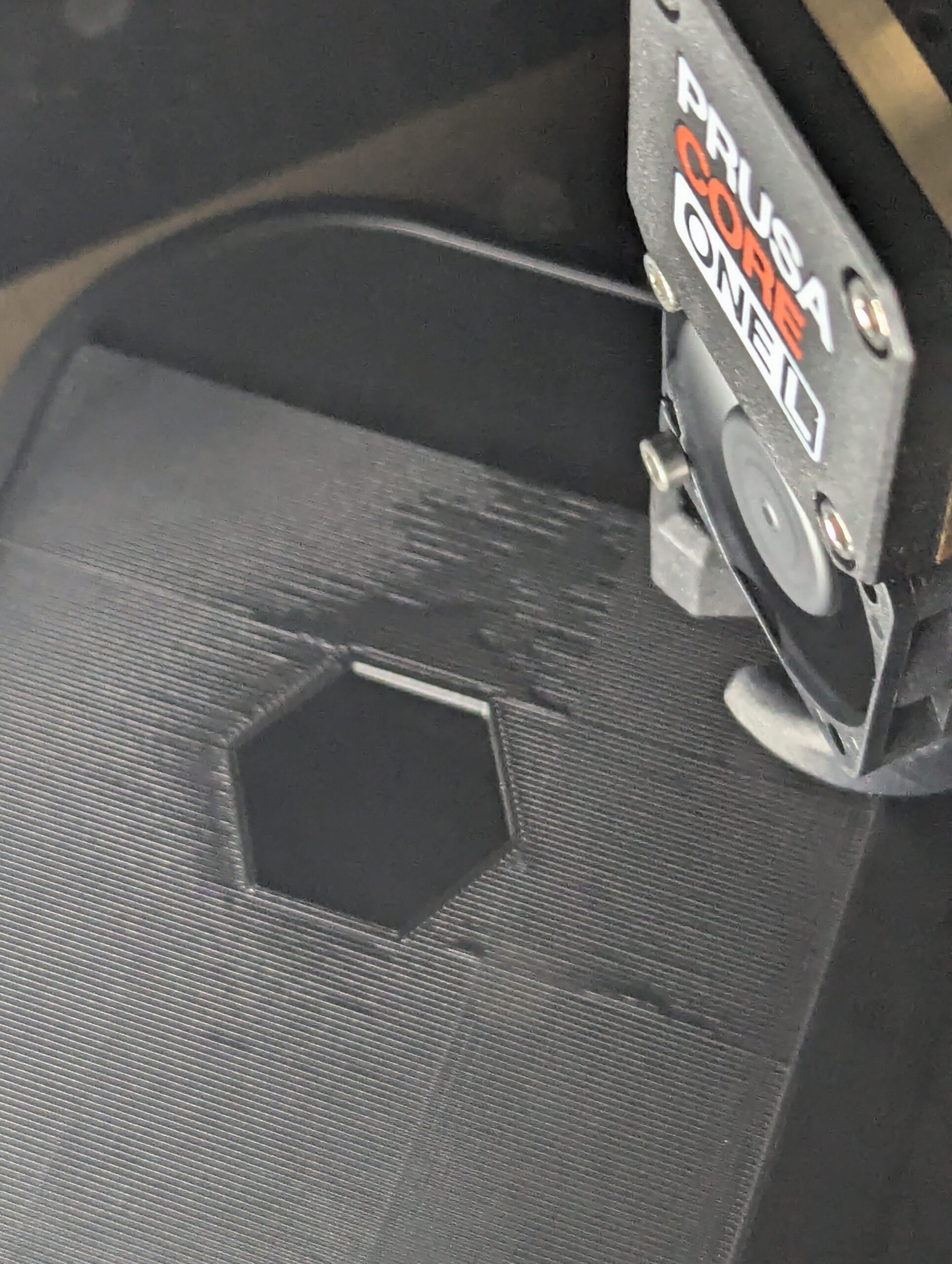
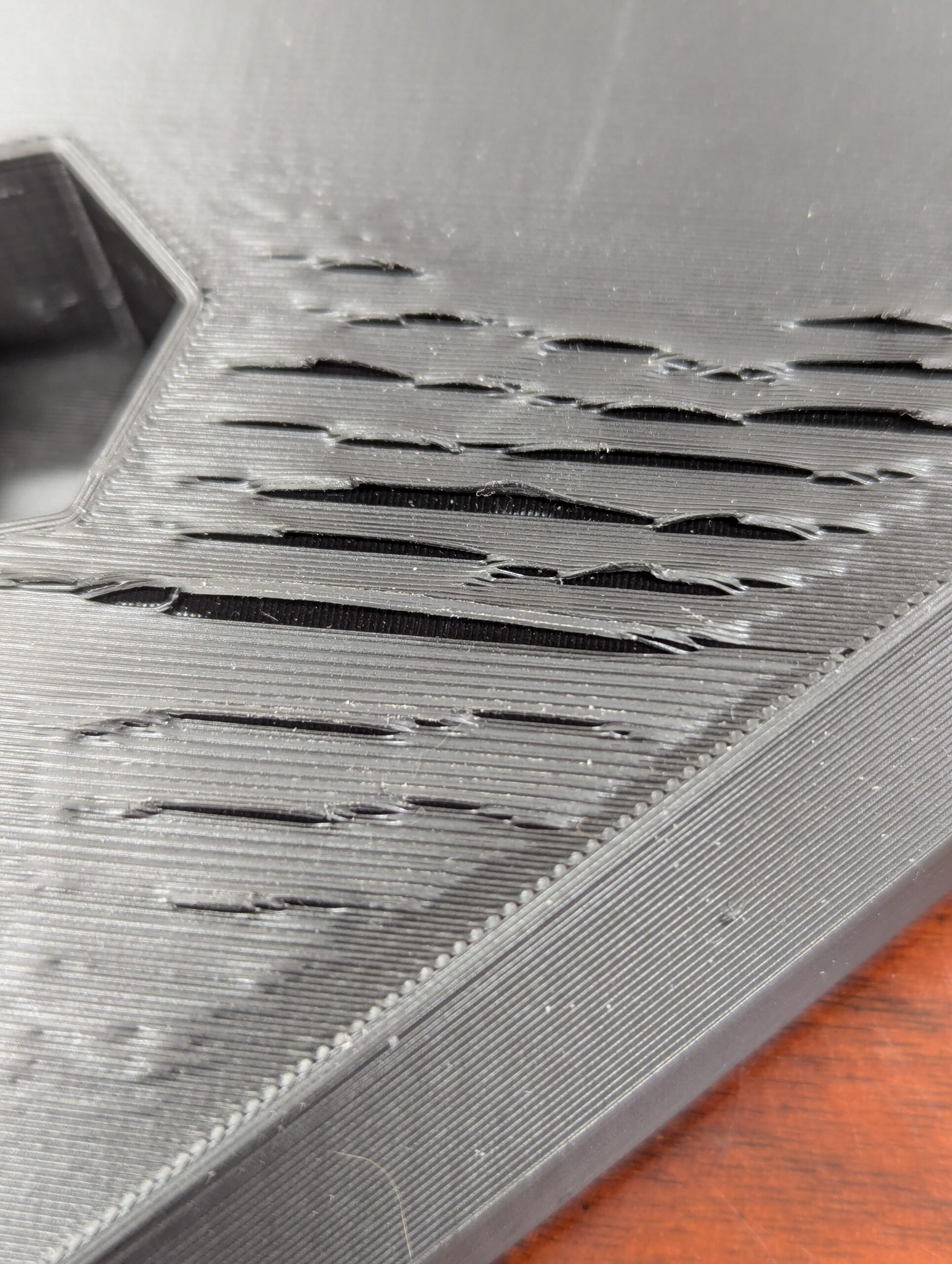
Printing a large rectangular plate which takes up the extents of the 300x300 Core One L bed at a 45° angle. All goes very well (beautiful first layer, clean side walls, clean infill, no material globbing up the nozzle, flawless 1st top layer and subsequent solid infill layers) until the very last layer...here is where this part goes from satisfactory to rejected...
Despite all layers below having no issues, the top layer prints with bubbles, ripples, and peeling over some portion of the part. I'd say about 60-70% of the top layer looks good, but there is always an area which does not turn out well. I've been struggling through multiple iterations of this program to determine why the top layer would print differently than the layer beneath it.
In an effort to match conditions, I changed the top layer settings to be as identical to the others as possible (same speed, same temp, same cooling, same infill pattern, etc), and was met with the same results. I've been printing for a few years, but I don't know it all and I'm sure I'm missing something.
The Specifics (led to the best results I've gotten thus far)
- Printer: Core One L (less than 1 month old)
- I have also run this part on a Prusa XL I have access to, and the results were no better (worse, in fact)
- Material: California Filament PETG - Matte Black
- Print Sheet: Textured
- Chamber: Door closed, vent open, 35°C (fans running on default setting)
- Nozzle: Standard 0.4mm high flow (came with C1L)
Print Structure:
- Layer height: 0.3mm
- Perimeters: 3
- Top / Bottom layers: 5 / 4
- Infill pattern and density: Rectilinear / 15%
- Top fill pattern: Monotonic Lines (have tried Monotonic and Rectilinear with no change in results)
- Infill pattern orientation: have tried both 45° (orthogonal to part) and 0° (orthogonal to printer axes)
Speed Settings:
- Perimeters: 75 (44 external)
- Infill: 100
- Solid Infill: 75
- Top solid infill: 35
Acceleration: I've never messed with acceleration settings before, so they're currently at default. Is it possible that equaling these could be a solution?
- Solid Infill: 5000
- Top solid infill: 2000
Filament:
- Extrusion multiplier: 0.94 (derived from test results)
- Nozzle temp: 213°C (derived from test results)
- I have tried bumping up the temp to 218° on the top layer: no change
- Bed temp: 85°C
- Nominal chamber temp: 35°
Cooling:
- Keep fan always on: OFF
- Auto cooling: ON
- Cooling slowdown logic: Consistent surface
- Fan speeds: 30% min - 50% max
I welcome ideas. Thanks!
Prusa MK4S; MMU3; Original EnclosurePrusa Core One L

RE: Stubborn Top Layer Issues with Larger Prints
Are you positive the print isn't lifting off the bed, the last layer looks like the z is off, too low on some, too high on others.
I found I needed to disable the chamber fans, caused alot of lifting/warping.
Core One L MMU3, MK3S

RE: Stubborn Top Layer Issues with Larger Prints
> Nozzle temp: 213°C (derived from test results)
This is way too low for PETG, get to 250C and try again?
Or before that try to compare it with Prusament PETG, or just try to use Prusament PETG profile.
See my GitHub and printables.com for some 3d stuff that you may like.
RE: Stubborn Top Layer Issues with Larger Prints
Normally, yes it would be too low, but CF's matte black PETG does not like higher temps at ALL (I assume due to the additive). Smokes like crazy and comes out looking awful (worse so than what I'm getting now). The manufacturer admits this material is rather "finicky". Through our own testing, we found the best results all around with a temp between 210 and 215 (surface finish, stringing, adhesion).
https://californiafilament.com/products/matte-black-petg-filament-1-75mm
Thank you
Prusa MK4S; MMU3; Original EnclosurePrusa Core One L
RE: Stubborn Top Layer Issues with Larger Prints
Our latest test was on the XL (unenclosed) so I haven't been able to yet, but I am going to run this part tonight on the C1L with the chamber fans off. Think I ought to close the vents as well, or do you think that might build up too much heat in there?
Prusa MK4S; MMU3; Original EnclosurePrusa Core One L
RE: Stubborn Top Layer Issues with Larger Prints
I've run it with the vent closed too, didn't have any problems. I went back to opening the vent, as I'm getting 47 with the vent open now, didn't see any issues either way, worth trying.
If you change the nominal temp for the filament profile to 0, it will turn off the chamber fans.
Core One L MMU3, MK3S
RE: Stubborn Top Layer Issues with Larger Prints
>Normally, yes it would be too low, but CF's matte black PETG does not like higher temps at ALL (I assume due to the additive). Smokes like crazy and comes out looking awful (worse so than what I'm getting now). The manufacturer admits this material is rather "finicky". Through our own testing, we found the best results all around with a temp between 210 and 215 (surface finish, stringing, adhesion).
I would rather change the filament provider if it is that problematic 🙂
See my GitHub and printables.com for some 3d stuff that you may like.