
RE: MMU3/MK4 Wipe tower issues(too much purged)
This is a noble effort and you did a lot of work to find a good solution.
My situation occurs when everything is normal and the filament misfeeds or has some other issue during change. While the printer is waiting for me to realize that I need to fix it and waiting for me to fix it, filament oozes out onto the tower. Now, an otherwise well formed tower has a glob on it which causes a collision and destroys the print.
My thought is that the nozzle should always park elsewhere during filament swap.
Perhaps there is a better thread for my issue?
Thank you.

RE: MMU3/MK4 Wipe tower issues(too much purged)
Hello,
I was having "blob on wipe tower" issues and tower crashes also. I did everything shown in this post - settings for tool change parameters and I set all filaments to same temperature. WOW! Finally got a great print. I will keep these parameters as my new default. Thank you very much.

RE:
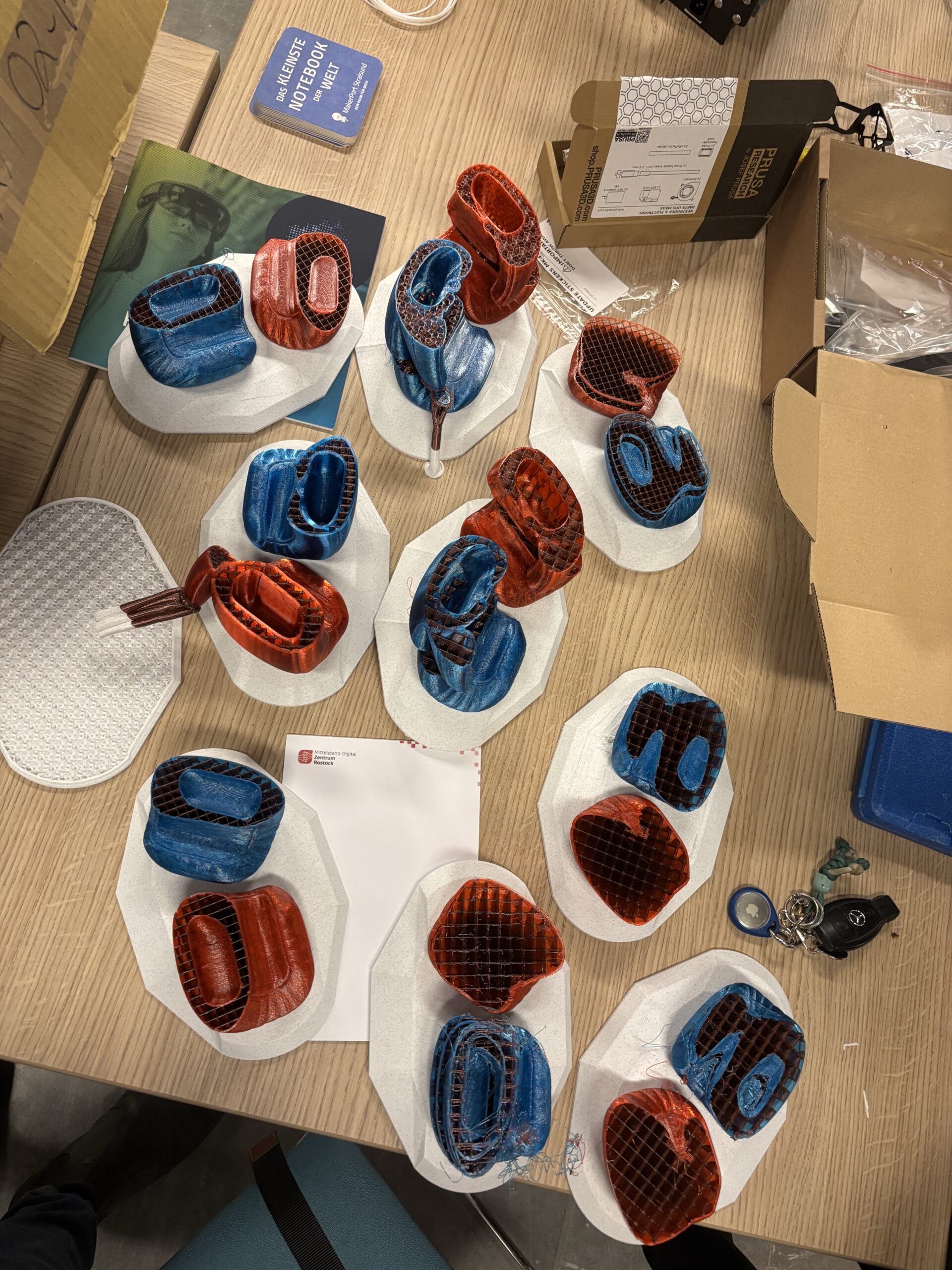
Hi, having the same issue for some weeks now. The blobs are running me crazy. I had a chat with Prusa support 2 times. The first one was great. I set down purge extra flow from 250% to 150% and disabled purigng in infill. This makes a mess of much more waste but I was able to atleast finish a print. Sadly after the second print my problems were back...
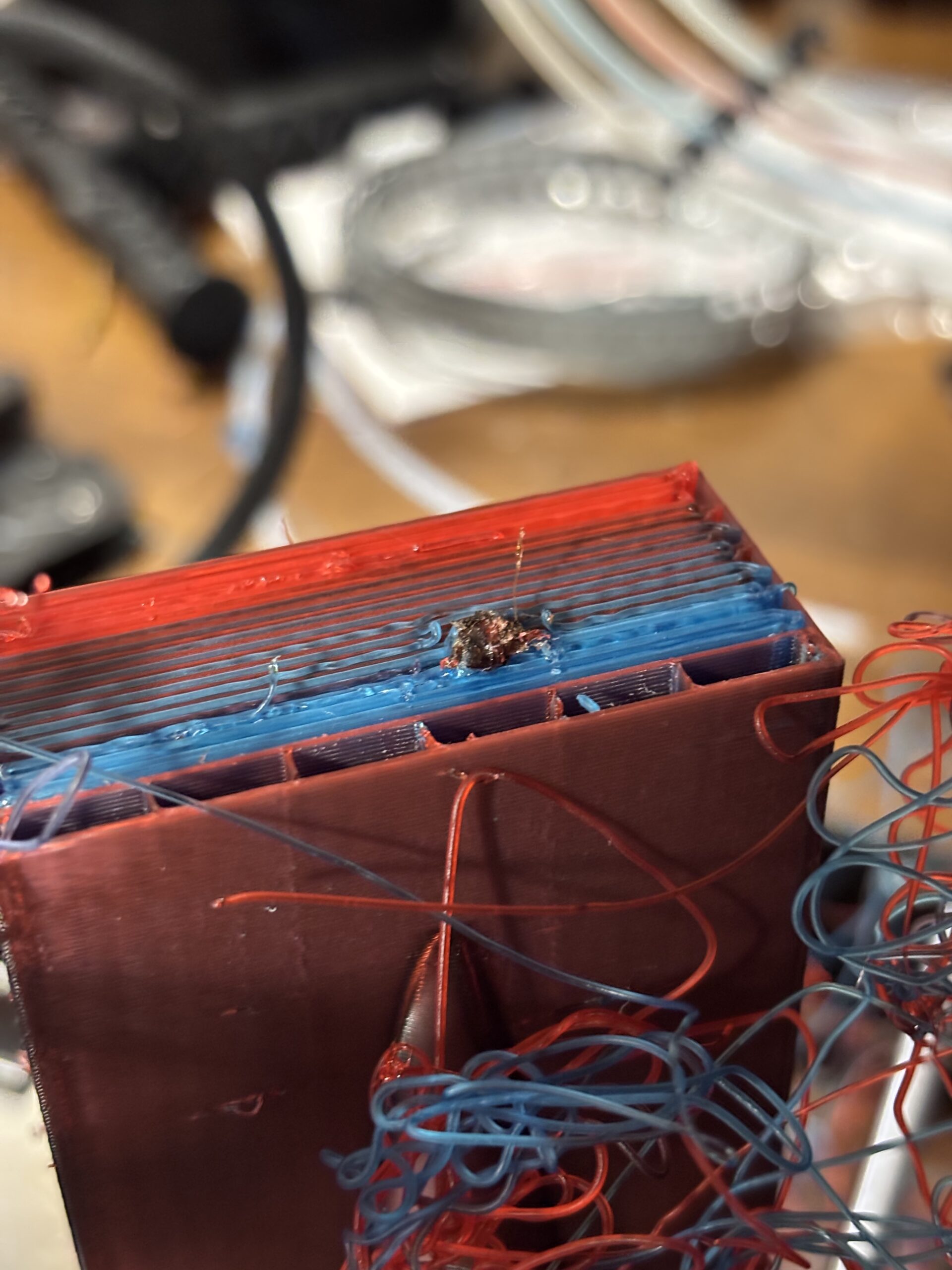
Since I want to use purging in infill, I tried a print with 150% purge extra flow and 10 degree cooler filament settings. But this ended pretty early to.
I'll check the setting that were mentioned here, but I don't think that will make a distance. On 2 colour prints there is no problem even with 48h print time. But this model makes me crazy. I never had these problems with MMU2S+...

RE: MMU3/MK4 Wipe tower issues(too much purged)
Did you use same temperature for all filaments?
RE: MMU3/MK4 Wipe tower issues(too much purged)
I did. Effectively the color change is only between red and blue. These two are the same brand, same type of filament but other colors. I used the original profiles for Generic PETG, the settings are like mentioned in this thread.
RE: MMU3/MK4 Wipe tower issues(too much purged)
The whole idea of an MMU is to have multiple materials with different temperatures and characteristics. Changing temperatures between materials must never be an issue. If it is, then your design or implementation is flawed. The fact that the nozzle parks over the tower and oozes during troubleshooting is very troubling to me and needs to be addressed.

RE:
So, it was a busy day.
Someone on Reddit told me, i should check my slicer settings, especially the Filament -> Toolchange parameters.
Well, all the values there were wrong...
Created new Filament profiles from the Generic PLA and now it works flawlessly.
It wasn't the material, it wasn't the hardware, it was purely the slicer and me, because i used an old profile.
All the filament tips are now perfect 10/10. No blobs, no weird behavior, no stringy tips.
I second this. I switched to "Generic PLA" and had no troubles whatsoever in 1 small (2 color 64 tool changes) and 1 bigger print (5 Colors 332 tool changes).
I guess the issue is due to the fact, that my old custom profiles had the purge volume multiplier at 100% and additionally there were some options missing:

Thanks for the hint @markg-2

RE: MMU3/MK4 Wipe tower issues(too much purged)
I am having the same issue, but it is not from temperature. My problem occurs during the new filament load. In the G-code, there are two extruder commands, and the second one is too much.
The extrusion command that is problematic is G xxx.xxx E22.4oo0
Is there a way to reduce the amount of this tool change extrusion? It does not seem to be affected by any of the filament tool change parameters. I can solve this issue by lowering the printhead and hanging it down lower under the nextstruder. This gives the space needed to "absorb" the extra extrusion before it hits the nozzle. But I am uncomfortable with that solution, as it seems I could jam things up by not properly cooling the heat break.
prusa MK4 MMU3 slicer 2.9.4
Rick
RE: MMU3/MK4 Wipe tower issues(too much purged)
I'd love to see a solution for this as well. MK4S with MMU3 and everything at the latest firmware versions (as of June 2026). Using all "Generic PLA" and base settings, the glob happens only on the wipe tower.
I am having the same issue, but it is not from temperature. My problem occurs during the new filament load. In the G-code, there are two extruder commands, and the second one is too much.
The extrusion command that is problematic is G xxx.xxx E22.4oo0
Is there a way to reduce the amount of this tool change extrusion? It does not seem to be affected by any of the filament tool change parameters. I can solve this issue by lowering the printhead and hanging it down lower under the nextstruder. This gives the space needed to "absorb" the extra extrusion before it hits the nozzle. But I am uncomfortable with that solution, as it seems I could jam things up by not properly cooling the heat break.
prusa MK4 MMU3 slicer 2.9.4
Rick
X marks the spot.

RE: MMU3/MK4 Wipe tower issues(too much purged)
Experiment with the Stamping distance.
Go to: Filaments -> Advanced -> Stamping distance measured from the center of the cooling tube: 45 mm
Lower this value by a small amount.
Only downside, that the tip of the filaments will no longer that perfect.
Also, if you are using 2.9.6 beta 1, it's a disaster. I have MMU at work, it took me 1 day to figure out why my printer layer shifting if i use MMU3. It was the slicer.
RE: MMU3/MK4 Wipe tower issues(too much purged)
I'm not using the beta, but I will try the stamping distance. Thank you.
X marks the spot.
RE: MMU3/MK4 Wipe tower issues(too much purged)
Although you might need to increase the value. Just start with a simple change, you will see the results for sure.
If you dont want to test it, i'll can test it for you on monday.
RE: MMU3/MK4 Wipe tower issues(too much purged)
Perfect recommendation. Thank you.
I think the default stamping distance setting on the MK4S is 45 in PrusaSlicer 2.9.5. I tried 40 and 52 and settled on 49, which at least for me appears to be close to perfect. I was testing with 3 different brands and styles, all PLA.
X marks the spot.