Notifications
Clear all

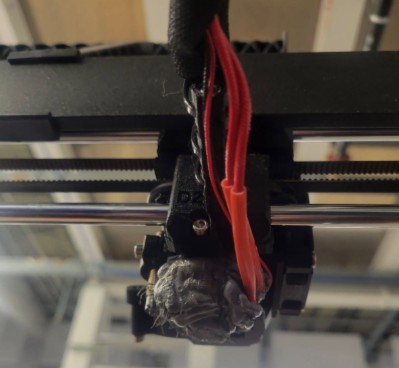
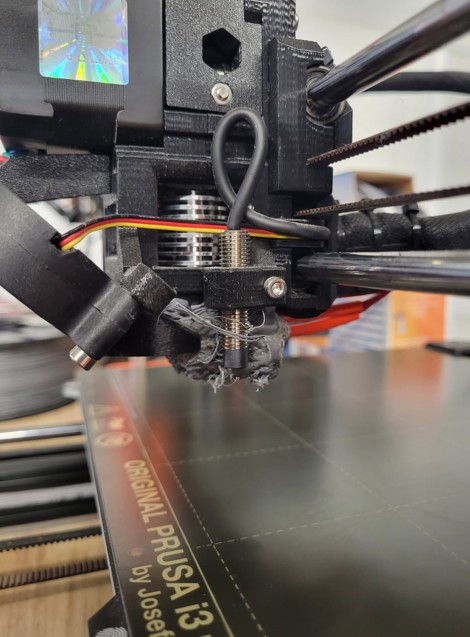
Ran out of filament, filament all over nozzle  

  RSS
Chewmacher
(@chewmacher)
Member
Ran out of filament, filament all over nozzle

Ran out of filament, also filament all over nozzle, large clump.

What happened?

How do I get this off?

Posted : 12/02/2026 9:08 pm
Diem
 Diem
(@diem)
Illustrious Member

You have a 'Blob of Doom' - search for that phrase to see how others have dealt with them.

They are usually caused by loss of adhesion, sometimes on MK3 caused by not updating the first layer Z calibration after nozzle wear.

Before doing anything, look at pictures of a clean extruder and note the position of the rather delicate wires that are currently hidden, if you damage them you will have to buy replacement parts as broken wires can't be rejoined.

You have probably damaged your fan shroud and will need a replacement.

To remove it:

Raise the nozzle temperature to the printing temperature for the filament in question and allow it to heat for several minutes.

If you are lucky you will be able to prise the blob open - more likely you will need to add heat from outside with a heat gun to aid the softening, sometimes it's worth using a soldering iron to carve chunks off the mass.

Use needle nosed pliers to prise this away; remove it in parts if it won't release the wires.

Once you have the worst removed you decide whether you need to disassemble the extruder to get at all the blob or perhaps you can clean up in situ.

After the cleanup there will be overcooked filament inside the nozzle so at least a purge and probably a cold-pull will be necessary.

Cheerio,

Posted : 13/02/2026 8:36 am
Share: