
Mintemp error, but can print after warming up
Hello there!
I have this weird, annoying problem with my 2.5s printer, it does not hinder me from printing, but I would still like to resolve it and came here for your help, if you are willing.
I went though a turbulent phase in my life and my printer ended up stored and unused for years, so a couple of days ago, I took it out of the moth balls and started printing again. I dusted the printer, lubricated the rods, a firmware update/calibration and here comes the gcode!
My first print failed and it turned out that the gear that fastens on the extruder motor was loose, so I tighten it and problem solved, ah the dopamine from solving the first printing problem after years was sweet. The printer finished its first print after its long rest in limbo!
Now to the issue at hand, since then, each time I print or try to load/unload filament, I get the mintemp bed error (around 30-31C), but if I power cycle/restart the printer and try again (while the bed is still warm from the first try) it does successfully finish the print. If I let the bed cool down (around 18-20C bed temp) and retry I get the mintemp error again. Attached are images before (idle printer) and after (the moment the mintemp error appeared).
Thank you for your time, Christopher.
Some facts:
The printer was unused for years
The room temp is 17-18C

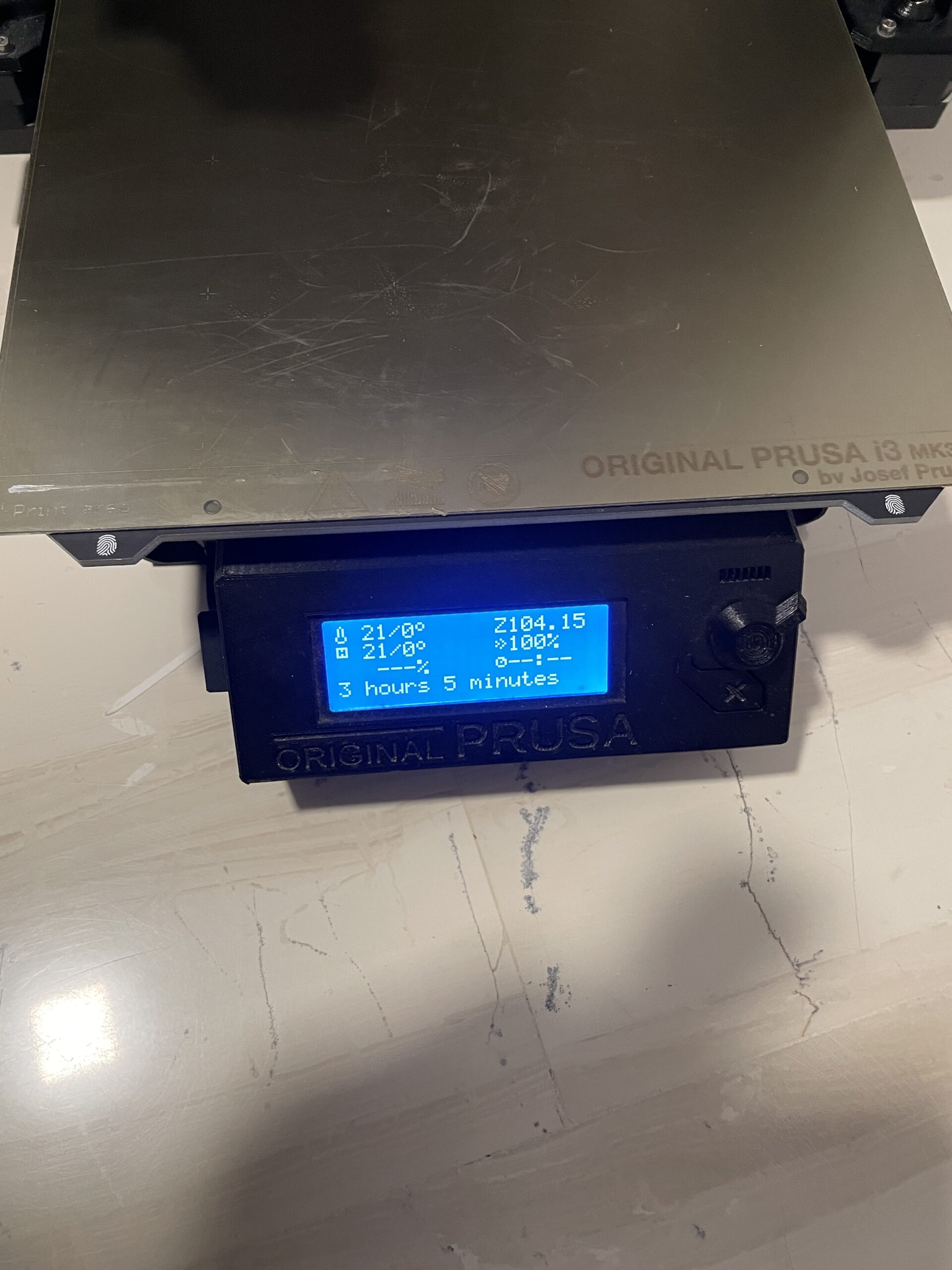

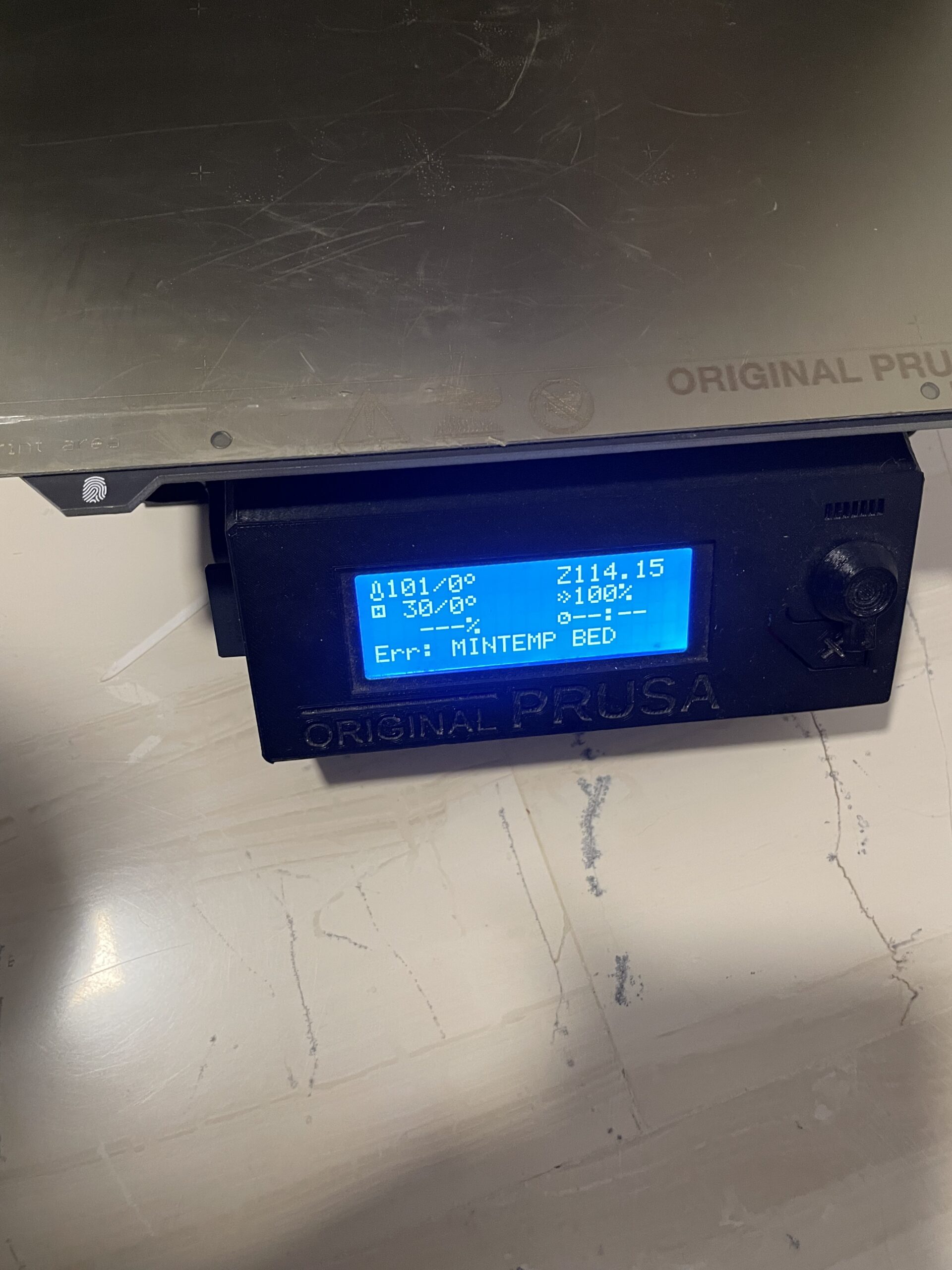

Mintemp is a warning the the ambient temperature is too low for reliable printing - you may get away with prewarming but quality may suffer and warping becomes more likely.
Cheerio,
RE:
From my understanding, the Mintemp error will fire if the bed temperature readings seem erroneous (the purpose is to protect from fire if the thermistor malfunctions), e.g. the thermistor resistance reading is off the charts. This may happen if the ambient temperature is too low (falling in a temperature range that the thermistor does not read correctly, this is what you are describing) or the thermistor is faulty. My case, I feel, is somewhere in between, the ambient temperature is not that bad and the thermistor does work if preheated. My guess, answering my own question, is that the thermistor is malfunctioning in the 3-30+1 C range, or there is something going on with the firmware that I used.
If I remember correctly, the thermistor is part of the bed, since the printer is so old, I will probably leave it as is and live with it.
RE: Mintemp error, but can print after warming up
Update: I remember I ran a diagnostic before updating and it passed.
I ran it again and it failed with 'sensor not connected' error, but the selftest will pass if the bed temperature is preheated ~30C.
I tried re-flashing but I had the same results, it keeps nagging me that before the update the selftest was a pass...
I think I will try downgrading the FW and see what happens
RE:
Update:
After failing a print my fan shroud broke, now I have to print a new one.
So I tried to print ABS, but the prints keep failing with a BED PREHEAT ERROR.
Initially I tried turning off the filament fan because (without a shroud) It could be cooling the bed, that did not work, then I noticed that the error occurs after printing some layers, reaching the "other layers" temperature setting in the filament options, there the bed temperature changes from 100C to 110C.
I took some pictures with a Flir One that has a accuracy of +-/3-5%
1. During the first layers the Flir reports a temp of 87-93C depending on the area of the bed, in the printer lcd the temperature reading is 100/100C
2. When the printer entered the 'other layers' phase the Flir device reported a max temp of 104C (center of the bed) and the printer LCD 104/110C (the moment the printer threw the BED PREHEAT ERROR).
So it seems that the printer fails to reach the 110C bed temp and then, after a while, throws the BED PREHEAD ERROR.
Given a maximum 5% error to the Flir readings it seems that the sensor is somewhat reading the bed temperatures (albeit on the low side and after the bed reaches 30C, see the Mintemp error above)
I noticed that the thermistor is glued with Kapton tape under the bed (turns out it is not part of the bed PCB), it seems to be placed fine.
So why am I blabbering about:
Do you agree that the error throws because the bed does not reach the 110C temperature?
Reading the bed thermistor resistance gave a value of 109kOhm at 18C bed temperature, a little bit over the values I found Googling around. Could the thermistor be bad?
What further tests would you do to diagnose the faulty part?
What do you think I should replace? Possible faulty parts: bed thermistor (under the bed), bed PCB, Rambo controller, wiring, PSU.
Thank you all for your help
Christopher.

RE: Mintemp error, but can print after warming up
you could try checking the thermistor itself. There is a guide here that might be helpful.
https://help.prusa3d.com/article/mintemp-error-and-mintemp-bed_2169
Shane (AKA FromPrusa)
RE: Mintemp error, but can print after warming up
So I found the bed that I replaced when I upgraded the printer to mk2.5s and compared the resistance of the two thermistors (same room temperature), it was identical, so I don't think its the thermistor.
I also removed the plastic covering the bed wires and tightened the bed cables, they were not loose, so its not that either.
I'm starting to think that @Diem was right, 18C might be too low an ambient temperature to print, I will warm up a room to 22C and print there to see if this solves everything.
RE: Mintemp error, but can print after warming up
I tried a ABS print while setting the bed max temp to 100C but the print failed with a thermal runaway error.
So I ripped the thermistor from the old bed and used it as a replacement, then I started a print with ABS and the bed reached 110C (LCD reading)
while it was printing I measured the Voltage in the bed terminals and it reads 11VDC
I will continue testing it but it looks promising so far
RE:
It turns out the 'Thermal runaway' error was the extruder not the bed, if it was the bed it would have been 'Bed thermal runaway', the fan shroud that I printed to replace the broken one was... broken and blew air in the nozzle thermistor, its a tricky fellow to print in ABS.
I still get the Mintemp errors with the replaced bed thermistor, and the bed preheat error when I print with 110C bed temperature, so it definitely was not the thermistor's fault.
The 11V reading in the bed terminals got me thinking, what if the bed gets a lower voltage than it needs? So I first removed the PSU connections from the Rambo and measured 12.5V on each, then I removed the terminals from the bed, started a preheat and read the same voltage on the bed terminals. So Rambo and PSU are probably OK although the PSU was not tested under load, and I’m not so sure how I could test the Rambo board.
The ambient temperature is not the issue because I printed in the same room with a MK3 that has the same bed, with 110C bed temperature, and had no issues whatsoever.
So now I ordered a new bed PCB to replace the old one, along with a Pinda to upgrade to MK2.5S+ and will update with the results for future reference. I feel these old printers are still good and have some life left to them, I don't want to give up on it.
So to recap if anyone gets the same crappy errors:
1. Mintemp error appears when heating the bed, around 30C, while ambient temp is around 18C
2. Bed preheat error appears when printing with 110C bed temperature
Diagnostic ideas:
- Preheated the bed and ran a print (basically, I imediately rebooted and started a print after getting the error while the bed was still warm, it printed successfully)
- Read the thermistor resistance and it was around the expected 80 kΩ - 125 kΩ range
- Read the bed resistance and it was 0.7 Ohm below the expected 3.4Ohm, according to the linked post (the MK2.5S uses the same bed with the MK3S).
- Reflashed the FW
- Tried to print with a max bed temperature of 100C, it did work
- Read the output voltage of the PSU: 12.5V
- Read the output of the bed terminals during preheat: 12V with the bed disconnected, 11V with the bed connected.
- Ran a print in the same ambient temperature with another printer using the same model of bed (MK3S+)
RE: Mintemp error, but can print after warming up
I got the new bed and started printing, so far, no more mintemp errors
before installing I compared the resistance of the beds, in the previous post update I mentioned that:
Read the bed resistance and it was 0.7 Ohm below the expected 3.4Ohm, according to the linked post (the MK2.5S uses the same bed with the MK3S).
This is wrong, the MK3S does not use the same bed, it looks similar but the MK3 series bed is 24V and the MK2 series is 12V, my mistake.
So now when I read the bed resistance between the new and old bed it is the same 0.7Ohm, the only difference I noticed is that the resistance in the old bed would fluctuate a little before settling in the same value, that is weird but it was consistent every time I repeated the comparison measurements, the new bed would read 0.7Ohm and the old would read 1+ for a couple of seconds before settling to 0.7Ohm, almost as if a capacitor was involved?
Anyway It looks like somehow the bed was malfunctioning and replacing it, solved at least the mintemp errors, I will also try to print in 110 bed temperature and see whats what
I really hope I can return the printer to optimal performance
RISPONDI: Mintemp error, but can print after warming up
Unfortunately, although rarely, I still get the mintemp bed error, and printing in 110C bed temperature does not work, I tried preheating to 110C first and further layers, the bed temperature will drop to 85 during print
I'm starting to suspect the PSU now
RE: Mintemp error, but can print after warming up
changed the psu with another 12V 20A and got the same results, whats left now... bed power cables and Rambo?
RE: Mintemp error, but can print after warming up
I replaced the power wires for the bed, I used some leftover wires from a retired hotend, they get a little warm but they seem fine and look way more cooler than the originals, I wonder what the recommended AWG is for these wires.
I also contacted Prusa support and they suggested I print off center because the print fan could be cooling the bed thermistor, and I think they were right because after that I was able to print the part with a 110C bed temperature.