
Persistent Warping/Curling on Large Flat Building Models – MK4S – Need Advice
Good day everyone,
I’m hoping to get some advice from those with experience printing large, flat architectural models.
We designed a 3-storey building consisting of a basement, ground floor, first floor, and a flat roof. The idea was to 3D print a scale model, with each floor printed separately and designed to interlock like LEGO so the full building can be assembled.
Initially, we created four separate models: one for each floor plus the roof.
Unfortunately, I have been struggling with these prints for over a month, with 30+ failed attempts, consuming a large number of printing hours and several rolls of filament. Despite extensive research on forums and online resources, and trying countless settings and approaches, I have not been able to achieve a fully successful print.
Some improvements were made along the way, but none have resulted in a complete, reliable solution.
What I’ve Tried
- Lowering bed temperatures
- Lowering nozzle temperatures
- Increasing first layer height (up to 0.3 mm)
- Adding various brim widths
- Adding mouse ears on rectangular corners
- Slowing fan speed for the first layer(s)
- Slowing print speed for the first layer(s)
- Multiple filament types:
- PLA
- PETG
- PC Blend
- Different steel sheets:
- Smooth PEI
- Textured (TXT)
- Different infill types:
- Square
- Gyroid
- Cubic
Printer & Setup
- Printer: Prusa MK4S
- Nozzle: HF Brass 0.4 mm
- Z-offset tuned by 0.05 mm
The printer itself performs beautifully. First layers for both PLA and PETG are absolutely perfect, and overall print quality is top-notch. There are no general print quality issues.
Material Behavior Observed
PLA
Despite most advice stating PLA should be the easiest, it has been by far the worst performer for me.
- Detaches from the PEI sheet relatively quickly
- With mouse ears, the center lifts
- With additional brims, the corners (mouse ears) lift instead
- Results in warping and eventual failure
PETG
This has been my most successful material so far.
- The basement model (smallest footprint) almost printed perfectly using mouse ears and a brim
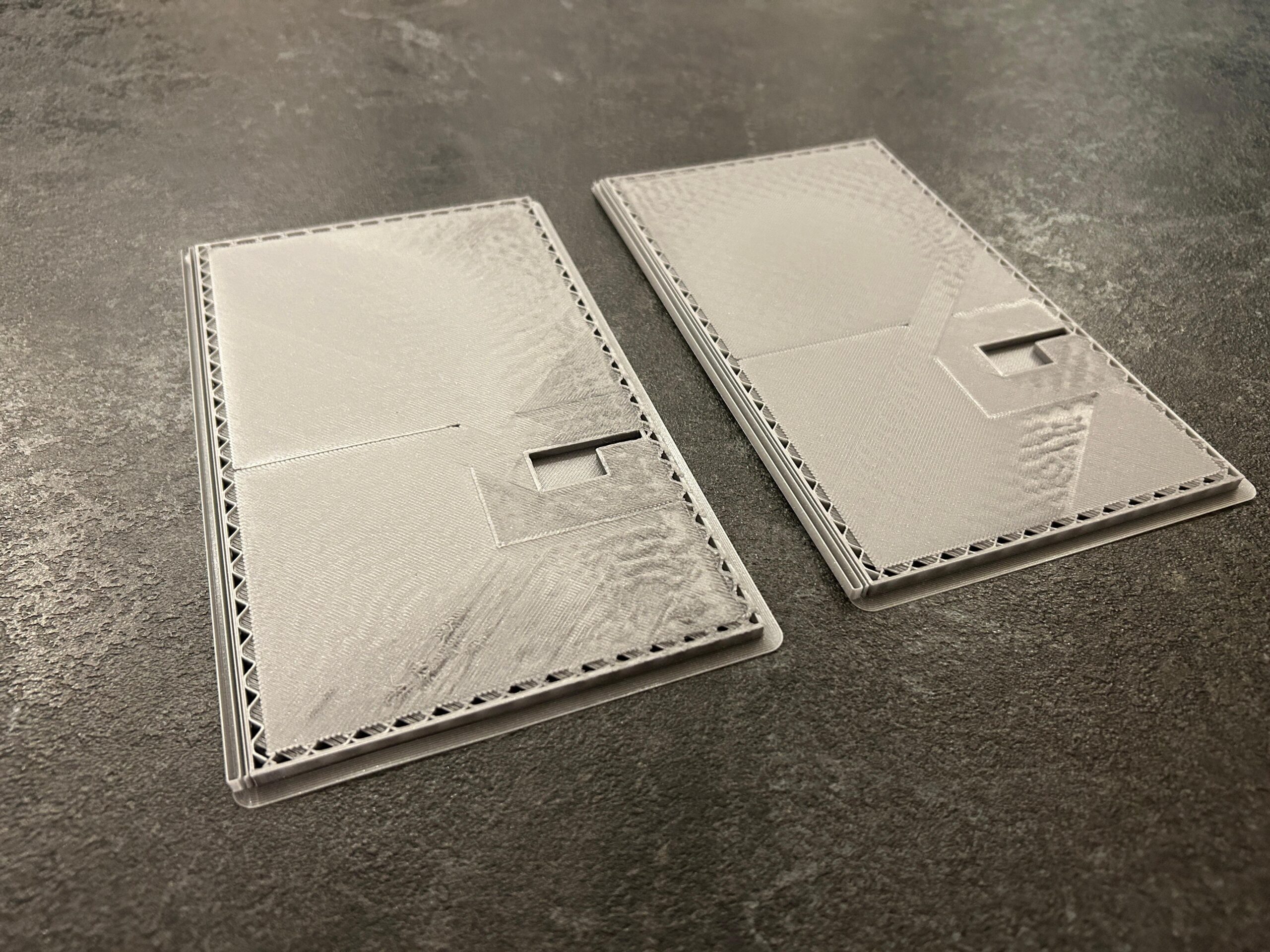
- However, the other floors occupy 80–90% of the print bed, and eventually still warp and curl after several hours
PC Blend
Initially, this seemed like the solution:
- Exceptional adhesion to PEI
- Excellent surface finish and print quality
However, the adhesion was too strong. Instead of the print lifting, the steel sheet itself began to warp and curl. It appears that the internal thermal contraction forces over such a large footprint are so high that the spring steel sheet takes the load instead.
So unfortunately, PC Blend also turned out not to be a viable solution.
Failure Pattern
- Prints consistently fail 4–6 hours in
- Failure is always due to:
- Corners curling upward, or
- When using mouse ears: the center lifting off the bed
Questions / Final Thoughts
At this point, I’m genuinely starting to wonder whether models like this are even realistically 3D printable on an open-bed printer.
- Is this simply the nature of large, flat architectural models?
- Are there design changes we should consider to make these models printable?
- Different segmentation strategies?
- Structural relief cuts?
- Different assembly methods?
I’m very close to giving up, but I wanted to make one last attempt by asking here, in case someone has real-world experience with printing similar large-scale building models.
Find "Some" Pictures below.
Any thoughts, insights, or suggestions would be greatly appreciated.
Thank you for your time.
Sebastiaan


RE: Persistent Warping/Curling on Large Flat Building Models – MK4S – Need Advice
Sebastiaan,
First, excellent documentation of your issue. I came across your post while searching for a solution to a much smaller issue I’m having with a small part prototype. But your situation intrigued me.
I’m not an expert on 3D printmaking by any means, but I wonder whether you have considered a slightly different approach. From what I’ve seen from your photos and descriptions, I assume you’re trying to print an entire floor all at once, walls and floor together. I might try separating the floors from the walls: first, print all the floors, then next print all the walls, then marry each floor with its associated walls, using an appropriate glue or modeled joints.
Good luck!
Gearloose

RE: Persistent Warping/Curling on Large Flat Building Models – MK4S – Need Advice
Hi Sebastiaan,
I'm not an expert, but I'd try Gearloose99's suggestion for the fastest "print it now, worry about it later" option.
I never saw on my MK4S the steel sheet to detach from the print bed due to warping. 😱 The Print bed magnets are pretty strong and keep the steel sheet in place.
Warping occurs when upper layers start to pull on the lower layers due to temperature inconsistency and material stresses.in my case... if a piece warped, it detached from the steel sheet. I used the Smooth PEI for PLA and Satin for PETG.
So... here are a few questions:
At what temps did you try to print? (nozzle, first layer, bed...)have you've ran any tests beforehand or just used the slicer default / available filament profile?What slicer and which version did you use? (I'm not sure it's relevant, but it might help to know)What PLA/PETG brands and type did you use?Have you've checked the internet for reviews? (some filament brands are more prone to warping than others)If PETG worked best for you, considering that people are usually complaining on the opposite (PETG warps more than PLA), have you've considered changing the PLA brand?what's the average room temperature when you're printing? Any chance for drafts to come into play?have you've tried to use some kind of box or DIY type of enclosure? (users generally report having positive results even by having something like a small "tent" put on top of bed slingers)MK4S generates quite a draft for the printed model just by moving the bed back and forward. if you have space, you could try to print a "draft shield" while the model is being printed.
Out of ideas and questions for now... so...