
How to add perimeter between parts or objects?
Hi. I am pretty new to PrusaSlicer so I apologize if it's a dumb question. I'm trying to print a gridfinity case and the owner of the model added these "feet" at each corner, so the corners don't warp (I assume). These duck feet are 1 layer tall, and they worked great in the prototype that I printed however, removing these were a bit painful because the solid infill was fused with the part itself. I thought to myself, can I add a perimeter around this? I stumbled upon "Split to objects" and "Split to parts", still a bit fuzzy as to what the benefits are of each one, but both options do work as I expect them to. When I split the object, I get 5 items, the main body, and 4 duck feet.
Below is a picture of the corner of the sliced object, unmodified. First layer is fused together with the infill.

Below is a picture of the sliced object after "Split to Objects". The duck feet and main body have a gap.
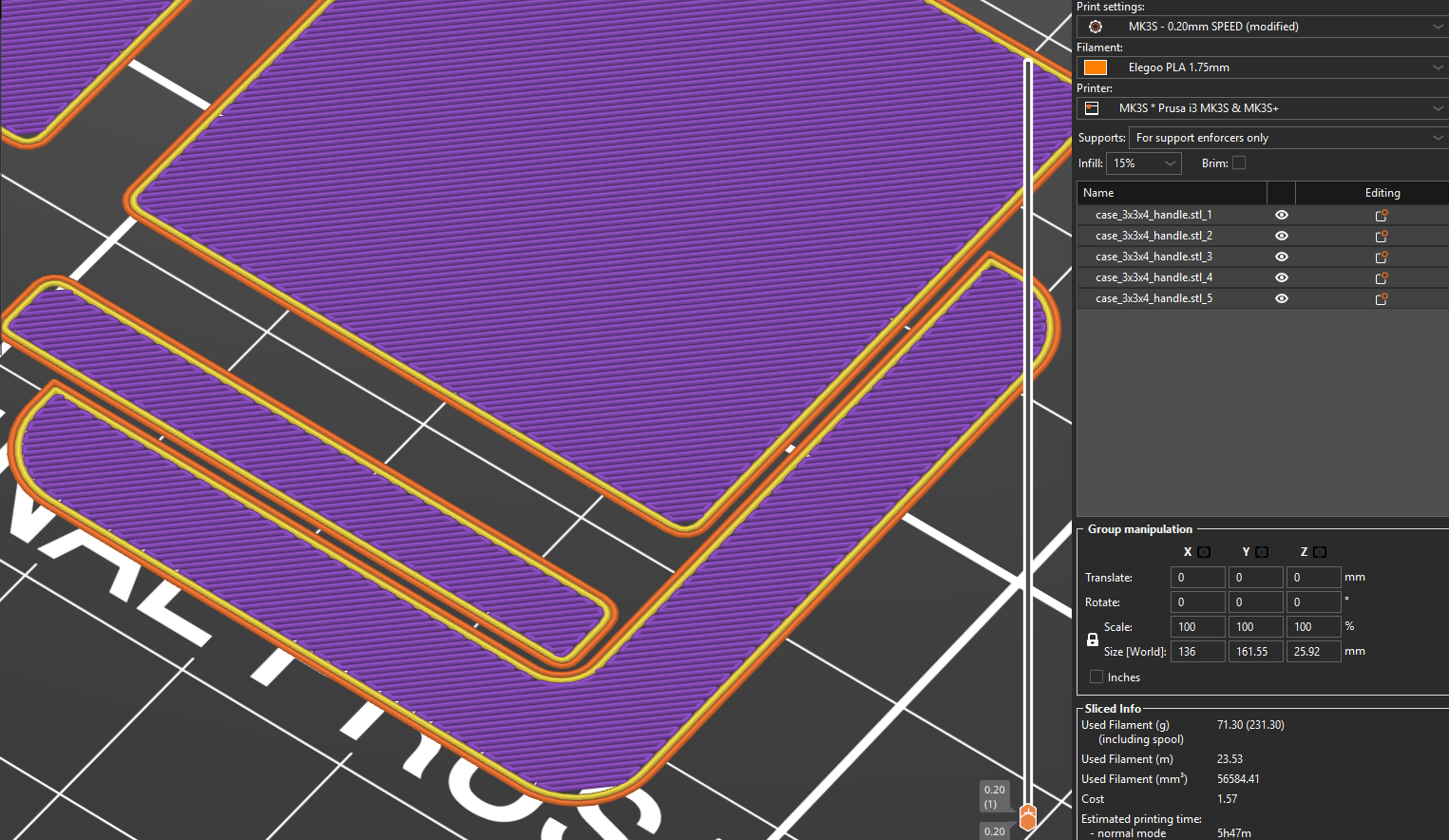
Below is a picture of the sliced object after "Split to Parts". Behaves the same as if the part was not split.

Here is the question. Which one do I want to use, part or object? And more importantly, how, or can I, split the object and have the first layer touch but not through an infill? I want the duck feet and body of the case to be touching but have a perimeter at the contact zone. This way, it'll be way easier to take the duck feet apart.
Thank you,

RE: How to add perimeter between parts or objects?
Your asking for someone to write an entire web page on how to use the basics of Prusa Slicer, your probably not going to find that person here anymore, although people have been known to be kind.
That said, if the file in question has built in Brims? try to find one that doesn't, and if you can't find one then try sinking the file in question, one layer and adding any necessary brims using the technique described here, "See Link".
and potentially here,
Good luck to you.
Don't be afraid to contact me privately if you need more help..

... I want the duck feet and body of the case to be touching but have a perimeter at the contact zone. This way, it'll be way easier to take the duck feet apart.
But unfortunately it will also be easier for the part to rip away from them as it warps - they will stop working.
Cheerio,
RE:
Hi, thanks for the replies. Unfortunately, these cases that I want to print don't come without duck feet. I can definitely open the STL in SolidWorks and remove them, but that's not really what I was looking for. I was hoping to learn and use some of these cool slicer features. I've been using Cura for about a year or so and the most complicated thing I've done is add custom supports... I do everything in SolidWorks and keep the slicing part simple and dumb. I'll take a look at these slicing videos. I was hoping that there was a specific setting that I needed to play with.
The bed that I have is super sticky to PLA, almost too sticky... I doubt that the corners will warp without the brim, but I'd like to keep them there just in case. If the bed adhesion was less reliable, I'd definitely considering leaving the first layer as is.
RE: How to add perimeter between parts or objects?
@matikitorch
... I want the duck feet and body of the case to be touching but have a perimeter at the contact zone. This way, it'll be way easier to take the duck feet apart.
But unfortunately it will also be easier for the part to rip away from them as it warps - they will stop working.
Cheerio,
Not if it's set up properly, you can have exactly what your asking for and it will work.
Best of luck, if you need help contact me privately, I will help you.