
Filament color is different in on Plate vs. Filaments tab
I'm running the MMU3 on a Core One, so my apologies if this belongs under the MMU3.
When I create a new filament profile on the Filaments tab for my new "Army Green" (color #29B2B2) PLA material, I want it to look like Army Green so my multi-color print jobs show up on the screen the way I would want them to look when they are printed. The problem comes when I go to the Plater tab and some sort of strange default or override color shows up.

I can click on the box showing the color and change it to be what I'd like, but you can also see how next to each material I've created a new profile for, it doesn't show that color on the plater!
I feel like I'm doing a bad job at this... The yellow shows up on the platter for nozzle #5 (instead of army green), pink for #4 (when it's supposed to be brown), blue for #3 that should be gray... etc. If I'm going to paint an army tank for my kid, it'd be a lot easier if it had the correct colors showing up vs. some psychedelic color scheme.
I did search for the first 10 pages to see if this is already covered, sorry again if I'm in the wrong place.
"I can change, if I have to, I guess."-Red Green Prusa Core One + MMU3

RE: Filament color is different in on Plate vs. Filaments tab
The left hand part of the colour key is whatever colour you assigned to the filament profile. Normally you wouldn't create a profile for each individual colour, unless that colour required different settings.
The right hand smaller part of the colour key is what colour is going to show on the plater when painting or slicing. If you click on the colour key box exactly where you have your screen cap it will pop up a colour palette for the right hand section. That allows you to change the colour for that extruder.
Be aware that this secondary colour is temporary and not persistent across uses. It is saved if you save the 3mf though (Save Project).
RE:
The left hand part of the colour key is whatever colour you assigned to the filament profile. Normally you wouldn't create a profile for each individual colour, unless that colour required different settings.
...
Be aware that this secondary colour is temporary and not persistent across uses. It is saved if you save the 3mf though (Save Project).
Maybe I'm missing something then. How would one normally set this up and what is the purpose of the secondary color? (I did observe that this is not saved 👎)
I thought I was going to save myself the hassle of plugging the right color in each time I wanted to start painting parts...
"I can change, if I have to, I guess."-Red Green Prusa Core One + MMU3
RE: Filament color is different in on Plate vs. Filaments tab
You can but you will need to modify and save a copy of your printer profile if you wish to do that. If you go to Printers>Extruder1, extruder 2 etc you will see a setting called Preview. Those are where the colours are set. By default they are set to those colours you have observed.
You can set them to "Undef" which uses the filament profiles colour. With your customised filaments that will get what you want. When you right click and set the small area you are actually editing those extruder settings. SO you can save a new printer profile and those colours will be saved as part of the Printer profile.
The Printer profiles isn't set up like that for a reason. The problem is that for a 'normal' user say one that is just using the default filament profiles and has 5 different colours of prusament, well they wont want to create 5 new profiles with the only thing being different is the colour. So the click and edit option so that a user can paint and see the difference on the plater in both layout and preview modes.
The colours are temporary as if they weren't you would end up creating either many filament profiles OR many printer profiles. Something other users have complained about for ages and ages.
What most people don't realise is that with a prusa slicer .3mf being a project file it saves all these extra choices as part of the project.
Always save projects when slicing. Build up your projects.
One thing many people overlook is that you can import settings from one project into another. This makes projects in effect saved workspaces as well as saves for your slicing. You can revisit and easily change settings later if say your printer changes, or you want to edit the colour.
Its just a different way of looking at what the software can already do and adapting a suitable workflow. Like you can add in small base Objects and make them non printable and off plate. You can then add commonly used modifiers to those non printable objects. Given that you can copy/paste modifiers from one object to another its an easy way to create a library of commonly used modifiers so you dont have to go through and recreate all the settings each and every time.
Seen many people request the ability to save settings in Prusa Slicer, when you can already do that using projects.
In effect you can save projects like Workspace 1 PLA, Workspace 2 PLA, Workspace 1 PETG, Workspace 1 ABS etc and save them with appropriate filaments and other settings pre-selected. Then you just either open up that workspace and add your object to be sliced or you just open a new one as before and then use the Import Config from Project option. Easy quick way to load settings. Combine that with saved library objects in your saved project workspaces and you can get a powerful way to work.
RE: Filament color is different in on Plate vs. Filaments tab
You can but you will need to modify and save a copy of your printer profile if you wish to do that. If you go to Printers>Extruder1, extruder 2 etc you will see a setting called Preview. Those are where the colours are set. By default they are set to those colours you have observed.
You can set them to "Undef" which uses the filament profiles colour. With your customised filaments that will get what you want. When you right click and set the small area you are actually editing those extruder settings. SO you can save a new printer profile and those colours will be saved as part of the Printer profile.
The Printer profiles isn't set up like that for a reason. The problem is that for a 'normal' user say one that is just using the default filament profiles and has 5 different colours of prusament, well they wont want to create 5 new profiles with the only thing being different is the colour. So the click and edit option so that a user can paint and see the difference on the plater in both layout and preview modes.
The colours are temporary as if they weren't you would end up creating either many filament profiles OR many printer profiles. Something other users have complained about for ages and ages.
What most people don't realise is that with a prusa slicer .3mf being a project file it saves all these extra choices as part of the project.
Always save projects when slicing. Build up your projects.
One thing many people overlook is that you can import settings from one project into another. This makes projects in effect saved workspaces as well as saves for your slicing. You can revisit and easily change settings later if say your printer changes, or you want to edit the colour.Its just a different way of looking at what the software can already do and adapting a suitable workflow. Like you can add in small base Objects and make them non printable and off plate. You can then add commonly used modifiers to those non printable objects. Given that you can copy/paste modifiers from one object to another its an easy way to create a library of commonly used modifiers so you dont have to go through and recreate all the settings each and every time.
Seen many people request the ability to save settings in Prusa Slicer, when you can already do that using projects.
In effect you can save projects like Workspace 1 PLA, Workspace 2 PLA, Workspace 1 PETG, Workspace 1 ABS etc and save them with appropriate filaments and other settings pre-selected. Then you just either open up that workspace and add your object to be sliced or you just open a new one as before and then use the Import Config from Project option. Easy quick way to load settings. Combine that with saved library objects in your saved project workspaces and you can get a powerful way to work.
That was really helpful, as I had never thought of using different project files like that. That does seem like a much easier way to manage colors and print settings.
Thank you very much!
"I can change, if I have to, I guess."-Red Green Prusa Core One + MMU3
RE: Filament color is different in on Plate vs. Filaments tab
In the cad software I use at work, there are start files that we use to create parts with settings already applied. Any chance there are templates that we can create/use in the slicer software? Maybe that's a thing of the future.
"I can change, if I have to, I guess."-Red Green Prusa Core One + MMU3
RE: Filament color is different in on Plate vs. Filaments tab
Unfortunately not. Most people just use the obvious and then ask for a bunch of changes as the software doesn't work how they would like (or expect).
Its like any software, once you use it for long enough and explore it you figure out ways it can be used that the devs never even thought of 🙂
There is a lot of functionality hidden under the hood. Wish it was either more obvious or that prusa wrote better guides. Then again the amount of people who have never seen what prusa DOES have in the way of documentation already is annoying. They don't seem to make finding any of it easy. Like the PS knowledge base. It only covers the very basics but we still see the same questions over and over again.

If I'm going to paint an army tank for my kid, it'd be a lot easier if it had the correct colors showing up vs. some psychedelic color scheme.
The above is sound - but I'm going to suggest you don't do it; not this time...
Print monochrome and give him/her some paints:-
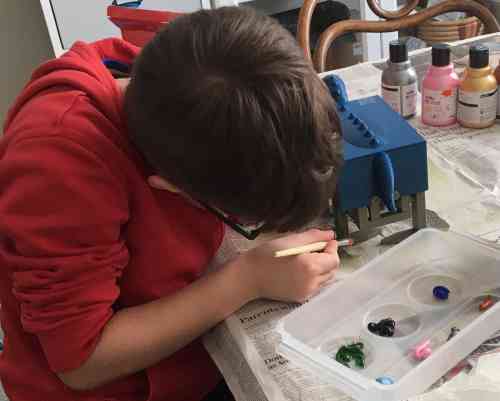
... and get a few extra, slightly messy, hours of fun out of detailing it to choice.
Cheerio,