
help me with printer setting
Hello,
I am printing on my core one L this big part from PETG. and i can not find right parameter for printing. the corners are alway bended upwards. from 1 to 2 mm. i am printing on PEI satin sheet. I already tried diferend nozzle temperatures such 240 and 255 degre, also i tried enclosure heanting on 50 degree with fan OFF. but still bending.
I tried also Brim 8 mm wide. without succes.
Can anybody have some proposal, how to print this part?
2 perimeters, 15 % fill.
Thank you

RE:
Make sure the build plate is clean, they are dirty from the factory, soap and water wash, wash wash, then IPA.
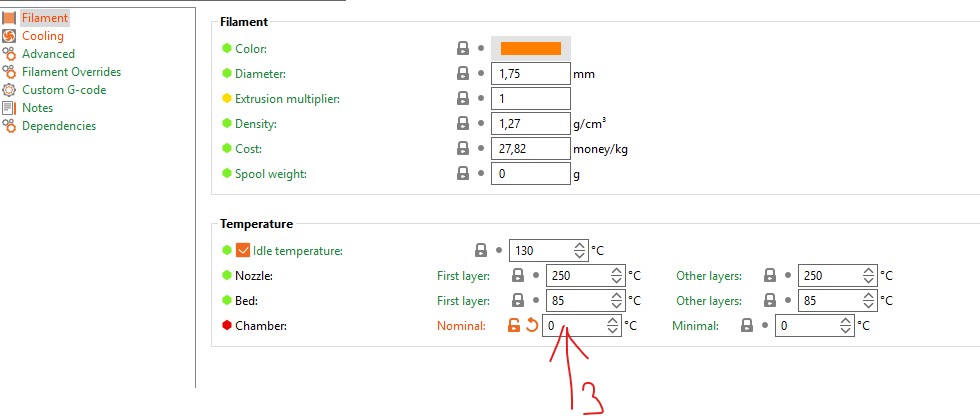
Turn off the chamber fans, it causes lifting and warping. Prusa should not have these enabled by default. You can set the Nominal Chamber Temp to 0 for the filament profile, this will also keep the chamber fan off.
Lastly the perfect 1st layer isn't so perfect. The above will likely be enough, but you may need to adjust your Z offset in the printer profile. ~-0.02

RE: help me with printer setting
This type of geometry is warp-prone with any material. What I would do is use 8-10% gyroid infill. Do not use grid or rectilinear infill. It will increase internal stresses which will cause warping. If you need to have a stronger part due to the decreased infill, use 3-4 perimeters.
RE:
Hello gentleman,
At first, thank you for you time and your response.
Ruebarb...when you are writing about chamber temp, would you mean only the point 3. down in the picture or also pint number 1 and 2 like down in the picture?
Anyway...as this part is quiet big, i prefered print with 0,28 layer thickness. would you think that this also can occur warping?
Hyiger... would you think that more perimeters do not have affect on warping?
And what about Fan speed for PETG would you recoment to let it by default (30-60) or turn it also off?
Thank you again for your time.

RE: help me with printer setting
I am confused with this prints....
The bed surface have been cleaned with water and soap, then 4 times with warm water. Than with isopropyl alcohol.
I tried also Z offset -0,02,
First layer speed 25 mm/s
Others perimeters speed 50 mm/s
Enclosure fan speed OFF.
Printing fan speed 15-25%.
Do have anybody idea what cold be working?
Thank you 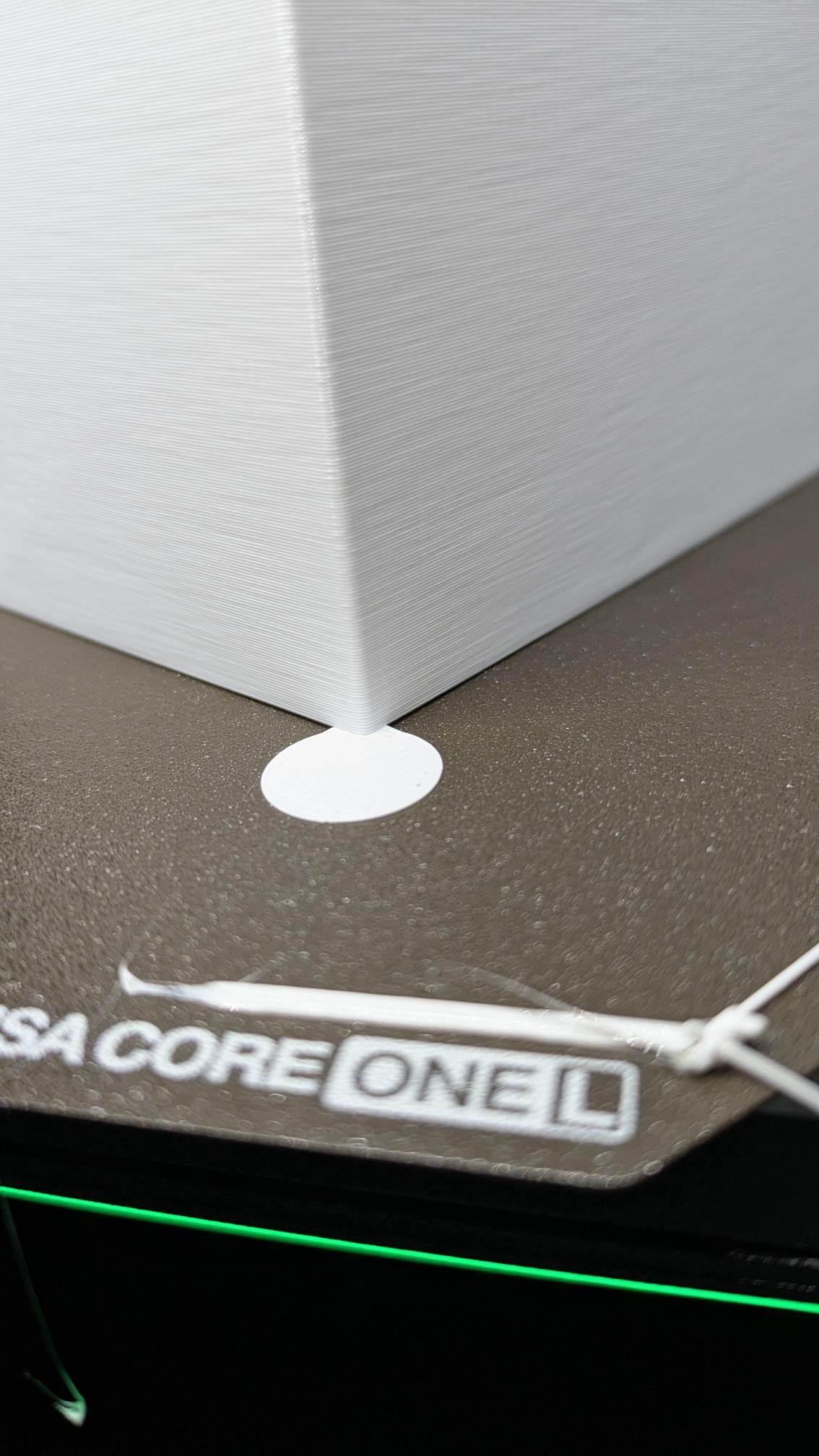

Disk on the corners
RE: help me with printer setting
I have been through a major printing project with PETG making 15mm square I beams. 160mm or longer ones were warping, lifting and failing. I had brim and supports and tried various settings. The solution was a different filament. Polymaker advertises their newer PETG as better bonding to the plate and less warping. It worked for me through 4 rolls. Used with default PETG settings.
Filament is still in develpment. There is no labelling of the trace elements in use or the pre-processing that could change how it acts in the printer. In my case I sent details back to the original, well known, filament maker. It is not a bad filament, it is falling behind today's needs is my opinion.
Printers are getting more stable and reliable. Filament needs continual improvement also.
RE:
When you have prints that are warping off the bed where brims or mouse ears are no longer effective you have several levers to try:
- depending on the geometry of the part you can switch the infill type to either gyroid 8-10% or rectilinear 8-10%. In the case of a long straight part the change the rectilinear angle to 0° if it is along the x-axis and 90° if it is along the why. Otherwise use gyroid. Also, lower the anchor distance. A lot of warping is caused by infill creating internal stress that warps the parts by pulling on the walls
- Increase the number of perimeters and decrease infill %. Don't go overboard though with perimeters
- Use an adhesive layer
- Switch to a different print bed. If you print primarily PLA or PETG then try the Cryogrip Glacier.
In my opinion, the Prusa Satin sheet is a mediocre print sheet. I've had much better success with the Cryogrip Pro
RE: help me with printer setting
There is definitely a lack of good 300 x 300 plates. I'm not impressed with any of the C1L Prusa plates, even thier smooth PEI is not as good as the one from the Mk3 series. The best textured sheet I found was TheKKiinngg, but they don't make build plates any longer, my Sunlu PETG stuck so well, I had to cool the plate and then heat it back up to 60, then it would pop off, never had a single lifted part in 6 years. The PETG does make a difference, the Prusa PETG does not stick well, I suffered through their Galaxy, as it was the only one that matched the printer. Haven't tested Sunlu yet on the C1L.