
What happened with this print?
I was trying to print parts from this toolbox. To save time I added the trays, latches, and holders all on to a single bed. But it looks like there are duplicate parts being printed plus the filament is stringy as if it is wet. (I swear I just dried it). I was printing in Prusament PETG. I've attached my .3mf file from the print if anyone cares to take a look.
Why can't I attach the .3mf file?
Prusa Core One

RE: What happened with this print?
Therefore, the file must be a zip! It's been repeated a thousand times here that the forum won't accept any other format, but it's like throwing peas at the wall.
RE: What happened with this print?
Attached is the .3mf file
Prusa Core One

RE: What happened with this print?
OK. Things to check for:
- You have this set for a high flow nozzle. Make sure that is what you have installed.
- The setting is for PETG. Are you sure you have PETG loaded and not PLA?
- Observe the first couple of layers. Check to make sure nothing is binding anywhere. Especially check to make sure the PTFE tube and umbilical cable are not getting caught between the print head and the print bed or the motor.
RE: What happened with this print?
Yes, it is the nozzle that comes with Core One, .4mm CHT brass nozzle.
100% sure it’s PETG because it’s the only orange I have.
I’ll run it again and watch the first few layers. Can the PTFE tube and umbilical cable just bind? I’ve never even removed the top lid or messed with any of the printers hardware. Just changed filaments since I got the printer in early January.
Prusa Core One
RE: What happened with this print?
OK. Things to check for:
- You have this set for a high flow nozzle. Make sure that is what you have installed.
- The setting is for PETG. Are you sure you have PETG loaded and not PLA?
- Observe the first couple of layers. Check to make sure nothing is binding anywhere. Especially check to make sure the PTFE tube and umbilical cable are not getting caught between the print head and the print bed or the motor.

RE: What happened with this print?
Therefore, the file must be a zip! It's been repeated a thousand times here that the forum won't accept any other format, but it's like throwing peas at the wall.
Why don't you throw some peas at Prusa, instead of expecting all new users to read up on all the forum quirks ahead of posting?
It is stupid to run a 3D printing forum that does not accept the manufacturer's own 3D printing files as an attachment. And it is totally incompetent to implement this in a way where these attachments are silently dropped, without any error message.
RE: What happened with this print?
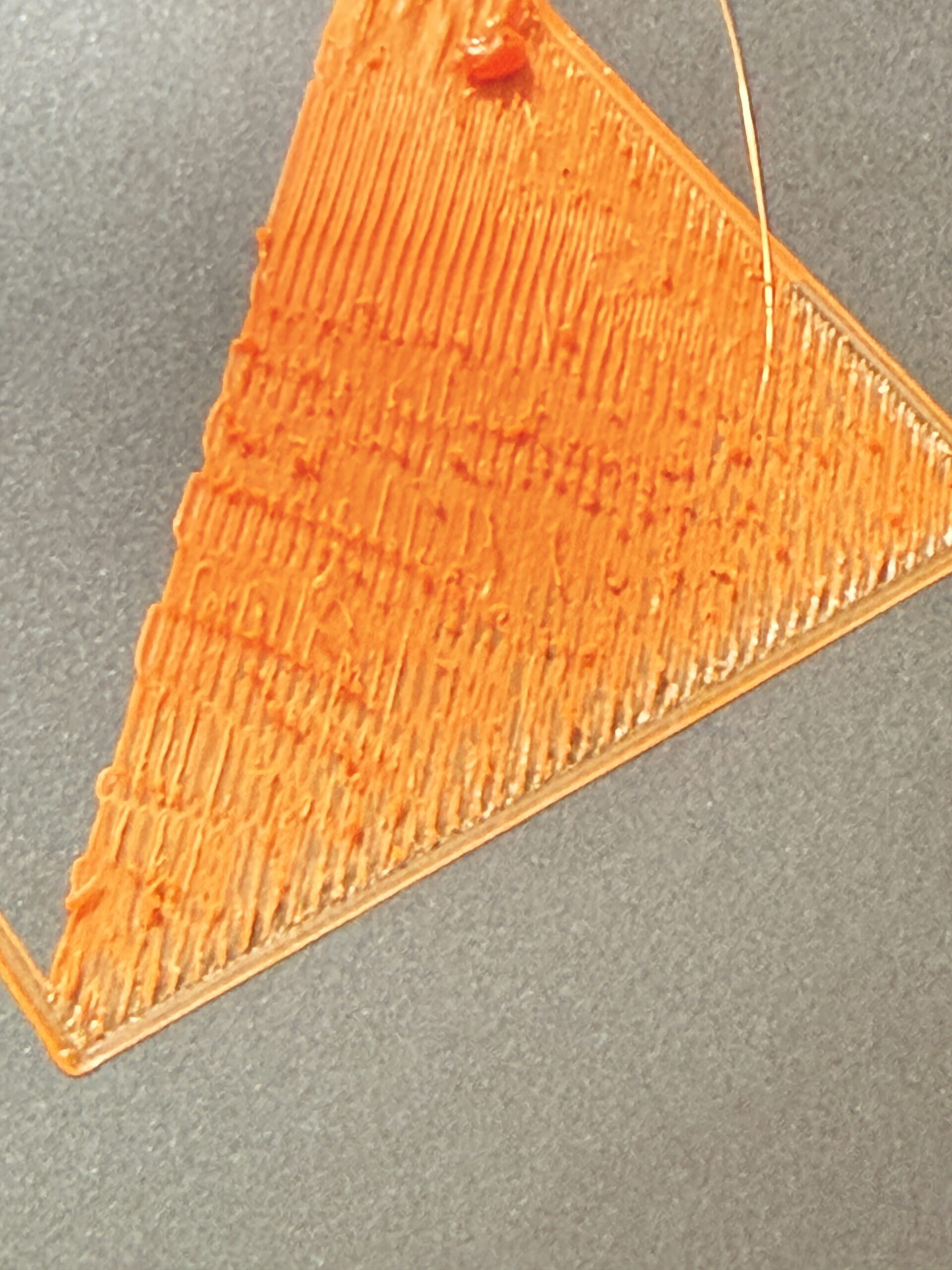
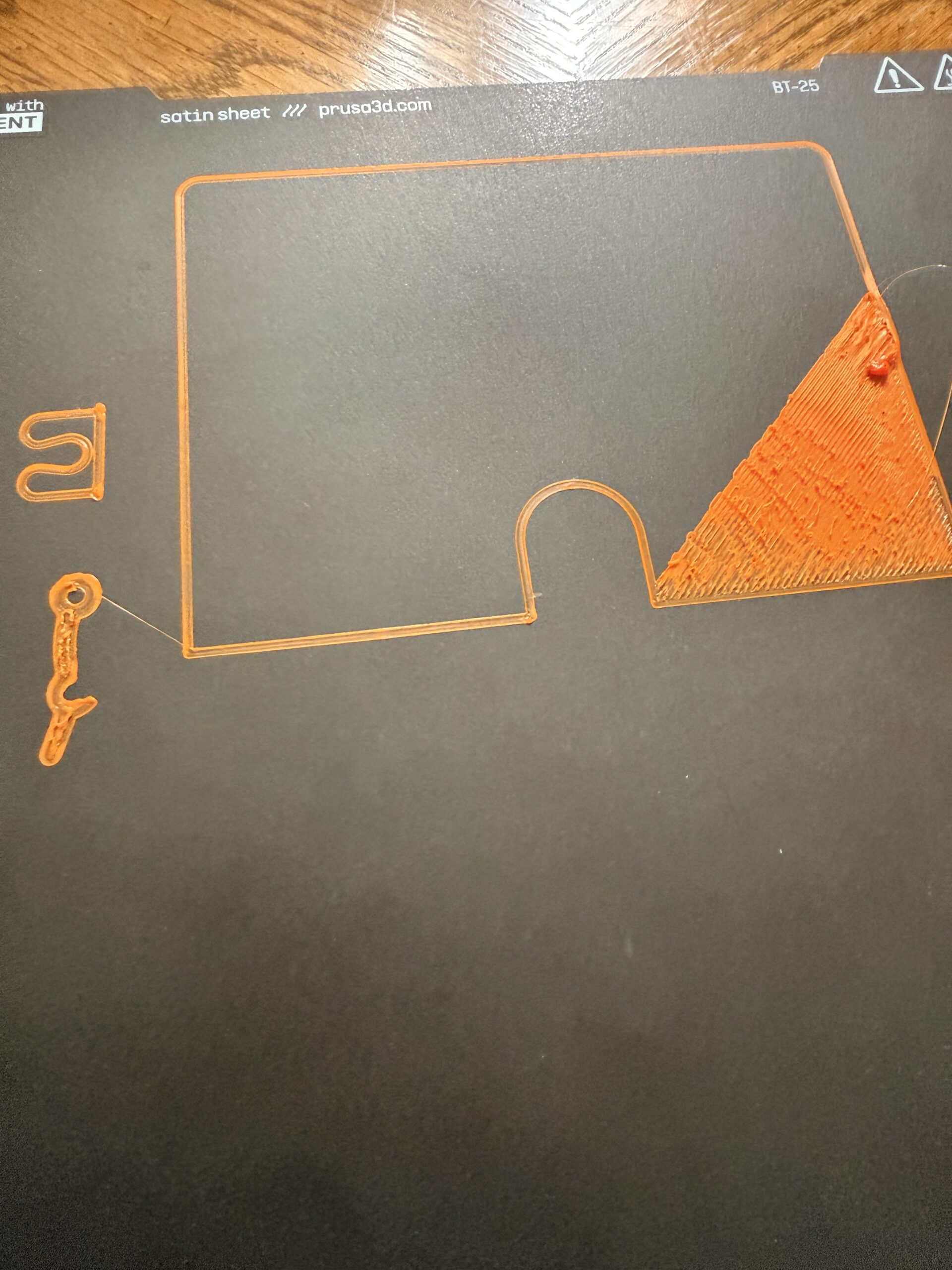
I tried it again. This time I cleaned the bed with soap & water and watched the first layer. It immediately went bad so I stopped the print. Can you see the glob and spikes in the triangular section? That is not right. Other than this the printer seem to run fine. No extra noises or weird movements.
Prusa Core One

RE: What happened with this print?
check the side of the nozzle facing the print, whether there is carbon buildup or any other material that doesn't belong there.
I wonder where the filament blob on the top right end of the triangular section comes from. This might have formed on the nozzle.
I'd do cold pull (with PLA filament as it's sticky), might be one of the channels in the CHT nozzle is clogged. Watch the end of the filament, it should show the internal structure of the nozzle.
RE: What happened with this print?
What is a cold pull? Should I just print a benchy with PLA?
Prusa Core One
RE: What happened with this print?
It's a procedure to clean the nozzle by pulling out filament after it has cooled down. You'll find good descriptions if you search the forum for "cold pull".
Highly recommended for daily routine, when things aren't running as smoothly as they should.
Plan B (if available), switch to any other nozzle you own, at least temporarily to rule out nozzle issues.

RE: What happened with this print?
Therefore, the file must be a zip! It's been repeated a thousand times here that the forum won't accept any other format, but it's like throwing peas at the wall.
Why don't you throw some peas at Prusa, instead of expecting all new users to read up on all the forum quirks ahead of posting?
It is stupid to run a 3D printing forum that does not accept the manufacturer's own 3D printing files as an attachment. And it is totally incompetent to implement this in a way where these attachments are silently dropped, without any error message.
Honestly this forum software and the way it’s implemented is like 2005. I find it just wild that you literally cannot disable email notifications that get sent every time anyone posts in a thread you once looked at 😂 why would anyone ever want that to happen?

RE: What happened with this print?
> What is a cold pull? Should I just print a benchy with PLA?
Official guide: https://help.prusa3d.com/article/cold-pull-31702-core-one-35702-core-one-l_930551
Formerly known on this forum as @fuchsr -- https://foxrun3d.com/
RE:
Yes, it is the nozzle that comes with Core One, .4mm CHT brass nozzle.
100% sure it’s PETG because it’s the only orange I have.
I’ll run it again and watch the first few layers. Can the PTFE tube and umbilical cable just bind? I’ve never even removed the top lid or messed with any of the printers hardware. Just changed filaments since I got the printer in early January.
It's very necessary to have access to the top of the printer. I have no idea why Prusa decided to rivet it in-place. It's stupid. I recommend this: Prusa Core One Magnetic Top Cover with Integrated Vent Handle
And yes, the umbilical sagging and getting caught between the print head and the motor housing is a common problem which causes layer shifts.
Also, verify your belt tension is correct.
RE: What happened with this print?
It immediately went bad so I stopped the print.
Looks to me like the bed leveling was off, which can happen easily with PETG if there's still some crap hanging on the nozzle, or if you inadvertently leave the priming strip from the previous print on the sheet (ask me how I know…). The nozzle cleaning procedure doesn't seem to clean it properly.
I suggest you print one of these nozzle brushes ( https://www.printables.com/model/1284808) and clean the nozzle while it's heating up for the bed leveling. There are also a bunch of models for nozzle cleaners mounted to the steel sheet but I've not seen a need to try them.
Formerly known on this forum as @fuchsr -- https://foxrun3d.com/
RE: What happened with this print?
I just printed a benchy in PLA and it came out as good as previous benchys.
BUT i did find a huge blob of orange on the nozzle. I cleaned it with Scotch-Brite. Not sure if Scotch-Brite is available outside the US, but here is a link. https://www.scotch-brite.com/3M/en_US/p/d/b00042849/
Prusa Core One
RE: What happened with this print?
I just printed a benchy in PLA and it came out as good as previous benchys.
BUT i did find a huge blob of orange on the nozzle. I cleaned it with Scotch-Brite. Not sure if Scotch-Brite is available outside the US, but here is a link. https://www.scotch-brite.com/3M/en_US/p/d/b00042849/
For the stock brass nozzle you can use a brass wire brush to clean it.
RE: What happened with this print?
It is stupid to run a 3D printing forum that does not accept the manufacturer's own 3D printing files as an attachment. And it is totally incompetent to implement this in a way where these attachments are silently dropped, without any error message.
Why don't you tell us how you really feel? But seriously, you're damn right. Can't attach 3mf files and no warning if you try? What were they thinking….
Alas, this has been complained about since the Dark Ages, and Prusa clearly has zero interest in updating the forum software to something from this century. I guess all their software people are busy cranking out top-notch software such as firmware 6.4 (and if someone doesn't get it, that's sarcasm…).
Formerly known on this forum as @fuchsr -- https://foxrun3d.com/
RE: What happened with this print?
@foxrun3d, this is a dead link.
It immediately went bad so I stopped the print.
Looks to me like the bed leveling was off, which can happen easily with PETG if there's still some crap hanging on the nozzle, or if you inadvertently leave the priming strip from the previous print on the sheet (ask me how I know…). The nozzle cleaning procedure doesn't seem to clean it properly.
I suggest you print one of these nozzle brushes ( https://www.printables.com/model/1284808) and clean the nozzle while it's heating up for the bed leveling. There are also a bunch of models for nozzle cleaners mounted to the steel sheet but I've not seen a need to try them.
Prusa Core One
RE: What happened with this print?
Pick your favorite: https://www.printables.com/search/models?ctx=models&q=core+one+nozzle+wiper
My design is in this list as well...