
RE: Inside vertical wall defects, only one wall, possible causes?
I think the fact that 3D printing has some voodoo is something that is holding it back. It makes it more a hobby than a tool, as it tends not to value the creator's time, due to the higher defect rate. I find that many iterations are required, some at design level which I own, but others at the printer level. You'd think that for instance, that the slicer would be able to show the effects of elephant foot on bottom layer text printing, but it doesn't. The slicer shows a lovely print, but the part wasn't so lovely, as many of the gaps filled in. So I wasted 2 hours to find that out. Sigh.
Once again, thank you. Appreciate your insight and help!

RE: Inside vertical wall defects, only one wall, possible causes?
It's no more than any other hobby that evolved. When I first got into astrophotography many years ago I spent hours looking though an eyepiece toggling the telescope with a joystick to keep a guide star centered in order to capture an image on film. Hoping that after I had developed it I actually had something to work with. It was really fun when it was -5 outside. No software existed to process the image so had to do it in the darkroom. Now I just (from inside) use my iPad to point the scope, start taking images, go to bed and wake up the next morning with a perfect set of images (I'm simplifying things... however...) I would never go back to the days of film. When cars had carburetors and the engine ran too lean or too rich, you manually turned a jet screw. Now we have computer controlled injection.
Same with 3D printers, as they get more sophisticated/complicated the software has to abstract away that complication. So hence the "voodoo". There is no way I would go back to manually tramming the bed or worrying about the Bowden tube cracking in the hotend. Anyway, I would say my defect rate is a lot less than working with a manually trammed bed on a glass plate. That said, working with Marlin on the Core One doesn't seem all that different from my Ender 3 days.
As for displaying elephant's foot. The slicer isn't going to be able to predict that unless it knows what kind of build plate you are working with. Same with things like under-extrusion or pressure advance.
RE: Inside vertical wall defects, only one wall, possible causes?
Wondering if other slicers are any better. Not sure the grass is greener on the other side of the fence.
But I'd think that at least for PrusaSlicer on a Prusa product, one could tell the slicer what build plate is being used. For me, printing is a tool to get prototype parts and concepts made. I'd rather not have printing become a time consuming hobby. Have enough things going on to occupy my time! I do realize that some proficiency is required, and slowly that has happened, but it's been a little rocky. Since I don't print everyday, (or even every week) there are times when I need to relearn some trick. Seems like there's a lot of tricks, more than expected.
Still find it somewhat hard to believe that no one has solved the buldge problem. Lots of talk about it but nothing that actually seems to work (all the time) at least using PrusaSlicer on my designs. I tried many of the online suggestions, and frankly nothing worked particularly well, and most changes did nothing to ameliorate the line. It seems that few (in the slicer community) care all that much about dimensional constraints, or design aesthetics. As a designer, who doesn't want sloppy fits, or goobers in critical places, this seem to be a major omission, in my opinion. I'll stop now. Just venting. Maintaining dimensions is a pet peeve of mine.
Things are better than previously. My MK3S was kind of primitive. The MK4 was much better. The Core 1+ seems to be better than the MK4. That doesn't mean that the slicer shouldn't attempt to have a WYSIWYG mode that gives one a better idea of the final product. You'd think with all this AI stuff, that it could be used to make nearly perfect sliced models that take into account (all sorts of things, like) filament fling due to high acceleration rates. There's literally millions of models to train on. Seems like a good and worthy task for AI.
RE:
Wondering if other slicers are any better. Not sure the grass is greener on the other side of the fence.
But I'd think that at least for PrusaSlicer on a Prusa product, one could tell the slicer what build plate is being used.
It seems that few (in the slicer community) care all that much about dimensional constraints, or design aesthetics. As a designer, who doesn't want sloppy fits, or goobers in critical places, this seem to be a major omission, in my opinion.
You can give OrcaSlicer a try which is a fork of BambuSlicer which is a fork PrusaSlicer which is a fork of Slic3r.
OrcaSlicer allows you to choose different bed types, however those bed types are wired to what is provided on a Bambu Labs printer. Also, not sure if it works with the Core One profiles (haven't tried it though).
Dimensional accuracy only applies if you need functionally accurate parts. Also, that's not the function of the slicer, that is a function of you. There are too many independent variables for the slicer to "guess". Your printer, belts, nozzle, print sheet, type of adhesive, ambient room temperature, max chamber temp, brand, type and even color of plastic all factor in. When I use a roll of filament for this first time (even Prusament) I basically ignore the built in profiles and create my own. I will spend a day (or more) calibrating slicer profiles for my filament. For most people, and in most cases, the built-in profiles are "good enough".
RE: Inside vertical wall defects, only one wall, possible causes?
Wondering if other slicers are any better. Not sure the grass is greener on the other side of the fence.
But I'd think that at least for PrusaSlicer on a Prusa product, one could tell the slicer what build plate is being used.
It seems that few (in the slicer community) care all that much about dimensional constraints, or design aesthetics. As a designer, who doesn't want sloppy fits, or goobers in critical places, this seem to be a major omission, in my opinion.
You can give OrcaSlicer a try which is a fork of BambuSlicer which is a fork PrusaSlicer which is a fork of Slic3r.
OrcaSlicer allows you to choose different bed types, however those bed types are wired to what is provided on a Bambu Labs printer. Also, not sure if it works with the Core One profiles (haven't tried it though).
Dimensional accuracy only applies if you need functionally accurate parts. Also, that's not the function of the slicer, that is a function of you. There are too many independent variables for the slicer to "guess". Your printer, belts, nozzle, print sheet, type of adhesive, ambient room temperature, max chamber temp, brand, type and even color of plastic all factor in. When I use a roll of filament for this first time (even Prusament) I basically ignore the built in profiles and create my own. I will spend a day (or more) calibrating slicer profiles for my filament. For most people, and in most cases, the built-in profiles are "good enough".
Umm, a lot of the time one needs parts that fit together! I can assure you, in CAD they fit with some reasonable clearance. I find the slicer often takes liberties in dimensions. There doesn't seem to be a way to set ranked goals for the slicer, so it knows where it could cheat a little vs, it has to hit the dimensions (within a tolerance, of course). This makes it kind of like a toy, rather than serious tool. Clearly this is just my opinion, but when I design a part that is supposed to fit around another one (that is premade), I certainly do want it to fit within a certain tolerance. And I can't get that with this slicer. Not without 5 iterations that take quite a while. That's empirical fooling around, with a poorly characterized slicer/printer combo, as opposed to designing to succeed the first time. I made a U-channel print to enclose a linear encoder read head. (Glass scale DRO). First print couldn't even get around the read head. CAD files were correct, but the slicer thought it could protrude outside of the boundaries of the part, which meant it not only took up the air gap, but it protruded into the area of the other part of the assembly. Sorry, you can't take the other part's volume. But my printer did just that. (MK4S, but the Core 1+ will do it too, because there's no way to prevent it.)
All I know is with an enclosure and sensors, like with a Core 1+, and a valid CAD solid file, the slicer ought to be able to exactly know what to do. It's deterministic, not random. It knows temperature, the filament, the model, and the printer. Ok, it doesn't know the color of the filament. One thing that is missing are what we would call constraints on the final output, there's no way (that I know of) to tell the slicer that an OD, or ID for example is critical. Sometimes the height is important, sometimes not. And certainly no way to weight the constraints, to indicate that, hey do the best you can, but you should consider this constraint a little more seriously than the others.
My two cents.
Like you, I find many of the filament profiles are not good enough. Apparently, unlike you, perhaps I lack the patience to dial in a filament. I really don't know how, to be honest. There's hundreds of knobs to adjust, and I find it quite frustrating, as often, the adjustments are not orthogonal. I find the tweaking cycle totally unrewarding, as most of the time (for me) the results are not significantly better. It feels like a vortex sucking me inward into a raging storm of minutia, which isn't my cup of tea.
I see printing as a tool to get other stuff done. It's getting there, but from my limited perspective, it takes a whole lot of my limited time, and I wonder if it's worth it at times. I still prototype with it, but in my opinion, it still takes too many printing cycles to get worthwhile results on technical designs. (That's independent of design screw ups, which I admit happens! I'm not perfect.)
RE:
When you design something with a CAD tool and send it off to a mill or lathe you can be reasonably certain that the dimensions specified in the CAD tool will be invariant within a tolerance. That is not true with depositing melted plastic from a hot end onto a heated plate in a heated chamber. You must take the properties of the material into account, as well as the printer and nozzle mechanics and adjust that inside the slicer. Everything the slicer does is controllable by you unless you don't touch the defaults.
For a given printer, nozzle, plastic (and sometimes color) these are the things one needs to calibrate:
- Ideal Nozzle Temperature - this depends not only on the type, brand and color of the plastic but also the type and material of the nozzle
- Max Volumetric flow - again depends type of plastic and nozzle
- Extrusion multiplier - ditto
- Pressure advance - again ditto
- Shrinkage - usually this is invariant based on the type (and vendor) of the plastic. Example Prusa PC Blend will shrink in XY differently than Bambu PC. However the shrinkage between one roll and the next will be reasonable constant across nozzle types and temperatures.
- XY Skew - can be significant on very long parts.
- Cooling fan
- Bed Temperature
- Chamber Temperature
These are just the main ones. Then there are a dozen other settings.
The profiles Prusa provide are conservative settings that are good enough for 99% of the stuff most people print. Again though if you require dimensional accuracy, i.e. that M3 screw hole has to line up on a 250mm bar then you must accurately calibrate the filament.
RE: Inside vertical wall defects, only one wall, possible causes?
Also I'll add that depending on the type of material and the geometry of the part:
- Number of perimeters
- Size of perimeters
- Extrusion width
- Infill type and percentage
- Infill anchors
- Infill speed
- Perimeter speed
Amongst others
RE: Inside vertical wall defects, only one wall, possible causes?
Like you, I find many of the filament profiles are not good enough. Apparently, unlike you, perhaps I lack the patience to dial in a filament. )
Just a final note. If you are printing stuff downloaded from Printables like various gadgets and other assorted trinkets then the default profiles are fine.
RE: Inside vertical wall defects, only one wall, possible causes?
Like you, I find many of the filament profiles are not good enough. Apparently, unlike you, perhaps I lack the patience to dial in a filament. )
Just a final note. If you are printing stuff downloaded from Printables like various gadgets and other assorted trinkets then the default profiles are fine.
I rarely print stuff from Printables. (Did it once or twice.) I mostly design in CAD because I can, and because I can make anything I want, not just what was put online, and then either machine it or print it. If the design is a little out there (at least for me) I'll print it first, to see if I can learn something from the basic shape. I did that for an indicator holder. Learned I had a major design flaw and made revisions. I then machined it from aluminum. The printed piece served it's purpose as a mock up.
The little box that started this whole thread was something I needed for a collection of tiny metric stub drills. No one made that. So I designed my own. And yeah, it took several iterations to get the fit needed, because I had no idea what the final inside dimension would really be. And that was a waste of time, in my opinion.
RE: Inside vertical wall defects, only one wall, possible causes?
Back to your original post. If you are using a 0.25mm nozzle then you should be printing PLA and not PETG. Especially if you are looking for detail. However PLA has it's own trade-offs which I'm sure you are aware of.
RE: Inside vertical wall defects, only one wall, possible causes?
Sorry, the forum being the forum again… Was unable to add photos or edit my post...
Original Settings:
With Avoid crossing Perimeters:

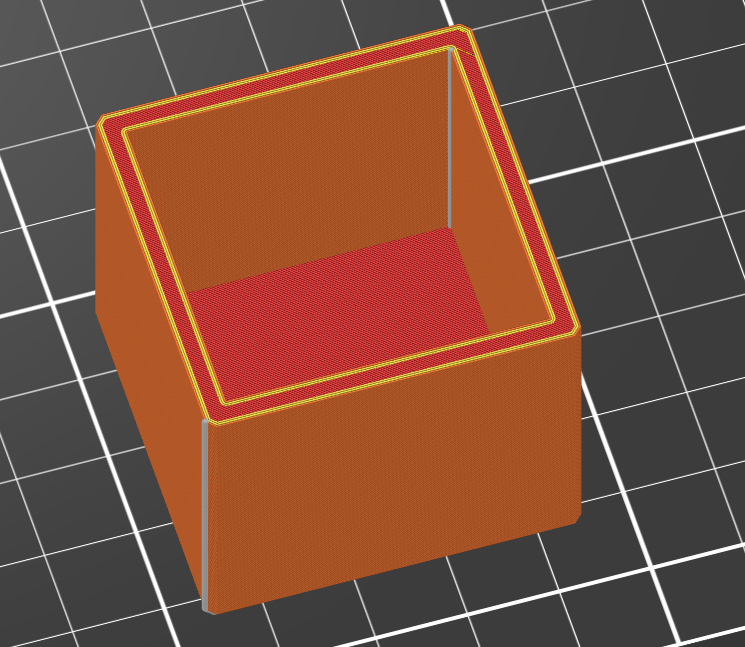
Unfortunately, the print did indeed suffer layer shift, starting at the second layer, in both x & y. And there's crud in the inside as well, actually worse than before. Oh well, it was worth a try. The filament was behaving funny. Lots of blobs sticking upwards. Part of the filament was in the bowden tube overnight, and not in the desiccator. I could try again, but my previous orange Prusa PETG print came out a lot better. This print there was a lot of snapping as the head came by and whacked the filament shards sticking out. Defects on both the exterior and interior walls, certainly more than I'd expect. Maybe I messed something up.
RE: Inside vertical wall defects, only one wall, possible causes?
Back to your original post. If you are using a 0.25mm nozzle then you should be printing PLA and not PETG. Especially if you are looking for detail. However PLA has it's own trade-offs which I'm sure you are aware of.
Why is that? Is this generally what happens with PETG? I've basically switched to PETG the first year I started printing. The only PLA I have is a roll of natural that I was hoping to use in a lost PLA casting process. PLA has some uses, and would be ok, I guess for this box, but not for most things I do.
RE: Inside vertical wall defects, only one wall, possible causes?
Back to your original post. If you are using a 0.25mm nozzle then you should be printing PLA and not PETG. Especially if you are looking for detail. However PLA has it's own trade-offs which I'm sure you are aware of.
Why is that? Is this generally what happens with PETG? I've basically switched to PETG the first year I started printing. The only PLA I have is a roll of natural that I was hoping to use in a lost PLA casting process. PLA has some uses, and would be ok, I guess for this box, but not for most things I do.
PLA cools a lot faster than PETG so it solidifies faster and more cleanly. So things like edges and fine features (like text) lock in almost immediately. PETG stays softer for longer, has a higher surface tension and rebounds especially at corners, so edges are rounder and details are softer. So you would use PLA for precision but PETG when you need a tougher more durable material.
I use PLA mostly for printing lithophanes and as an interface support material for PETG since PLA and PETG will not stick together.

RE: Inside vertical wall defects, only one wall, possible causes?
I also use PETG when I need a bit of "flex", as PTA tends to be stiffer and less prone to deform over time.
I designed and printed a boatload go tool holders similar to Bruce's and used to print them in PETG, now I just use PLA, prints easier and can handle whatever abuse I throw at them.
Formerly known on this forum as @fuchsr -- https://foxrun3d.com/
RE: Inside vertical wall defects, only one wall, possible causes?
Bought some PLA and will try again. Hopefully it will come out better. For this drill index, anything would be fine as there's no temperature worries, nor solar exposure. As I said above, I make stuff, and usually design it myself, since it's rare to find stuff that solves my needs.
One day, I'll design a metric stub drill index over a wider range. I've found jobber length indices, but no stub (machinist) length. Getting the hole dimensions right and accounting for the inaccuracies of printing has stopped me. The slicer, as far as I know, is rather liberal in it's ID allowances. At least that's my experience. Pretty hard to print a 1mm hole with any accuracy, or a 3mm hole for that matter. Ideally, I'd like a slip fit, but at least for me, I don't know how to set that up in CAD, so that the printer ends up with the right sized hole to the tolerance needed. It doesn't seem to be a linear allowance value based on ID.
RE: Inside vertical wall defects, only one wall, possible causes?
It also helps to set the fill to "Grid 15%" and the seam position to "Nearest". The size and amount of errors are greatly reduced.

RE: Inside vertical wall defects, only one wall, possible causes?
Caveat: Apparently Avoid crossing perimeters may cause lawyer shifts. I have rarely seen that myself but you may have to pick your poison.
Yes, lawyers can be pretty shifty! 😊
But indeed, Avoid crossing perimeters can apparently cause PrusaSlicer to generate impossible moves in the Gcode output -- with accelerations and speeds which the printer mechanics cannot follow, and which hence cause step loss. It's not fully understood which other conditions need to be met for this problem to strike, I believe.