
Side sensor base part change
Hi,
I am assembling a Core One+ and got to the side sensor.
The one that I got seems to be different than the one shown in the assembly manual at page 163: https://help.prusa3d.com/wp-content/uploads/generated/prusa-core-one-kit-assembly_2251_en_2026-01-10.pdf .
There is no slot to insert a second magnet (see red) and it seems the distance between the ball and the magnet on the lever is larger that shown in the assembly manual (see blue). As a consequence, the ball is not attracted to the magnet.
Please advise on how to proceed.
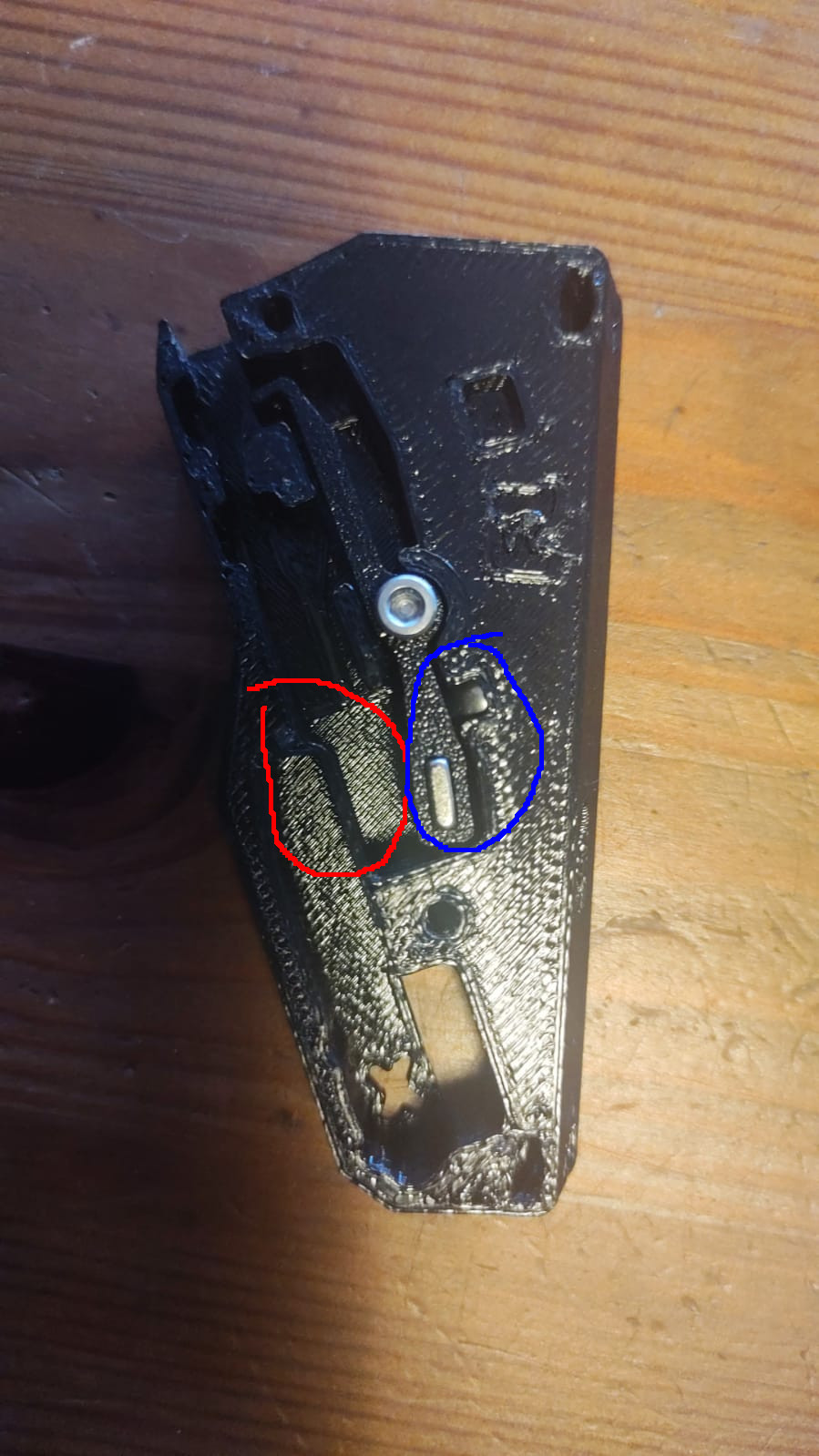

RE: Side sensor base part change
This holder is used in the CORE One+ extension. And you should have a small orange part into which you insert a magnet. And you insert this part into the holder. If you do not have it, contact Prusa support.
RE: Side sensor base part change
Thank you. I found the part...

RE: Side sensor base part change
Also be careful that the magnet in the lever does protrude out too far or it will bind the lever to the cover.
RE: Side sensor base part change
Yes, I actually had that problem during the initial checks when I was asked to insert the filament and it would not pass through. So I had to disassemble the sensor. But now everything's working.