
Core One motherboard info
Good afternoon
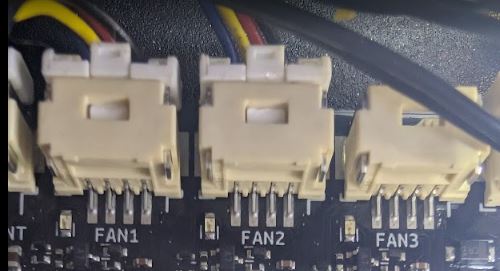
I'm working on a new mod for my Core One and I need to know a couple of technical details about my Core One Buddy motherboard. I'm hoping someone can help me. The Core One Buddy motherboard has three fan headers: Fan 1, Fan 2, and Fan 3. Does anyone know the wattage output of the 4-pin Molex connector for Fan 3? I imagine it's 24V, but I want to know the exact voltage. I also need to know the maximum amperage that connector for Fan 3 can handle. I'm working on a new project that will be powered by this connector, but I need the exact technical specifications since they aren't included in the technical data sheet. Thanks

RE: Core One motherboard info
And how about looking at the Prusa website? If you look for a moment, there is a diagram of the Buddy board and you can find the required data there. I won't give you a direct link here, because a developer at this level should be able to find the information. And the link to the board diagram was also mentioned here.
RE: Core One motherboard info
Yes, I already know that, I understand that much. The problem is that I need to know the maximum amperage that connector can handle. I already know the voltage, 24 volts, but not the maximum amperage, which, by the way, isn't in the specifications.

RE:
mods are good...
possibly 2 A rating per pin, 2 pins => 4A. But, does the PSU budget allow this much? Seems unlikely it would just be overspecified by 100 W. So back to square one.
https://www.molex.com/en-us/products/part-detail/5031542290?display=pdf see 2nd page for current rating per contact.
Please confirm correctness of the information.
Edit: Actually this is not the fan connector but another one on the board, so you'll have to do a bit of work yourself 🙂
RE: Core One motherboard info
I am an electronics engineer and I know what I'm doing. I'm making a splitter from the fan 3 output and connecting the Prusa HEPA filter I have to a 24V input. I've also made another 12V input to connect peripherals like fans, etc., all controlled.
RE: Core One motherboard info
mods are good...
possibly 2 A rating per pin, 2 pins => 4A. But, does the PSU budget allow this much? Seems unlikely it would just be overspecified by 100 W. So back to square one.
https://www.molex.com/en-us/products/part-detail/5031542290?display=pdf see 2nd page for current rating per contact.
Please confirm correctness of the information.
Edit: Actually this is not the fan connector but another one on the board, so you'll have to do a bit of work yourself 🙂
This is not about what the contacts on the connector can withstand. You need to see what current the switching FET on this output can withstand. And I think it will be about 500 mA. I don't know, I didn't look at the schematic, but I think it will be very similar to FAN1 and FAN2. And connecting some fan atrocities here, in my opinion, will not be the best. And it also depends on the power reserve of the power supply, which probably won't be very large either. And operating a switching power supply at the limit of its performance smells like some trouble in the future. I would rather see it using some SS relay or a proper switching FET controlled by the FAN3 output signal and a separate power supply.

RE: Core One motherboard info
I am an electronics engineer and I know what I'm doing.
I am always a bit weary of people who feel the need to tell me that they know what they are doing. And of "electronics engineers" who talk about "amperage" and "wattage"...
Anyway, you may not have found the right schematic -- the FAN3 connector is not on the Buddy board but on the Extension board. You can find the schematic here: https://www.prusa3d.com/page/open-source-at-prusa-research_236812/ It has the spec for the connector as well as for the MOSFET which drives it, and of course it specifies the supply voltage.
RE: Core One motherboard info
I really don't care what you think, understand, or let me explain it another way. If you don't believe I'm an engineer, that's your problem, not mine. But you can keep your suspicions to yourself; they don't interest me. Ok?
RE: Core One motherboard info
Good, then you should be all set with the schematic.
RE: Core One motherboard info
I really don't care what you think, understand, or let me explain it another way. If you don't believe I'm an engineer, that's your problem, not mine. But you can keep your suspicions to yourself; they don't interest me. Ok?
Oh, the master is offended! So you know what? If you're so smart, why do you even come here and find information that a normal electrical engineer should know, because surely he knows where to look for it?! Goodbye and do whatever you want!