
Another thread about homing issues but at my wits end
So, Core one kit, assembled now since July. Mostly happy customer. A few weeks back I broke the left belt tensioner, (too much fiddling with belt tension tbh). TLDR - since disassembling the nextruder to replace the tensioner and reassembling, I have been having a nightmare with homing. Never had a homing issue prior to this, it would do a couple bangs and move on. Now after changing filament or just before (most) prints, I get an endless loop that I generally need to reset the printer for. Calibration passes ok every time. Hoping the community might just give me some tips as to specifics I could look at following the work I did.
I have a couple more relevant details. I also changed my linear rail brackets. I always had issues with resonance noises. Between prints and when I had the time I'd try one of the many suggested fixes in the forums. Run a "noisy" print and pray... (that my wife wouldn't kill me for spending more time with the printer than her and the kids!). I systemically went through all the different tweaks that people saw varying success with in the forum. Last 2 on the list 1. changing out the linear rail brackets 2. the x y motors (don't think these are my issue). After breaking the belt tensioner I figured I may as well give the brackets a go considering I was going to have to dissemble the nextruder and reroute the belt anyway. Cheap enough parts. Gantry only ever had the tiniest misalignment (<1mm) but said I'd give it a go. Funnily changing the brackets seemed to have solved the worst of the resonance issues (yayyy!) but now I have this homing problem (boo). Resonance seems to have come back now today... could start a print with the homing issues, so loosened the belts to check the gantry squareness (all good), and re-tensioned the belts per the new process. Fit to cry. This printer is great when it works but I have spent more time trying to tweak it than Id say I have print hours put in at this stage.
Any recommendations on most probable cause would be most appreciated.
Best Answer by WDLandry:
I feel like this.
I’ve managed to resolve/reduce the issue in the past by retuning belts, little adjustments here and there but was never 100% why it worked. I seem to have just prolonged or delayed a bigger problem 🤣 😭
The toolhead never made the noise while moving by hand at the original 85hz belt target. Might try going back for a bit.

RE:
It's worth buying the accelerometer and running phase stepping calibration. That quieted down things a lot. Another thing to try is loosening the gantry bracket screws, manually move the gantry up and down in the Y direction a few times and then tighten it up again. That also made a difference.
Another issue I had been having is I kept losing belt tension which resulted in Y calibration failures and homing issues. My gantry is square (within reason, < 1mm). After removing the nextruder from the belt harness I noticed one of my belts had slipped as in the number of exposed teeth was 1 instead of 5 for the other belt. Once I corrected that and retention the belts my homing and Y axis calibration failures went away (so far).
RE: Another thread about homing issues but at my wits end
Thanks for you're reply. The phase stepping did lower some of my noise but the worst of it on the long straight x and y movements for perimeters on structured only quietened slightly. This is an older video but after the phase stepping calibration 82F3CDB9-8B07-4925-9485-20E396D4E401. That said this strangely isn't as bad now since I replaced the broken left tensioner and brackets. However I am getting resonance during general movement in random positions on the XY, mostly close to the outside sections. If I disable the motors, the extruder does get harder move by hand at the extremes of the XY and also causes vibrations on movement by hand. By the homing position, front right, its very bad. Almost feels like something is catching or restricting the belt movement. This might be my issue can't for the life of my see what's causing it unless my linear rail is the issue. But done think so as when the belts are loosened everything moves freely.
I've tried loosened the bracket screws as mentioned previously but didn't get much improvement, but I wouldn't if it may help here after I put things back together.
I mean once I get past the homing, I can't really flaw the prints. Seems like for a self assembly the tolerances are a little too tight to be reproducible for every build.
RE: Another thread about homing issues but at my wits end
Noticed that as well, perimeters are extra noisy. Could it be from one of the Y axis bearings? Or maybe the Y axis smooth rods are not parallel to each other? In my case I'm thinking of replacing the Y axis smooth rod bearings/bushings since they descended from an MK4 originally.
RE: Another thread about homing issues but at my wits end
I’m very much thinking it’s the bearings now alright. Was tolerable for a while but after a bit of tuning of the belts the other day it got a bit worse. I started dismantling and checking the steppers and pulleys. All good. Put it all back together and it’s way worse now 🤣 but I know it’s coming from the right idler now, and suspecting the bearing or as you mentioned the rods not being aligned. Wits end so finally back onto support to try and get this resolved as it’s stopping me from printing now. Printers in my office so not the easiest thing to ignore in meetings when it’s rattling in the corner
RE: Another thread about homing issues but at my wits end
Right bearing, not idler. Tired

RE: Another thread about homing issues but at my wits end
Unless the kit assembly instructions have been updated in the meantime, they do not include a step to ensure that the two Y rods are actually parallel. They just get bolted down, but there is always a little tolerance in the screw holes.
I recommend that -- after the X gantry has been installed but before the belts are added -- you loosen the screws which mount the Y rail blocks to the CoreXY frame, on one of the Y rails. Then slide the X gantry back & forth, to nudge the movable Y rail to the correct position. Lightly tighten the mounting screws, slide the gantry once more for a final correction, then fully tighten the screws.
RE: Another thread about homing issues but at my wits end
Thanks for your reply Jürgen. I can remember reading your comment in the kit assembly and I thought I did this but thinking now I left the rods loose not the rod holder/blocks. Which makes more sense in hindsight! I will give it a go, it’s something.
This could very much be it. When I took off the side panels yesterday I saw that one of the bolts that secured the right y rod was completely loose. I thought I had found my culprit but it’s been worse since I tightening it. The rod would have still been pretty secure with it loose but possibly it being loose was giving just enough movement to compensate for them being misaligned. Now that I’ve tightened it, there’s no give and it’s made it worse.
Unless the kit assembly instructions have been updated in the meantime, they do not include a step to ensure that the two Y rods are actually parallel. They just get bolted down, but there is always a little tolerance in the screw holes.
I recommend that -- after the X gantry has been installed but before the belts are added -- you loosen the screws which mount the Y rail blocks to the CoreXY frame, on one of the Y rails. Then slide the X gantry back & forth, to nudge the movable Y rail to the correct position. Lightly tighten the mounting screws, slide the gantry once more for a final correction, then fully tighten the screws.
RE: Another thread about homing issues but at my wits end
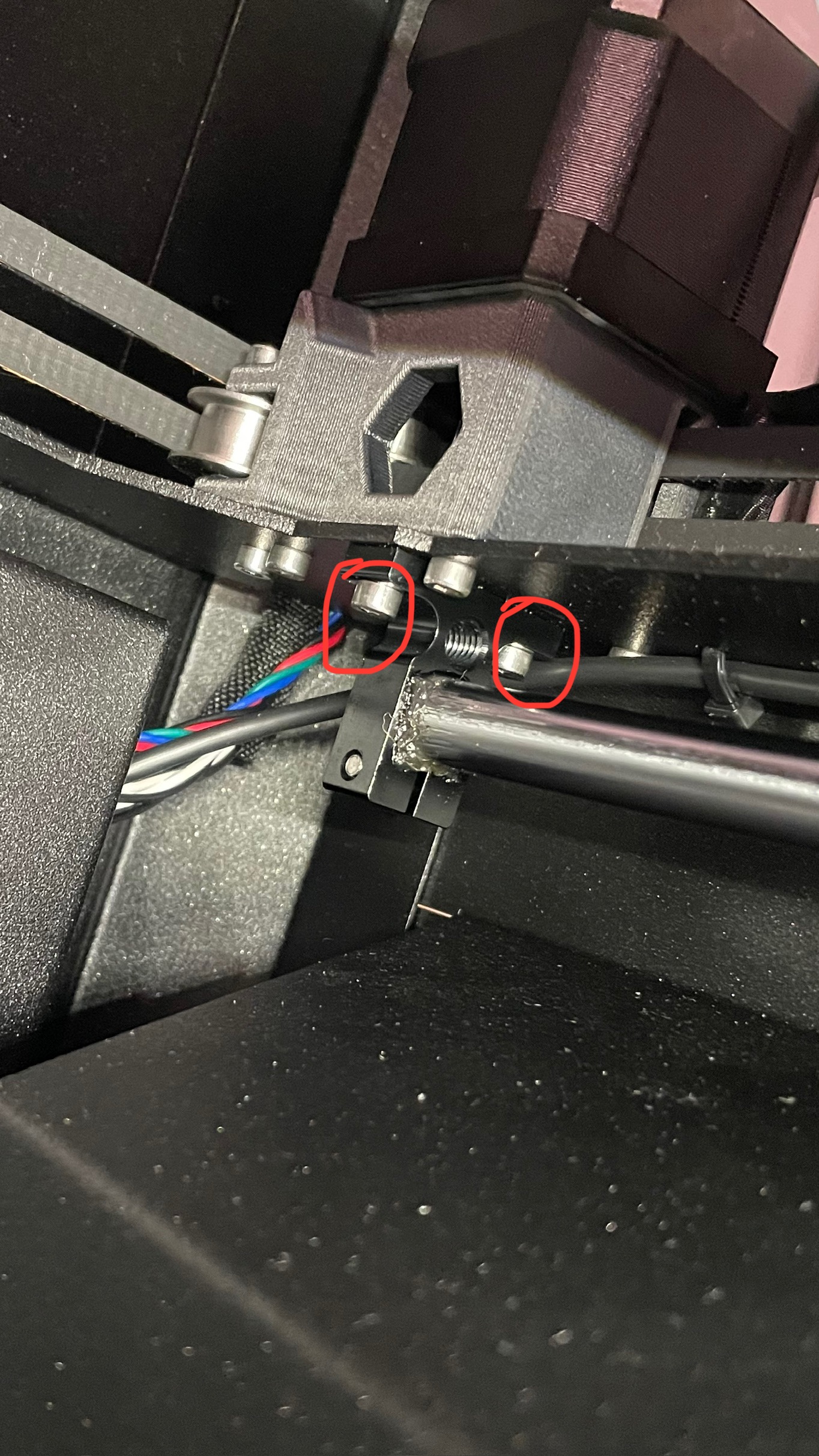
Just so I’m 100%, you’re referring to keeping these loose and the bolts holding the y rod block at the opposite end? I assume you do that movement prior to installing the xy on the rest of the frame?
RE:
Just so I’m 100%, you’re referring to keeping these loose and the bolts holding the y rod block at the opposite end? I assume you do that movement prior to installing the xy on the rest of the frame?
No, it would be the screws bolting the gantry to the Y axis bearing holders
https://help.prusa3d.com/guide/5-corexy-assembly_835522#844219
The four screws to where the belt is exiting in this photo. Loosen all four on both sides, slide the gantry back and forward several times then tighten.

RE: Another thread about homing issues but at my wits end
Thanks, I’ve tried doing a few different times and unfortunately it hasn’t helped. Even with the screws that attached the bracket to the linear bearings loose, I still get a rattle noise if I move the printhead slowly by hand.
Just so I’m 100%, you’re referring to keeping these loose and the bolts holding the y rod block at the opposite end? I assume you do that movement prior to installing the xy on the rest of the frame?
No, it would be the screws bolting the gantry to the Y axis bearing holders
https://help.prusa3d.com/guide/5-corexy-assembly_835522#844219
The four screws to where the belt is exiting in this photo. Loosen all four on both sides, slide the gantry back and forward several times then tighten.
RE: Another thread about homing issues but at my wits end
Maybe at this point either re-lube the bearings or replace them.
RE: Another thread about homing issues but at my wits end
Just so I’m 100%, you’re referring to keeping these loose and the bolts holding the y rod block at the opposite end? I assume you do that movement prior to installing the xy on the rest of the frame?
Yes, those are the mounting screws I had in mind. (Sorry, did not see your post before I went to bed yesterday.)
When you loosen and re-tighten the screws at the gantry's mounting bracket, as suggested by @hyiger, you let the gantry length adjust to the Y rod distance at that Y position. But if the Y rods are not parallel, the X distance will still not match once you move the carriage to a different Y position.
Having said that -- if you get bearing noises even with the screws still loose (i.e. when the carriage length can change "in real time"), something else may be at play here. Maybe the Y bearing was indeed damaged somehow and should be replaced, as hyiger suggested.
RE:
Thank you both, appreciate the advice. From the weekend and yesterday I created a few videos and photos to send to Prusa support of me ruling out the usual suspects, very much leading towards something related to the right Y rod or bearing/pulley system. Hopefully they’ll be quick to reply and send me out a couple bearings to test. Not looking forward to having to dismantle the core xy to replace them though!
Again so I’m not crazy, I’ve attached a video of me moving the printhead by hand. The variability in the noise at different position’s means that the noise is somewhat sporadic when I’m printing. When I lower belt tension into the 80hz and below range it moves smoother and doesn’t make these same racket. I have tried lubing the rod with no improvement
RE: Another thread about homing issues but at my wits end
Again so I’m not crazy, I’ve attached a video of me moving the printhead by hand. The variability in the noise at different position’s means that the noise is somewhat sporadic when I’m printing. When I lower belt tension into the 80hz and below range it moves smoother and doesn’t make these same racket. I have tried lubing the rod with no improvement
Hmm -- you seem to get the same noise whether moving in X or Y direction? I had misunderstood that before; thought it was during Y movements only. This makes the Y bearings a much less likely culprit, I think.
Can you isolate the noise to just one of the motors moving? I.e. if you move the print head at +- 45°, does only one direction trigger the resonances?
RE: Another thread about homing issues but at my wits end
Just checked. Moving by hand, those vibrations are the same when isolate either the x or y motor by moving 45o. Worse at the furthest and closest points
RE: Another thread about homing issues but at my wits end
Heck... the Core One should really come with a stethoscope to let us locate those vibration sources.
RE:
I feel like this.
I’ve managed to resolve/reduce the issue in the past by retuning belts, little adjustments here and there but was never 100% why it worked. I seem to have just prolonged or delayed a bigger problem 🤣 😭
The toolhead never made the noise while moving by hand at the original 85hz belt target. Might try going back for a bit.
RE: Another thread about homing issues but at my wits end
As a follow up on this. After a back and forth over the last few months with Prusa support, multiple disassembly's and reassemblies, pictures and videos, they are planning on sending me out 2 new y bearings and a new Y motor. So fingers crossed that'll sort it. The fear now is I'll get my Core One to a state where I'm happy finally from a noise perspective... and then I'll have the INDX pre-order drop at my doorstep. Honestly making me rethink that pre-order, solely because I don't want to spend the guts of 2026 troubleshooting that. 🤣
I do have to appreciate Prusa Supports diligence in assessing the issues. Coming from a Science and engineering background I completely understand, the step by step approach. That said, I can also see why I read posts from customers about getting frustrated with it. I'll admit the length of time it took really was my fault as every ask from support required my time and the printer being out of use for a period. So there were weeks in my replies. Likely could have gotten to this point in less than a month. Anyway, will update here is the Y bearings resolve it. I'm skeptical about the motor but can't harm to go all in at this point!