
Assembling Your Christmas Printer Kits
Everyone one who got a Core One printer kit for Christmas (or otherwise) before you embark on assembling the belt system, do yourself a favor, study very carefully the photos in the assembly guide and read all of the user side comments. Pay very close attention to the orientation of the parts. Do not second guess the photos... yes... the teeth of the belt are supposed to be in contact the smooth idler pulleys. Before you tighten the belts, read this section many times: Adjusting belt tension until you have it memorized. Next when inserting nozzle and heatblock into the heat sink make sure it is fully inserted as in this photo and that the thumbscrews are tight:
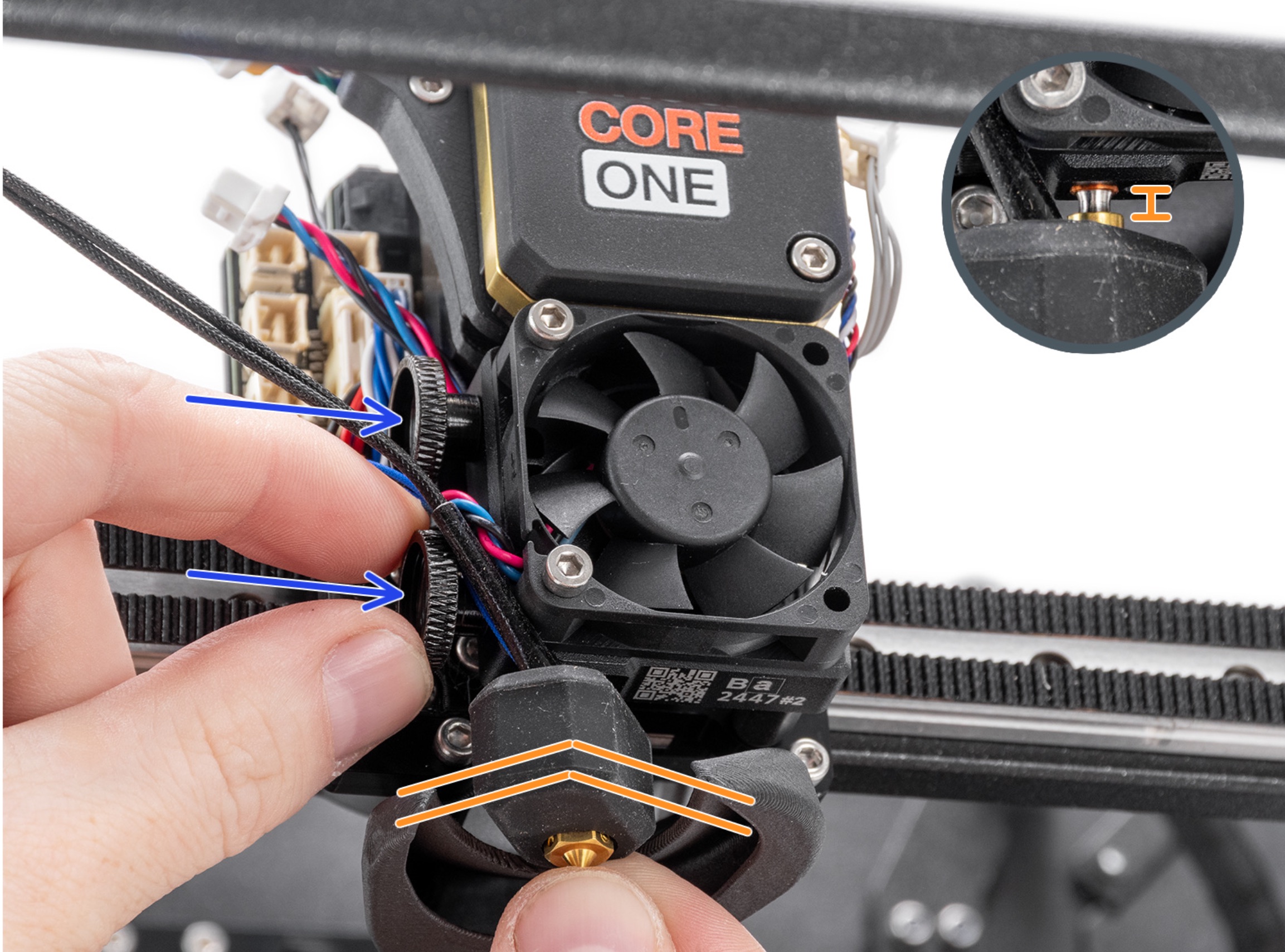
Failure to heed this advice will cause you to post here "Why is my printer not working"

RE: Assembling Your Christmas Printer Kits
Agree - sometimes it's the smallest thing you overlook, that snowballs and has a knock on effect elsewhere, and causes an entire printer malfunction!

RE:
But that's like throwing peas at the wall! Do you think these "Christmas experts" will follow your advice? Not at all, because they are the ones who don't have to follow any advice, because they are the "called ones"! And then here we have them shouting "Help, help", instead of realizing that Prusa produced tens of thousands of these kits and the more sensible ones assembled them without any problems And so that instead of writing heartbreaking posts, they would think about themselves, go through the assembly instructions again and look for their own mistakes. And the Prusa instructions are written in such a way that even a trained monkey can assemble the printer according to them. Well, that's all from me, we have more than enough experience with them here.
RE: Assembling Your Christmas Printer Kits
And one more thing. If I start talking about the "experts" here in a slightly harsher tone, a lot of defenders of these "experts" will come running to me and start explaining to me that they are really "poor and unfortunate people" and I am the biggest villain! For God's sake, stop with the "hyper-correctness" and start calling things by their real names! I am a moderator on another forum that has nothing to do with this, and I can tell you only one thing: Of course, I do not use any vulgar or vulgar expressions there, but it has never happened to me that anyone would protest against slightly harsher expressions. And I do not attack anyone for slightly harsher expressions towards other users. Of course, everything has its limits and if there are vulgar and dishonorable posts, the person who used them is warned and the post is deleted. And if the user in question does not want to give up such expressions that I talked about, I will ban them without mercy and that's it. And if he doesn't like it, I'll ask the admin to delete the account. And believe me, the admin will comply. Howgh, I'm done!
RE:
Um... OK...

RE: Assembling Your Christmas Printer Kits
IMO, Prusa's instructions are very good. Not flawlessly perfect, but if you carefully follow them and use a bit of common sense, your printer has a good chance of working correctly right from the start. I put a laptop with a big screen right next to my assembly bench and used the online instructions so I could zoom in on the photos. I needed to do that multiple times to be sure I had things right. You'd have to be a serious masochist to do it with a phone. Not everybody has the same level of experience with electromechanical assemblies, so hopefully the people here will have some patience with the less experienced and less focused. My guess is these things are being built by teenagers to old men (me) and everybody in-between.

RE: Assembling Your Christmas Printer Kits
Good morning,
before the pandemic, we assembled over 50 Prusa (MK3 / MK4) printers in our hackerspace in Augsburg (Bavaria, Germany). With course participants of varying levels of prior knowledge. The course ran from Saturday morning to Sunday afternoon. Six printers were built each time. By individual participants, but also by families. Before the assembly, I gave a one-hour lecture on Reprap printers, the most important components, the software workflow, a little history and the obligatory safety instructions.
Then it was time to start building. At least two supervisors (who had already built an MK3/MK4 themselves) were always on hand to help if problems could not be solved with the building instructions. We also helped with the initial start-up. (In particular, it was necessary to impress upon the participants that they must never let go of the end of the filament on a spool!) When the first print was finished, we were delighted to see the broad smiles on the participants' faces. Those were wonderful moments.
None of the participants left the course without a working printer. All parts were of the highest quality throughout the entire course, including the assembly instructions. Of course, we supervisors noticed some participants taking ‘shortcuts’. They then had to go back a few steps. These things happen. Those who build on their own naturally do not have the advantage of supervision. They simply have to follow the instructions exactly.
We also offer support with any problems after the course. However, we haven't had to deal with much follow-up care. Mostly minor issues such as a clogged nozzle or an incomplete calibration. Things that can easily be taken care of during our 3D printer evening every Tuesday.
This experience shows me that a wide variety of participants (technicians, hobbyists, accountants, teachers, etc.) are capable of building and operating a technically sophisticated machine.
But of course, we also had some negative experiences. Not with Prusa. A kit from China was challenging. For example, there was no power supply cover included. The contacts were exposed... So we designed one and printed one for each participant. With a cold device plug and a switch with a fuse. The technical inspection (yes, Germany wants its residents to live safely...) was carried out by a friend who is a master electrician.
There were no assembly instructions whatsoever. We had to create them ourselves based on a prototype that had been delivered in advance. One heating bed had a short circuit, which we were able to fix by carefully drilling out the conductor track. Such a component would never leave the Prusa premises. There was also no initial start-up procedure. We created that ourselves as well. Of course, these are not real problems for experienced 3D printer users, but they could be difficult for beginners.
But the worst experience we had was during the very first course. Do you remember what happened back then with the fake FTDI chips and the Windows driver? The first course printer was a self-assembled Prusa clone. With a wooden frame and Melzi board. It had an FTDI chip that provided the USB interface. And the day before the course, the manufacturer decided to distribute a new Windows driver (via Windows Update) that recognised the fake chips and rendered them unusable.
The new driver deleted the vendor and type ID from the chip. As a result, the driver no longer recognised the chip and it was no longer possible to establish contact with the Melzi board. No Pronterface, no Octoprint, nothing.
The hobbyist community reacted quite angrily at the time, and a few days later FTDI came to its senses and stopped punishing users at the end of the chain, who are not to blame if a board manufacturer deliberately or unwittingly soldered a fake chip.
But the damage had already been done... so what to do? The solution came from the community. All we had to do was run a programme on a Linux computer to reconfigure the ID in the chip. But you can imagine how stressful it was to notice the error during the course, investigate the cause and correct it quickly. This experience and the China thing ultimately led us to Prusa. And from then on, we had no more bad experiences.
The key message here is: things happen. None of us are perfect. If someone comes to the forum and it turns out that their nozzle isn't pushed in all the way, then they've just been sloppy with that part. OK, it's not the end of the world, it's something that can be fixed. The majority of this forum (I only read the German and English sections) is tolerant of beginners, sloppy people and fidgety people. Most people are helped patiently.
But what annoys me endlessly, to come back to Core One, is Prusa's ignorance regarding the grounding of the X and Y motors. The problem may not affect everyone, as it only occurs during long X or Y movements. So if you only print small items, you may be able to get by without any problems for years. But what if it does occur? Perhaps even after the warranty has expired? And what if you don't know about the forum, or even if you do, you can't find the thread with the solution? Would you dare to go to the Prusa chat or write an email to support? And what response would you get? A new buddy board? New motors? Are there any current responses from support regarding this error?
After all these years of positive experience with Prusa, this situation has the potential to change everything. It makes me want to rethink everything and possibly make future decisions against Prusa. Above all, I cannot understand how anyone can be so stubborn for months on end and ignore such a primitive, simple solution. Is Prusa afraid of losing face if they admit that the lack of grounding of the motors is a design flaw? I think Prusa is strong enough to withstand it. They should just give it a try.
- Bäckergasse 32, 86150 AugsburgEvery Tuesday we meet to talk shop about 3D printing and share our experiences with our printing projects. We tinker, design, draw and print using the 3D printers available…

RE: Assembling Your Christmas Printer Kits
After all these years of positive experience with Prusa, this situation has the potential to change everything. It makes me want to rethink everything and possibly make future decisions against Prusa. Above all, I cannot understand how anyone can be so stubborn for months on end and ignore such a primitive, simple solution. Is Prusa afraid of losing face if they admit that the lack of grounding of the motors is a design flaw? I think Prusa is strong enough to withstand it. They should just give it a try.
They could have simply sold it as a feature in the + upgrade. A safety feature. A small, self-printed countersink with broken pieces of an Olfa cutter blade integrated as cutting edges, and a few flap discs. Done.
I'm sure everyone will continue to receive help here in the future. Everyone has to start somewhere!
RE: Assembling Your Christmas Printer Kits
I'm biased as I've worked as an electronic technician and designer for most of my career, but IMO the Core One didn't get enough attention when it comes to shielding and grounding. I doubt it would pass the usual group of CE tests, certainly not for susceptibility. The powder coating is very good and even things solidly screwed together with machine screws may not have electrical continuity. A quick check on the X-Y motors is easy. Just measure from any top screw of the X to any top screw of the Y with an ohmmeter. If either motor isn't electrically connected to the frame, you'll get a high/infinite reading. Remove a lower screw and remove a small area of powder coat and replace the screw. Check again. The Z motors are more difficult as they mount on printed pieces. I would think they should be grounded but haven't experimented with it. Easiest would be a few ring lugs and wires under one of the mounting screws, to ground. I once accidently touched the rear Z screw with the build plate and the printer completely shut down and rebooted. I don't know the discharge path, but that sort of thing shouldn't happen.
RE:
When I started this thread, it was after the Nth
- Why is my Nextruder clicking?
- How come Y calibration doesn't pass?
- Why does homing not pass?
I've seen a lot more of these in Jan/Feb than I saw in the previous 6 months which led me to suspect these were Christmas gifts. I'm sure some people started out with: "Oh, this is just like Legos, how hard can it be?"
When I built my Core One, it was reasonabily uneventful. The only issues I had was the grounding problem and the PWM interference with the load cell which was not caused by user error. Before I built the kit I read through the assembly guide and all of the comments twice. I paid particular attention to belt routing. At the time, there were no clear instructions on gantry skew so I kind of messed that up when I was tensioning the belts but soon figured it out.
The only reason why I chose Prusa in the first place was:
- I love building things from scratch
- It gave me an upgrade path
- At the time when I got the MK4 kit (3 years ago) Prusa was still at the top of their game.
I'm speculating (of course) but I wouldn't be surprised if the Core One experience has soured Prusa on providing future kits.
RE: Assembling Your Christmas Printer Kits
Well, let's hope not. We old guys didn't get where we are without building hundreds of plastic models, playing with erector sets, Lincoln logs, chemistry sets and building totally unsafe downhill go-carts out of old crate wood. You can't get skills and real understanding without the hands-on play/work.