
X Axis Motor Install Mistake
I made a mistake during my MK4s-to-CoreOne conversion 🙁 I installed the X-axis pulley upside down, despite the instructions clearly stating in red: “Slide the pulley on, note the CORRECT orientation.” Feeling pretty foolish about it! Now I need to fix the issue, which requires removing the X-axis motor, and that part has me a bit worried. I’ve already taken off the side panels on the motor side of the X-axis. Do I also need to remove the hotend and completely take off the CoreXY plate?
Prusa MK4s > CoreOne | Prusa Mini | BondTech Extruder | BondTech Heatbrake | Supper PINDA Ender 3 Pro | Micro Swiss Direct Drive and Hotend | WamBam Bed

RE:
I have not had to do this myself, but don't see why it would be necessary to remove the Nextruder and CoreXY unit. If you have the side panel and top panel removed, doesn't that give you access to all the motor mounting screws, and a free path to pull the motor upwards? Make sure to relax the belt tensioners as far as you can before you remove the motor.
Before you start disassembling things: Are you sure it is the X motor (the one on the left) which has the pulley reversed? The more common error is to get the Y pulley wrong, because that comes second in the assembly guide and one is tempted to install it in the same orientation as the X pulley before.
RE: X Axis Motor Install Mistake
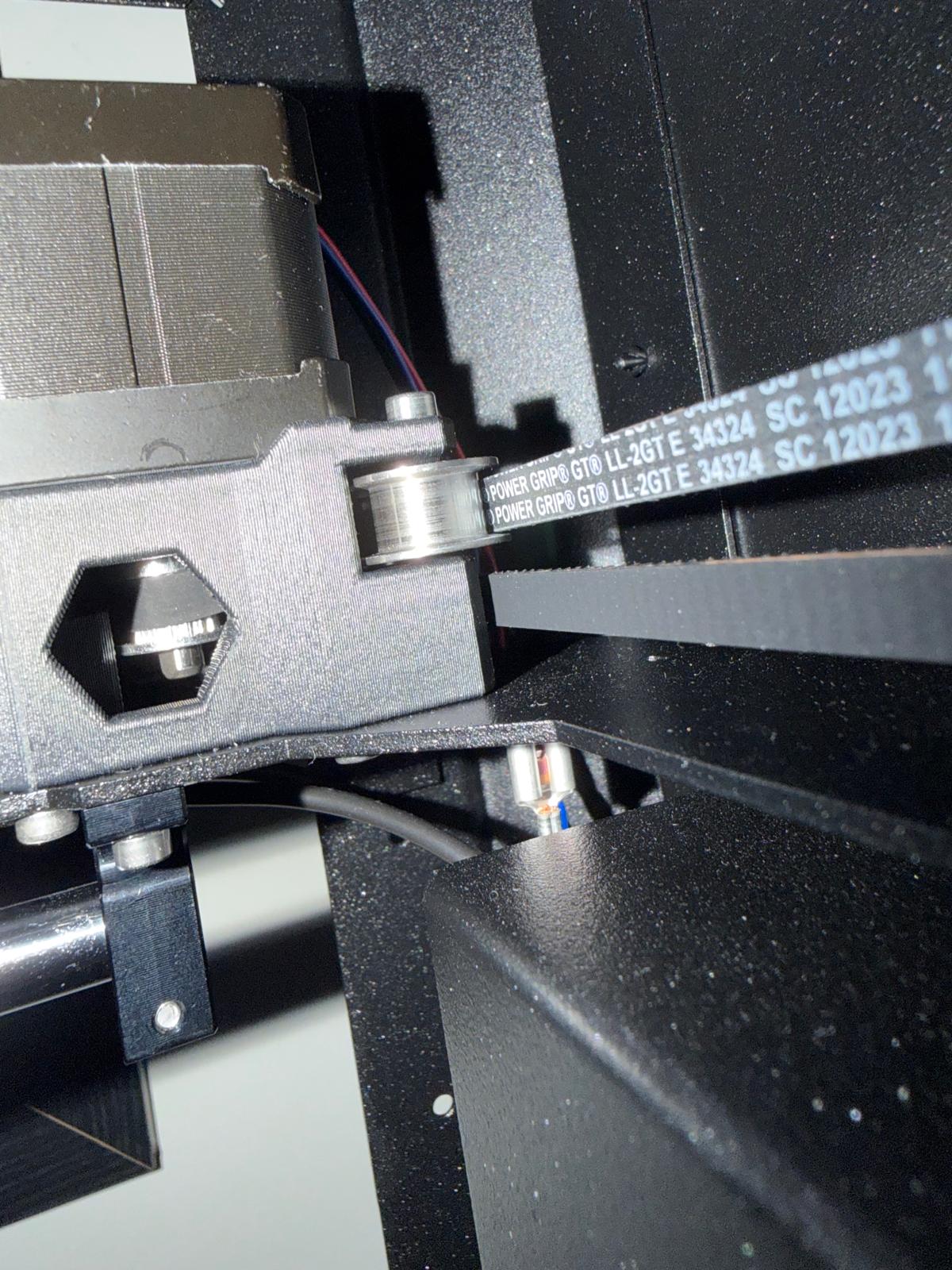
Thanks for the feedback, yes, its the X motor back left. As you can see I've messed up the pulley 🙁
Prusa MK4s > CoreOne | Prusa Mini | BondTech Extruder | BondTech Heatbrake | Supper PINDA Ender 3 Pro | Micro Swiss Direct Drive and Hotend | WamBam Bed
RE: X Axis Motor Install Mistake
Indeed, that dos not look right... You used the spacer tool correctly (with just the narrow gap between motor and pulley), but put the pulley on the wrong way round.
Fingers crossed that the disassembly and reassembly goes smoothly! It may be a bit of a fumble to get the pulley back into the belt loop. If you need more slack on the belt, I would loosen the X belt tensioner to the point where it comes apart.
RE: X Axis Motor Install Mistake
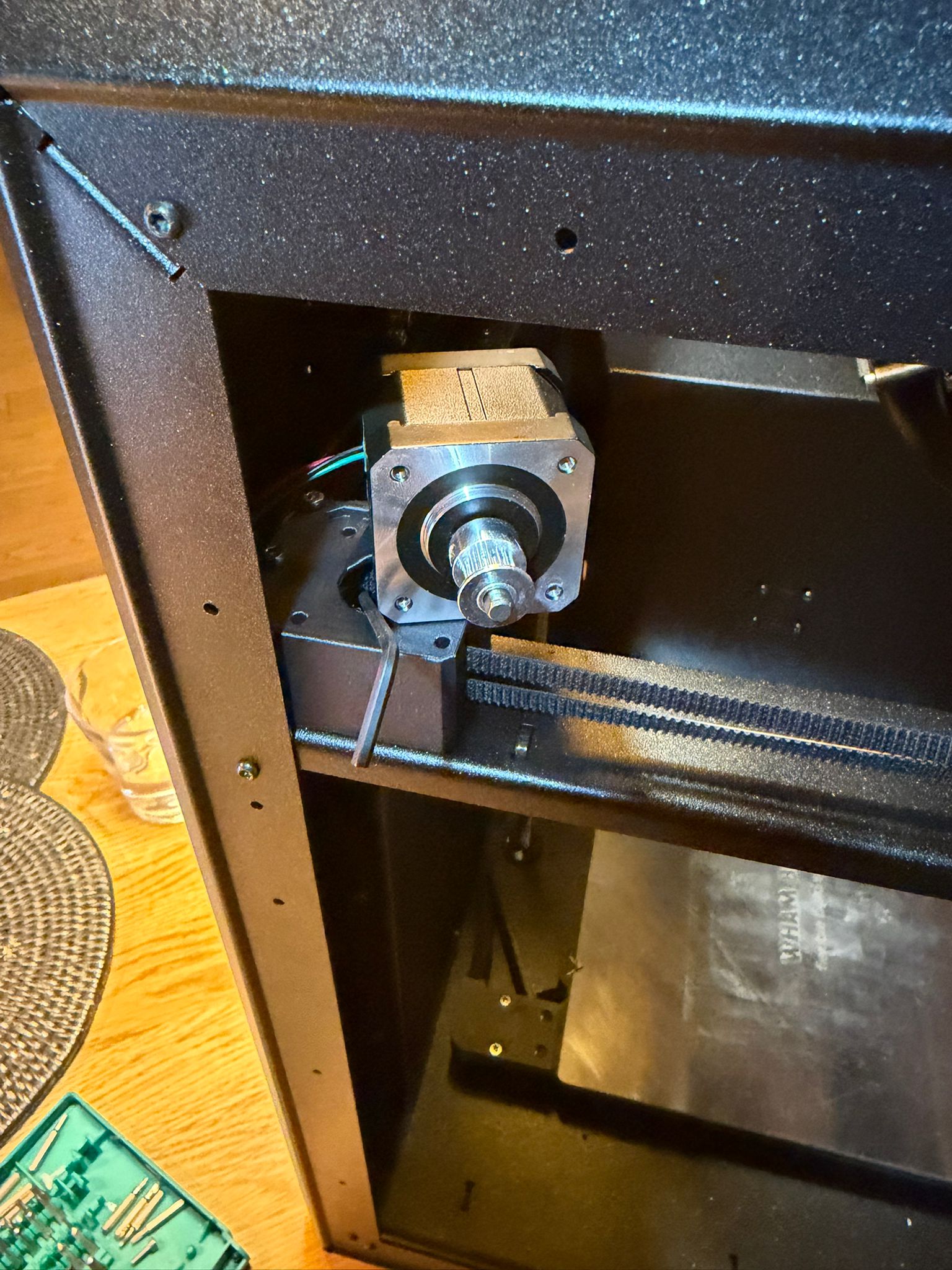
Took the side panel off, loosened the belts, hooked in to keep the belt loop, unbolted the motor, turned the pulley round, reinstalled the motor. working 🙂

Prusa MK4s > CoreOne | Prusa Mini | BondTech Extruder | BondTech Heatbrake | Supper PINDA Ender 3 Pro | Micro Swiss Direct Drive and Hotend | WamBam Bed
RE: X Axis Motor Install Mistake
Y calibration failing as expected, not sure if I should lol or cry
Prusa MK4s > CoreOne | Prusa Mini | BondTech Extruder | BondTech Heatbrake | Supper PINDA Ender 3 Pro | Micro Swiss Direct Drive and Hotend | WamBam Bed
RE: X Axis Motor Install Mistake
Y calibration failing as expected, not sure if I should lol or cry
I think there are mainly two things which can get in the way of Y calibration:
- Ensure that the belts are properly tensioned and the gantry is squared (touches front left and right at the same time). This is best aligned with the new firmware 6.4.0 RC and the updated instructions here: https://help.prusa3d.com/article/adjusting-belt-tension-core-one-l-core-one_845048
- Make sure that the cable from the filament side sensor (right side panel) runs straight towards the back. If it bulges inwards it can get in the way of the travelling Y bearing and cause step loss.
I hope it's one of those issues -- both are relatively easy to fix.
RE: X Axis Motor Install Mistake
I downloaded version 6.4 and flashed the CoreOne with no issues. I tensioned the gantry, and it now touches the front left and right simultaneously. I then ran the belt wizard, but it crashed after about 5 seconds on prusa.io/31102.
I’ve checked and double-checked the pulleys, and everything appears correct. All motion is smooth, and the cable from the filament side sensor isn’t interfering as far as I can tell.
I tuned the belts using the belt tuner app and eventually got both sides to 94 Hz, but the belt wizard still crashes and when trying the Y-axis on its own it continues to fail.
Prusa MK4s > CoreOne | Prusa Mini | BondTech Extruder | BondTech Heatbrake | Supper PINDA Ender 3 Pro | Micro Swiss Direct Drive and Hotend | WamBam Bed

RE:
I downloaded version 6.4 and flashed the CoreOne with no issues. I tensioned the gantry, and it now touches the front left and right simultaneously. I then ran the belt wizard, but it crashed after about 5 seconds on prusa.io/31102.
I’ve checked and double-checked the pulleys, and everything appears correct. All motion is smooth, and the cable from the filament side sensor isn’t interfering as far as I can tell.
I tuned the belts using the belt tuner app and eventually got both sides to 94 Hz, but the belt wizard still crashes and when trying the Y-axis on its own it continues to fail.
How did you tension the belts? I'm assuming you turned both screws equally? Is the gantry still square after tuning the belts? I haven't had any issues at all with the belt wizard crashing. I would suggesting though filing a bug report here: https://github.com/prusa3d/Prusa-Firmware-Buddy/issues click on the green "New Issue" button to create.
RE: X Axis Motor Install Mistake
How did you tension the belts? With the two tensioning bolts at the front of the machine
I'm assuming you turned both screws equally? Not ready yet, I just trying to get the tuning MHz the same on both side
Is the gantry still square after tuning the belts? Yes, but I should note that when the belts are loose, the gantry on the right-hand side is about 3 mm out of square. I have tried moving with a little force, no joy
Prusa MK4s > CoreOne | Prusa Mini | BondTech Extruder | BondTech Heatbrake | Supper PINDA Ender 3 Pro | Micro Swiss Direct Drive and Hotend | WamBam Bed
RE:
How did you tension the belts? With the two tensioning bolts at the front of the machine
I'm assuming you turned both screws equally? Not ready yet, I just trying to get the tuning MHz the same on both side
Is the gantry still square after tuning the belts? Yes, but I should note that when the belts are loose, the gantry on the right-hand side is about 3 mm out of square. I have tried moving with a little force, no joy
Never turn the screws independently of each other. It will bend the gantry. This is the cause of Y-axis calibration failures.
Start by completely loosening the belt tension, move the gantry to the front of the printer. On the left-hand side, wedge something about 2-3 cm wide (like the universal wrench) between the gantry and the frame and manually bend the right hand side until it is completely square. Next move the print head to the front right corner. Then start tensioning the belts by always turning both screws an equal amount. Start by turning both 2 rotations at a time and when the belts start to gain tension, do 1 turn at a time. As you are tuning to get into range, do 1/4 turn each. But alternate so left 1/4 turn, right 1/4 turn etc. Then switch to 1/8 of a turn. Again never turn the left and right screws by unequal amounts.
RE: X Axis Motor Install Mistake
Thank you, I'll give that a go and update 🙂
Prusa MK4s > CoreOne | Prusa Mini | BondTech Extruder | BondTech Heatbrake | Supper PINDA Ender 3 Pro | Micro Swiss Direct Drive and Hotend | WamBam Bed