
Prusa CORE One extruder clicking
Hello, I’m trying to print a lithophane lamp, but during the print the extruder occasionally stops feeding filament and starts clicking. I’ve already printed several lamps without any problems. The print time is about 1 day. The filament is Prusament PLA Vanilla White, new and dried. Here’s what I’ve tried so far:
- Significantly reduced print speed (to 40 mm/s)
- Printed with the door open (previously only the vent grilles were open and chamber ventilation was on); current room temperature is 22 °C / 71.6 °F
- Varied the extruder spring tension
- Switched the nozzle from an E3D HF ObXidian back to a standard brass nozzle
It keeps happening that the extruder stops feeding filament and starts clicking. When I then cancel the print and extrude filament via the menu, there are no problems, so I would rule out a clogged nozzle (especially considering I already changed the nozzle).
As mentioned, I’ve already successfully printed three lamp shades. Then the filament ran out and I switched to new Prusament (same color). That’s the only difference compared to the previous prints that I can think of—however, as I said, it’s brand new and dried.
Do you have any idea what else I could test? I’m a bit at a loss.

RE: Prusa CORE One extruder clicking
Oh, I know that – but with PETG. I started another print last night and bang, it was over in the 10th layer. The filament wasn't being fed.
What layer height are you printing with?
What is your flow factor?
Reducing the printing speed is not a good idea. PLA in the Nextruder is already problematic because of the heat. That's why it's better to print faster so that it doesn't heat up too quickly and too much.
Take a look in the Nextruder when it clicks to see if the filament has jammed at the edge of the nozzle inlet.
Mods for Core One: Core One HT 450 degrees, Comfortable display , Very fast print start and Reducing noises
Mods for Prusa XL: Very fast print start

RE: Prusa CORE One extruder clicking
In my case it was blocked nozzle, I had to disassemble and go through the "cold pull" procedure to unblock.
https://help.prusa3d.com/article/clogged-nozzle-core-one-core-one-l-xl-mk4-s-mk3-9-s_411823
RE: Prusa CORE One extruder clicking
Hi Jan, thank you very much for your reply. Okay, got it — then I’ll increase the speed again a bit. Since this is a lithophane lampshade, I need a lot of detail and I’m printing with a 0.1 mm layer height. In my case, the problems also only occur later on, not right at the beginning of the print.
I’ve attached a photo of my last catastrophic print. I wasn’t in the room, otherwise I would have stopped it earlier. At around 11.5 mm you can already see the first issues where the extruder stopped feeding filament. Then it seemed to work again for a few layers before several layers were printed in mid-air again.
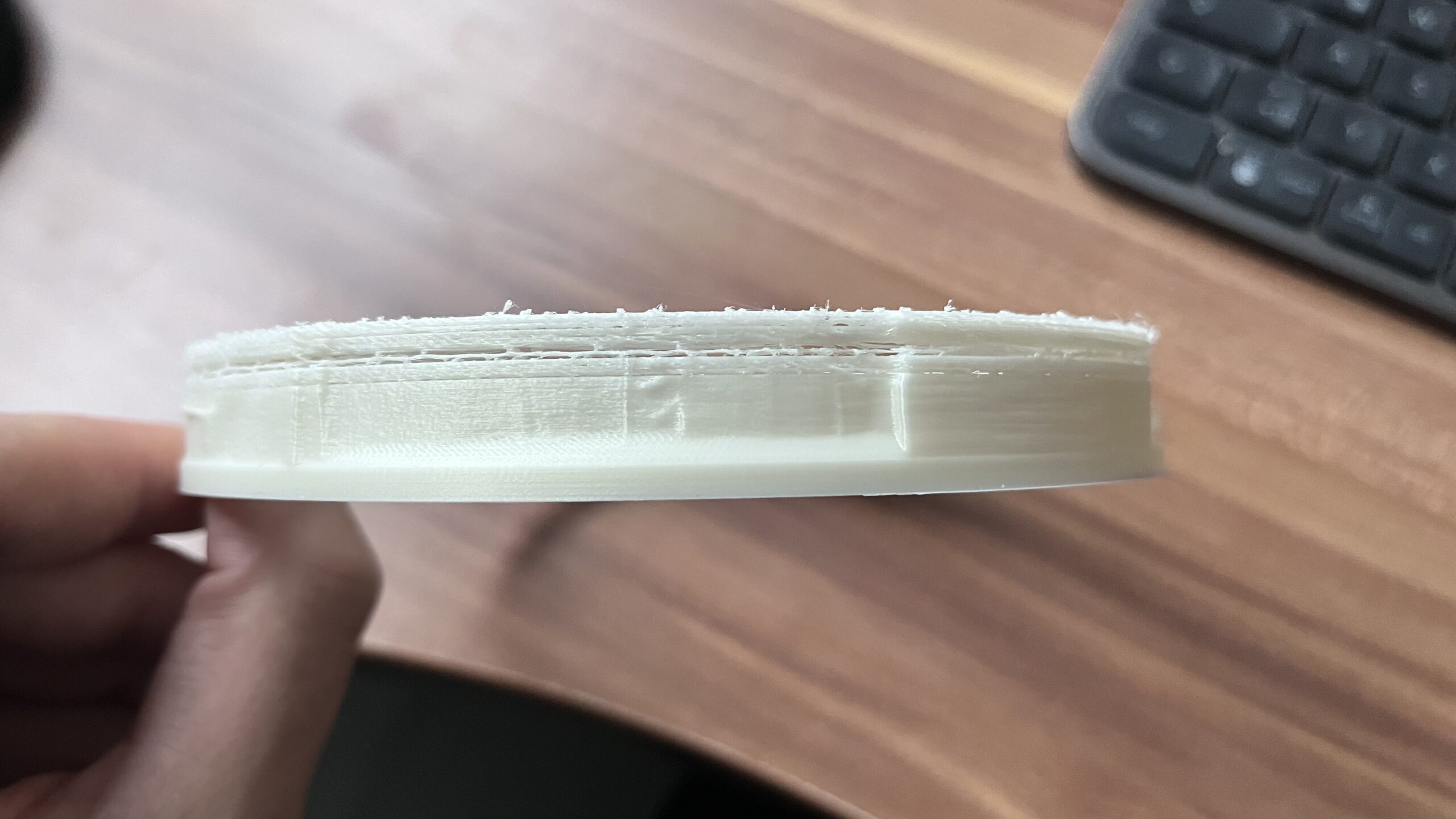
I’m using the standard 0.10 mm FAST DETAIL profile for printing (okay, as mentioned, with reduced speeds), and the Prusament PLA filament preset with the flow factor left at the default value of 1. When I just checked the filament profile in the slicer, I noticed that the nozzle temperature is set to 230 °C by default. On the Prusa website, only 215 °C is listed. That surprises me a bit. As I said, I haven’t had any problems with the standard profile so far — except now. But maybe simply lowering the nozzle temperature could help?
RE: Prusa CORE One extruder clicking
Be sure to check your filament to make sure it doesn't break in the idler.As I said, I suspect that your preload on the idler and/or the filament is causing nothing to come out of the nozzle.It may also be that the 0.1 mm layer height causes the filament to jam and the idler to spin at the top.It would be good to start a new print and, as soon as the extruder rattles or makes noise, stop the print and open the idler. Then look at the filament string to see if there are any sharp-edged and clearly visible marks from the gear wheel, whether the filament is squashed or simply mushy.
I would definitely lower the nozzle temperature.
Mods for Core One: Core One HT 450 degrees, Comfortable display , Very fast print start and Reducing noises
Mods for Prusa XL: Very fast print start

RE: Prusa CORE One extruder clicking
For Lithophanes I've found the best filament to be Overture Matte White PLA. I use a 0.4mm diamondback nozzle with 0.15mm layers. I started with a brass 0.25mm nozzle but that was a disaster since it clogged easily so I gave up.
As for the initial 230 temperature that should be OK. I think the issue though is you might want to try a higher temperature and faster speeds. My guess is heat creep is causing a partial clog. Also clean out any gunk in the heatsink fan.
RE:
Sorry for the late reply. I tried printing the lamp again and this time wanted to stay nearby so I could hear the extruder clicking if it happened again. With a 24-hour print, something like that has to be planned 😉
For now, I tried it the way you suggested. In the standard Prusament PLA profile, a temperature of 230 °C is set — I reduced that to 215 °C. I also increased the print speed from 40 mm/s to 70 mm/s.
During the print, I sat next to it for a good 12 hours (home office), and the extruder didn’t click even once. The rest of the print also seems to have gone smoothly, because it looks like filament was being fed the whole time. I can’t see any gaps.
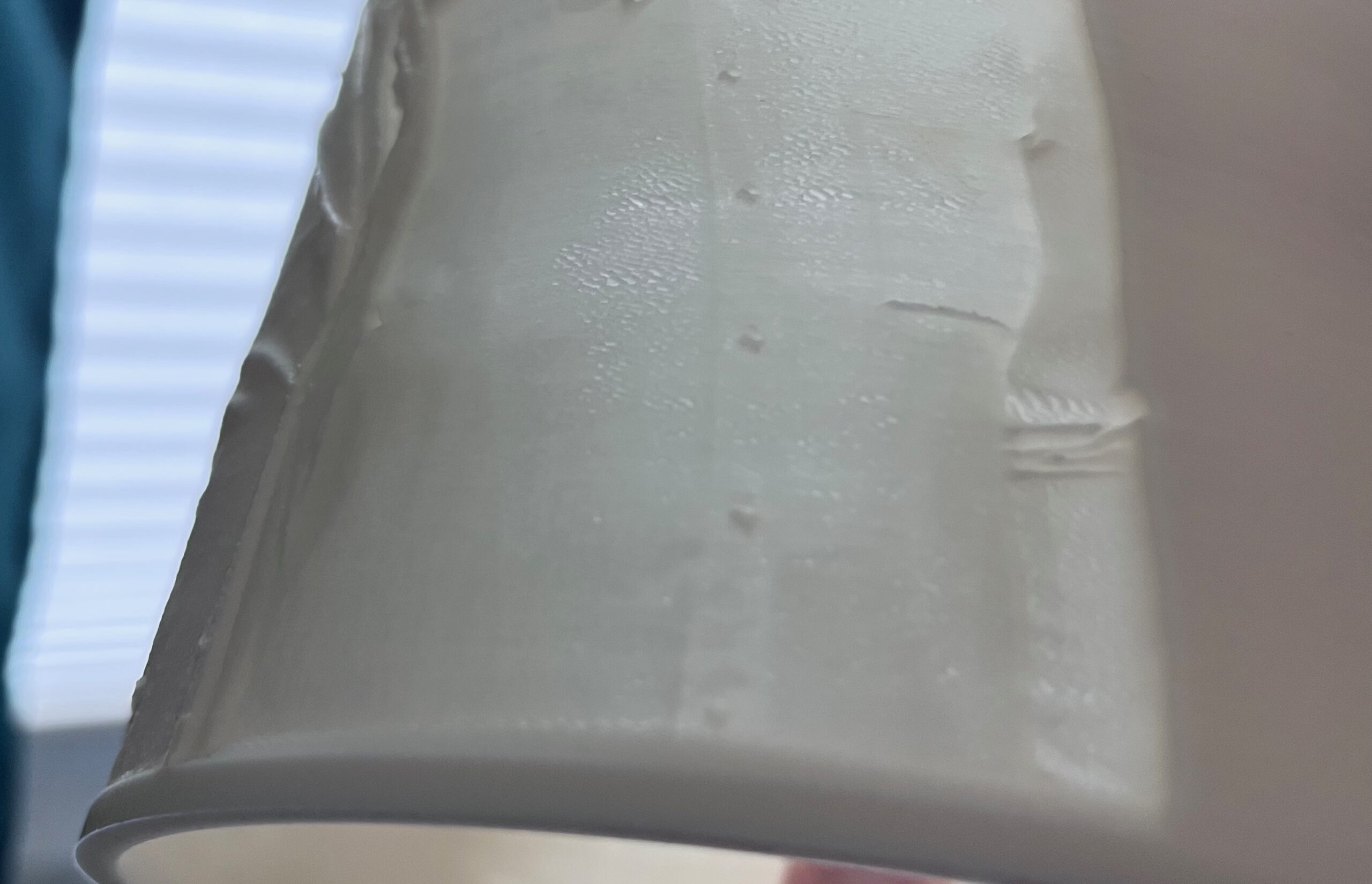
Now I actually have another problem, which would probably fit better in a new thread. I’ll try it here anyway… In some places I can see small holes in the print. I can rule out a clog — it’s too systematic, over several layers, and I don’t think it’s a printing error. With a lithophane you might assume it’s just brighter areas in the photo, maybe a light reflection — but it isn’t. There’s also nothing visible in the slicer; everything looks normal there.
However, it’s worth mentioning that after generating the litho, the slicer detected and repaired quite a lot of errors (30,000+) as well as 10 open edges. From what I’ve researched, that seems relatively normal for lithos. Could that possibly be related?

RE: Prusa CORE One extruder clicking
Hello, it seems the Nextruder doesn't like slow printing, or rather, low filament flow rates. The heat isn't dissipated quickly enough, leading to premature melting of the filament in the heat break zone and resulting in partial clogging, which in turn causes underextrusion. I recently observed this myself with TPU Extrudr Flex hard. At a maximum extrusion rate of 1.5 mm³/s, I had very poor results in terms of underextrusion and surface quality. At 3.5 mm³/s, it was okay. Therefore, a certain throughput seems necessary to keep the melt zone stable. Could you mark which holes you're referring to in the image?

RE: Prusa CORE One extruder clicking
Hello, it seems the Nextruder doesn't like slow printing, or rather, low filament flow rates. The heat isn't dissipated quickly enough, leading to premature melting of the filament in the heat break zone and resulting in partial clogging, which in turn causes underextrusion. I recently observed this myself with TPU Extrudr Flex hard. At a maximum extrusion rate of 1.5 mm³/s, I had very poor results in terms of underextrusion and surface quality. At 3.5 mm³/s, it was okay. Therefore, a certain throughput seems necessary to keep the melt zone stable. Could you mark which holes you're referring to in the image?
Try thermal paste on the nozzle and reduce retract settings. It really helps, especially with the 0.25 mm nozzle. Also check the heat break temperature (put on footer), it shouldn't go far above chamber temp or there may be some fan issue. It loves to collect filament stringing, for example.