
first print trash; extruder "clicking" noises
Finally got the printer assembled, got all of the calibrations to succeed etc. Tried the "first print" (prusa keychain straight from the included USB) and it went poorly. I didn't change any of the default settings (temperature, speed, etc). I used the included orange PLA. I'm new at this so please forgive incorrect terms.
I stopped the print at around 50% because the nozzle was running into and scraping away what it had already printed (layers?), flicking bits of dried filament all over the place. It was also making the same noise in the video included in @leon-m's post[1]. At first, I thought this noise was the z-axis jamming but as best I can tell, it's the extruder moving the nozzle up(?), and then some kind of spring tension releases and it slams back down. This happens a few times per second and the sound is the same as in the video.
I'm not positive, but I think this also ruined the first side of the included print sheet. I can't tell if there's a thin layer of filament material that I can't get off the sheet, or if the extruder carved the pattern of the keychain into the print sheet. Either way, it's no longer a smooth sheet. Since I only have one more side to ruin, I'm hesitant to try again until I have some idea of what's going on.
Possibly related: After the failed print, I ran the z-axis calibration test again to make sure that was working properly. It was fine. The next test is the "load cell" so I tried to do that one. This test succeeded during the initial calibration, but now the printer keeps saying I "didn't touch the nozzle or touched it too soon". I've tried about 10-12 times. I also tried unloading the filament and re-running this test, got the same result. I can see on the display the little horizontal line moving when I touch the nozzle, but the test isn't able to pass to the printer's satisfaction for some reason anymore. As best I can tell, the nozzle moves freely up and springs back down.
thanks
Best Answer by Jürgen:
It is normal that the Core One forgets its XYZ positions when powered off. You do not need to run the "Z alignment calibration" in that case (where the bed moves down to the mechanical end stops), only the "Auto home" (where the bed moves up until it reaches the nozzle's load cell). The printer will also do the homing on its own before a print.
If the Z axis test fails, it might not be related to the mechanical Z drive at all, but could also be due to problems with the load cell sensing. A somewhat common and easily fixed cause seems to be that the nozzle is not inserted far enough into the hotend. There should only be a gap of ~ 2mm between the heater block and the brass part of the nozzle, as shown here.

RE: first print trash; extruder "clicking" noises
Probably your nozzle is not fully inserted into the heat sink. Make sure it looks like this and that the thumbscrews are tight.
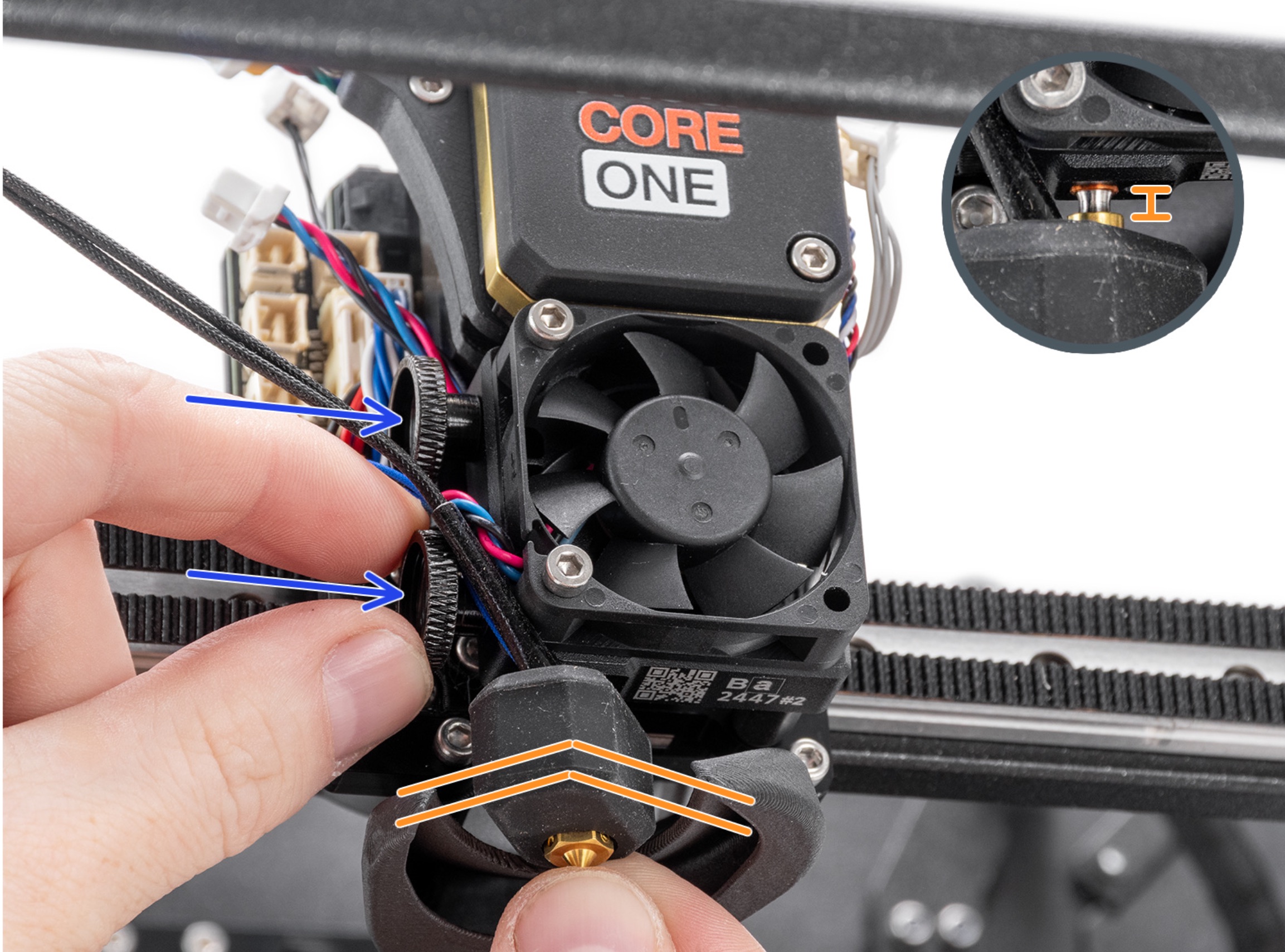

RE: first print trash; extruder "clicking" noises
The assembly shouldn't go flush all the way in, the heat break needs to be visible, right? I have about 2-3mm gap on mine. Occasionally it complains about the load cell, but I think that was because the thumbscrews loosened. Don't care for the thumbscrews all that much, since they are hard to access/tighten. However, one needs to avoid over tightening those screws, which will damage your nozzle assembly. So I guess they are appropriate for most. Loose thumbscrews will give weird printing, had that happen.
I also have the silicone sock installed. If you've ever goobered up your hot end, you will buy a sock. Buy one on your next order, they are cheap to throw in, just like a brass brush.
Usually, when I heard clicking in the extruder, the screws (with the springs) at the top of the extruder were too loose. Had that while fooling around with TPU on my MK4S. Haven't tried TPU on my Core 1+ yet, that will be a future adventure.
RE: first print trash; extruder "clicking" noises
This photo is for the Mk4 but the same applies to the Core One. You should only see a sliver (<0.5 mm) of copper from the heatbreak tube if the nozzle is properly inserted.

RE: first print trash; extruder "clicking" noises
Thanks for the replies. The nozzle was out too far, but now looks like your photos. I applied a little more force to "tapping" the nozzle, the load cell test finally passed.
Unfortunately I can't get the z-axis test to pass now. It's making a horrible squealing noise as the plate moves to near the top of its travel. The noise stops if I touch the guide that goes around the rear/center z-axis motor, but I don't know if that noise is the problem. It's a little frustrating that you can run a calibration/test like this and it just fails. You get a red x where the green check should be but no other information. I don't want to try to print again until I can get all the tests to pass again.

RE: first print trash; extruder "clicking" noises
Go to controls then move axis and move the Z axis to the bottom, then up a few cm. Disable the motors. Can you turn the screws by hand up and down a bit, without too much resistance? The motor itself will have detent resistance, but they should all be the same. I'd probably loosen the screws holding the trap nuts at this point, to see what free feels like, then carefully tighten them again to be sure the nuts are centered. With the plate at the bottom, is the back screw centered in the guide bracket? If you move the Z axis again, does the rear screw wobble in the hole, or do the front screws, which don't have a lot of clearance, seem to want to? Trust your senses and your fingers. The ultimate goal is for the plate to move freely over the full travel. Failing the Z cal is probably telling you that something is binding, but the machine can't tell you exactly what.
RE: first print trash; extruder "clicking" noises
Just want to add that whenever you disturb the Z screw positions you have to run the Z calibration routine again. I think (not sure) that's the only time the system bangs the platform against the bottom, establishing the synchronization of the three screws. I should look next time I print something, or if somebody knows different, please speak up! (My Core One is so trouble-free I usually push print and walk away!)
RE: first print trash; extruder "clicking" noises
Thanks for the reply. The screws appear to turn freely, except for the stepper motor detents you described.
I removed the trap nuts (I think you're referring to the nuts in the lower part of the two plastic pieces that hold the plate on the rear z-axis screw/motor?) and reassembled that piece with no luck. I also tried loosening the screws a bit, and it reduced the noise a little but didn't pass the test. When I tightened them back up, the noise seemed to get worse.
The back z-axis motor screw appears to be centered, and moves around freely when the plate is at the bottom. As best I can tell visually, nothing is wobbling. The front two z-axis motor screws appear to operate normally, and don't seem to wobble or have any specific issues that I can tell. The screeching noise that happens when the plate nears the top of the travel seems to be the rear z-axis motor against the guide. A slight squeeze with my fingers on that guide makes the noise go away.
The noise seems to suggest there's some kind of interference between the motor screw and that guide, but nothing that appears to be binding or hanging up. The plate is able to complete its full travel, but it doesn't - to me at least - seem to be as smooth as it probably should be.
I do wonder, since I've had such a hard time getting the nozzle correct, if the z-axis test is using feedback from the load cell and isn't seeing what it expects when the plate reaches the top of its travel. The load cell test passes, and it looks to me like during the z-axis test the plate is reaching the end of the nozzle.
Linked a video of the test below. Sorry for the vertical video but it seemed to be the best fit for this, and really sorry to your ears for when the plate starts moving back down.
RE: first print trash; extruder "clicking" noises
That video looks fine going up. I've never heard that squeak on the stop and there's certainly some problem going down, but I'm actually surprised it doesn't pass the Z calibration. It doesn't appear to be binding. I'd go a step further with the trapezoidal nuts since it's not hard to do. Send the plate to the bottom and remove the screws entirely. If you spin them up the screws, are they all free, with a tiny bit of clearance, and don't wobble? Reassemble and try again! Somebody else must have some opinion after watching the video, as I'm not sure where to go from here. Though I'm not a fan and it's hard to undo, a very small amount of light oil on the screws might be worth trying, but I'd want other opinions first.
I don't know exactly what the Z calibration looks for but I assume it knows the distance from the bottom, to impact with the nozzle, and if it sees the wrong time or number of steps, it fails the test. But that's only a guess on my part.
RE: first print trash; extruder "clicking" noises
Definitely something is binding. Loosen the screws on the nuts but not all the way, move it up and down then to the bottom then tighten evenly but do not over tighten.
RE: first print trash; extruder "clicking" noises
Still thinking- I've never had to worry about the rods and ball bushings, but if you undo the nuts and spin them up to the top, can you carefully lift the plate from top to bottom? Never done it, but I assume it should make no noise, glide smoothly and not bind. Don't tilt it!

RE: first print trash; extruder "clicking" noises
Another thing to try is to remove the screws holding the T-nuts (Trapezoidal nuts) on the Z shafts. Spin each nut on the shaft and see if it moves freely. This is because Prusa did have some nuts that were out of tolerance and were too tight. The nut should spin to the bottom if you spin it to the top and flick it to get it started. It's OK if you can't get it to free-spin but if it stops quickly, you may have bad hardware. Infrequent, but worth checking.
RE: first print trash; extruder "clicking" noises
Another thing to try is to remove the screws holding the T-nuts (Trapezoidal nuts) on the Z shafts. Spin each nut on the shaft and see if it moves freely.
These all seem to move freely. I spun the back one all the way up to the top and it was loose enough that it would almost spin down under its own weight.
When I spun it back down, it wouldn't quite turn all the way to line up the screw holes, so I basically had to spin it up 1/2 turn to get the holes to line up to re-insert the screws.
I did the z-axis alignment calibration, and then the z-axis test again. The z-axis test made less noise from the rear/center than it did before, but still some noise and the test failed.
RE: first print trash; extruder "clicking" noises
While the nuts were loose, did you spin them all the way up and then try to move the plate up and down just on the ball bushings? There might be a clue there.
RE: first print trash; extruder "clicking" noises
While the nuts were loose, did you spin them all the way up and then try to move the plate up and down just on the ball bushings? There might be a clue there.
Yep, I did. The plate moved smoothly and without any binding or problems.
The noise is quieter and doesn’t go on for as long, but it’s still there and the z-axis test failed.

RE: first print trash; extruder "clicking" noises
These all seem to move freely. I spun the back one all the way up to the top and it was loose enough that it would almost spin down under its own weight.
When I spun it back down, it wouldn't quite turn all the way to line up the screw holes, so I basically had to spin it up 1/2 turn to get the holes to line up to re-insert the screws.
I did the z-axis alignment calibration, and then the z-axis test again. The z-axis test made less noise from the rear/center than it did before, but still some noise and the test failed.
Did you loosen all six M3 screws (3*2) which old the three trapezoidal nuts at once? The lateral position of the bed should be defined only by the two smooth rods. The nuts need to settle into matching lateral positions, to avoid strain in the Z drive.
Also, many kit builders have found that they need to lubricate the lead screws to avoid noises during movement. The squeak you get towards the end of the Z range is pretty unique, but groaning noises during longer Z travel are not uncommon. Applying a bit of the lubricant that came with the kit has fixed the noise in all cases I have followed here on the forum.
RE: first print trash; extruder "clicking" noises
Just wanted to add, since I mentioned it above, I've now watched my printer over multiple power-ups and prints and the only time the three lead screws are run to the bottom and synchronized is when you do a Z calibration. The printer assumes that no lead screw has been disturbed and that no step has ever been lost, forever! Thus, if you disturb a lead screw or suspect anything unusual has happened during a print, it would be wise to run the Z calibration. In fact, I could make the case that it should be done regularly, depending on how much the printer is used.
RE: first print trash; extruder "clicking" noises
I have Z calibration included in the starting G-code and it always performs it before each print. Just insert the line G162 Z; Calibrate Z before the line with the code G28; home all without mesh bed level. And if you also edit the line like this: G28 I; home all without mesh bed level, you will eliminate that annoying banging of the print head. For most parts, basic head position accuracy is enough. And to avoid any mistakes, the added letter is a capital I like India.
RE: first print trash; extruder "clicking" noises
For most parts, basic head position accuracy is enough.
I would not expect the lower-accuracy, fast XY homing to have any impact on the part being printed. The only benefit of the extra-accurate homing (with multiple head bangs) should be the ability to accurately resume a print after a power failure?
RE: first print trash; extruder "clicking" noises
Just wanted to add, since I mentioned it above, I've now watched my printer over multiple power-ups and prints and the only time the three lead screws are run to the bottom and synchronized is when you do a Z calibration. The printer assumes that no lead screw has been disturbed and that no step has ever been lost, forever! Thus, if you disturb a lead screw or suspect anything unusual has happened during a print, it would be wise to run the Z calibration. In fact, I could make the case that it should be done regularly, depending on how much the printer is used.
Well, the mesh bed leveling will take care of minor deviations (tilt) and will complain if the tilt becomes too large.
For large prints with high precision requirements it might become relevant if the bed surface it not actually aligned with the Z travel direction. So I would re-run the Z calibration ahead of such critical prints; and of course if I know that I have adjusted or knocked something. But I don't run the Z calibration routinely. The unpleasant noise is holding me back more than the time it takes, I guess.