
RE: Factory assembled Core One+: Printer decalibrates during print ?
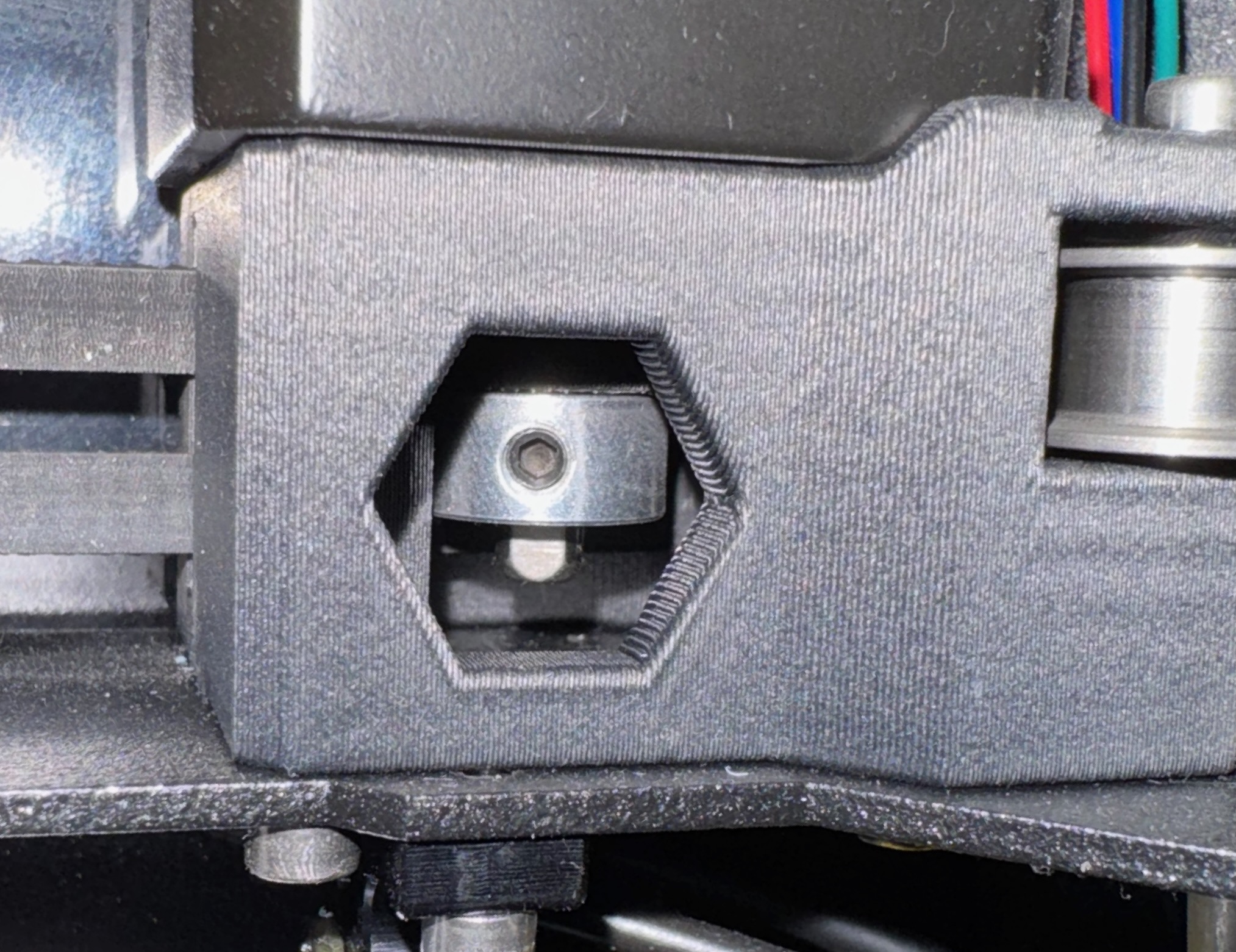
I seem to remember somewhere, there was a similar issue that was caused by the grub screw on the X or Y motor pulley that was not binding against the flat part of the motor shaft. This was on a factory assembled printer.
Yes, that's exactly what I tried to describe yesterday, but apparently was not clear. Can you find a photo for Martin which shows where to look, by any chance?

RE:
Hello again, thanks for all the effort !
I have as well the impression, that fast movements put the printer out of position. I was now opening the plexiglas on the top and checked about all the screws in there for being fixed (I found no one really loose). I tightend those, which I thought could be a bit more tightened, especially those on the xy-motors (4 screws at each side, in addition to those at the roles). After that I went through all calibration steps again (since the printer demanded that) - everything on "green ok" again. Finally I took another try on the model (see above). This time the printer moved to the middle, but still gets depositioned after every fast movement (see picture).
To the point of position of the plate: I tried several positions (the last in the picture is - I think - the one proposed). Still no real effect.
Another idea I could think of would be to renew the firmware - is that of use ?
Thanks again for any help or more ideas.
Here is the page that describes ensuring the grub screws are tightened against the flat part of the motor-shaft: https://help.prusa3d.com/guide/5-corexy-assembly_835522#843284
I've seen in a few places now, including a review of the Core One L on YouTube where factory assembled units had this problem. That is the person manually assembling the printer at Prusa wasn't following their own instructions.
Even if you didn't build the kit, it's worth reading through the assembly guide because there is a lot of useful information with regard to self-repair.
RE: Factory assembled Core One+: Printer decalibrates during print ?
Thanks! The page shows the motor and pulley before they are installed on the CoreXY frame. My point was that it is not necessary to disassemble everything, but that the grub screws can be reached while the motor (and pulleys, and belts) are all in place. But there are no photos in the build guide which show that, since the situation does not occur during the regular build process.
RE:
Thanks! The page shows the motor and pulley before they are installed on the CoreXY frame. My point was that it is not necessary to disassemble everything, but that the grub screws can be reached while the motor (and pulleys, and belts) are all in place. But there are no photos in the build guide which show that, since the situation does not occur during the regular build process.
Happen to be working from home today so here it is. For @Martin: there are two grub screws. One of them has to be tightened against the flat part of the motor shaft as in this photo. The other motor (Y) is hard to see because the pulley is flipped around, offset and covers the shaft.
RE: Factory assembled Core One+: Printer decalibrates during print ?
Perfect, thanks! That's the view I was trying to describe in so many words...

RE: Factory assembled Core One+: Printer decalibrates during print ?
Thanks to all ! I checked about the grub screws (left and right) - there are two on either side and they were all properly tightend (enclosed the pic of both sides).
For today I have no more time for checks (job to do) - I guess I will continue with the belts tomorrow.
RE: Factory assembled Core One+: Printer decalibrates during print ?
Hmm, the fact that the screws were not loose is actually disappointing. That was the hot candidate I could think of, based on the behavior visible (and audible) in the video. I'm running out of ideas, I'm afraid.

RE: Factory assembled Core One+: Printer decalibrates during print ?
Yes, that would have been the logical cause and an easy fix. So many times in troubleshooting one zeros in on what should be the obvious problem, only to find it's something entirely different.
RE: Factory assembled Core One+: Printer decalibrates during print ?
Hello to all. I finally checked the belt tensions and in this process I saw a gantry displacement by about 1-2 mm. Adjusting this, I would not call it a "gentle force in the opposite direction" as described in the documentation. Putting a key at the tighter side and applying "some" force as shown in helped ...
The frequency tests on the belts worked (the fine tuning works better, if one sets the desired frequency and turns the adjustment screws until the belts shows some (horizontal) resonance.
The first test on a very simple example (keyring_0.4n_0.2mm_PLA_COREONE_4m) showed a perfect print so far.
Before I cry "Halleluja" I would first make a test with a bigger (2 hour) model, but so far it looks as the gantry displacement (and maybe wrong belt tensions) could have been the trouble.
Once the bigger model runs through (I hope so), I will shortly confirm that (in the other case I reply as well ...).
So far already thanks to the very useful suggestions !
RE: Factory assembled Core One+: Printer decalibrates during print ?
Halleluja ! The bigger model (my own first model, about 3 h) has also finished properly. Problem solved. Thanks to all for your patience with a newbie in terms of 3D printers. It gave me valuable hints (where the problem could be) and - above all - the feeling not to be left alone with the problem.
The problem of XY-displacement was (in this case !) a gantry displacement (whereever this comes from in a factory-assembled printer). The solution was belt tension (this contains also the gantry alignment).
Thanks again !
Martin