
First layer calibration looks good, then I get this.....
This is a program I have ran over 100 times. Its HS Petg. This just started happening. I have changed the nozzle and have had no luck. Any ideas?
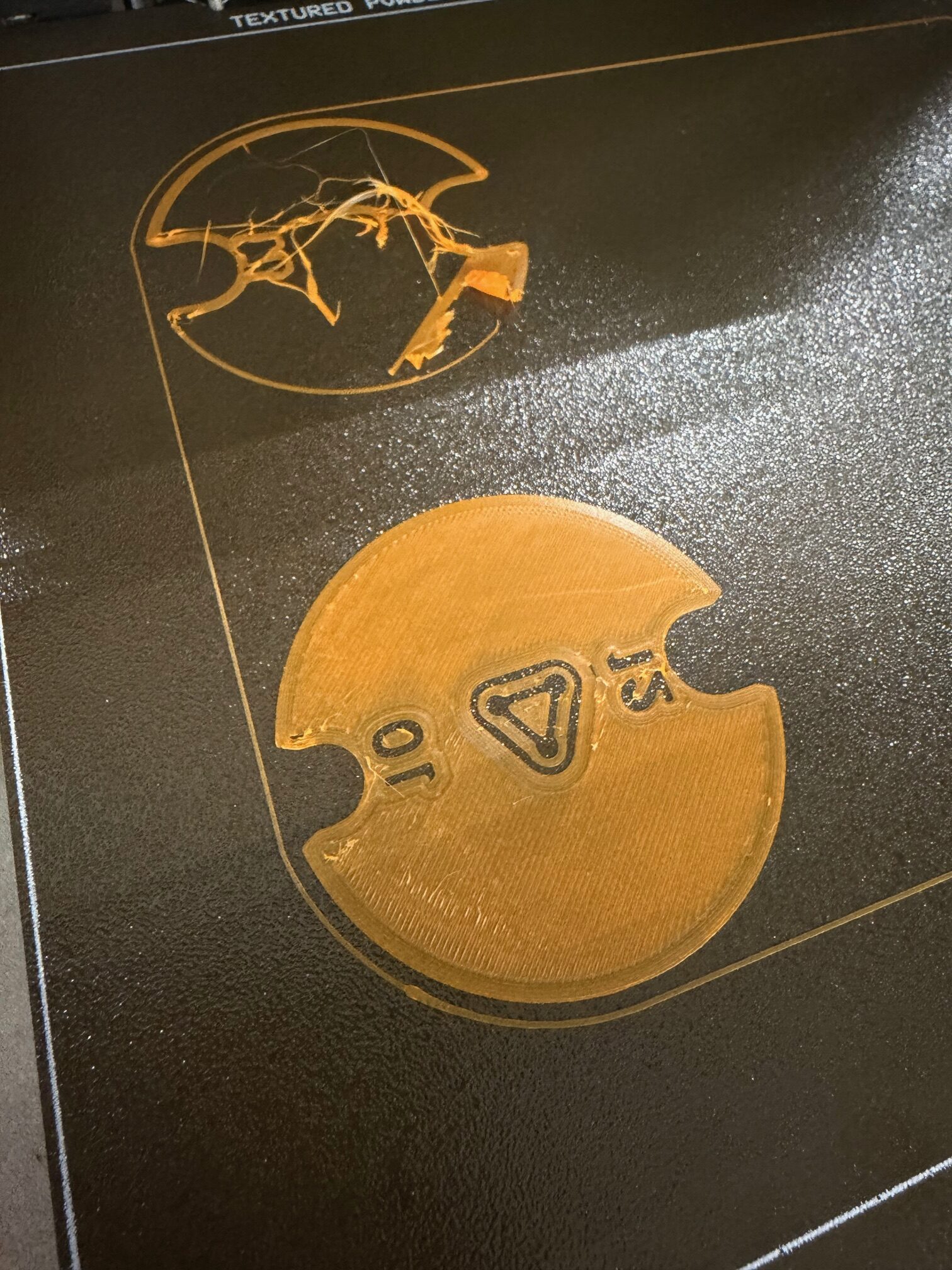
RE: First layer calibration looks good, then I get this.....
Additionally, it prints black PetG just fine.
RE: First layer calibration looks good, then I get this.....
The comment I made about the black PetG is void now. It printed better but still messed up.
How are you cleaning the build sheet?
Cheerio,

RE: First layer calibration looks good, then I get this.....
Any change to filament may make an issue. Even the same brand and type may change due to the manufacture date and process. I do a calibration series on all filaments and find that two spools may have different settings when calibrated.
RE: First layer calibration looks good, then I get this.....
90% isopropyl
OK, good for general inter-print cleaning but there are a couple of things that can slowly build-up that it can't easily shift. Look for the many threads here about using HOT water and dish-washing detergents.
Cheerio,
RE: First layer calibration looks good, then I get this.....
Everyone always says to use isopropyl alcohol to clean their build plates with. If it is 90% alcohol, what it the other 10%. Water. While some of the oils will be cleaned off some of it is just going to be smeared around as the alcohol evaporates faster than the water. I use denatured alcohol on my printers. In the US it is commonly sold as "Stove Fuel" at your hardware store. It is 100% alcohol. My current primary printer is a 3S+ I built over three years ago. Before first use the build plate got the hot water/detergent cleaning everyone recommends. It has not been cleaned since other than a quick wipe down with denatured alcohol on a paper towel before each print. I have not had a single print failure in all that time.
Bed deposits seem to vary according to the filament printed - even some colours are worse than others and of course it also depends on the users' cleanliness - school and college open-use printers can be - horrible.
Cheerio,

RE: First layer calibration looks good, then I get this.....
What's the problem?

RE:
Did you just switch filament types, seen this issue when the nozzle needs a longer purge to clean out. Sure it is dry? Seen issues wiht that. Seen this too, 1st attempt failed 1st layer, the 2nd attempt suddenly works fine. Never had a good explanation.
Core One L MMU3, MK3S
RE: First layer calibration looks good, then I get this.....
I have been running the same program for several months. Using PETG the whole time. I've even changed nozzle and new calibrations to see if it helped. Also tried a new textured plate.
RE:
I've had my Mk3S for 6 years, the pinda probe would move over time until I finally used purple thread locker. Had to reestablish my z offest too many times. Thier zip tie method to get the generic placement, but you need then run live z tests to dial it back in in. I used a different file to get the live Z, never found the built in very good. See below.
Go back to the old plate to sort this out, new plates need to beak in for textured. Stick far less when they are new, just another variable.
Core One L MMU3, MK3S
RE: First layer calibration looks good, then I get this.....
Was working on a project that had many 3D printed parts. Was looking at using threadlocker for the project. My research found that thread locker degrades plastics very quickly.
I agree with the Pinda moving. I printed mine out of ASA last time I rebuilt my system. Just about to do it again.
All things shift over time. It is necessary to recalibrate or confirm calibration every once in awhile. R&D was a lesson in calibration.
Are you sure the Pinda is moving? I have suspected mine a couple of times but then realised I had merely experienced some unusually rapid nozzle wear from white filament ... too much titanium oxide pigment.
Cheerio,
RE:
The screw threads into a metal nut, this is why thread locker is appropriate.
Was working on a project that had many 3D printed parts. Was looking at using threadlocker for the project. My research found that thread locker degrades plastics very quickly.
I agree with the Pinda moving. I printed mine out of ASA last time I rebuilt my system. Just about to do it again.
All things shift over time. It is necessary to recalibrate or confirm calibration every once in awhile. R&D was a lesson in calibration.
Core One L MMU3, MK3S
RE: First layer calibration looks good, then I get this.....
In my case, the pinda would wiggle up over time, the cable bend creates tension. The screw losening, allowed this to happen. Verified with height measurement. Never destroyed my nozzle, still using the same one, still prints perfect prints.
Are you sure the Pinda is moving? I have suspected mine a couple of times but then realised I had merely experienced some unusually rapid nozzle wear from white filament ... too much titanium oxide pigment.
Cheerio,
Core One L MMU3, MK3S

RE: First layer calibration looks good, then I get this.....
I Need help. I have not been able to print anything successfully. Printer was retrieve from sitting a storage for more than 2yrs. I did a basic cleaning( brushing, compressed air, alcohol wipe down, and lubricate. installed new hot end, nozzle, heat bed, and a brand new filament.
Printer has latest firmware, and passed all calibrations. My final try was to print this https://www.printables.com/model/251587-stress-free-first-layer-calibration-in-less-than-5 attached images. Yet it still failed. I'm feeling a little disappointment at this point. I'll take any help.


RE:
Use a zip tie to set/verify the pinda height., link below. Follow this video to get rought 1st layer, then follow my guide (3rd digits count on the MK3S)
https://help.prusa3d.com/article/nozzle-crashed-into-the-heatbed_112003
I Need help. I have not been able to print anything successfully. Printer was retrieve from sitting a storage for more than 2yrs. I did a basic cleaning( brushing, compressed air, alcohol wipe down, and lubricate. installed new hot end, nozzle, heat bed, and a brand new filament.
Printer has latest firmware, and passed all calibrations. My final try was to print this https://www.printables.com/model/251587-stress-free-first-layer-calibration-in-less-than-5 attached images. Yet it still failed. I'm feeling a little disappointment at this point. I'll take any help.

Core One L MMU3, MK3S
RE: First layer calibration looks good, then I get this.....
Use a zip tie to set/verify the pinda height., link below. Follow this video to get rought 1st layer, then follow my guide (3rd digits count on the MK3S)
https://help.prusa3d.com/article/nozzle-crashed-into-the-heatbed_112003
I Need help. I have not been able to print anything successfully. Printer was retrieve from sitting a storage for more than 2yrs. I did a basic cleaning( brushing, compressed air, alcohol wipe down, and lubricate. installed new hot end, nozzle, heat bed, and a brand new filament.
Printer has latest firmware, and passed all calibrations. My final try was to print this https://www.printables.com/model/251587-stress-free-first-layer-calibration-in-less-than-5 attached images. Yet it still failed. I'm feeling a little disappointment at this point. I'll take any help.
Thanks for the recommendation. I was able do a full clean print.