
Bulging corners
I've recently started seeing small "bulges" in the corners of my prints. It's only the top layers that show this and it's only 1-2 mm from the corner, not the entire layer.
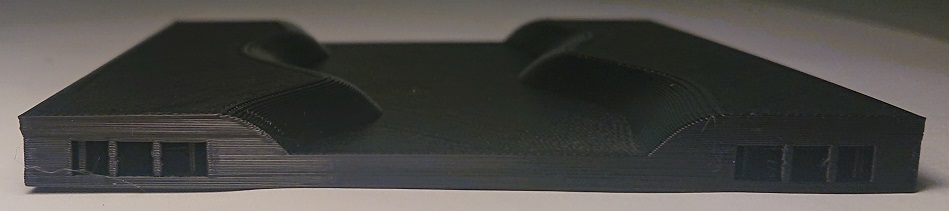
Unfortunately I don't have a picture from the top, but I can add one tonight if it would help.
My first thought was that it might be a speed setting, but since the bottom layers looks fine, I'm not so sure.
I'm printing with PLA and using PrusaSlicer.
Any ideas on what might cause this?

RE: Bulging corners
It may be related to cooling settings in Filament. When a layer takes less than XXX time, the printer slows down. Default is like 20 seconds. You might try lowering the setting to 1 second to test if this is what's happening.
Another test is to add a couple perimeters to avoid the infill pushing them outward.
And another idea that helps certain bulges is to reduce external perimeter speed to 20 mm/s.
RE: Bulging corners
And a second look - seems it can also be partly due to the part warping. The part cools too fast and corners pull up.
RE: Bulging corners
I think you might be right. I checked the print against a flat surface and the corners are slightly warped.
I'm wondering if the weather here might have something to do with it. The temperature has dropped to almost 0° recently and there's a fresh air intake in the same room as the printer. It doesn't feel cold in the room, but maybe there's a very faint draft of cool air that affects the printer.
RE: Bulging corners
Temperatures being cooler is certainly one cause; and probably as important is humidity drops as heaters get turned on. It looks like a small part: try increasing bed temp to 70c, and print it with a full height skirt. See if anything changes.
RE: Bulging corners
It's roughly 100x100x9 mm in size.
I've made a temporary case around the printer and it is printing right now. I'll see how it looks when I get home tonight.
If this doesn't work, I'll try increasing the bed temp.
RE: Bulging corners
It looks much better now. I still see very small amounts of warping though. I'm testing with 70° on bed together with my improvised enclosure now. I'll know tonight if it fixes it.
RE: Bulging corners
Don't forget to try a full height skirt and reduce fan speed to keep local heat in.
RE: Bulging corners
Well, that fixed the warping, but I still get the bulges in the corners.


The speed of external and small perimeters is 25 mm/s. Do you think it might be worth going even slower?
RE: Bulging corners
Try increasing perimeter count to three or four. But I've gone as low as 15 mm/s for perimeters.
Inspect the print speeds in slicer - and see what the program is doing as the layers step up to the stepped curvy region. You might find a speed change there, and more changes as the layers get smaller. Making all the perimeters print the same speed can fix a lot of artifacts. As can adding a perimeter.
If you zip and post the STL it lets other look at the issue too. More eyes can often see missed details.
RE: Bulging corners
This latest model is slightly different from the first one; it has a completely flat top.
I've tried printing a 3x3x3 cm cube as well and I see no bulging on that one.
I will take a closer look at what the slicer is doing and also post the model and settings I'm using tonight.
RE: Bulging corners
You can find the PrusaSlicer project here: https://welzien.se/misc/tile.3mf
RE: Bulging corners
You can find the PrusaSlicer project here: https://welzien.se/misc/tile.3mf
No, I can't. External files can go away, leaving holes in threads, and I try to make it a point to never grab binaries from anywhere but the forum. ZIP it, and post here.

RE: Bulging corners
You can find the PrusaSlicer project here: https://welzien.se/misc/tile.3mf
That seems to be the flat surface, not the curved one that you show in your last pics.

RE: Bulging corners
Hallo all,
it seems i have the same issue. Since a couple of days i see warping (did not had that before) and tried various changes (Z level, bed temperature, ...) but it only improved partially. Than i realized that the warping is more severe the more far away the objects are from the center of the bed (independent of the size of an object -> small object warps more when not in center ) . With a infrared thermometer i measured the bed a various locations: there is a significant drop in temperature from center 60 C to 45 C at the outer parts. Assume this is not how it should be ?
Any idea how i can test if the heat bed has a problem ? Or any other changes who could have caused such a warping behavior if the temperature drop from center to rim is normal.
Juergen
RE: Bulging corners
Jurgen, what is the viewing distance and angle of your IR thermometer?
RE: Bulging corners
I'm able to get @pwzapp's corners to print without the distortion. From top-to-bottom, using my normal settings, moving z-seam to the rear (away from that corner) and adjusting Linear Advance to even the corner out:
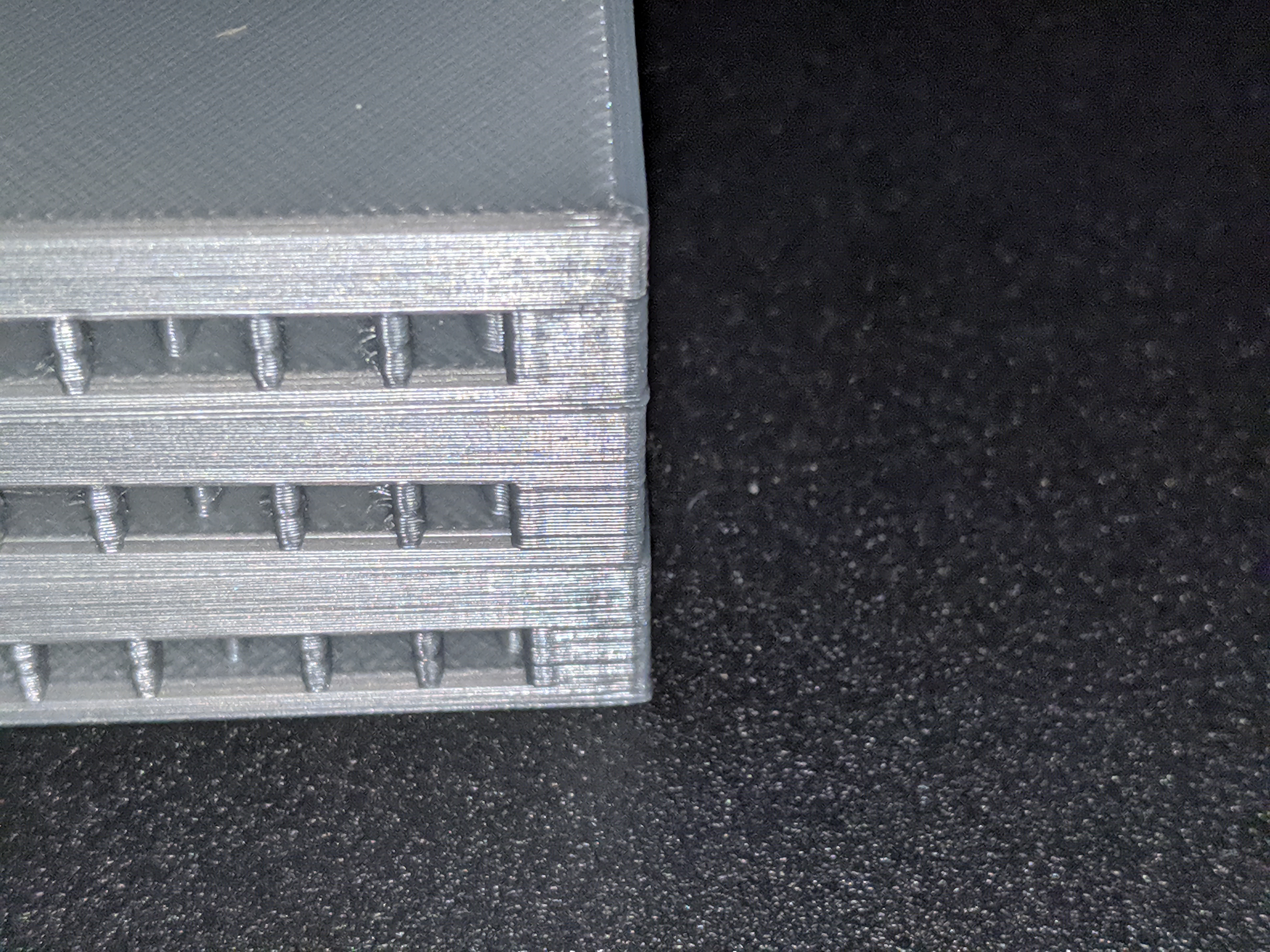
3 external perimeters, 25mm/s external perimeter speed and calibrated the filament diameter, extrusion multiplier and Linear Advance (M900) values.
RE: Bulging corners
[...] Since a couple of days i see warping (did not had that before) and tried various changes (Z level, bed temperature, ...) but it only improved partially. Than i realized that the warping is more severe the more far away the objects are from the center of the bed (independent of the size of an object -> small object warps more when not in center ) .
It's worth looking at the temperature variations, but if you had good adhesion previously, make sure you've properly cleaned the printing surface and calibrated your Live-Z. Unless the temp variations only started recently, you should be able to get back to where you were.
RE: Bulging corners
I just did a couple test prints of the flat topped box. Looks fine with stock settings, a touch better with 3 perimeters. Are the corners perfect? No, but unless I look at them with magnification they look square and perpendicular. 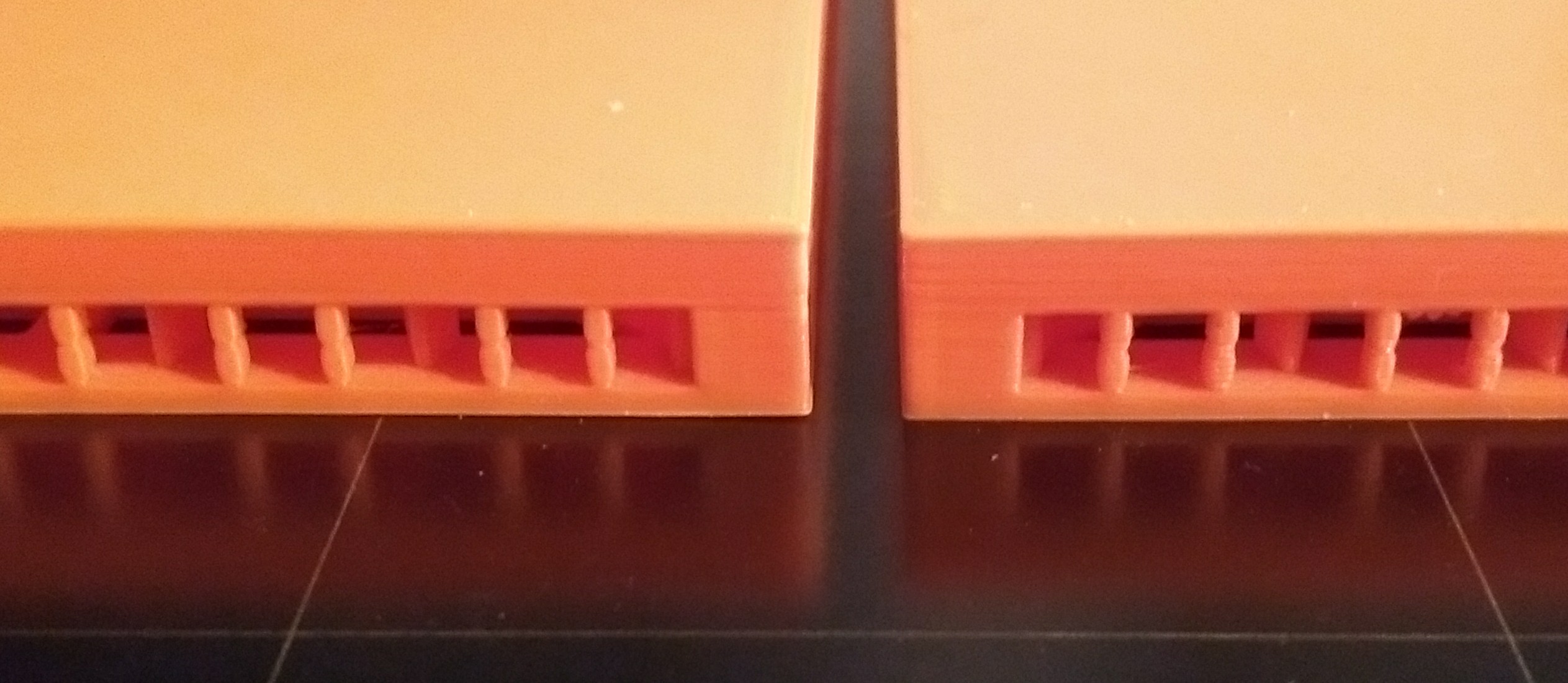
RE: Bulging corners
@tim-m30
Arround 10 cm and perpendicular to the bed
Will repeat the measurement end of the week when I am back home.