
How to write an OpenPrintTag
My goal with this topic is to learn, but also help others.
For OpenPrintTag to work (after-market), we need to get tags (Prusa Webshop) and once delivered, program them.
Generating the data seams easy enough, the Prusa App can do that, for example, and this creates a .BIN file.
1. If would be fantastic if the app could just program a tag. Prusa; please make this happen 🙂
2. The bin file now lives on my iPhone, no idea where. I would think Downloads, but it ain't there.
Then we need to write this data to a blank tag.
I found a few apps (NFC Tools, Amiiboss, ...) but they are all limited (#shareware) until an upgrade is paid for, but I am not going to pay for multiple apps; I wil gladly pay, but only if I am 100% assured the app will do what it must.
So if Prusa is not going to add NFC Programming to their app; what app should I get?
Or - Should I get an NFC device for my computer and program it on the desktop? If so, what app.
My request to all is; if you post app recommendations, please mention what system it is for (Mac, Windows, Linux, iPhone, Android etc) so people searching this forum can see what's what.

RE:
Writing to the tags will be made available after one week (Nov 18) and the hardware is open so I'm sure there will be apps forthcoming: https://openprinttag.org/#hardware
Blank OpenPrintTag (10 NFC Tags)
The PRUSA.app will be able to write the data starting on 18th November 2025, and OpenPrintTag readers for Prusa printers will be available in Q1 2026.
RE: How to write an OpenPrintTag
LOVE IT! 🙂

RE: How to write an OpenPrintTag
The new version 1.13.3 of the Prusa app is able to read from the QR code on a Prusament spool and it offers to 'clone to NFC' with the data, but I'm getting an 'unknown NFC error' 'material-nfc.ios-alert.write-faild' (sic) when I try to clone to a blank Prusa tag with an iOS device. FWIW, NFC Tools seems happy to read/write/erase the tag.
Anyone have better luck?

RE: How to write an OpenPrintTag
Yes, cloning data from the QR of a Spool Prusament onto a blank Tag was done without any issues with the Prusa App. Als Reading of the new dritten Tag was done without any Issue.
RE: How to write an OpenPrintTag
Yes, cloning data from the QR of a Spool Prusament onto a blank Tag was done without any issues with the Prusa App.
@RalfD, I'm using the iOS version of the Prusa app, are you using the Android version?
RE:
@ssmith
yes i‘m using the iOS
Version: 1.13.3+287
tested yesterday with freshly arrived openprinttags


RE: How to write an OpenPrintTag
Are you generating the QR code yourself or cloning one from a spool you bought with the new tags? I have 100 blanks that I want to start retrofitting old spools (many non-prusament). I have been creating the .bin files on https://openprinttag.org/generator/ but it is not generating QR codes that the app seems to need in order to write to the OpenPrintTags.
Any help is appreciated.
RE: How to write an OpenPrintTag
I was only scanning the QR-code from a prusament spool, then your getting a proposal to clone it to NFC.
this is what I've done.
I would also be glad to generate the data via the openprinttag generator, and then write the bin file onto the tag.
I got an answer from Jerry from Prusa, that writing on a blank tag is under development at the moment and will be roled out later.
RE: How to write an OpenPrintTag
Thanks for the update. If you're in touch with Jerry again, maybe mention that it would be helpful for them to post a roadmap on the OpenPrintTag site. I'm sure we're not the only ones trying to adopt early.

RE: How to write an OpenPrintTag
Nice to hear im not the only one having issues here. Got a heap of tags at Formnext and was excited to retrofit my older prusament.
Android user and app is up to date BUT nfc was failing to work. Happy to wait but would love a road map as @DaveYHZ said.
RE:
For iOS/Android NFC.cool can read/write OpenPrintTag. Can also import the .bin file created by OpenPrint Generator I just tested it and it works. On the NFC screen, goto NFC Expert -> OpenPrintTag and enter in all the field information. In the upper right corner there an NFC button. Click on that and you can then write to the tag. Otherwise you can use the OpenPrint Generator, download the bin, click on the NFC button, import the BIN then write it to the tag.
The caveats are that the app is not free (there is a 3 day trial) and the UI is super annoying (to me at least). But it works...
 NFC Expert Screen
 Import BIN file
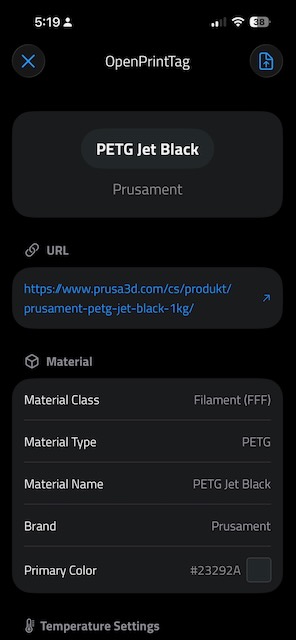 Read Tag
RE: How to write an OpenPrintTag
The tag I created with NFC.cool is readable by the Prusa App. Interestingly enough, the app doesn't display all of the fields. I guess it's a WIP:
 Prusa App
RE: How to write an OpenPrintTag
Note, if when trying to write to the tag and NFC.cool reports that it's "Read Only", use the "NFC Tools" app to erase it. Go to Other -> Erase Tag. Then NFC.cool should be able to then write to the tag.

RE: How to write an OpenPrintTag
Note: It actually only works on the iOS app. I checked the Android app, and this feature isn’t available.
RE: How to write an OpenPrintTag
Note: It actually only works on the iOS app. I checked the Android app, and this feature isn’t available.
Good to know. I don't have an Android phone so no way for me to test.
RE: How to write an OpenPrintTag
Hi,
Does anyone know when the Prusa app will be able to read and write tags correctly?
RE: How to write an OpenPrintTag
Hi,
Does anyone know when the Prusa app will be able to read and write tags correctly?
The Prusa App can read the tags just fine. Writing via the Prusa app is only supported by first scanning the QR code on Prusa spools and writing it back to the tag. The app doesn't support writing the BIN file created by OpenPrintTag Generator. The only way to write to tags using data for 3rd party spools is to use a paid app like NFC.cool.
It's early days and the printer doesn't have an NFC reader yet. My guess is it won't be available until the INDX systems ship.

RE: How to write an OpenPrintTag
Put a value in Consumed Weight to make it editable in prusa app.
The tag I created with NFC.cool is readable by the Prusa App. Interestingly enough, the app doesn't display all of the fields. I guess it's a WIP:
Prusa App
RE: How to write an OpenPrintTag
Would be nice if there was space to store max volumetric flow (for example) for different nozzles as user fields but then I understand that with 316 bytes available, there is not a lot to work with. What I have in my head is to be able to scan a spool and it loads the profile into prusa slicer automatically.