
How I've started to use OpenPrintTags for filament management
I attach these iCode SLIX2 Sticker Label which are 25mm in diameter to the outside of my dry boxes. For iOS (don't know about Android) I first use NFC Tools to format the tag and then NFC.Cool to generate the OpenPrintTag record for 3rd party spools and then save it to the tag. For Prusa Spools, I use the Prusa App to scan the QR Code and then I write the record to the tag using the Prusa App. Then I read it back using NFC.Cool so I can edit the container weight (to change it from just the spool weight to the box weight plus spool). When generating a record I use the dry box and spool weight for the "container weight" and the container and spool weight plus the filament weight (for a new spool) as the "nominal weight". I then weigh the filament in the box to get the remaining amount of filament.
So far this is still in it's infancy. If I have time (which I don't really) I would think about designing an app that allows me to scan my filaments into a database that can be exported to a spreadsheet.
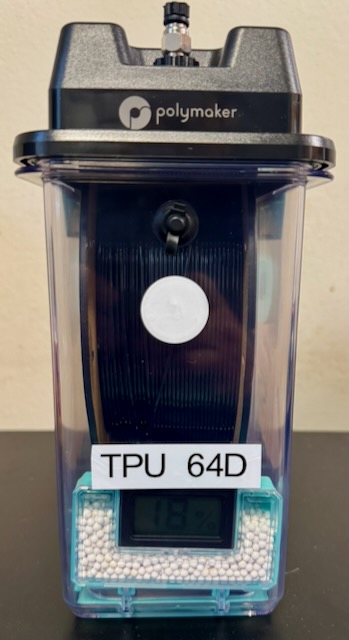
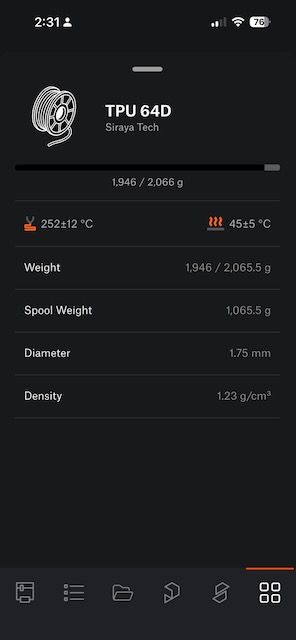 NFC Tag and importing into Prusa App

RE: How I've started to use OpenPrintTags for filament management
Reads like a bit of a rigmarole to get the relevant information onto the tag. Once it is on there, how do you use it? Is there a workflow now where PrusaSlicer or the printer prompts you to scan the tag upon filament changes? (Via the phone and app, receiving the information from the phone, I'd assume?)
RE:
Reads like a bit of a rigmarole to get the relevant information onto the tag. Once it is on there, how do you use it? Is there a workflow now where PrusaSlicer or the printer prompts you to scan the tag upon filament changes? (Via the phone and app, receiving the information from the phone, I'd assume?)
The answer to all of those questions is currently "Nope". There is zero integration with the slicer. I have a bunch of these tags so I'm starting to put them into use. Even if right now it doesn't really offer much.
Once the tag is formatted and has the filament data stored on it the work flow is:
- Read the tag
- Weigh the box
- Update the weight
- Write the tag
I'm assuming... And this is a big assumption that a possible work flow would be:
- Start PrusaSlicer 3.0
- Scan spool with Prusa App, Slicer is then configured for what you just scanned
- Load filament into printer. Not sure how the scanned information (filament type) can get to the printer without sending an M-code of some sort. Probably still have to manually select the filament.
- I slice something and PrusaSlicer says: "Warning, you don't have enough filament"
Anyway, a long way (very long way) to go before Prusa approaches the automation of BL AMS.
I don't really see any utility to this until the INDX is fully baked. I very curious to know how Prusa plans to automate filament loading or do I have to manually update the type of filament for every tool twice? Both in the firmware and in the slicer which would be a PITA.
My current goal is just inventory management. I have a couple weeks off, maybe I get an external scanner for my MacBook Pro and dump everything into a database. I have around 40 types of filaments so some sort of management system is in order. I could just as easily add the information to spreadsheet and update it there but this is more fun (?) I suppose?

RE: How I've started to use OpenPrintTags for filament management
So that is aPolyDryer? $80 for box and dryer or $30 for the box.
r to the outside of my dry boxes.

NFC Tag and importing into Prusa App
RE:
So that is aPolyDryer? $80 for box and dryer or $30 for the box.
Yes, but I don't use the PolyDryer (it sucks) I only use the boxes for storage. I got a decent discount on them ($20 each) so I bought a lot. Most people are happy just using dry cereal boxes and modding them to add rollers and desiccant boxes.
RE: How I've started to use OpenPrintTags for filament management
So that is aPolyDryer? $80 for box and dryer or $30 for the box.
r to the outside of my dry boxes.
RE: How I've started to use OpenPrintTags for filament management
So that is aPolyDryer? $80 for box and dryer or $30 for the box.
You posted the same thing twice 30 minutes apart?
RE: How I've started to use OpenPrintTags for filament management
Hmm, I wonder if any of my spools have an OpenTag? Perhaps just the one new spool from last month.
I could buy 10 tags for $5.99 from Prusa. Not bad.
I might give that a try. Looks like some big changes are coming in just a few months on filament managing !
Great job by PRUSA.
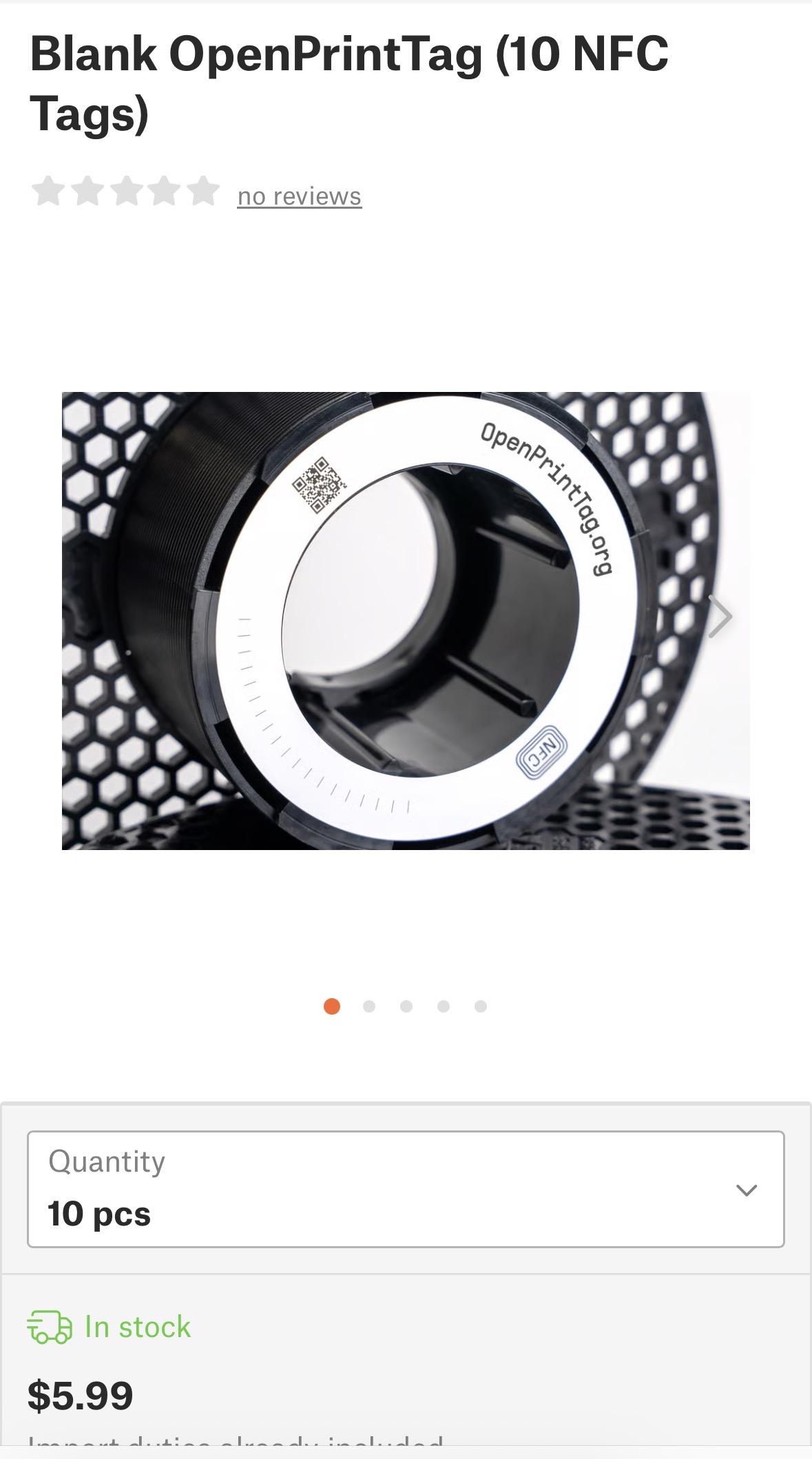 Screenshot
l to generate the OpenPrintTag record
RE: How I've started to use OpenPrintTags for filament management
So there is anOpenTag web site. Nice
 Screenshot
to generate the OpenPrintTag record
RE:
All new Prusament spools that are labeled "NFC" have the tags installed. At the moment you really can't do anything with them other than update the weight of the spool as you are using it. I suspect we won't see anything more from Prusa until June at the earliest which is about when the INDX systems will be available for public sale.

RE: How I've started to use OpenPrintTags for filament management
Hmm, I wonder if any of my spools have an OpenTag? Perhaps just the one new spool from last month.
Another indication that a Prusament spool has the NFC tag that you can see from across the room is the color of the box. AFAIK all Prusament spools sold that have the NFC sticker pre-installed (and programmed) come in black boxes, not the original brown (cardboard colored) boxes. I think I remember that being mentioned in one of the original announcement videos from Prusa.
See my (limited) designs on:
Printables - https://www.printables.com/@Sembazuru
Thingiverse - https://www.thingiverse.com/Sembazuru/designs
RE: How I've started to use OpenPrintTags for filament management
All new Prusament spools that are labeled "NFC" have the tags installed. At the moment you really can't do anything with them other than update the weight of the spool as you are using it. I suspect we won't see anything more from Prusa until June at the earliest which is about when the INDX systems will be available for public sale.
I'm not convinced that the development of INDX is necessary for incorporation of NFC readers for Prusa printers. My suspicion is that it the NFC development is more linked to the PrusaSlicer 3.0 that they have teased for "early next year".
See my (limited) designs on:
Printables - https://www.printables.com/@Sembazuru
Thingiverse - https://www.thingiverse.com/Sembazuru/designs
RE: How I've started to use OpenPrintTags for filament management
All new Prusament spools that are labeled "NFC" have the tags installed. At the moment you really can't do anything with them other than update the weight of the spool as you are using it. I suspect we won't see anything more from Prusa until June at the earliest which is about when the INDX systems will be available for public sale.
I'm not convinced that the development of INDX is necessary for incorporation of NFC readers for Prusa printers. My suspicion is that it the NFC development is more linked to the PrusaSlicer 3.0 that they have teased for "early next year".
Probably, but then there is still the hardware that will need to be added to the printer as well as the firmware updates to support it.
Also with INDX I can't imagine Prusa will put more effort into the MMU to make it more AMS "like" and I don't see the utility of OPT (open print tag) for single spool/single nozzle setups unless it's for inventory management.
IDK, I guess we shall see.
RE:
All new Prusament spools that are labeled "NFC" have the tags installed. At the moment you really can't do anything with them other than update the weight of the spool as you are using it. I suspect we won't see anything more from Prusa until June at the earliest which is about when the INDX systems will be available for public sale.
I'm not convinced that the development of INDX is necessary for incorporation of NFC readers for Prusa printers. My suspicion is that it the NFC development is more linked to the PrusaSlicer 3.0 that they have teased for "early next year".
Probably, but then there is still the hardware that will need to be added to the printer as well as the firmware updates to support it.
Also with INDX I can't imagine Prusa will put more effort into the MMU to make it more AMS "like" and I don't see the utility of OPT (open print tag) for single spool/single nozzle setups unless it's for inventory management.
IDK, I guess we shall see.
One use case even for single filament that I can see is for the printer to know automagically what filament is loaded instead of relying on the user to properly select it during load. This can enhance the existing checks to avoid printing with the wrong filament (PETG loaded trying to print something sliced for PLA as an example). Inventory management is a quality of life enhancement to help avoid spools running out mid-print. (A feature that keeps me using Spool Manager in Octoprint on my MK4S.)
See my (limited) designs on:
Printables - https://www.printables.com/@Sembazuru
Thingiverse - https://www.thingiverse.com/Sembazuru/designs
RE: How I've started to use OpenPrintTags for filament management
Nice. I was thinking about this yesterday. I need to better track what I have in stock and usage as I start up my business. I could see a possibility where the Prusa App is used. When you load filament, select the printer in the app and then it would have a scan filament option. You scan what you load and it tracks it. Since
it know what it is and how much the machine uses until you do the reverse and mark it unloaded. One minor tweak for MMU, you select which extruder slot you load to.

RE: How I've started to use OpenPrintTags for filament management
I would say it works as advertised. I have dried close to 100 rolls with it.
So that is aPolyDryer? $80 for box and dryer or $30 for the box.
Yes, but I don't use the PolyDryer (it sucks) I only use the boxes for storage. I got a decent discount on them ($20 each) so I bought a lot. Most people are happy just using dry cereal boxes and modding them to add rollers and desiccant boxes.
--------------------
Chuck H
3D Printer Review Blog
RE: How I've started to use OpenPrintTags for filament management
I would say it works as advertised. I have dried close to 100 rolls with it.
So that is aPolyDryer? $80 for box and dryer or $30 for the box.
Yes, but I don't use the PolyDryer (it sucks) I only use the boxes for storage. I got a decent discount on them ($20 each) so I bought a lot. Most people are happy just using dry cereal boxes and modding them to add rollers and desiccant boxes.
It only goes up to 55C so to dry nylon it will take 18+ hours and will not properly dry some formulations of TPU. So it's not really that convenient for drying engineering filaments.
RE: How I've started to use OpenPrintTags for filament management
I can see your point. I primarily use engineering filaments, PETG, and TPU. It has worked well for me. I use it in conjunction with a vacuum chamber. Heat it up and vacuum it out. My Polydryer reaches a little warmer than 55C. It goes to 70C.
I would say it works as advertised. I have dried close to 100 rolls with it.
So that is aPolyDryer? $80 for box and dryer or $30 for the box.
Yes, but I don't use the PolyDryer (it sucks) I only use the boxes for storage. I got a decent discount on them ($20 each) so I bought a lot. Most people are happy just using dry cereal boxes and modding them to add rollers and desiccant boxes.
It only goes up to 55C so to dry nylon it will take 18+ hours and will not properly dry some formulations of TPU. So it's not really that convenient for drying engineering filaments.
--------------------
Chuck H
3D Printer Review Blog
RE: How I've started to use OpenPrintTags for filament management
I can see your point. I primarily use engineering filaments, PETG, and TPU. It has worked well for me. I use it in conjunction with a vacuum chamber. Heat it up and vacuum it out. My Polydryer reaches a little warmer than 55C. It goes to 70C.
Perhaps they've updated it then. When I had mine 6 months ago, they advertised 70C but when I measured with a thermocouple it only reached 55