Catastrophic print failure - don't even know where to begin to repair this
Okay, so I was printing a large flat tabletop piece on my MK4S, and some hours into the print the print must have popped up in one corner, because the extruder head pushed so hard against it that the magnetic plate came loose and it and the print flew off. The extruder kept spitting out PLA and by the time I heard the unusual sounds it had formed a glob about the size of a misshapen golfball completely encasing the extruder. It took good amount of time to chip/melt off the PLA to free the nozzle, but by the time I finished I may have severed a wire.
Where do I even begin to diagnose/repair this? I'm terrified I'll have to replace the entire extruder assembly (I'm kinda figuring I'll have to break it down to make sure I got all the PLA off). Does anyone have a diagnosis step-by-step, or should I just follow the installation instructions backwards? Can I buy a new extruder assembly? 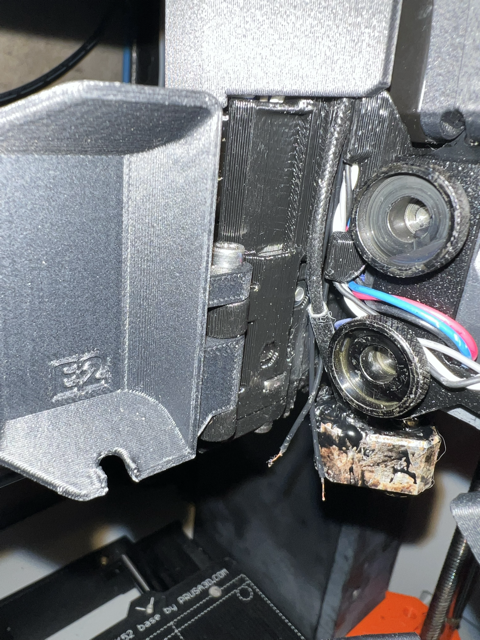


RE: Catastrophic print failure - don't even know where to begin to repair this
Personally, I would proceed as follows:
- Replace the temperature sensor for the heating block
- Check the heating element for the heating block to see if the wiring is OK
- Remove the nozzle and check if it wobbles or runs unevenly; if so, replace it
- Check the remaining cables to see if the insulation is OK
- Make a first layer print to see if the load cell has been “pre-damaged.”
Mods for Core One: Core One HT 450 degrees, Comfortable display , Very fast print start and Reducing noises
Mods for Prusa XL: Very fast print start

You had a 'Blob of Doom' - use that term to look up the many threads here on the topic and see how others have dealt with them.
The commonest cause is poor adhesion and the commonest cause for that is a dirty print sheet - the second commonest, more frequent at change of season, is warping due to cold drafts...
Blobs of Doom frequently damage fan shrouds, long term users often pre-print a spare just in case.
As you have severed a connection you will have to replace the part (reconnecting isn't easy without specialist tools as hotends work at solder melting temperatures) - maybe just a thermistor or heater cartridge maybe a whole hotend depending on how much damage you have done in the cleanup.
Reversing the build instructions is the correct procedure, all the spares are listed in the Parts and Accessories tab at the top of this page.
Cheerio,