
RE: Poor Print Quality on Sloped Surfaces That Face the Rear
The complete model in PLA printed perfectly!
Prusa i3 MK4S Kit in Lack Enclosure
RE:
I dried my spool of Prusament Jeg Black PETG for a bit more than 11 hours and the weight including the spool dropped from 362 g to 360 g, so I think I can say it is dry.
I printed the PETG in the enclosure with the doors closed.
I had to increase the brim size to 5 mm; at 3 mm the part got knocked over during printing.
I printed the part stub to test the 2 problem areas and it isn't too bad, but it can be better. I would like to know what recommendations there are to improve the quality in the sloping edges. I applied most of the settings I used for PLA, but left the cooling fan speeds per the default since the PETG needs less cooling.
Also, a grooved seam has appeared on the print that is not where the seam appears in Prusa Slicer. When I print PLA, the seam appears as a long bulge, but in this PETG print, it is a groove. I would like to understand why the seam isn't where Slicer showed it to be, and why it is such a large groove.
Here is the project file for reference.
license plate bracket handle - V5 (revised production design) prusament PETG slowed 25 pct
The long edge at the right of this picture a 45-degree overhang at the left rear of the print. The vertical edge is what rested on the print bed; part of the brim is still visible. The left rear edge is bowed inwards until it was nearly half way up the edge. For the PLA print, this aberration was fixed by increasing cooling and slowing the print. I have already slowed this print to 75% of the default. Do I need more cooling?
This surface is facing the front of the print bed. The ugly seam visible in this picture is not where the seam is in the slicer. The seam is supposed to be at the edge to the left of the seam. You can see that the edge at the lower left was the edge resting on the bed; the remnants of the brim are still visible.
Prusa i3 MK4S Kit in Lack Enclosure
RE: Poor Print Quality on Sloped Surfaces That Face the Rear
Here is an image of the painted seam in Prusa Slicer.
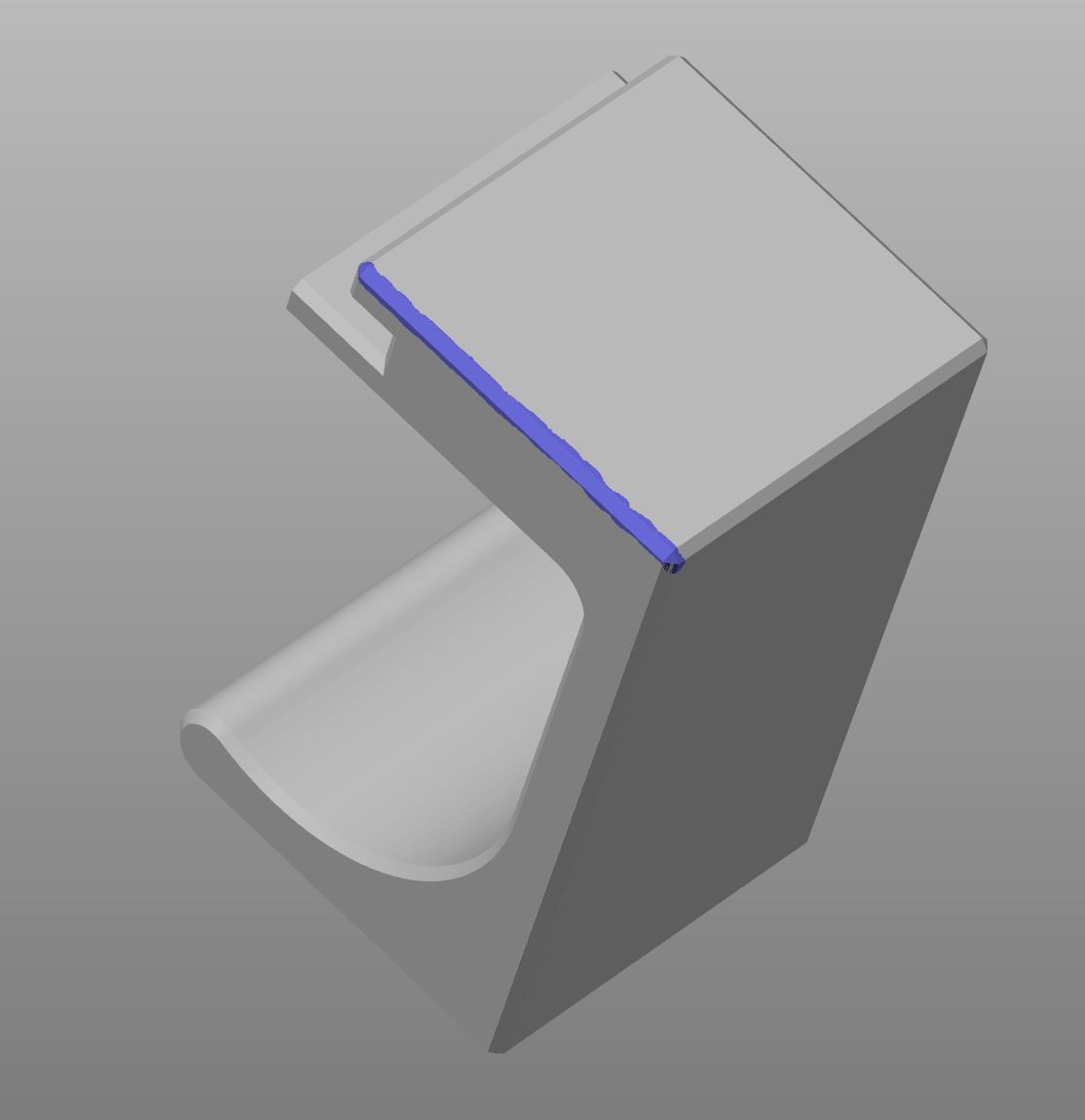
Here is an image of the seam placement after slicing.

I changed the Perimeter Generation setting to Classic, but the seam is still in the wrong place.
Why on earth would the seam not be placed where defined in Prusa Slicer?
Prusa i3 MK4S Kit in Lack Enclosure

RE: Poor Print Quality on Sloped Surfaces That Face the Rear
From the pictures you posted I cant see an issue. Your painted seam extends approximately half way up your object on that edge. The seam is placed in the area you have defined. The seam is right on the edge of the painted area which covers both sides of the corner. The normal settings for seam are applied within the painted area, so aligned , rear etc are tried within those defines. If you want more control then use a thinner painted line to give it less area to choose from.
Your object extends upwards past the painted seam area so PS it adding seams to those layers you haven't painted where its settings allow.
RE: Poor Print Quality on Sloped Surfaces That Face the Rear
I used the thinnest control available to paint that edge and it is on the chamfer, not on the larger flat surface. When sliced, the seam is on the corner of the chamfer at the adjacent narrow face, not on the larger flat face.
The seam setting is "Aligned".
When printed in PLA, the seam is on the large face, but right at the corner where it is painted (just not exactly where shown in the sliced rendition). I looked at the PLA print more closely (required a magnifying glass) and the seam is also split like the PETG print, but I can't see the short part of the seam; perhaps it is on the inside of the groove.
In this picture, you can see the sliced seam is on the chamfer edge closest to the narrow face. The red lines mark where the seam is printed; note that the seam is split into 2 separate seams, neither of which are where indicated in Prusa Slicer. Where the 2 seams split is coincident to the bottom layer of the groove behind the large face. The tool path in Slicer also shows the seam at the white line, not the red line. The gcode is clearly not in agreement with the rendition.

Prusa i3 MK4S Kit in Lack Enclosure
RE: Poor Print Quality on Sloped Surfaces That Face the Rear
Moving on, I still have the issue of narrowing near the print bed on the left rear edge. It looks just like the issue I had with PLA that was cured by increasing cooling.
Here is the project file.
license plate bracket handle - V5 (revised production design) prusament PETG slowed 37 pct
I have improved it with some setting changes, but it isn't perfect yet. I would like some ideas to fix this problem edge. The bit sticking out at the left is the brim.

Current settings that differ from the default:
Print Settings:
- Perimeters: 5
- Extra perimeters if needed
- Avoid crossing curled overhangs
- Perimeter generation: Arachne
- Seam gap distance: 1% (at 15% a large groove appears, but it isn't even where the seam is supposed to be; at 1%, the groove is still there and still as wide, just not nearly as deep.)
- Brim width: 5 mm (at 3 mm, the part came off the bed mid print)
- Brim separation gap: 0.15 mm (at 0.1 mm, it was very difficult to remove from the print)
- Generate supports (painted on)
- Organic supports
- Top contact Z distance: 0.2 mm (default is 0.17 mm, but the documentation states the value should be between 50 and 75% of the layer height. My experience is that at 0.17 mm the PETG supports are fused to the model. At 0.2 mm, the supports separated easily.)
- Speed: Perimeters: 50 mm/s (it doesn't appear to have improved the left rear edge over when set to 60 mm/s. (default is 80 mm/s, so a reduction of 37.75%)]
- Speed: Small perimeters: 50%
- Speed: External perimeters: 50%
- Enable dynamic overhang speed: enabled
- Elephant foot: 0.3 mm
Filament Settings:
- Cooling slowdown logic: Uniform cooling
- Ensure dynamic fan speeds: enabled
- Fan speed: Min: 35% (changed from default 20%)
Settings already tried:
- Perimeter generation: Classic (looked worse at the left rear overhang edge)
- [Dynamic overhang speed] Speed for 50% overlap: 35 mm/s (default was 45 mm/s; changed because the rear corners that were printing poorly were at a 45 degree angle, or 50% overhang) Result: Worse; reset to 45 mm/s
- Cooling slowdown logic: Consistent Surface (made the left rear edge look worse.)
- Ensure dynamic fan speeds: disabled (made the left rear edge look worse)
- Dynamic overhang speeds: disabled (made the left rear edge look slightly worse.
- Fan speed: Min: 30% (improved the quality of the lower left edge, but not enough)
- Fan speed: Min: 35% (further improved the quality of the lower left edge, but not enough)
- Fan speed: Min: 40% (the lower left edge is worse than at 35%
Prusa i3 MK4S Kit in Lack Enclosure

RE:
Here is the project file.
license plate bracket handle - V5 (revised production design) prusament PETG slowed 37 pctI have improved it with some setting changes, but it isn't perfect yet. I would like some ideas to fix this problem edge. The bit sticking out at the left is the brim.
Good morning.
Does the seam have to be in that spot?
Mods for Core One: Core One HT 450 degrees, Comfortable display , Very fast print start and Reducing noises
Mods for Prusa XL: Very fast print start
RE: Poor Print Quality on Sloped Surfaces That Face the Rear
Does the seam have to be in that spot?
If the seam is not important for the function of the component, move it to a smooth surface.
Thank you for your reply. I wanted the seam on to be "hidden" on an edge and not appearing on a face. Where the seam ended up is functionally OK as it is hidden when installed. Reducing the seam gap has greatly reduced the seam effect.
What is even more interesting is that the stub part at the left on the plate has a painted seam, but the full part has no painted seam because the rendered seam appeared where I wanted it, yet both parts printed the seam in the same place on a face, not on the edge shown in the sliced rendition.
Looking at the definitions of the Aligned and Nearest, they both want to look for a non-overhang to place a seam. However, painting a seam is supposed to override the Seam Position setting for that given seam. Where I painted the seam is an overhang, but the painted seam should be where the seam is printed. I chose that edge since the rear-facing overhang edges have cooling issues.
Therefore, the feature to print the seam where it is painted is not working as advertised. The seam printed is nowhere near the enforcer area and nowhere near where Slicer shows the seam in its sliced rendition.
"When the Aligned option is active and enforcers are used, the seam is placed in the middle of the enforcer area."
Prusa Instructions on Seam Painting
I will take this up with Prusa as a bug.
Prusa i3 MK4S Kit in Lack Enclosure
RE: Poor Print Quality on Sloped Surfaces That Face the Rear
I'll print the part today to have an independent comparison.
Mods for Core One: Core One HT 450 degrees, Comfortable display , Very fast print start and Reducing noises
Mods for Prusa XL: Very fast print start
RE: Poor Print Quality on Sloped Surfaces That Face the Rear
Vielen Dank.
I have been wondering if the rear edge would print differently at the rear of the plate and at the front of the plate. At the rear of the plate, there may be some cooling air bouncing back against the rear of the enclosure that may help. I have been printing at the center of the plate. I may also see how it does outside the enclosure.
I am nearly out of PETG, so I will wait to see the results of your print.
You only need to print the part stub at the left of the plate; no need to print the entire part.
Prusa i3 MK4S Kit in Lack Enclosure
RE: Poor Print Quality on Sloped Surfaces That Face the Rear
I use filament from Material4Print. PETG is easy to print and does not require cooling when printing without supports.
Unfortunately, I forgot to adjust the cooling on my first attempt. The inclined print did not work out on the first try.
Until then, I will print it lying down.
Mods for Core One: Core One HT 450 degrees, Comfortable display , Very fast print start and Reducing noises
Mods for Prusa XL: Very fast print start
RE:
I need it to print in the orientation in the project file. The direction of the layer lines play a role in strength, as does the quality of the snap tab surfaces. When laying down, one of the snap tab surfaces is compromised by the support due to the extreme overhang. I have explored other orientations.
Prusa i3 MK4S Kit in Lack Enclosure
RE:
I need it to print in the orientation in the project file. The direction of the layer lines play a role in strength, as does the quality of the snap tab surfaces. When laying down, one of the snap tab surfaces is compromised by the support due to the extreme overhang. I have explored other orientations.
Okay, I'll test it again.
Here the first test:
Mods for Core One: Core One HT 450 degrees, Comfortable display , Very fast print start and Reducing noises
Mods for Prusa XL: Very fast print start
RE: Poor Print Quality on Sloped Surfaces That Face the Rear
You have confirmed that on it's side, the supports ruin the sloped surface of one of the tabs. The rest of the print came out well for me as well as you.
Prusa i3 MK4S Kit in Lack Enclosure
RE: Poor Print Quality on Sloped Surfaces That Face the Rear
Yes, that's right, one of the tabs is damaged by the support.
I'll print it tomorrow as it was stored in the file.
We'll get it done 😉
Mods for Core One: Core One HT 450 degrees, Comfortable display , Very fast print start and Reducing noises
Mods for Prusa XL: Very fast print start
RE: Poor Print Quality on Sloped Surfaces That Face the Rear
Thank you. 😎
Prusa i3 MK4S Kit in Lack Enclosure
RE: Poor Print Quality on Sloped Surfaces That Face the Rear
Would a draft shield help to direct cooling to the rear or would it retain more heat and make the print worse?
Prusa i3 MK4S Kit in Lack Enclosure
RE:
Good morning.
Thank you. 😎
No problem. I'm happy to help, and the nice thing is that you learn something new in the process.
Would a draft shield help to direct cooling to the rear or would it retain more heat and make the print worse?
I think that the error you described above is more a matter of speed and acceleration than a temperature problem.Here is my second attempt, as you requested:

I won't be able to examine the finished print more closely until this afternoon. However, after adjusting the cooling slightly, the print remained stable.
Here is my current print file:
I will add detailed images of the edge where the seam is.
Mods for Core One: Core One HT 450 degrees, Comfortable display , Very fast print start and Reducing noises
Mods for Prusa XL: Very fast print start
RE:
Here are the pictures I promised. They're not quite perfect, but the “problem areas” are better.
I need to upload the 3MF file from the other PC. I'll do that later.
The supports were very easy to remove and there is no visible damage to the clips.


Mods for Core One: Core One HT 450 degrees, Comfortable display , Very fast print start and Reducing noises
Mods for Prusa XL: Very fast print start
RE: Poor Print Quality on Sloped Surfaces That Face the Rear
Thank you. You only had to print the model stub, not the full model, but I greatly appreciate your help.
You have proven that that the Prusa XL can print the model. One difference between the XL and MK4S is that the XL cooling fan duct is rotated 180 degrees from the MK4S duct. The edge in your print that is opposite my problematic edge looks OK.
I have already slowed down the printing process by 37.5% and the problem still exists. Your print speed is much faster, so I assume it is per the profile default. At times, I wish I had bought the Core One kit instead of the MK4S kit.
I am still open to setting change ideas to make the model or model stub print properly on the MK4S. The problem was solved on my MK3S with an improved cooling fan duct. Modifying cooling and speed made the model print in PLA on my MK4S. I still believe the PETG print needs additional cooling help; some setting changes have improved the problem area while other changes have made the problem worse. I still need to see how it prints outside the enclosure, which will help to point to a cooling issue. I may make time to try that today and report back.
Prusa i3 MK4S Kit in Lack Enclosure