
Export Slicer summaries in CSV format
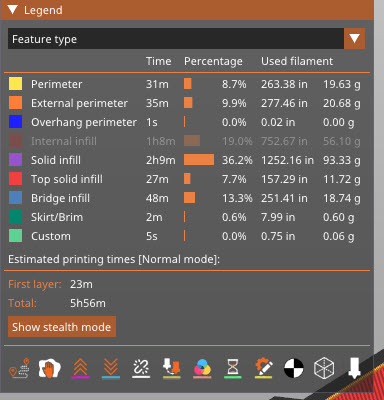
I would like to be able to import this summary Slicer information into Excel to be able to compare different ways of printing a file. It is not selectable text, and using OCR on a PDF of a screen capture is simply a mess. CSV would be fine.


RE:
I did something similar to analyze gcode and config.ini settings. It takes a g-code file, config.ini and compiles an excel XLSX with charts and tables. It's still very much a work-in-progress still.
Have a look here: https://github.com/hyiger/gcodeToExcel
Can run like this:
python gcode_to_excel.py --config config.ini 3DBenchy_0.6n_0.2mm_PC_COREONE_1h6m.gcode
Make sure to scroll around the sheet since a lot of the charts are further down on the page. Make sure to follow the installation instructions in the README file

RE: Export Slicer summaries in CSV format
Ah! Thanks for the clue about the GCODE file. For what I need, which is really just the Sliced Info, I can open the GCODE in a text editor and copy/paste the first 24 or 25 lines into Excel.