
Eliminate small arcs
Hello.
I want to print some bushings and I have problems with the roundness of the part. It looks like the big circle is made from interpolated circles. How can I make more smooth and eliminate this problem? Any ideas of what settings I might make?
Thanks.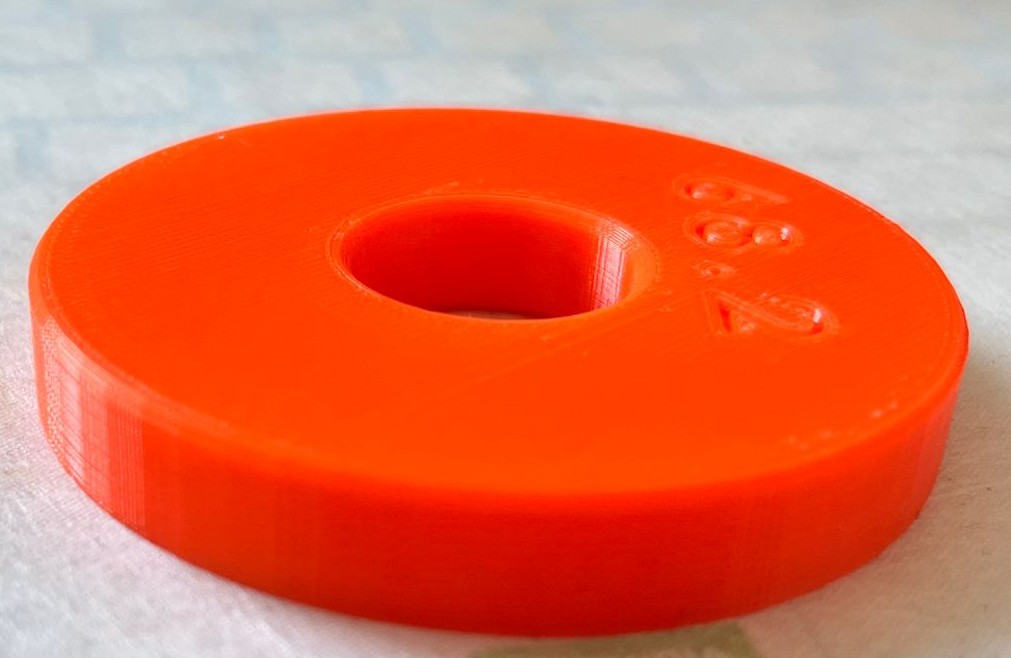

RE:
If you have access to the original CAD file for the part you can try to increase the export quality/resolution there and export the part again. If you have access to the CAD you can also try to export it in STEP format. PrusaSlicer can handle this format.
Or you can try to enable the arc fitting option in PrusaSlicer in case this is not enabled yet: Print settings > Advanced > Slicing > Arc fitting

RE: Eliminate small arcs
Is this an STL file from the internet or your file from a CAD program?
A little tip: most STL files are not of very good quality (for round objects).
If you created this object yourself, export it in STEP format—you will see the difference
Mods for Core One: Core One HT 450 degrees, Comfortable display , Very fast print start and Reducing noises
Mods for Prusa XL: Very fast print start
RE: Eliminate small arcs
right after I made the post I exported as STL with higher resolution and I can even see the changes in the Slicer . Seems much better. I will try also as step after this one. Thank you!
RE: Eliminate small arcs
I will try also as step after this one.
STEP is easier to work with.You load a STEP file into the CAD program and you're ready to go. With STL, you first have to scale, convert, and adjust.
Mods for Core One: Core One HT 450 degrees, Comfortable display , Very fast print start and Reducing noises
Mods for Prusa XL: Very fast print start

RE: Eliminate small arcs
I use FreeCAD and found there's a resolution setting that can improve things dramatically. Also, if you're printing bushings for use as bearings, be aware that IGUS has low friction filaments that are better than about anything else you can get.

RE: Eliminate small arcs
Also, if you're printing bushings for use as bearings, be aware that IGUS has low friction filaments that are better than about anything else you can get.
Maybe. The IGUS iglidur i150 is basically PETG mixed with some PTFE (from what I was able to research) and other additives. I happen to have a roll of it, it's expensive ($85/kg). I've only done a few prints with it but it doesn't print well. Looks and feels like dried toothpaste using the Prusa provided PrusaSlicer profile. My Tech Fun channel on YouTube did a test on tribo (low friction) filaments and i150 didn't do any better on sliding friction tests than Nylon (I think it was Nylon, have to rewatch).
I have experience printing POM (acetal Delrin) that has an extremely low COF (much lower than i150) but it's one of the most difficult filaments I've ever printed. I'm planning to do a writeup on these shortly. Small bushings are possible but requires maintaining very accurate chamber temperature control.

RE: Eliminate small arcs
While I agree with the advise to transfer from CAD to Slicer using a STEP file (I do this exclusively for my own projects), there is a caveat to remember. When the STEP file is imported into PrusaSlicer it is converted to a triangle mesh. The default detail value is sufficient that you won't see any faceting when printing normally, but if for some reason you need to scale the imported STEP significantly, then you'll start to see the triangles.
This can be mostly ameliorated by selecting a higher resolution when you import, though. You just need to remember to watch for that instead of blindly clicking through the import window because that's what you always do. 😉
I would really like for slicers to handle STEP natively (without converting to triangles), but that might require choosing a new project file format. The last time I looked at the 3mf format specifications, I didn't see a data block for 3D vector files, only 3D triangle mesh files. Maybe I missed something?
See my (limited) designs on:
Printables - https://www.printables.com/@Sembazuru
Thingiverse - https://www.thingiverse.com/Sembazuru/designs
RE: Eliminate small arcs
Yes, the IGUS material takes some fine tuning. We use it at work for some production parts. We also use machined Delrin for bearing parts, but I wouldn't want to print the stuff! Oddly, plain old black Delrin works as well for us as the low-friction Delrin AF. The IGUS material has low stick/slip properties, which we value. It's one more tool in the tool kit, sometimes the best choice, sometimes not.
RE: Eliminate small arcs
In the photo, the part is exported from Solidworks to PrusaSlicer as a 3mf. Changed to stl with good resolution and also to step, and it's much better. I also think this is the best you can get from the hardware. it has step motors , no glass scales etc. pretty round , good enough for my application .