
Merge infill print
This is somewhere in the middle of model(solid fill at layer before):
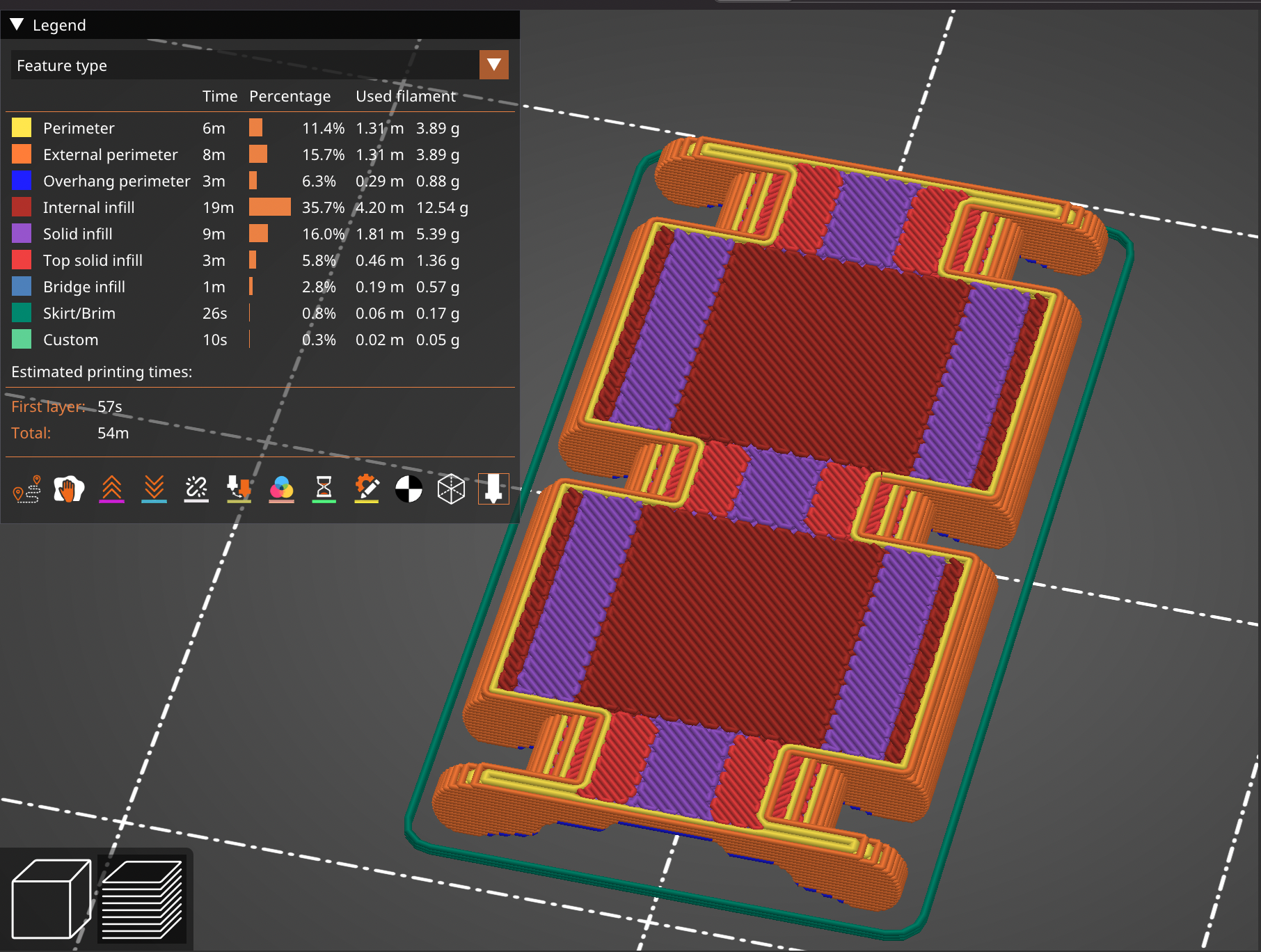
There is a top solid fill, solid fill and internal fill with 100%(also solid). So we have 3 different solid fills that are printed separately each other. It looks really weird when printing, not to mention wasting for traveling. Is it any way to force it print as one region?

RE: Merge infill print
Not in PRUSA slicer no. While they may all look the same remember that their speeds and extrusion widths are capable of being configured differently, and in the case of topfill itself it can use a different pattern. Does it make sense to do so where they are configured the same, sure. That’s why there have been issues opened on the PRUSA slicer GitHub for ages.

RE: Merge infill print
I know this topic is old but I searched for a way to solve this problem for soooooo long and I finally found one tonight.
It definitely is overcomplicated, but it can save hours depending on the object and it also seriously reduces useless movements that make noise and wear the machine.
Just set top solid layers and bottom solid layers to zero. Set main infill to 100%. This solves any problems and merges all types of infills even bridges. Yes it may seem counterproductive to many, but to me it feels like relief from years of pain.
Then for sure, you will have to play either with cutting your model down to pieces, either with height modifiers to give back smaller infill % where needed.
I just love to be able to control everything.

