
Inside vertical wall defects, only one wall, possible causes?
I printed a lid for a small drill index I created. It's just a square box, with a few chamfers on the sides. 3mm wall thickness. Printed with Overture PETG using a 0.25mm brass nozzle. One of the interior vertical walls have little blobs and things sticking out. The junk interferes with using it as a lid, so I had to remove some of it. Why just one interior wall, out of 4, and perfect exterior walls? It's a beautiful print, besides that one wall. I'll package up the 3mf shortly. Here's the interior view. I put the part on it's side, to take advantage of the lighting.

Any suggestions would be most welcome. This is the cap that covers the stub machine drills.
RE: Inside vertical wall defects, only one wall, possible causes?
So first: Why are you using a 0.25 nozzle and a 0.15 layer on a box like this?
Second: Why are you stuffing the prints into the corner of the base instead of holding the parts around the center of the build plate?
Third: Why do you have such thick box walls, and with gyroid filling on top of that?
Recommendation: Use a 0.4 nozzle and a 0.2 SPEED layer. Cover wall thickness max 1.6 mm side perimeters 2. This will stop creating internal filling in the cover walls and the walls will be smooth. However, for the 0.4 nozzle it will be necessary to change the font size or select the "Bold" font style.
RE: Inside vertical wall defects, only one wall, possible causes?
So first: Why are you using a 0.25 nozzle and a 0.15 layer on a box like this?
Second: Why are you stuffing the prints into the corner of the base instead of holding the parts around the center of the build plate?
Third: Why do you have such thick box walls, and with gyroid filling on top of that?
Recommendation: Use a 0.4 nozzle and a 0.2 SPEED layer. Cover wall thickness max 1.6 mm side perimeters 2. This will stop creating internal filling in the cover walls and the walls will be smooth. However, for the 0.4 nozzle it will be necessary to change the font size or select the "Bold" font style.
RE: Inside vertical wall defects, only one wall, possible causes?
So first: Why are you using a 0.25 nozzle and a 0.15 layer on a box like this?
Second: Why are you stuffing the prints into the corner of the base instead of holding the parts around the center of the build plate?
Third: Why do you have such thick box walls, and with gyroid filling on top of that?
Recommendation: Use a 0.4 nozzle and a 0.2 SPEED layer. Cover wall thickness max 1.6 mm side perimeters 2. This will stop creating internal filling in the cover walls and the walls will be smooth. However, for the 0.4 nozzle it will be necessary to change the font size or select the "Bold" font style.
RE: Inside vertical wall defects, only one wall, possible causes?
So first: Why are you using a 0.25 nozzle and a 0.15 layer on a box like this?
Second: Why are you stuffing the prints into the corner of the base instead of holding the parts around the center of the build plate?
Third: Why do you have such thick box walls, and with gyroid filling on top of that?Recommendation: Use a 0.4 nozzle and a 0.2 SPEED layer. Cover wall thickness max 1.6 mm side perimeters 2. This will stop creating internal filling in the cover walls and the walls will be smooth. However, for the 0.4 nozzle it will be necessary to change the font size or select the "Bold" font style.
I have hollow (engraved) text at the bottom surface of the box. A coarse nozzle yields poor text. Already have experienced that.
I move individual prints around my build plate, all the time. That way I only treat the plate once, but I can make multiple prints before having to clean again. In my experience, it isn't necessary to always be at the center. Always printing at the center can cause premature wear at that spot.
No. A 0.4mm nozzle cannot print 2.5 or 3mm text with any fidelity. I can show you what it looks like. Yes it's faster, but the details are poor.
I am searching for why all the stuff ends up on the interior wall, pretty much only on one wall. It's clearly a setting in the 3mf and the filament that I have. Every version I have printed has it. I imported step files into PrusaSlicer, not stls. They should be clean. The slicer output looks clean, but there's debris on that inner wall that interferes with the fit of the cover. And it looks bad.
RE: Inside vertical wall defects, only one wall, possible causes?
So first: Why are you using a 0.25 nozzle and a 0.15 layer on a box like this?
Second: Why are you stuffing the prints into the corner of the base instead of holding the parts around the center of the build plate?
Third: Why do you have such thick box walls, and with gyroid filling on top of that?Recommendation: Use a 0.4 nozzle and a 0.2 SPEED layer. Cover wall thickness max 1.6 mm side perimeters 2. This will stop creating internal filling in the cover walls and the walls will be smooth. However, for the 0.4 nozzle it will be necessary to change the font size or select the "Bold" font style.
I have hollow (engraved) text at the bottom surface of the box. A coarse nozzle yields poor text. Already have experienced that.
I move individual prints around my build plate, all the time. That way I only treat the plate once, but I can make multiple prints before having to clean again. In my experience, it isn't necessary to always be at the center. Always printing at the center can cause premature wear at that spot.
No. A 0.4mm nozzle cannot print 2.5 or 3mm text with any fidelity. I can show you what it looks like. Yes it's faster, but the details are poor.
I am searching for why all the stuff ends up on the interior wall, pretty much only on one wall. It's clearly a setting in the 3mf and the filament that I have. Every version I have printed has it. I imported step files into PrusaSlicer, not stls. They should be clean. The slicer output looks clean, but there's debris on that inner wall that interferes with the fit of the cover. And it looks bad.
RE: Inside vertical wall defects, only one wall, possible causes?
So first: Why are you using a 0.25 nozzle and a 0.15 layer on a box like this?
Second: Why are you stuffing the prints into the corner of the base instead of holding the parts around the center of the build plate?
Third: Why do you have such thick box walls, and with gyroid filling on top of that?Recommendation: Use a 0.4 nozzle and a 0.2 SPEED layer. Cover wall thickness max 1.6 mm side perimeters 2. This will stop creating internal filling in the cover walls and the walls will be smooth. However, for the 0.4 nozzle it will be necessary to change the font size or select the "Bold" font style.
I have hollow (engraved) text at the bottom surface of the box. A coarse nozzle yields poor text. Already have experienced that.
I move individual prints around my build plate, all the time. That way I only treat the plate once, but I can make multiple prints before having to clean again. In my experience, it isn't necessary to always be at the center. Always printing at the center can cause premature wear at that spot.
No. A 0.4mm nozzle cannot print 2.5 or 3mm text with any fidelity. I can show you what it looks like. Yes it's faster, but the details are poor.
I am searching for why all the stuff ends up on the interior wall, pretty much only on one wall. It's clearly a setting in the 3mf and the filament that I have. Every version I have printed has it. I imported step files into PrusaSlicer, not stls. They should be clean. The slicer output looks clean, but there's debris on that inner wall that interferes with the fit of the cover. And it looks bad.
RE: Inside vertical wall defects, only one wall, possible causes?
Forum is broken, I didn't triple post.
RE: Inside vertical wall defects, only one wall, possible causes?
I didn't post multiple posts either. I posted it only once, the famous Prusuv server, probably powered by an I486 SX processor, which cannot handle the load, took care of the multiplication. I think Josef should "slap his pocket" and buy something more modern and with proper software for this forum, which currently corresponds to software from the end of the last century.
RE: Inside vertical wall defects, only one wall, possible causes?
Any idea why there's crud on the inner wall? Here's my original index on the left, printed with a 0.4mm nozzle. The cap, which has an inner wall with zits, in the middle. Finally, the reprinted index with bigger font, so I can read the drill sizes.

The cap is also printed using a 0.25 nozzle, since I was printing the legend "Metric Stub Drills" and "1.0mm - 2.0mm". Those letters did not come out well. I need to use a bold font, and a little larger. I have already edited my CAD file. Need to print it, but would like to know if there are any changes that should help in the slicer.

The font is 2.5mm, and not bold. The filament has smeared inwards, maybe elephant foot. There are supposed to be decimal points and a hyphen... The slicer output looks fine, but the print does not.
Use a 0.4mm or larger nozzle and 0.2mm layers.
Forget about trying to use a 3D printer for miniscule 2D text (even a 0.25mm nozzle equates to a 0.28mm 'pixel' or roughly 90 dpi) and instead print a sticky label on a 2D printer and apply.
When printing sensibly sized text into a surface consider ticking the (expert mode) single perimeter on top surface - or first layer, setting.
Cheerio,
RE: Inside vertical wall defects, only one wall, possible causes?
Ordinarily I'd use 0.4 nozzle and 0.2 layer height. Just wanted to give this a try. Can't learn or gain knowledge without occasionally failing.
Thanks for the tip on single perimeter, I'll see if that helps.
Still no answer on the crud on the inner wall surface though. What causes that? Can it be eliminated? Don't understand why the walls are very good everywhere else. This question is still unanswered.
RE: Inside vertical wall defects, only one wall, possible causes?
What an odd forum. Ask a question, get solutions to everything else in the world, but none answering the original question. Strange.
Because you asked the wrong question - changing to a larger nozzle will greatly reduce the overpressure problems at the seam and if they don't go away we will return to the stock 'Dry your filament' answer.
Cheerio,
RE: Inside vertical wall defects, only one wall, possible causes?
Because you asked the wrong question - changing to a larger nozzle will greatly reduce the overpressure problems at the seam and if they don't go away we will return to the stock 'Dry your filament' answer.
Cheerio,
No sir, I asked a perfectly valid question. If the pressure advance is incorrect for the nozzle size, then that should be addressed, if it's a bad preset. I posted my 3mf, for that very reason.
A fine nozzle was used because of the text size, since the text won't print correctly with a coarse nozzle. Tried that... Had to go to a slightly larger font, and a bold font to get it to work at all. Knew one trade off was print time and accepted that. I've printed small objects with the fine nozzle and haven't seen this artifact before.
The filament was directly connected from my PrintDry unit, through a teflon tube into the Core 1+. The dryer temperature is set to 65C. The PETG is stored in containers with 0.25kg of quite dry desiccant. (Not 0.5gm, but 250 grams of desiccant.) It's not wet filament.
Well at least I got a clue what it might be. Not that helpful, but a clue. Sorry to bother you sir. Seems like asking questions on a Prusa forum isn't a very good way to get decent help these days. It used to be.

RE: Inside vertical wall defects, only one wall, possible causes?
Thanks for the 3mf. If you turn on Travel in the preview, you see extensive travel from one side to the other, which may or may not coincide with where you see the zits but that has been the cause of "internal zits" issues for me in the past.
If you go to Print Settings>Layers and Perimeters>Quality and turn on Avoid crossing perimeters, those travel lines disappear (and hopefully the zits).
Caveat: Apparently Avoid crossing perimeters may cause lawyer shifts. I have rarely seen that myself but you may have to pick your poison.
Formerly known on this forum as @fuchsr -- https://foxrun3d.com/
RE: Inside vertical wall defects, only one wall, possible causes?
Sorry, the forum being the forum again… Was unable to add photos or edit my post...
Original Settings:

With Avoid crossing Perimeters:
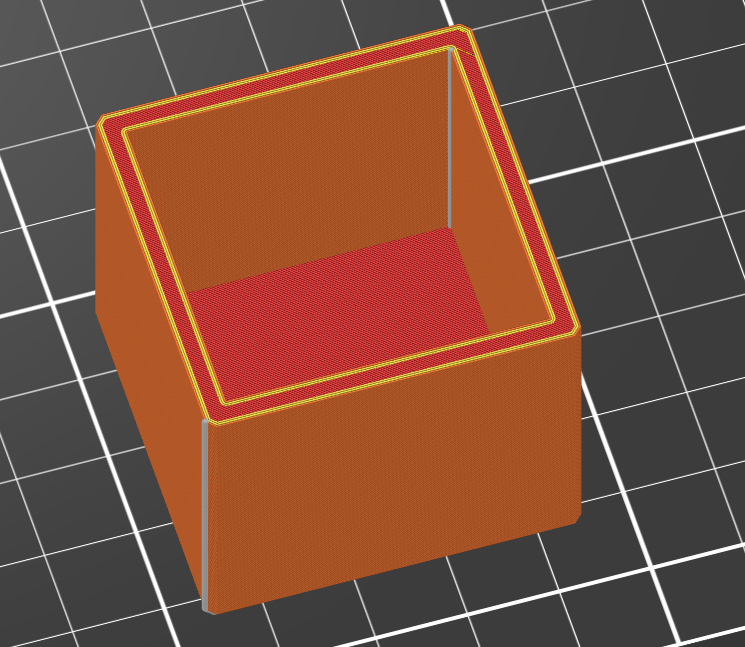
Formerly known on this forum as @fuchsr -- https://foxrun3d.com/
RE: Inside vertical wall defects, only one wall, possible causes?
Thanks for the 3mf. If you turn on Travel in the preview, you see extensive travel from one side to the other, which may or may not coincide with where you see the zits but that has been the cause of "internal zits" issues for me in the past.
If you go to Print Settings>Layers and Perimeters>Quality and turn on Avoid crossing perimeters, those travel lines disappear (and hopefully the zits).
Caveat: Apparently Avoid crossing perimeters may cause lawyer shifts. I have rarely seen that myself but you may have to pick your poison.
Thank you! I'll give that a try.
Honestly, this sometimes seems like a dark art, where you have to deeply inspect the output of your tools. Thought this would be a little more mature by this point. I've always known that the output isn't machinist accurate and accepted that, but it hadn't occurred to me to closely inspect head travel to determine filament flinging! I'd imagine that might occur when there's large acceleration or deceleration of the head. This little index box of mine wasn't supposed to stress a Core1+, it's just a little box so I don't lose my tiny drill bits and I know what's in the box. Adhesive labels have a way of falling off in a machine shop, since they are affected by oils and alcohol. That's why I wanted the labels part of the design.
RE: Inside vertical wall defects, only one wall, possible causes?
Oh yes, if you've been around 3d printing for a while you know it's voodoo.
It would help if Prusa implemented a PR that has been available for a while for Prusaslicer to keep some of the preview settings (in particular Show Seams) persistent across launches… But no…
Formerly known on this forum as @fuchsr -- https://foxrun3d.com/
RE: Inside vertical wall defects, only one wall, possible causes?
Sorry, the forum being the forum again… Was unable to add photos or edit my post...
Original Settings:
With Avoid crossing Perimeters:
Thank you so much for showing this! Never understood why the head moved around so much. Thought that there likely were more "economical" moves. It's a tough general problem to solve (slicing). Excellent choice of graphics to show the possible issue.