
Printing quality issue
I have had this core one for a few months but have yet to get a good long print out of it. I have ran calabrations multi able times checked tension on belts. And extruder I have tightened and loosened. But still same issues. 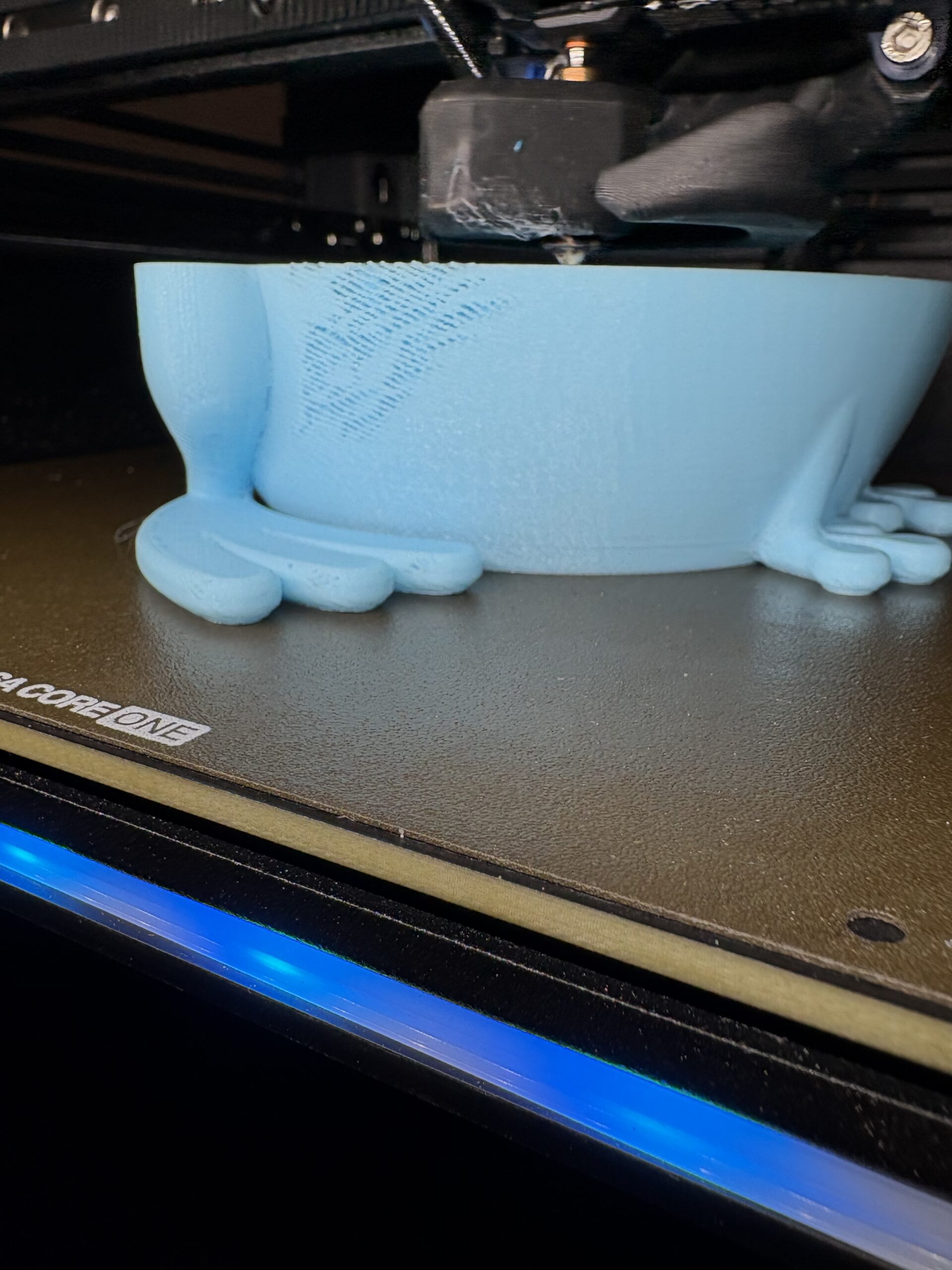

RE: Printing quality issue
This looks like under extrusion.
- What filament are you using?
- What are your print settings?
- What nozzle are you using? What size, what type?
Could you save your project as a zipped .3mf and attach it here? It's very hard to give advice without this information.

Agreed, we need a project file: Files > Save Project as
Zip the .3mf and post it here. It will contain both your part and your settings for us to diagnose.
BUT that er pot? is not well designed for 3D printing and will inevitably have a poor finish around the base. Better to find another file with chamfers at the bed instead of those unprintable overhangs and try with that. If the problems recur come back with a .3mf and we'll take a look.
Cheerio,
RE: Printing quality issue
BUT that er pot? is not well designed for 3D printing and will inevitably have a poor finish around the base. Better to find another file with chamfers at the bed instead of those unprintable overhangs and try with that.
Looks like an AI generated model. Kids these days...
RE: Printing quality issue
I have had this core one for a few months but have yet to get a good long print out of it. I have ran calabrations multi able times checked tension on belts. And extruder I have tightened and loosened. But still same issues.
Wanted to add, it's always best to provide as much information as possible. Easiest would be to attach the zipped project file as @diem has suggested and also if you are using a generic filament profile then which brand of filament, type? I'm going to guess from the color it's Polymaker Pro PLA Teal?

RE: Printing quality issue
question is, throw it at a BL machine, what will you get? Overhang quality was one of the sales arguments in the glossy color brochures...
RE: Printing quality issue
I have printed this with the MK4S and no issues. But it is not just this print. It happens on all prints that have much height.
RE: Printing quality issue
I have printed this with the MK4S and no issues. But it is not just this print. It happens on all prints that have much height.
Which nozzle are you using? Which filament? What settings?
RE: Printing quality issue
You might have a look at "volumetric flow rate" in Prusa slicer, whether it correlates with the observed faults. From the picture, I'd wager a bet that it correlates, material doesn't get through as intended e.g. because of a damaged nozzle => underextrusion.
In Prusa Slicer, go to "Plater" Tab, then from the list of item options show "volumetric flow rate (actual)".
It's the amount of plastic in mm³/s the printer is putting through, and your picture is obviously lacking material in some spaces.
If in doubt, try a different nozzle, especially if you made any cleaning attempts with a needle (the "CHT" high-flow default nozzles are reportedly sensitive to mechanical damage). You could slow down the print from the front menu or dial down the printing speed in the "perimeter" settings (but if in doubt, get a second nozzle- fixing hardware issues in software is expensive. 'nuff said...)

RE: Printing quality issue
I get similar defects when using scarf joints on some filament spools, but not all. I either disable scarf joints or switch to a known working filament. I haven't figured out what makes it do that, even Prusament will show those defects in my prints!