
RE: Help me get my core one printing! *assembly issue
The linear Carriage stops hard against the security-plug and the motor-power works against that, stetches the belt, so that it slips out the frame.
RE: Help me get my core one printing! *assembly issue
The linear Carriage stops hard against the security-plug and the motor-power works against that, stetches the belt, so that it slips out the frame.
RE: Help me get my core one printing! *assembly issue
When the linear slide hits the safety plug, the motor's force stretches the belt, pulling it out of the frame.
In my opinion, that's the cause of the fault.
RE: Help me get my core one printing! *assembly issue
When the linear slide hits the safety plug, the motor's force stretches the belt, pulling it out of the frame.
In my opinion, that's the cause of the fault.

RE: Help me get my core one printing! *assembly issue
In the picture 20260216_190848 the belts seem to be inserted correctly. Now just press the assembly onto the X carriage and fasten the 4 screws. The belts must be pressed onto the carriage! And next time it will convert the photos to jpg format! Just because you have the HEVC codec installed doesn't mean everyone else has it to open the photos!
RE: Help me get my core one printing! *assembly issue
And of course those green plugs must be gone.

RE: Help me get my core one printing! *assembly issue

Only as example. You see the interlocked teeth.
RE: Help me get my core one printing! *assembly issue
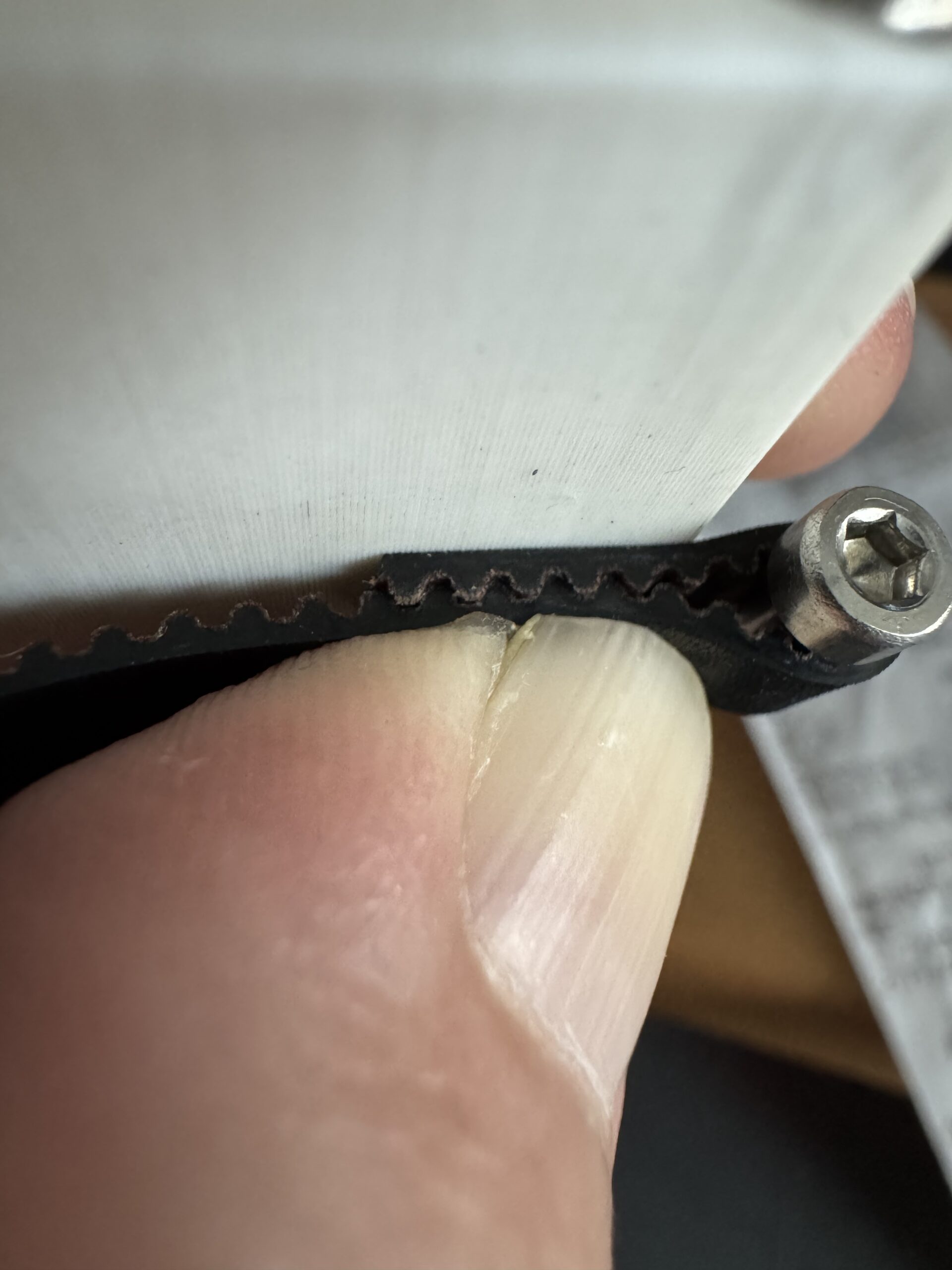

RE: Help me get my core one printing! *assembly issue
I completed rebuilding with the belts as shown. The belts STILL slipped out after running calibration tests.
RE: Help me get my core one printing! *assembly issue
This photo is useless! Insert the belts according to my previous answer, and screw the black piece onto the X carriage. Do not assemble the extruder! Then take more detailed photos of the X truck from all sides! And post them here! If the belts are inserted correctly, the engine is nowhere near strong enough to rip them out!
RE: Help me get my core one printing! *assembly issue - try this simple method!
This is the only part of the upgrade from my MK4S to CoreOne that was not good. I had the same problem the belts kept slipping out.
Here is how I did it.
Slacken off the left and right screws that tighten the belts completely.
You can even open them out so the blocks fall out.
Now the belts are totally slack, but thereaded through the puleys still, its time to put the belt ends in place. With no tension on the belts this part is simple. Please see the manual for how to thread the belts there.
Then put the blocks left and right back. Tighten the belts manually till they feel about right.
Now the belt end won't come out of the block anymore
You can then run the new belt tightening procedure. This stroboscope software for the belts is pure genius. It works.
Not sure why Prusa di not use this method. Once I did this, it took a few minutes to get the belts set up correctly.

RE: Help me get my core one printing! *assembly issue
since the last two posts pretty much told all, let me point out that yor cable + PTFE tube seem to sag a lot. It shouldn't be this low, I guess you may want to check the way this is fixed to the swinging metal arm. Not related to the current problem you have but it could become the next issue, so you may want have a look at this while you have the printer in "maintenance mode"...
RE: Help me get my core one printing! *assembly issue
Could you please take detailed photos of the Core XY system so we can see the position of each belt, etc.? Are the pulleys also different than in the picture? It's strange that only the Y belt ever slips out.
https://help.prusa3d.com/guide/5-corexy-assembly_982276#991148

RE: Help me get my core one printing! *assembly issue
As @miroslav pointed out you'll need to remove the belt harness from the linear rail and show us a photo of how it is routed. It needs to look like this:


RE: Help me get my core one printing! *assembly issue

Is that a shadow or is it broken?

RE: Help me get my core one printing! *assembly issue
Nice catch! I will be sure to check when I can disassemble. I am hoping to have time to work on it this Friday. 🙂
Is that a shadow or is it broken?
RE: Help me get my core one printing! *assembly issue
You are just trying to help, which I appreciate. 🙂
Ignore me - should have read page 2 before commenting! lol
RE: Help me get my core one printing! *assembly issue
Are the pulleys for the X and Y motors correctly adjusted? There's a difference in the distance to the motor (steps 42-43 of the assembly instructions).
Is the belt routing correct? (Step 45)
Are the motor connections reversed? X belongs in the first socket from the left; Y in the second socket from the left (step 81).
Please work through the assembly instructions slowly, step by step.
I get the impression you're too impatient and trying to do too many steps at once (sorry, no offense intended).