
Print Nozzle Blocked
Hi All
I built the Core One + kit
It passed all the initial tests (after a bit of struggling with the belt tension)
I printed the Prusa Key Holder and the Benchy boat flawlessly.
Next I printed a small part (30 minutes) that I uploaded from the Prusa Slicer.
A day later I sent another job to the printer, but it printed only fresh air.
The filament feeder makes a loud clacking noise, so I guessed the extruder might be blocked.
Is this common after less than one hour of total print time?
I used the red PLA that was supplied by Prusa.
I opened the tension lever and I can see a very tiny bit sticking out, but way to short to pull up.
I followed the nozzle cleaning procedure as described under Prusa help. I pre heated the nozzle to 250 degrees and pushed the cleaning needle all the way in, but that does not help. I tried loading the filament after this procedure but it still does not feed. Just the clacking noise.
Does this mean replace the extruder?
Surely they should last a little longer.
Any advice will be appreciated.
RE:
Welcome to the club. Been there, done that. For me, the root issue was that my hot end was not fully inserted, so the filament got stuck in the nozzle. I contacted PrUSA thru Live Chat and got them to walk me through the problem.
I managed to clear the hot end without too much difficulty. Everything is back together and printing up a storm for several weeks now.
A day later I sent another job to the printer, but it printed only fresh air.
The filament feeder makes a loud clacking noise, so I guessed the extruder might be blocked.
Is this common after less than one hour of total print time?
I opened the tension lever and I can see a very tiny bit sticking out, but way to short to pull up.
RE: Print Nozzle Blocked
Contact PrUSA tech support using the live chat - the button is in the lower right corner of most PrUSA screens. (click on example to left). The wait is not too bad - play on the internet while you wait for the response. The techs are very helpful and much more knowledgable than I am on the machines issues.

I expect you will be back up and running in no time.

RE: Print Nozzle Blocked
PrUSA
But you do know that "Prusa" is the last name of Mr. Josef Průša, and that both he and his company are based in the Czech Republic, right?

- However, for the commonest cause with new users: After printing and at any time there will be few hours between prints - did you unload the filament and at least store it with dessicant? Preferably actively dry it between prints...
Open the extruder idler, heat the nozzle to about 10° above printing temperature, take half a meter of filament and, bypassing the extruder gears by inserting directly into the top of the nozzle tube use it to push the filament through the nozzle by hand. Push slowly at first, slowly accelerate until it is going as fast as the heatblock will accept it then finish by pulling the last few cm back out as fast as you can.
If you only print regular, non abrasive filaments, expect a nozzle to last about 9 months at 40% duty cycle.
Cheerio,

RE: Print Nozzle Blocked
Hello,
I keep having the same issue with the red lipstick filament as well. The nozzle clogs on the default profiles when printing small details, such as the last layers (with the numbers) of this: https://www.printables.com/model/485572-gridfinity-boltscrew-measuring-tool-2x1
Or anything above the horns for this: https://www.printables.com/model/1345838-cute-mini-triceratops-keychain
I tried either the 0.15 BALANCED or 0.2 SPEED, and it happens with both, with the Core One and Prusament PLA profiles in PrusaSlicer-2.9.4
There is no "minimum time per layer" setting. I don't know if that could mitigate it.
Honestly, I am quite disappointed with it. I managed to unclog it by heating it at 280°C and then moving the extruder axis. However it happens again and is repeatable. I did not try other filaments yet, as I want to solve this issue before running other colors

RE: Print Nozzle Blocked
PrUSA
But you do know that "Prusa" is the last name of Mr. Josef Průša, and that both he and his company are based in the Czech Republic, right?
Probably just a keyboard slip, like MAGAzine.
RE: Print Nozzle Blocked
I keep having the same issue with the red lipstick filament as well. The nozzle clogs on the default profiles when printing small details, such as the last layers (with the numbers) of this
There is no "minimum time per layer" setting. I don't know if that could mitigate it.
Honestly, I am quite disappointed with it. I managed to unclog it by heating it at 280°C and then moving the extruder axis. However it happens again and is repeatable. I did not try other filaments yet, as I want to solve this issue before running other colors
I'm assuming this filament is PLA? Have you dried it? Do that first. Also try printing with the door open.
RE: Print Nozzle Blocked
Thank you for all the feedback.
I managed to unclog the hot end by removing the nozzle from, heating it to 250C and I was finally able to pull the cooling filament from the nozzle using the cold pull method.
Please be careful, I burnt my finger.
I then tried printing the same model, it still would not feed. I cancelled the print job, and while he printer was still hot printed another model perfectly fine.
That got me thinking it could be a slicer or g-code problem. But I'm still learning so could not explore further.
RE: Print Nozzle Blocked
I would suspect a tiny alignment issue between the extruder and the nozzle. In my case, it was the nozzle being 1mm too low. Or perhaps brittle filament.
I have used a spool and a half of the Prusa Red Lipstick PLA without any clogging issues. My one clogging issue was when switching from Hatchbox PLA to Prusa Vanilla PLA. While it initially purged fine on the load, it got stuck immediately after that. The root of the plug was the old filament. The was about 68mm of new filament stuck in the hot end. I removed the filament from the nozzle by:
removing the nozzle; putting the nozzle in water near boiling to soften it; sticking a needle into the soft filament; letting it cool; then pulling it out. Rodded out the rest of the plug; then did a purge at 250 C to remove the residue.
Slicer and g-code issues would affect everyone (assuming you have not customized either of them). So it is unlikely to be them.
I managed to unclog the hot end by removing the nozzle from, heating it to 250C and I was finally able to pull the cooling filament from the nozzle using the cold pull method.
Please be careful, I burnt my finger.
I then tried printing the same model, it still would not feed. I cancelled the print job, and while he printer was still hot printed another model perfectly fine.
That got me thinking it could be a slicer or g-code problem. But I'm still learning so could not explore further.
RE: Print Nozzle Blocked
Merry Christmas!
I'll print the same model in a different filament in order to eliminate the red lipstick pla
RE: Print Nozzle Blocked
I keep having the same issue with the red lipstick filament as well. The nozzle clogs on the default profiles when printing small details, such as the last layers (with the numbers) of this
There is no "minimum time per layer" setting. I don't know if that could mitigate it.
Honestly, I am quite disappointed with it. I managed to unclog it by heating it at 280°C and then moving the extruder axis. However it happens again and is repeatable. I did not try other filaments yet, as I want to solve this issue before running other colorsI'm assuming this filament is PLA? Have you dried it? Do that first. Also try printing with the door open.
Hello,
Yes it is. The filament was brand new, so I assumed it was dry. While it was drying I switched to a roll or Form Futura Emerald green Galaxy PLA and it printed fine with the same G-code. I'll update you on the dried Red Lipstick Prusament PLA
Cheers,
RE:
Hello,
Yes it is. The filament was brand new, so I assumed it was dry. While it was drying I switched to a roll or Form Futura Emerald green Galaxy PLA and it printed fine with the same G-code. I'll update you on the dried Red Lipstick Prusament PLA
Cheers,
It's a common mistake to assume that brand new unopened filament is dry. I always dry filament after removing from the factory sealed bag before printing it.
I'll illustrate with some examples.
Brand new roll of Prusament PC-CF printed straight from the vacuum sealed bag and on the right after drying at 80° for 6 hrs.
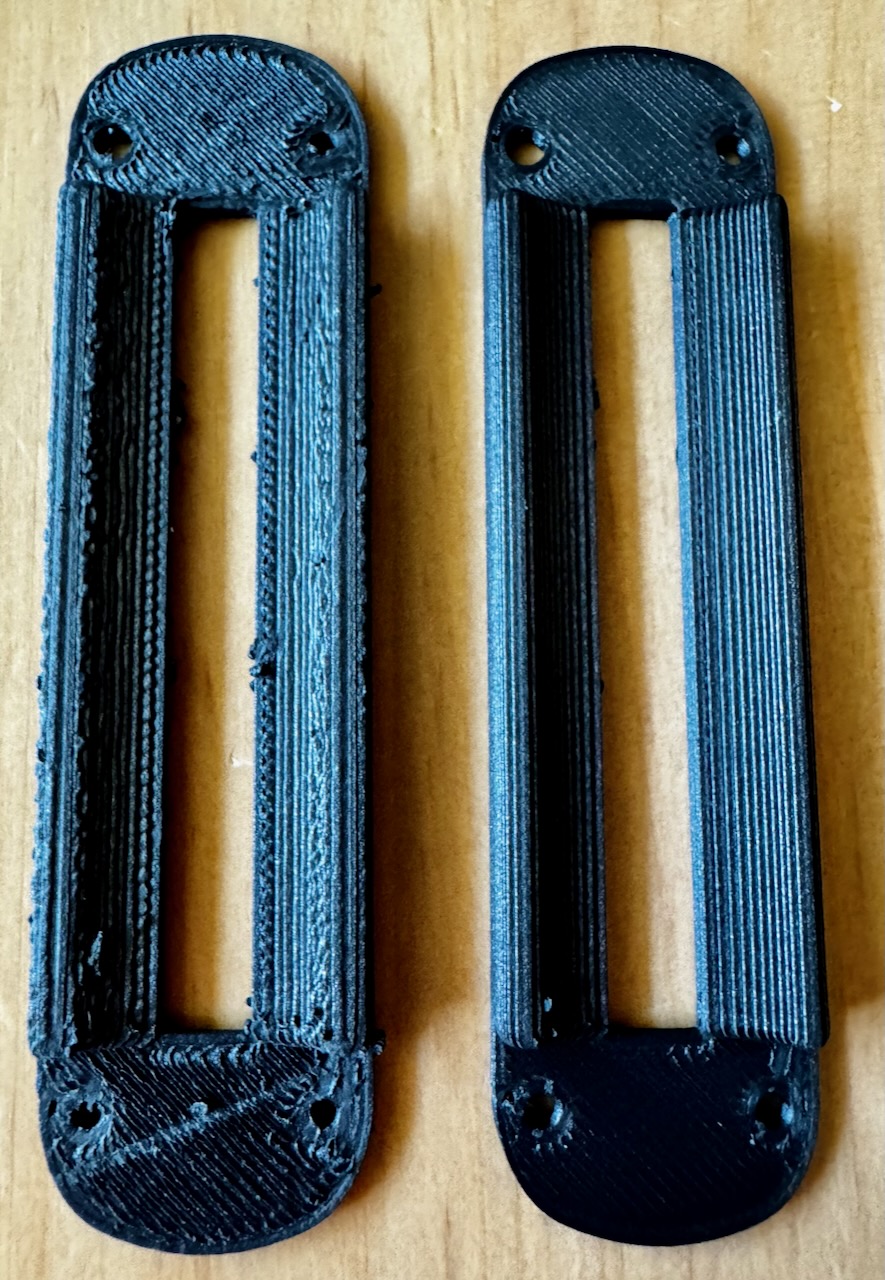
Brand new roll of Suraya Tech TPU 64D taken straight from the vacuum bag and after drying
