
MK4S -> Core One + Axis calibration failure - out of ideas
So after about 20 hours I have finally finished building my Core One + from my trusty old MK4S.
And I am starting to regret it.
Here's the symptoms of the problem:
- Homing calibration consistently fails
- No noticeable play/gap on either side
- Belt tension perfect based on in-printer calibration as well as the Prusa app
- Y Axis calibration mostly fails, sometimes it is succeeding
- Printer shows -19 when Y Axis is moved all the way to the front of the printer
- Z Axis calibration sometimes fails because Nozzle is too close to the door so the print bed actually hits the fan outlet at the back of the Nextruder instead of the tip of the nozzle
I am out of ideas at this point. Prusa support said something about rods/bearings not being smooth but I checked them thoroughly before assembly.
Trying to bend the X-Axis as shown here also did not make any difference:
Neither did loosening both belts completely and slowly tightening them again on both sides simultaneously until the tension was in the green range.
Edit: also this is what my first test print looks like: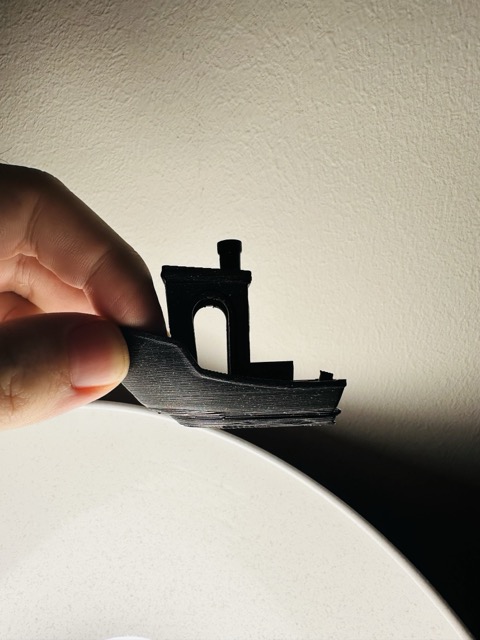
Best Answer by Jürgen:
For better control when bending the brackets, you can detach the X gantry from the bracket on one side, then bend the bracket on the opposite side using the gantry as a lever. Reattach the bracket and repeat on the other side. This way, you can ensure that both brackets have 90° angles individually, and they will be easier to bend too.
Of course the belts need to be fully loose for this (as with the "bend in place" method suggested by Prusa.) I found it easiest to fully unscrew the two tensioner screws until the idler blocks come loose.

RE:
Y calibration failures are often due to some obstruction which gets in the way of Y travel. You can try by pushing the gantry by hand, with the motors powered off -- do you feel resistance anywhere? The most common cause is that the cable to the side filament sensor is not running straight back, but bulges inwards a bit. It will interfere with the linear bearing on the right Y rod then.
The Y=-19 position is normal. The firmware defines Y=0 to be the front edge of the printable area, limited by the print bed size. But the print head can travel a bit further forward into the "negative" domain. Used today for moving the vent grille (in the Core One +), and some users have mounted a nozzle wiper in that extra area. The extra space will also come in handy with the Bondtech INDX upgrade, to park and pick up the nozzles without losing too much printable area.
Edit: I don't understand this point. Could you post a photo of the collision which clarifies in which position the print head sits when it happens?
"Z Axis calibration sometimes fails because Nozzle is too close to the door so the print bed actually hits the fan outlet at the back of the Nextruder instead of the tip of the nozzle."
RE: MK4S -> Core One + Axis calibration failure - out of ideas
Ah, I think I understand that last point now. You mean that the Y position is too far forward during Z homing, so the nozzle sits in the empty space where there is no print sheet, right? That's probably a knock-on effect of the Y homing/calibration problem and will be resolved once the Y axis behaves.
RE: MK4S -> Core One + Axis calibration failure - out of ideas
Thanks Jürgen, yes that is exactly what is happening.
Yesterday I completely removed the Nextruder and tried to bend the axis to eliminate any gap on both sides.
This gives me a bit more reliable Y-Axis and X-Axis test results (successful multiple times in a row after a printer restart), but the homing calibration is still failing. When I run the Y-Axis test directly after a failed homing calibration, the Y-Axis test fails again and then succeeds after a second attempt.
My current hypothesis is that the belts are too tightly pulled on the Nextruder mount.
I will remove the nextruder again and make sure that each belt on both ends has exactly 4 teeth sticking through the opening.
If that does not bring any results I will need to contact Prusa support with a few videos of the homing calibration and also the manual belt tuning frequencies so they can debug the issue further.
RE: MK4S -> Core One + Axis calibration failure - out of ideas
I don't think the number of teeth clamped in the Nextruder is that critical. As long as you have enough overlapping teeth to hold the bels securely, and the tensioner adjustment range lets you tighten the belts to spec, everything is fine. Some users have theorized that you need to clamp the same number of teeth everywhere, exactly symmetrically -- but that does not make sense to me.
Have you confirmed that the Y axis can travel smoothly without obstructions? Checking that by hand with the motors powered off is probably good enough. If you are willing to do more disassembly, checking it again with the belts detached is a more sensitive test. I take it that you have looked at the filament sensor cable and confirmed that it is not getting in the way of the Y bearing?
RE: MK4S -> Core One + Axis calibration failure - out of ideas
Yes, Y-Axis travel is smooth and unobstructed.
Just had a chat session with support to confirm. The issue they found was that the X Axis pulley was not correctly aligned on the motor shaft. I fixed that now, but still same result. What seems off to me is that no matter what I try, the left side of the gantry always has a 1mm gap between. I tried using moderate force to bend it as stated in the instructions, but it just won't get straight.
RE: MK4S -> Core One + Axis calibration failure - out of ideas
For better control when bending the brackets, you can detach the X gantry from the bracket on one side, then bend the bracket on the opposite side using the gantry as a lever. Reattach the bracket and repeat on the other side. This way, you can ensure that both brackets have 90° angles individually, and they will be easier to bend too.
Of course the belts need to be fully loose for this (as with the "bend in place" method suggested by Prusa.) I found it easiest to fully unscrew the two tensioner screws until the idler blocks come loose.
RE: MK4S -> Core One + Axis calibration failure - out of ideas
Thanks!
After a lengthy chat session with support I was able to finally get the homing calibration to work.
Turned out that the belt tensioning measurements from the app and also the in-printer menu were completely wrong for my printer. I had to tighten the belts several screw turns more than what the wizards told me. Now I have already printed a benchy without any layer shifts, and now I am printing a small functional PETG model to see if this works as welll.