
I’m slowly losing my mind - first layer issues and under extrusion
hi, I’ve had successful prints in the past and was enjoying the printer. After the recent update I haven’t had a single good print.
I am experiencing regular blobs forming.
under extrusion on the sides even when the first layer is perfect.
lots of weird artifacts when going diagonal.
here is me trying to fine tune my first layer.
PLA
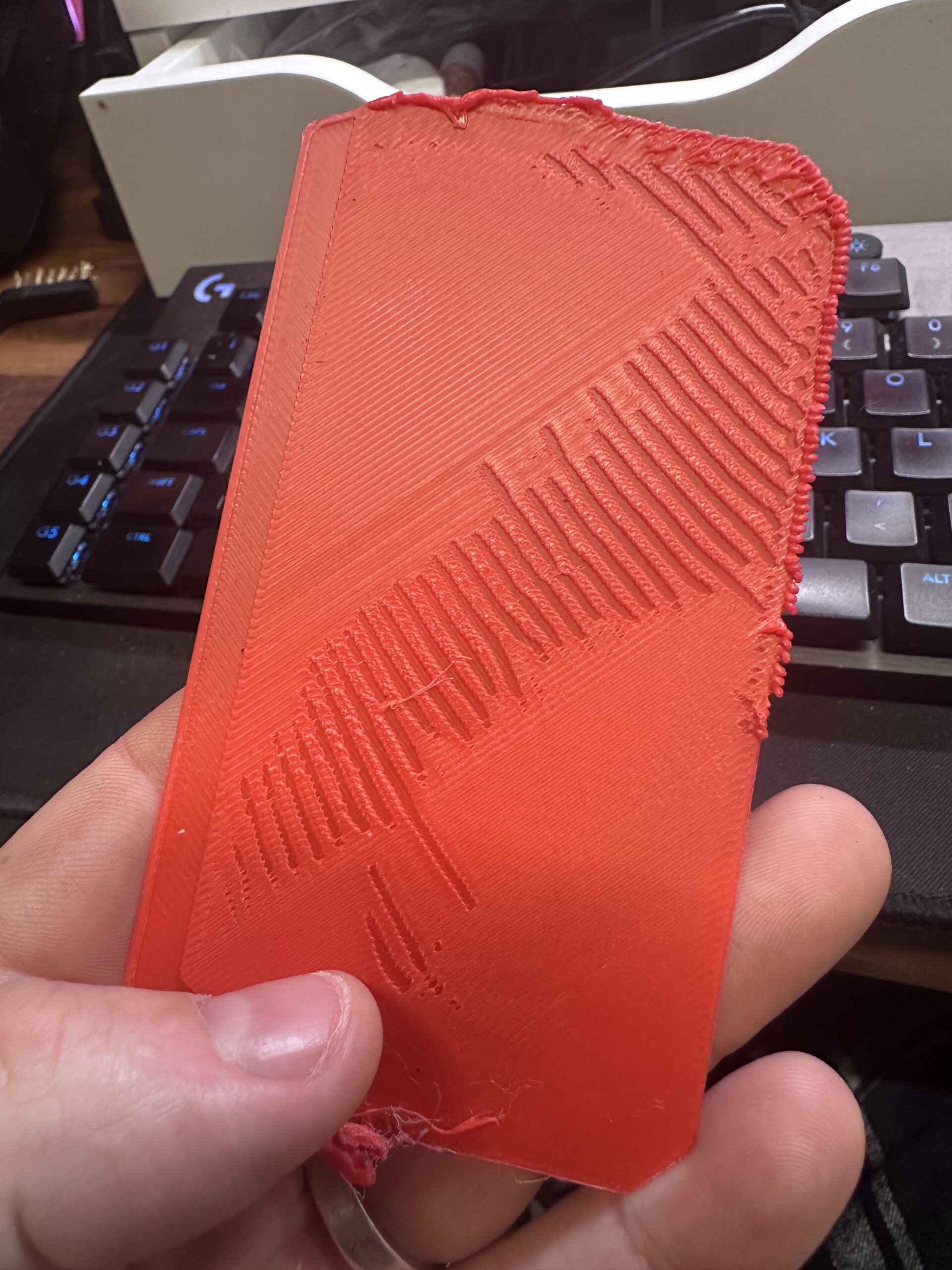

i was on the phone for a few hours with support and they got me to reset the firmware , recalibrate everything including checking the belts were tuned and then print out multiple cubes in the file they sent me.
this is the best one we managed.

I am washing the sheet with warm water and dish soap and I have 99% isopropyl alcohol to wipe in between prints.
Any ideas or help is greatly appreciated

Despite your cleaning regime there do seem to be some fingerprint patterns there... Are you working with any other chemicals in the same workspace? Paints, glues, resins, protein mixtures (including foods) - that sort of thing?
Also the sheet is rather scratched which suggests rough handling; something we see quite often in university printing spaces where students look up hints for 3D printing and find old advice intended for outdated borosilicate glass print beds..?
A picture of the underside of that failed print might help us eliminate the print sheet.
As it's a smooth sheet (this ONLY applies to smooth sheets) try a clean with acetone - do not repeat this tactic often, once or twice a year is OK but more will damage the sheet. This change of solvent may shift buildups of substances insoluble in water or alcohol. Then try printing with one of Prusa's default profiles.
Cheerio,

RE: I’m slowly losing my mind - first layer issues and under extrusion
I am confused... Your post title and text focus on the first layer and the print sheet -- but your first picture seems to show the second or third layer, looking at the print from the top, and the layer below appears to be continuous without the strange ripple/gaps? And in your third picture, isn't the surface pointing up the original bottom layer of the print, which looks alright -- but the real mess occurs on the sides of the cube?
To me it looks like the extruder can drop into a mode where it periodically does not feed any filament. So I would focus my troubleshooting on the Nextruder. What have you checked together with service? Tension of the two idler screws; taking the lid off and looking for debris (broken pieces of filament)? Do you have a spare nozzle which you can swap in?
Agreed but even the first picture shows what might be warping which, as we know, can propagate errors through the entire print so I tend to approve the OP's plan of getting the first layer fixed and then worrying about remaining issues.
Cheerio,
RE: I’m slowly losing my mind - first layer issues and under extrusion
Thank you very much for your quick reply.
I use the Prusa spatula printed in PLA to lift failed prints off the sheet, that may have scratched the sheet.
I don’t use any other products or contamination around the printer.
just a bit of lateral thinking, I’m using generic filament from china, would that ever put a coating on the sheet?
The sheet is only 2 months old, as this is how long I have owned the printer.
kind regards
RE: I’m slowly losing my mind - first layer issues and under extrusion
Sorry if I caused confusion, I’m confused myself as I’ve spent hours trying to rectify this and though it might be a “first layer” issue
I am confused... Your post title and text focus on the first layer and the print sheet -- but your first picture seems to show the second or third layer, looking at the print from the top, and the layer below appears to be continuous without the strange ripple/gaps? And in your third picture, isn't the surface pointing up the original bottom layer of the print, which looks alright -- but the real mess occurs on the sides of the cube?
To me it looks like the extruder can drop into a mode where it periodically does not feed any filament. So I would focus my troubleshooting on the Nextruder. What have you checked together with service? Tension of the two idler screws; taking the lid off and looking for debris (broken pieces of filament)? Do you have a spare nozzle which you can swap in?
The spatula should only be necessary when very thin remains have to be removed from the sheet - any print after the first few layers should either pop off as the plate cools or come loose when the plate is flexed.
Generic filament rarely causes adhesion problems but some pigments - used in all qualities of filament, do sometimes leave noticeable and detrimental residues.
In your case there are a few darker marks on the print sheet (second picture) including one very obvious fingerprint running out of shot close to the bottom left corner of the upper, complete but ragged first layer object, and the ragged breakthroughs and other imperfections are also in a pattern that might indicate fingerprints.
A picture of the underside of that failed print might help us eliminate the print sheet.
In any case a very thorough clean will do no harm. Also cleaning and using the other side is worth trying.
third picture, isn't the surface pointing up the original bottom layer of the print,
If you blow the picture up you will see it's a top layer. Clearly the machine is printing OK by then...
Cheerio,