
Clicking & No Extrusion When Starting Print
Hello,
I bought a Core One Kit at the end of 2025, assembled it, and was able to make a few initial prints (keychain, boaty, and some small planters). I had no clicking or extrusion issues on the first print but the printer was on a table that vibrated too much so I stopped the print and moved the printer. I never had an easy time getting a successful print after the first attempt.
The printer will get to the stage where it creates an initial purge line but nothing is extruded and I hear clicking from the print head (gearbox). I could not fix this at the time so I resorted to adding a brim to each print, pausing the print, unloading->loading the filament, running a purge, then resuming the print. I did this for several prints and there were no extrusion issues/clicking after the purge. Then I had to pause any further troubleshooting/use of the printer due to life getting busy.
Now I am back to trying to fix this. Because I am able to get extrusion sometimes, I do not suspect a clog. I mainly targeted the idler tension. My concern was that I over/undertensioned the idler screws.
Here is what I have tried:
- Run a gearbox calibration. No issues
- Unload, load filament, purge. Sometimes this works, often when I add a little force on the filament by pushing it into the nextruder. Other times, I get clicking noises and nothing is extruded.
- Tightening the idler tension screws in increments of 5 rotations and running a print. I did this 4 times, totaling 20 rotations on the 4th print attempt. Print attempt #3 had clicking but did extrude after the purge line step was complete. I ran a couple attempts with tension a little tighter and looser around this point because I thought I was close and just need to dial it in but I saw no improvement. All other attempts in this step had clicking and no extrusion.
- Loosening the idler tension screws, undoing the above tightening, and then loosening in increments of 5 rotations. I experienced clicking and no extrusion as well. At the loosest, the screws were well backed up within the idler nut.
I'm at a loss as to what to do next. I have considered completely disassembling the nextruder but I would prefer not to unless it is necessary. Any help or advice is appreciated.

RE: Clicking & No Extrusion When Starting Print
I'm at a loss as to what to do next. I have considered completely disassembling the nextruder but I would prefer not to unless it is necessary. Any help or advice is appreciated.
There are multi causes of Nextruder "clicking". First, which filament are your printing?
Here are some (possible) causes:
- The nozzle is not fully inserted into the heatsink. This is a common mistake.
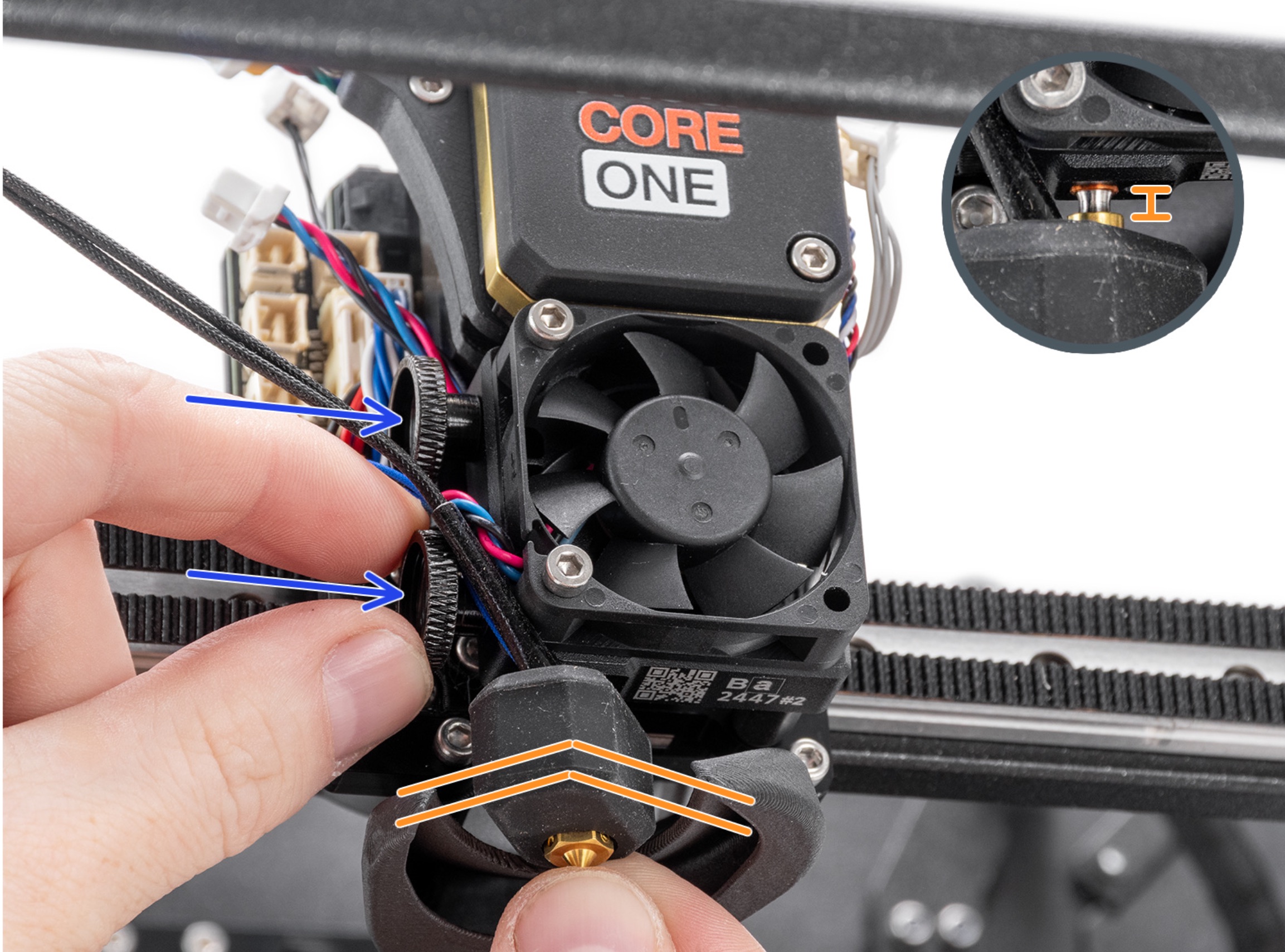
2. You are printing PLA or damp PETG and the nozzle is getting partially clogged. Try doing a cold pull.
3. Idle tension screws are too tight or too loose. If the filament is properly loaded then you should see it descend into the nozzle heat break tube when you open the idler lever after loading the filament
4. The Nextruder main plate is damaged and the filament is not getting guided into the nozzle heatbreak tube and getting jammed on the outside of the tube
5. Planetary gears were assembled incorrectly. The ring/annulus gear was installed with the chamfer in the wrong direction.