
Failed First Print - Fix for PETG Benchy that shifted after a couple layers on textured sheet?
I have a brand new Core One L received less than a week ago and today attempted to do my first ever 3D print - a 3DBenchy in PETG on textured sheet.
Problem: after a couple minutes and a couple layers, the base portion already printed was rotated and moved as the newest layer was being added - the base was no longer fixed in the original position it was laid down in (i.e. bow pointing to the right). I immediately cancelled the print. See included photos.
Fix? Looking for help identifying the cause so I can fix this. I did find one known problem after the fact - in the slicer I had the wrong nozzle (0.4mm, instead of the 0.4mm high-flow nozzle actually shipped with the printer). I'm not sure how big an issue that is - so before I try again with that corrected, I wanted to inquire to see if anyone had any ideas about other possible causes and what I could do to fix.
Details:
- Filament: Prusament PETG Galaxy Black
- Sheet: CORE One L Textured Powder-coated Print Sheet - brand new, never used, never handled without latex gloves, cleaned before first use with 99% IPA
- Model/Settings: 3dbenchy.stl by Prusa downloaded from printables.com into Prusa Slicer 2.9.4 on MacOS, with these being some of the slicer settings:
- Filament: "Prusa PETG @CoreOne (modified)" (I think the "modified" is because I changed the default orange colour to black)
- Printer Settings: Layer Height=First Layer Height=0.2mm; Perimeters=2
- Print Settings: "0.20mm SPEED"; Filament: "Prusa PETG (modified)"; Printer: "Prusa Core One L 0.4 nozzle" <--that SHOULD have been HF0.4 nozzle!
Are there other settings I should check on?
Is my failure to set the nozzle type to HF likely to be a significant issue or not?
Any feedback appreciated.
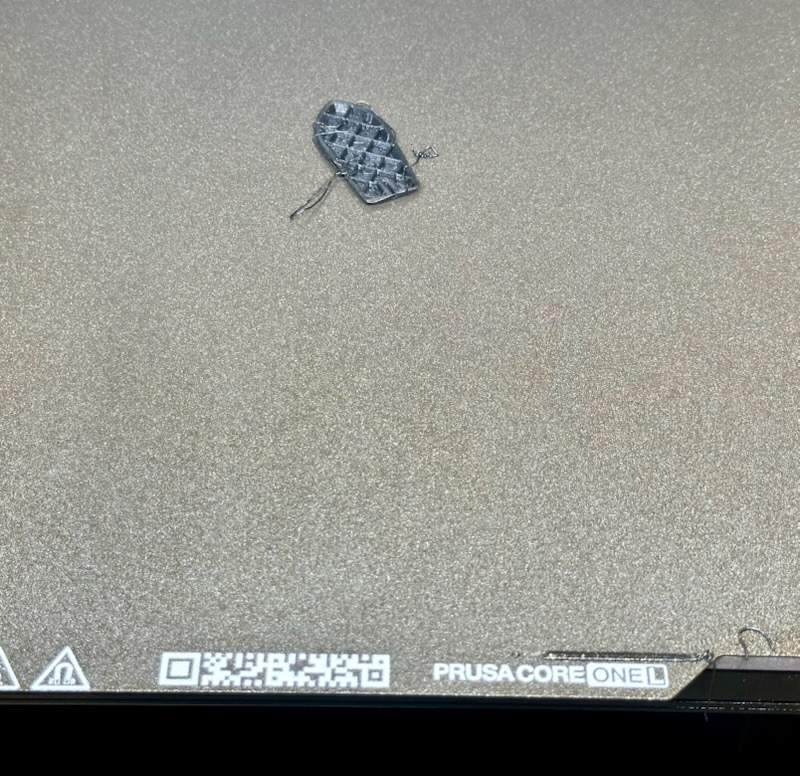 Failed Print: benchy is rotated!
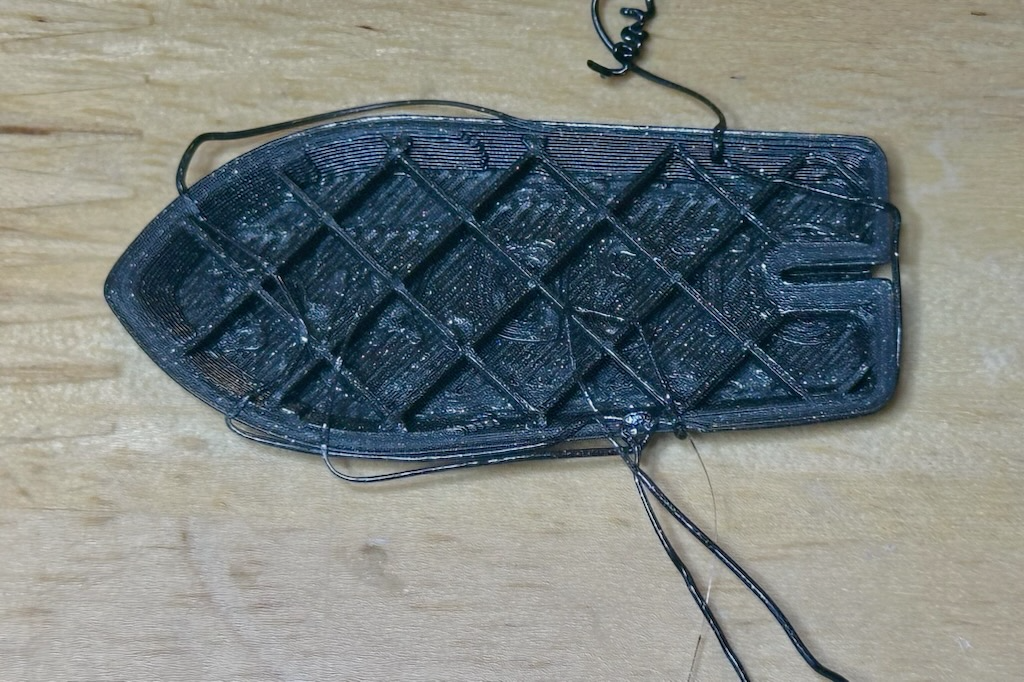 Top view of failed print
 Bottom view of failed print

RE: Failed First Print - Fix for PETG Benchy that shifted after a couple layers on textured sheet?
The answer you seek, was 5 threads down in this sub forum. https://forum.prusa3d.com/forum/prints-troubleshooting/z-offset-incorrect-textured-sheet
Add -0.03mm or -0.035mm (currently using) to the Z Offset on the printer profile. You can create a printer profile for the Textured Sheet and add the -0.035mm to the Z Offset. You'll need elephants foots compensation of 0.4
Always Peform a live z test for your build plate. Also the Prusa PETG profile sucks.
I have used the galaxy black petg. See the Zip, Cal cube, Live Z and all my filament and print settings. Cal cube is just for the cube, my structual in the live z is for everything else. Hope this helps
Calibrate extrusion for the filament profile.
Measure diameter of the filamentMultplier, by using hollow cube, measure the wall thickness, See Precise Method --> https://help.prusa3d.com/article/extrusion-multiplier-calibration_2257
Print the Cube with 1 perimeter, 2 bottom, no top so you can measure wall thickness.
RE:
Also are you using the Actual textured or the Satin sheet that came with the printer? The z offset I provided was for the Textured sheet, haven't done a live Z for the Satin yet.
Also wash your plates in soap and water 1st, really really well, my 3 plates were very dirty from the factory, especially the Satin, then IPA.

RE: Failed First Print - Fix for PETG Benchy that shifted after a couple layers on textured sheet?
> Also wash your plates in soap and water 1st, really really well, my 3 plates were very dirty from the factory, especially the Satin, then IPA.
This. Get a normal dishwasher soap, use a warm water and scrub the plate very well so the water does not run with streaks/droplets but adheres to the print sheet over larger area.
I had exactly the same issue that PETG was absolutely not sticking to the brand new textured sheet.
See my GitHub and printables.com for some 3d stuff that you may like.
RE: Failed First Print - Fix for PETG Benchy that shifted after a couple layers on textured sheet?
To _KaszpiR_ - Thanks for that tip: I will try that and report back!
To Ruebarb - Thanks also:
I will be sure to first give the sheet a good washing (as Kaszpir also noted).
It is indeed a textured sheet (ordered that as an extra item, by default you just get a satin sheet with the printer).
I had already seen your other post that you linked:
As per my photos, you can see the bottom does not look bad (not like your BEFORE example), so I was thinking that was not an issue for me.
Given that difference, I did not think it safe to make that Z adjustment. Do you still think I should do that Z adjustment (in addition to washing) despite the differing surface results?
RE: Failed First Print - Fix for PETG Benchy that shifted after a couple layers on textured sheet?
If you did a live Z test, you would see the same type of results. Printing an object is not a live Z test. The test is to print a single layer to verify layer adhesion. You do not want to make adjustments blindly, but to verify.
Don't do anything drastic until you have made certain the sheet is clean and the print is sliced for the correct nozzle - but I wouldn't print a benchy as a first attempt. The original benchy from https://www.3dbenchy.com/ is a useful torture test for diagnosing printing issues - but nowadays there are thousands of benchy variants and remixes that are not.
You have a brand new machine that has been shaken up in transit so it will be a while, perhaps a month, before it has settled down and run-in enough for printing an original benchy to be worthwhile.
I have never printed a benchy btw, I have never needed one.
So: clean the print-sheet(s) - dishwashing detergent (dawn/fairy) and rinse well with HOT water then start printing low profile, useful objects and build some experience, make your first mistakes and establish a routine then, after you have done your first monthly maintenance perhaps print a benchy to check your now stable machine is correctly dialled in.
Cheerio,
RE:
Before seeing the rest of the responses I tried two more times (with same results):
First retry: did this after thoroughly cleaning plate with warm water and Dawn dish soap using a new clean rag (Costco), followed by thorough alcohol cleaning and wipe down with a new microfiber cloth. Maybe I really did not clean it enough? I think I will retry with hotter water and perhaps a synthetic brush? (Don't have sponges handy.)
Second retry: tried with a new profile with z offset of -0.04mm (saw someone else recommending -0.05 elsewhere, so split the difference between that and what Ruebarb mentioned).
Not sure what to do next other than retry the cleaning. Re Ruebarb link for Live Adjust Z: if C1L even supports that (menus not as shown in linked article), it is really just doing the same kind of Z adjustment I did in the slicer: I can probably instead just pause printing after the first layer and examine/photo the result to see how it looks.
Any other ideas?
EDIT TO ADD: I used the Prusa 3D benchy from printables (since the bgcode version on the provided USB was for PLA). Link: https://www.printables.com/model/3161-3d-benchy
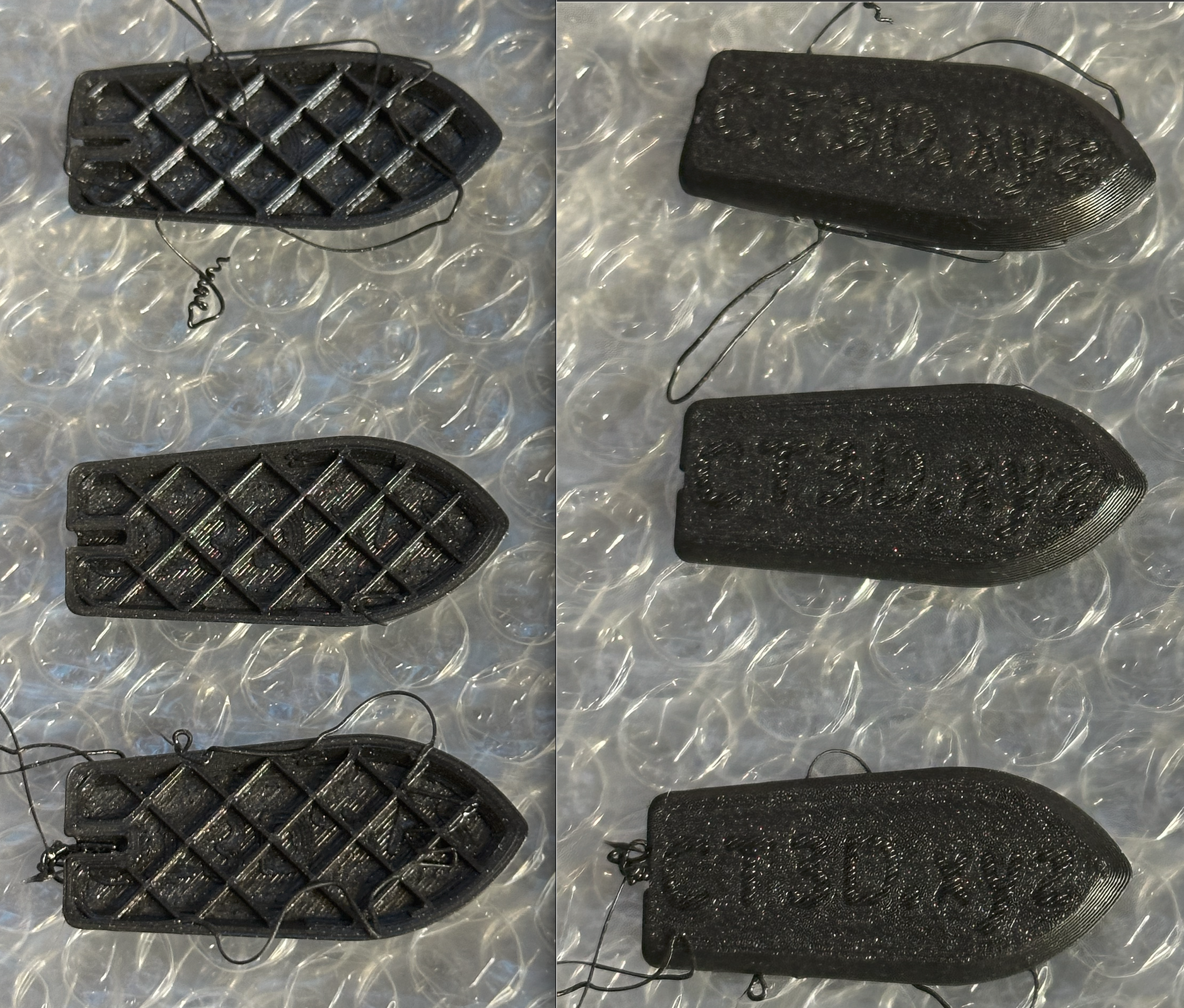
Three tries, same results
TWO MORE FAILURES -- RE: Failed First Print - Fix for PETG Benchy that shifted after a couple layers on textured sheet?
Weird problem editing prior post. Corrected title here.
Also had wanted to edit that my first retry also included correcting the nozzle type setting in slicer: first try was 0.4, but the C1L comes with 0.4HF nozzle.
RE: Failed First Print - Fix for PETG Benchy that shifted after a couple layers on textured sheet?
Thanks. Will definitely try something simpler next time: the included keychain is very simple, will try that after another/better plate cleaning. But will also see if anyone has any other ideas!
RE: Failed First Print - Fix for PETG Benchy that shifted after a couple layers on textured sheet?
I had the same problem with the textured sheet and PETG, it was all about the cleaning procedure, don’t use IPA at all, just clean with dishwashing soap and water, then for inbetween prints I use window cleaner and a clean cloth.
/Anders
RE:
Use the Live Z file I gave you in this post (Bottom), https://forum.prusa3d.com/forum/postid/776776/ It also includes the filament profile this PETG, you'll need to adjust the extrusion based on your cal cube testing.
If you can print this simple file successfull, should come off the bed as one perfect piece, and all the layers are bonded together without gaps (Hold it up to a light) and the surface is also not too rough (too low). Like the Prusa article states. Then you should have solved your adhesion issue, assuming your plate is clean.
You can make adjustments while the print is going, do each corner square at a different setting, give you some idea which offset is correct or you can just print the entire file with different settings in the printer profile. Doing it live may be more than your skill level at this time.
Live Adjust Z (LoadCell)
The Prusa CORE One, and the Original Prusa MK4/S, MK3.9/S, and XL are equipped with a LoadCell, which will calibrate the first layer automatically.
In case you would still like to fine-tune it, you can long-press the LCD knob while the first layer is printed. The Live Adjust Z will not be saved for the next print in this case.
You can also tune this value in PrusaSlicer, under >Printers >General >Z offset, where a negative value means a more squished first layer, and vice versa. This value is specific to the G-Code where this value is set.
If you have constant issues with the first layer on a Prusa printer with the Loadcell, check the dedicated paragraphs from the general first layer issues article.
RE: Failed First Print - Fix for PETG Benchy that shifted after a couple layers on textured sheet?
Thanks for all the suggestions so far.
Today I cleaned the sheet once more (dish soap and water only, per Anders).
Then based on Ruebarb's post I tried to print the Precision Method Cube STL (linked from this help article).At first, after bottom layer and starting on walls, I saw a couple blobs that I thought would be a problem, but it finished OK: see photos.
I will post full details later (only get access to a new micrometer tomorrow).

RE: Failed First Print - Fix for PETG Benchy that shifted after a couple layers on textured sheet?
I am doing some more testing of the Galaxy PETG, found for a tiny part with very little contact area, it would not stay on the textured sheet, but worked great on the satin sheet, very strong adhesion. Also thinking this prusa petg is very moisture sensative too, printed with sunlu petg for 6 years on a textured sheet on the MK3S, with zero issues, only ever had to dry it once.
RE: Failed First Print - Fix for PETG Benchy that shifted after a couple layers on textured sheet?
Interesting, thanks. My micrometer from Amazon got delayed, so no update yet.
But I can say I pulled the PETG direct from a dryer at UNDER 10% humidty just before every print (and it is winter here and cold and dry anways).
So moisture is not an issue.
Will have to consider trying on a satin sheet at some point!
But first, will check precision cube wall measurements to see if flow rate needs adjusting ... once that micrometer arrives.
I am doing some more testing of the Galaxy PETG, found for a tiny part with very little contact area, it would not stay on the textured sheet, but worked great on the satin sheet, very strong adhesion. Also thinking this prusa petg is very moisture sensative too, printed with sunlu petg for 6 years on a textured sheet on the MK3S, with zero issues, only ever had to dry it once.
RE: Failed First Print - Fix for PETG Benchy that shifted after a couple layers on textured sheet?
Moisture was not the issue.
I redid my live z test, it was like I never did it before, very weird. Had to go much lower with the nozzle. I have now successfully printed the very small part on the textured sheet. Still more testing to go.
Not a fan of this self adjusting 1st layer. Once I had it dialed in on my Mk3S, I never needed to change it again, was always the same, had one for the smooth and one for the textured sheet, it was 100% repeatable.
RE: Failed First Print - Fix for PETG Benchy that shifted after a couple layers on textured sheet?
Besides washing the plate very well. IPA alone is not enough. Use gloves to keep it clean.
The biggest issue is the chamber venting 🤯, the moment you turn off the chamber fans and close the vent, everything sticks and also doesn't warp and lift. Why these vents are enabled by default is 🤪. My Mk3S had the lack table enclosure, which held the heat and everything printed great, still does.
The z offset is now much less a factor, the default will get a decent 1st layer, but for a perfect 1st layer, -0.02, elephant foot comp 0.4 to correlate.
Set filament chamber nominal to 0, will shutdown the exhaust fans. You'll need to manually close the vent or edit the custom g code to not open the vent. Fan speed min 20, bed 85, nozzle 240 (best temp tower test for bridging and no stringing)
I printed the Benchy with this file 👍 3mf in the attached .zip that has all of my settings for the C1L. I am using a standard nozzle, should work fine with the HF, just going slower.


RE:
Hint: You can definitely manage with cleaning but the problem may turn out to be harder than it looks, you're fighting invisible enemies (plural, such as residue from the production process that wears off once the plate is "broken in").
I wouldn't call cleaning a "rabbit hole" - it's standard operating procedure for many - but when you're stuck in it, it surely does look like one.
Get yourself a can of 3D printing spray adhesive and use the time to fix relevant problems, not bed adhesion. At least that's what I'd tell myself if I could time-travel - other than bragging rights, I see no advantage to managing without (unless I really start looking for it ...)
RE: Failed First Print - Fix for PETG Benchy that shifted after a couple layers on textured sheet?
Also wanted to note that the HF printer profile vs the standard does make a different. I was forced to place the HF nozzle back in as I am having nozzle cleaning failures and Prusa wants to ensure it wasn 't the diamondback nozzle. I tried the standard profile with the HF and their was no layer adhesion.
RE:
nozzle cleaning: Check whether the cables to the hotend cause any mechanical force (which will get sensed by the loadcell and may have hysteretic behavior if there is any friction).
From Core One (not "L") there are frequent reports of electrical interference from print bed heating to the loadcell sensor, and it can be fixed in G-code by temporarily turning off the heater. There were dozens of posts on the topic in autumn timeframe.