
Multicolor print with different nozzle sizes
Greetings,
I'm trying to print our production plate with model name, serial number, etc. Until last year, I made it many times with i3MKS with fillament change in PrusaSlicer, as there is no more colors than white plate + black for last 2 layers. This can be simply print with PrusaXL, as there is no issue to set plate (white) with 0,4 mm nozzle and than last 2 layers (black) with 0,25 mm nozzle for better text resolution.

So after slicing I set change of tool to number where is installed 0,25 mm nozzle. Just in the same way, as color change - as you can see on picture, that is no issue.
But... what if I wish to have logo in colors? I did the same settings, starts multicolor painting and add another 2 tools to get colors into our logo... but from this moment, PrusaSlicer ignores my request to chenge tool and made everything (except logo) in one (white) color:

So it looks like we can have standard (black&white) plate or colored logo, but not both. I cannot find a reason for this, because if I wish e.g. black sides of this plate, that I understand that request for tool change get against multicolor painting. In this case, logo is embossed and everything from color painting is done before tool change to black 0,25 mm nozzle.
I'm not sure if I'm doing something wrong or it just matter of time that PrusaSlicer will get more updates for different nozzle sizes... Anyway, surface (top) layers has to be done with 0,25 mm, as 0,4 mm cannot handle this small letters. For sure I can print whole production plate with 0,25 mm, but I like idea that most of plate (1,2 mm) will be done with 0,4 mm with layer height 0,25 mm and only last two layers will be finished by 0,25 mm nozzle with layer height 0,15 mm.
KarelLyotrade Freeze Dryers
Výrobce lyofilizátoru potravin pro živnostnÃky a malé podnikatele

RE: Multicolor print with different nozzle sizes
Can you upload your 3mf project file? Hard to diagnose without seeing your settings. Make sure it's zip compressed before you upload it, or the forum software will reject it (silently)
Formerly known on this forum as @fuchsr -- https://foxrun3d.com/
RE: Multicolor print with different nozzle sizes
Here we are... 🙂
KarelLyotrade Freeze Dryers
Výrobce lyofilizátoru potravin pro živnostnÃky a malé podnikatele
RE: Multicolor print with different nozzle sizes
Huh, interesting. Yes, with your configuration you can only have one or the other.
I played with it a bit and I noticed that if I move Black and White around, so the model is printing with "default" and the height range modifier uses extruder 3, the paint-on seems to work. See screenshot. Why, don't ask me.

Formerly known on this forum as @fuchsr -- https://foxrun3d.com/
RE: Multicolor print with different nozzle sizes
Thanks! I have to check this out. 🙂
KarelLyotrade Freeze Dryers
Výrobce lyofilizátoru potravin pro živnostnÃky a malé podnikatele

RE: Multicolor print with different nozzle sizes
I've done a lot of text printing. The trick is to use a fine extruder 1 for the letters, and fill with the higher number extruders. This way the letters are printed first and not blurred. It works best to print face down with the visible letters on the sheet.
RE: Multicolor print with different nozzle sizes
It's always been one of those weird limitations where you simply cannot use the 'sliced view color change' and the tool painter at the same time. The tool painter will simply 'turn off/cancel' the sliced view color change. That's why painting in the red/grey into the logo cancels how you currently have your black set up.
One workaround is to just also paint in the black like you did the red and grey. Little annoying because of the numerous little islands.
Better workaround is to simply use your layer height modifier to set extruders to black. Very much like using the sliced view color change without actually using the sliced view color change specifically to avoid the painter tool conflict. You even already had the layer height modifier setup; it just wasn't actually doing anything.
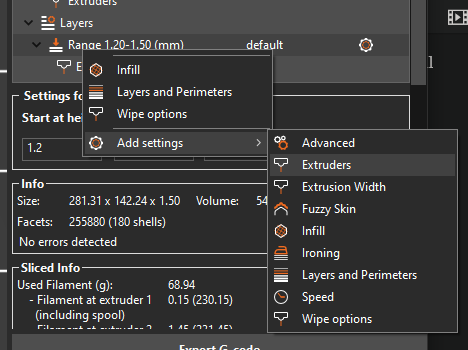
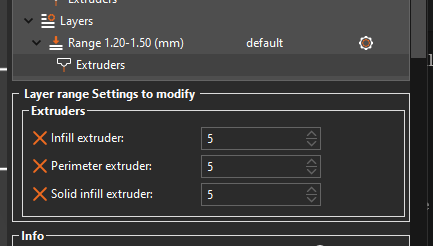
Another thing to consider is using the paint tool will get you perimeters in the text rather than the zero-perimeter look of the white text. If you want to get the same effect of the white text then you'd need to setup precisely placed modifer shapes to do the color/extruder change instead of the painter tool; example in the bottom right card.
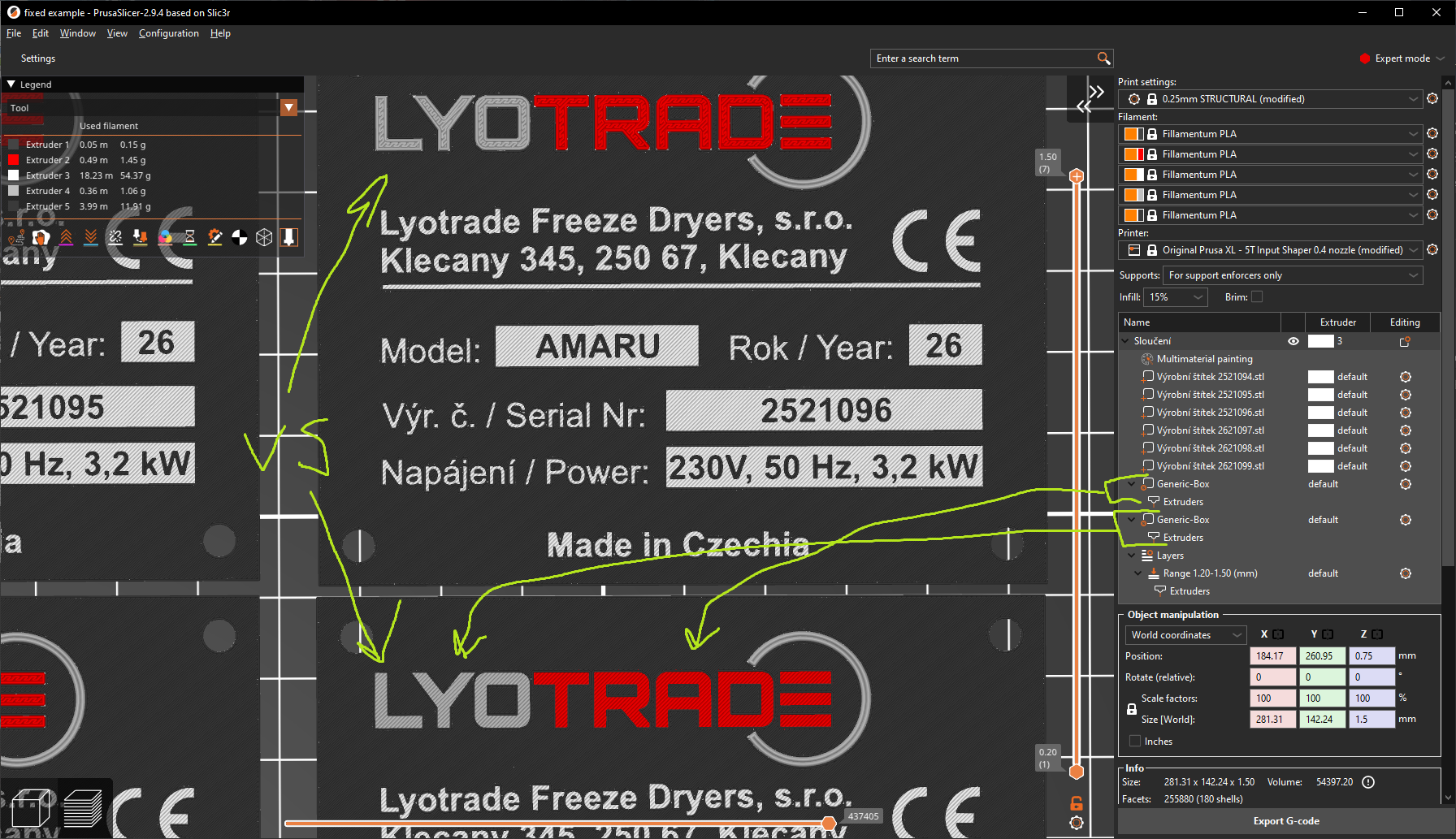
file:
XL-5T, MK3S MMU3 || Printing with multiple nozzle-sizes: Official Guide, Unofficial(old) || PrusaSlicer Fork || Other advanced slicer tactics || TPU || HF Nozzles
RE: Multicolor print with different nozzle sizes
Thanks! As you noted, workaround #1 should works, but in real production... I cannot imagine to adapt every plate like that 😱
Regarding workaround #2, here I'm not sure what you mean with "layer height modifier are doing nothing", as it visibly changes layer height from default 0,25 mm to 0,15 mm which I need for letters layers. I think that I also tried set whole file without this (whole model was in 0.15 mm layer height), but effect with colors was the same.
More interresting for me is that painting logo and black extruder with 0,25 mm nozzle doesn't collide, as last two layers (extruder 5) are made when logo is finished.
Anyway, I like to first check your fixed example file. You're right that logo without perimeters inside looks way better 😊
KarelLyotrade Freeze Dryers
Výrobce lyofilizátoru potravin pro živnostnÃky a malé podnikatele
RE: Multicolor print with different nozzle sizes
Regarding workaround #2, here I'm not sure what you mean with "layer height modifier are doing nothing", as it visibly changes layer height from default 0,25 mm to 0,15 mm which I need for letters layers. I think that I also tried set whole file without this (whole model was in 0.15 mm layer height), but effect with colors was the same.
That's my mistake, I overlooked that it's a .25 height print since I do a lot of .15. I'll change my statement to 'you can also use that same modifier to change extruders along with layer height.'
More interresting for me is that painting logo and black extruder with 0,25 mm nozzle doesn't collide, as last two layers (extruder 5) are made when logo is finished.
The last two layers are only using the black .25 nozzle; there is nothing to collide with. The white/grey/red are all in layers before the black .25 comes into play.
Even if they were all on the same layer, the slicer can make them all work together. But having the layer fully printed in .25 will look better than if it was mixed because small text creates small spaces that larger nozzles leave holes in: example.
ou're right that logo without perimeters inside looks way better 😊
I did it once as an example but it's something that is much easier to create and precisely place while in the CAD software phase. You can then convert the box into a modifier box after it's imported into the slicer. Much like painting tiny islands, it can become daunting if you manually do it in just slicer every time.
XL-5T, MK3S MMU3 || Printing with multiple nozzle-sizes: Official Guide, Unofficial(old) || PrusaSlicer Fork || Other advanced slicer tactics || TPU || HF Nozzles